Tech Republic

Private Internet Access VPN Review: How Good Is PIA VPN?

Private Internet Access Fast facts Our rating: 4.5 stars out of 5Pricing: Starts at $3.33 (annual plan)Key features: 10,000-35,000 servers across 91 countries. Customizable VPN experience. Unlimited device connections. Private Internet Access has been a long-time player in the VPN space. It has a massive server fleet that spans across 91 countries and offers fast speeds through its customizable application. Supported platforms include Windows, macOS, Linux, Android, iOS, Smart TVs, and routers. While its operation in the surveillance-heavy United States may sway some users, PIA’s balance of security, speed, and usability make it a strong VPN solution this year. Semperis Employees per Company Size Micro (0-49), Small (50-249), Medium (250-999), Large (1,000-4,999), Enterprise (5,000+) Small (50-249 Employees), Medium (250-999 Employees), Large (1,000-4,999 Employees), Enterprise (5,000+ Employees) Small, Medium, Large, Enterprise Features Advanced Attacks Detection, Advanced Automation, Anywhere Recovery, and more ESET PROTECT Advanced Employees per Company Size Micro (0-49), Small (50-249), Medium (250-999), Large (1,000-4,999), Enterprise (5,000+) Any Company Size Any Company Size Features Advanced Threat Defense, Full Disk Encryption , Modern Endpoint Protection, and more ManageEngine Log360 Employees per Company Size Micro (0-49), Small (50-249), Medium (250-999), Large (1,000-4,999), Enterprise (5,000+) Micro (0-49 Employees), Small (50-249 Employees), Medium (250-999 Employees), Large (1,000-4,999 Employees), Enterprise (5,000+ Employees) Micro, Small, Medium, Large, Enterprise Features Activity Monitoring, Blacklisting, Dashboard, and more Private Internet Access VPN pricing Duration Price 1 year $3.33 per month 3 years (+4 months free) $1.98 per month 1 month $11.95 per month 7-day free trial Free via Android and iOS (account can be used in desktop apps after mobile sign-in) All three subscriptions for PIA come with the same set of features, so you won’t have to worry about missing any key features if you choose one plan over the other. PIA VPN’s one-year subscription is the best value at $3.33 per month and is very affordable compared to other one-year plans offered by competing VPNs. For example, ExpressVPN’s annual subscription costs $6.25 per month, while NordVPN’s Starter one-year plan costs $4.59. Of course, these VPNs bring their own standout features to justify the price, but at face value, PIA VPN’s one-year plan is a bargain. The three-year plan is also very affordable at $1.98 per month, but the $2-dollar spend may not be worth it if you don’t want the three-year-long time investment. Lastly, PIA VPN’s one-month plan falls along the same price range as other VPNs and doesn’t provide the same cost-savings as two former subscriptions. Like most modern VPNs, PIA offers a 30-day money-back guarantee for the three plans. While I wish that PIA had a full-fledged free version (which would be great for first-time VPN users), it provides a seven-day trial through its mobile application (iOS and Android). In my testing, I found that I could use the same account I got through the seven-day mobile free trial and then log into a desktop version of PIA using the same credentials. Having a dedicated desktop free trial is preferred, but the workaround for the free trial was painless and easy to set up. My recommendation would be to fully utilize the seven-day mobile free trial and use it on your desktop or device of choice. This way, you get some hands-on time with the service without spending on an initial payment. Is Private Internet Access VPN safe? PIA VPN has two of the most important security protocols today: OpenVPN and WireGuard. This gives users a good balance of security (with OpenVPN) and speed (with WireGuard). It also uses 256-bit AES encryption, has a reliable kill switch, and protects against DNS leaks. With PIA VPN’s company background, there are drawbacks. First, PIA operates in the United States, which can be a red flag for users who are wary of the country’s surveillance practices. Next is PIA VPN’s ownership. Like CyberGhost VPN, it’s owned by Kape Technologies, which acquired PIA in 2019. Kape (formerly Crossrider) had been associated with distributing malware and adware before it rebranded and started moving into the cybersecurity industry. PIA itself addressed the acquisition and emphasized that the VPN service operates as a separate entity independent of Kape. In terms of addressing security concerns, PIA VPN does have a no-logs policy, which states that it does not keep records of user IP addresses, browsing history, session timestamps and the like. In 2022, this no-logs policy was independently confirmed and verified by Deloitte. Fortunately, PIA VPN has continued its commitment to independent testing as it recently completed a second audit back in April 2024. This audit was also conducted by Deloitte and looked into PIA VPN’s security infrastructure, which includes its server network and network and incident management systems. PIA VPN’s second third-party audit. Image: PIA VPN In my view, third-party audits are essential when choosing a VPN. While providers can promise to keep your data secure, the only real way to confirm security claims is through things like third-party audits. In this respect, I commend PIA VPN for not shying away from independent assessments and continuing to have their service audited. unskippable In addition, PIA VPN utilizes RAM-only servers, which means any possible traces of user data are automatically erased upon reboot. PIA VPN is also an open-source service, providing public access to its source code and allowing privacy enthusiasts to spot vulnerabilities in the code themselves. Lastly, the company has a public Transparency Report that outlines court orders and requests for logs. It reiterates that because the service doesn’t log any information, it doesn’t hand over any data to law enforcement. In my opinion, while PIA’s ownership and US operations are valid concerns, the service has done enough to show that it is a safe and viable VPN service in 2024. Key features of Private Internet Access VPN PIA VPN comes with both industry-standard and unique VPN features for prospective VPN buyers. Let’s take a look at some of PIA’s highlight features. Impressive server fleet PIA VPN’s server selection. Image: Luis Millares PIA VPN offers servers spread out across 91

Private Internet Access VPN Review: How Good Is PIA VPN? Read More »

Samsung Unpacked S25: Galaxy S25 Phone Goes All-In On Google AI

Samsung announced the release of its next flagship phone, the Galaxy S25, on Jan. 22 at the Samsung Galaxy Unpacked S25 presentation. As is essential for any tech presentation in 2025, generative AI was at the forefront of the event. “We are making it [AI] a reality right here right now,” said ™ Roh, Samsung’s president and head of Mobile Experience. “To make the shift possible, we built an AI OS from the ground up.” Samsung Galaxy S25 offers business as usual outside the AI The Samsung Galaxy S25 comes in three standard variants: The base model Samsung Galaxy S25 has a 6.2-inch display and up to 256 GB of storage. The Samsung Galaxy S25 Plus has a 6.7-inch display and up to 512 GB of storage. The Samsung Galaxy S25 Ultra has a 6.9-inch display and up to 1TB of storage. All three variants include the Snapdragon 8 Elite for Galaxy chip and Google Gemini as its AI assistant. The largest model, the Ultra, weighs just 218g. The Samsung Galaxy S25 can be preordered now, with the phones hitting store shelves on Feb. 7. Samsung offers Gemini Advanced and 2TB of cloud storage with purchase. The S25 retails at: $799.99 for the base model. $999.99 for the Samsung Galaxy S25 Plus. $1,299.99 for the Samsung Galaxy S25 Ultra. Samsung says the S25 offers the longest battery life of a Samsung phone yet — up to 31 hours of video. The S25 Ultra offers more camera lenses than the S25 or S25 Plus. Image: Samsung Mobility must-reads Google Gemini stretches through all aspects of the S25 With the rest of the specifications not varying much from the S24, Samsung wants AI — and particularly its partnership with Google — to provide a reason to upgrade. After introducing the S24 with Google Gemini last year, Samsung has woven AI even more deeply into the S25. A dedicated side button will activate Google Gemini. This replaces most of the requests a user might have made to Samsung’s own Bixby digital assistant before. Gemini is multimodal, able to respond to voice commands, answer questions about live video, or identify music being played. It can create transcripts and summaries of calls during the call. SEE: OpenAI and Microsoft joined an AI infrastructure initiative that pledged $500 billion over four years to data centers and more. AI will have access to any app on the phone and can draw information from all of them. An AI-curated “Now Brief” on the home screen will collect information like weather, upcoming meetings, and sports scores from Google every morning. An “Evening Brief” sums up the day at night. As expected from generative AI nowadays, Gemini on Samsung will be able to generate text, summarize text, edit images, and answer questions about pictures. AI data stays on the device “As AI becomes more powerful, it must also become more personal to deliver class leading personalization we are introducing the Personal Data Engine,” said Roh. “Now you can enjoy tailored experiences while keeping your personal information secured on your device, not in the cloud.” Essentially, the Personal Data Engine means AI data from individual phones is not used for model training or advertising, Samsung said. Some AI queries may be deleted after the interaction is complete. To protect copyright and disclose when AI has created an image, Samsung has adopted C2PA cryptography. One UI 7 emerges from beta Underneath the hood of the S25 is the One UI 7 OS. Roh said that Samsung is leveraging the operating system to reimagine Android “with AI at the core.” One UI 7, debuting in general availability with the S25 series, enables: Expanded writing tools, including call transcripts. The “Now Bar,” which includes timely notifications on the lock screen. Redesigned camera UX. Developers and partners will soon have access into the new UI, Roh said. AI is the new normal on smart phones The Samsung Galaxy S25 series competes primarily with: A slim version of the S25 is coming At the end of the Unpacked presentation, Samsung dropped a tease of Galaxy S25 Edge, the upcoming ultra-slim variant. A release date or details have not yet been announced. source

Samsung Unpacked S25: Galaxy S25 Phone Goes All-In On Google AI Read More »

How to Set Up an SFTP Server on Linux

Any Linux server distribution is a very powerful server that performs above and beyond what your business might need. Whatever task you throw at the server, it will be ready. And, if it isn’t ready out of the box, you can make it so. If you aren’t sure about SFTP, it is the FTP service built into Secure Shell (SSH), which allows users to securely push and pull files to and from the server, using SSH. I’m going to walk you through the process of setting up an SFTP server. I’ll demonstrate by creating a single user that is limited to only SFTP logins. Once you know how to do this, you can create as many users as you need. This process will work on any Linux distribution. Let’s make it work. SEE: Troubleshooting Linux: An Admin’s Guide (TechRepublic Premium) What you’ll need You’ll need access to an account with admin rights. Once you’ve procured that access, it’s time to make this work. SFTP Directory The first thing we must do is create a directory that will house our FTP data. Open up a terminal window, su to the root user (type su and then, when prompted, type the root user password), and then issue the following two commands: mkdir -p /datachmod 701 /data SEE: How to Add an SSH Fingerprint to Your known_hosts File in Linux (TechRepublic) Create the SFTP group and user Now we’re going to create a special group for SFTP users. This is done with the following command: groupadd sftp_users Now we’re going to create a special user that doesn’t have regular login privileges, but does belong to our newly created sftp_users group. What you call that user is up to you. The command for this is: useradd -g sftp_users -d /upload -s /sbin/nologin USERNAME Where USERNAME is the name of the user. Next, give the new user a password. This password will be the password the new users use to log in with the sftp command. To set up the password, issue the command: passwd USERNAME Where USERNAME is the name of the user created above. SEE: How to Start, Stop, and Restart Services in Linux (TechRepublic) Create the new user SFTP directory Now we’re going to create an upload directory, specific to the new user, and then give the directory the proper permissions. This is handled with the following commands: mkdir -p /data/USERNAME/uploadchown -R root:sftp_users /data/USERNAMEchown -R USERNAME:sftp_users /data/USERNAME/upload Where USERNAME is the name of the new user you created above. Configure sshd Open up the SSH daemon configuration file with the command: nano /etc/ssh/sshd_config At the bottom of that file, add the following: Match Group sftp_usersChrootDirectory /data/%uForceCommand internal-sftp Save and close that file. Restart SSH with the command: systemctl restart sshd SEE: 5 Best Linux CentOS Replacement Options & Alternatives (TechRepublic) Logging in You’re all set to log in. From another machine on your network that has SSH installed, open up a terminal window and issue the command: sftp USERNAME@SERVER_IP Where USERNAME is the name of our new user and SERVER_IP is the IP address of our SFTP server. You will be prompted for USERNAME’s password. Once you successfully authenticate, you will be greeted with the sftp prompt. Type pwd to check the working path and you should see /upload as depicted in the image below. After you have successfully completed authentication, you will see the sftp prompt. Image: Jack Wallen A simple solution That’s all there is to setting up an SFTP server on Linux. For any company looking to offer staff and clients a simple, secure means of uploading and downloading files, this is a not only a great solution but also very budget friendly one. Get your SFTP server up and running with zero cost and zero headache. This article was originally published in September 2019. It was updated by Antony Peyton in January 2025. source

How to Set Up an SFTP Server on Linux Read More »

European Commission Fails to Sufficiently Regulate Apple, Google, Claim Advocates

European politicians and advocacy groups are adamant that the region’s legislation is not hardline enough to dismantle the monopolies of Big Tech companies. In the last week, two open letters have been penned to regulators criticising how Apple and Google remain unchecked. On Jan. 16, four digital rights groups responded to the measures proposed by the European Commission for Apple to ensure interoperability with iOS and iPadOS operating systems. They allege that Apple’s current process for handling interoperability requests is convoluted, discouraging developers from submitting them. “Gatekeeper” organisations — the most prominent tech firms operating in Europe, including Apple and Google’s parent company Alphabet — must provide third parties with the tools they need to make their software and hardware products work seamlessly with their own, as per the Digital Markets Act. SEE: EU Approves NVIDIA Deal With Run:ai, Pushes for Apple Interoperability The next day, Club de Madrid, a network of former European heads of state, voiced its support of the Commission “end(ing) Google’s monopoly over digital advertising technologies” through forced divestiture. “Google’s unchecked dominance, stemming from its 2007 acquisition of DoubleClick, has stifled competition and consolidated its control over every segment of the adtech market,” the 18 leaders wrote in a letter. In June 2023, the Commission told Google that a “mandatory divestment” of part of its ad tech business would be the only way to address competition concerns. This came after an investigation yielded the preliminary view that the company had breached E.U. antitrust rules. According to Club de Madrid’s letter, the Commission will announce the final outcome soon. What’s hot at TechRepublic Digital advocacy groups say Apple is still able to avoid interoperability with the existing Digital Markets Act In September 2024, the European Commission initiated two proceedings under the DMA to guide Apple into enhancing interoperability between iOS, iPadOS, and third-party devices like smartwatches and headphones. Then, in December, it published its preliminary findings and proposed remediations. Recommended measures include improving compatibility between iOS and features of devices such as smartwatches and earbuds. These features include notifications, automatic Wi-Fi connections, AirPlay, AirDrop, and automatic Bluetooth audio switching. SEE: Meta and Apple Violated the Digital Markets Act, EU Charges The authority also suggested that Apple make its process for developers to request interoperability within iOS and iPadOS features more transparent and predictable. This involves providing clear information about its internal features and timely request status updates. However, Free Software Foundation Europe, ARTICLE 19, European Digital Rights, and Data Rights said that the Commission’s proposals are “clearly deficient and structurally incapable of delivering effective interoperability.” In their letter, the groups recommend that Apple should: Embrace interoperability by design as it is “required by the letter of the DMA” rather than relying on a reactive, request-based model. Not be allowed to “impose non-disclosure agreements solely at its own discretion” that block access to APIs. Be required to provide a standardised, freely accessible interoperability request form to developers, dedicate adequate resources for handling them, and offer greater transparency on a request’s status or rejection. Not be able to use security claims to block effective interoperability. Be encouraged to offer “flexible” third-party APIs in response to interoperability requests, which accommodate diverse developer needs. Improve or overhaul its system for addressing interoperability-related bugs. They also suggest that the Commission should appoint neutral conciliators to resolve disputes and prevent Apple bias. In response to the Commission’s proposed measures, Apple published a document outlining how granting access to its technology stack and, thus, user data could compromise privacy and security. It highlighted how Meta had made 15 requests for access to Apple’s software tools that, if accepted, would provide swathes of user data, and that the company “has been fined by regulators time and again for privacy violations.” SEE: Meta Offers Less Personalised Ads for EU Users to Appease Regulators Meta Communications Director Andy Stone responded to this on X: “Here’s what Apple is actually saying: they don’t believe in interoperability. In fact, every time Apple is called out for anticompetitive behavior, they defend themselves on privacy grounds that have no basis in reality.” Former European heads of state say that Google’s dominance in the ad tech sector puts democracy at risk The digital advertising technology sector, known as the “ad tech stack,” includes various intermediaries facilitating the sale of online ads. Google owns four of these: Google Ads, DV360, AdX, and DoubleClick For Publishers. Google Ads and DV360 are both used by advertisers to bid for advert spaces on websites and apps. DoubleClick For Publishers is a platform for managers of websites and apps where they can list their available ad space. AdX connects the two by matching the highest bidding advertiser with the website or app manager in a real-time auction. Club de Madrid described this setup as “as if Goldman or Citibank owned the New York Stock Exchange.” Google’s ownership of a significant portion of the ad tech stack means that “Europe’s democracy is still at risk” despite the publication of the pioneering DMA and Digital Services Act. The group, which includes former heads of state from France, the Netherlands, Austria, Greece, Sweden, Belgium, Finland, and Poland, said that Europe’s “reliance on foreign platforms” that influence the bottom line of news organisations could erode local journalism, ultimately resulting in the proliferation of misinformation, political and otherwise. Club de Madrid made two recommendations in its letter: Regulators should be given the resources and authority to implement structural remedies that restore fair competition, following decisive action in the ongoing Google investigation. The Commission should actively seek to foster European innovation — such as by supporting startups, enforcing the DMA and DSA, and building independent digital infrastructure. The second point specifically addresses recent criticism that lack of funding and over-regulation has led to a technological gap between Europe and other global superpowers like the U.S. Only four of the world’s top 50 tech companies are European. Club de Madrid also supports the sentiments voiced by Teresa Ribera, Europe’s new competition commissioner, on

European Commission Fails to Sufficiently Regulate Apple, Google, Claim Advocates Read More »

Get Ready for the New Tax Year With H&R Block Tax Software

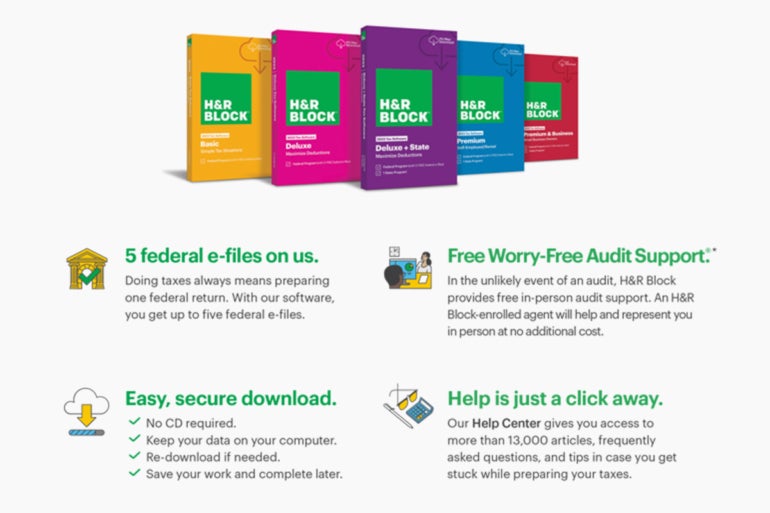
TL;DR: H&R Block Tax Software Deluxe + State 2024 for Windows/Mac helps you file your taxes and maximize deductions, and it’s just $39.99 on PC/Mac. There’s plenty to be excited about when building a business. Filing your taxes is more of a chore. If you want to make the process less stressful and max out your deductions, H&R Block Deluxe can help. This powerful tax software lets you file both federal and state taxes online with ease. It also comes with free audit support and a massive library of 13,000 tax articles. Through February 11, you can get it for just $39.99 over at TechRepublic Academy. Image: StackCommerce April might feel a long way off, but April 15 will come around sooner than you think. That’s the last day to file your taxes unless you fancy a big bill. According to the IRS, the process requires 13 hours of work in total — the best part of two whole working days. H&R Block Deluxe allows you to spend your time on something more productive. Available on PC and Mac, the software shows you how to claim 350 credits and deductions through step-by-step tutorials. That means fewer hours spent reading PDF documents written in legalese. You also have that huge library of articles for reference, along with FAQs and tips from expert accountants. If you need to pause while preparing your filings, you can easily save your work and start where you left off. Once you have run the numbers, H&R Block Deluxe gives you five federal e-files and unlimited federal prep. Previously used TurboTax? No problem. You can import all your data to H&R Block Deluxe with a couple of clicks. It’s easy to see how the software has earned glowing reviews. Earning 5 out of 5 stars on BestBuy and 4.5 on Amazon’s Choice, it shows it’s one of the best tax filing software on the market right now. Order today to get this H&R Block Tax Software Deluxe + State 2024 for Windows/Mac for just $39.99, saving $20 on the regular price. Prices and availability are subject to change. source

Get Ready for the New Tax Year With H&R Block Tax Software Read More »

What is Grok AI? Is It Worth the Hype?

Amid a sea of generative AI products, Grok AI sets itself apart with a bold and irreverent personality. Developed by Elon Musk’s xAI, Grok’s unconventional tone may make it less suitable for business use compared with its competitors. However, Grok still holds its own among the leading foundation models of today, boasting strong test performance and competitive speed. 1 New Relic Employees per Company Size Micro (0-49), Small (50-249), Medium (250-999), Large (1,000-4,999), Enterprise (5,000+) Any Company Size Any Company Size Features Analytics / Reports, API, Compliance Management, and more 2 Wrike Employees per Company Size Micro (0-49), Small (50-249), Medium (250-999), Large (1,000-4,999), Enterprise (5,000+) Medium (250-999 Employees), Large (1,000-4,999 Employees), Enterprise (5,000+ Employees) Medium, Large, Enterprise Features 24/7 Customer Support, 360 Degree Feedback, Accounting, and more What is Grok AI? Grok AI is a large language model designed for generating, changing, or analyzing text. It also offers advanced generative AI capabilities, including internet search functionality and image creation, making it a versatile tool for various tasks. Unlike standalone AI tools, Grok resides within X (formerly Twitter). To access it, users must log into X and purchase a subscription to Grok. This integration aligns Musk’s vision of transforming the social media platform into an “everything app,” where tools like Grok complement the platform’s ecosystem of services. Additionally, Grok’s development is part of xAI’s larger mission to build AI systems with a distinct personality and edge, reflecting Musk’s intent to differentiate Grok from its more conventional competitors. What are the key features of Grok AI? “Grok is designed to answer questions with a bit of wit and has a rebellious streak,” the Grok team wrote in a blog post in November 2023. “A unique and fundamental advantage of Grok is that it has real-time knowledge of the world via the 𝕏 platform. It will also answer spicy questions that are rejected by most other AI systems.” Web search and citations Grok leverages X to deliver real-time answers about current events. Answers to questions related to the news or current events will show links to the source post or website next to the chat window. Images Grok generates images by using xAI’s Aurora, a separate video model. Aurora is an autoregressive image generation model. Autoregressive refers to the statistical technique the model uses to predict what content is most likely to come next in a sequence. Unlike other AI models, Grok will create photorealistic images — a controversial capability, since it can be used to create deepfakes. Grok accepts prompts including copyrighted characters or politically inflammatory material. X users might see the “draw me” feature, in which Grok will generate images based on information in that user’s profile. Facebook similarly introduced AI-generated images into the feed recently. This included images putting the user’s likeness in fantastical situations. API The API for Grok allows for function calling, a 128k context length, and system prompt support. It interoperates with OpenAI and Anthropic software development kits. More must-read AI coverage Who developed Grok AI? xAI developed Grok. Musk founded and leads xAI, which was publicly announced in November 2023. How does Grok AI compare to other AI chatbots like ChatGPT? A major difference between Grok and other generative AI products, like ChatGPT or Llama, is that Grok operates entirely within the X social media platform. Grok will answer questions related to productivity, analyze text,and solve math and coding problems. It can also perform many of the other tasks generative AI can do for business. However, its data remains within the X platform. xAI said the latest version of Grok, Grok 2, scored 87.5% on the MMLU benchmark. MMLU measures the ability to correctly answer natural language questions in academic disciplines including philosophy and mathematics. OpenAI said its o1 scores 92.3%. Meta said its Claude 3.5 Opus scored 86.8%. SEE: Google Workspace subscriptions increased slightly as the Gemini AI became a default part of the package. Is Grok AI free to use? Grok AI is not free to use. It requires a subscription to X Premium or Premium+. Premium costs $8/month or $84/year on the web. Premium+ costs $22/month or $229/year on the web. The Grok enterprise API costs $2 per 1 million input tokens and $10 per 1 million output tokens. What are the privacy concerns associated with Grok AI? Grok’s close association with X has raised concerns about the privacy of personal data on the platform, which may be fed into the AI. X posts are used to train Grok by default. What is the controversy around Grok AI? Musk’s control of Grok and X’s trend toward unlimited — including potentially offensive — content has led some to be weary of using Grok. xAI describes Grok as providing “unfiltered answers.” During the November 2023 announcement of the model, xAI said: “Grok is designed to answer questions with a bit of wit and has a rebellious streak, so please don’t use it if you hate humor!” In September 2024, the National Association of Secretaries of State alleged Grok contributed to election misinformation regarding the US presidential race. In response, X changed Grok’s responses such that questions about voting were redirected to a nonpartisan site, CanIVote.org. Is Grok worth the hype? We find it difficult to recommend Grok for business use cases. Its irreverent tone may make the content it produces inappropriate for general audiences, while heavy reliance on social media for information may make its answers potentially unreliable. Additionally, Grok is not accessible to people without an X account. However, Grok’s irreverent tone may work for some content and audiences, and its placement on X may meet users where they already are. As noted above, Grok scores higher than Meta’s Claude and some versions of OpenAI’s GPT-4 on certain benchmarks. In particular, it holds its own when offering general knowledge and mathematics answers. source

What is Grok AI? Is It Worth the Hype? Read More »

‘Sneaky Log’ Microsoft Spoofing Scheme Sidesteps Two-Factor Security

Security researchers at French firm Sekoia detected a new phishing-as-a-service kit targeting Microsoft 365 accounts in December 2024, the company announced on Jan. 16. The kit, called Sneaky 2FA, was distributed through Telegram by the threat actor service Sneaky Log. It is associated with about 100 domains and has been active since at least October 2024. Sneaky 2FA is an adversary-in-the-middle attack, meaning it intercepts information sent between two devices: in this case, a device with Microsoft 365 and a phishing server. Sneaky 2FA falls under the class of business email compromise attacks. “The cybercriminal ecosystem associated with AiTM phishing and Business Email Compromise (BEC) attacks is continuously evolving, with threat actors opportunistically migrating from one PhaaS platform to another, supposedly based on the quality of the phishing service and the competitive price,” Sekoia analysts Quentin Bourgue and Grégoire Clermont wrote in the firm’s analysis of the attack. Must-read security coverage How does the Sneaky 2FA phishing-as-a-service kit work? Sneaky Log sells access to the phishing kit through a chatbot on Telegram. Once the customer pays, Sneaky Log provides access to the Sneaky 2FA source code. Sneaky Log uses compromised WordPress websites and other domains to host the pages that trigger the phishing kit. The scam involves showing a fake Microsoft authentication page to the potential victim. Sneaky 2FA then shows a Cloudflare Turnstile page with a “Verify you are human” prompt box. If the victim provides their account information, their email and password will go to the phishing server. Sneaky Log’s server detects the available 2FA method(s) for the Microsoft 365 account and prompts the user to follow them. The user will be redirected to a real Office365 URL, but the phishing server can now access the user’s account through the Microsoft 365 API. If the visitor to the phishing site is a bot, cloud provider, proxy, VPN, originated from a data center, or uses an IP address “associated with known abuse,” the page redirects to a Microsoft-related Wikipedia entry. Security research team TRAC Labs detected a similar technique in December 2024 in a phishing scheme they named WikiKit. Sneaky Log’s kit shares some source code with another phishing kit found by risk platform company Group-1B in September 2023, Sekoia noted. That kit was associated with a threat actor called W3LL. Sneaky Log sells Sneaky 2FA for $200 monthly, paid in cryptocurrency. Sekoia said this is slightly cheaper than kits Sneaky Log’s fellow criminal competitors offer. SEE: Multifactor authentication and spam filters can reduce phishing, but employees who understand social engineering techniques are the first line of defense. How to detect and mitigate Sneaky 2FA The activities associated with Sneaky 2FA can be detected in a user’s Microsoft 365 audit log, said Sekoia. In particular, security researchers looking into a phishing attempt might see different hardcoded User-Agent strings for the HTTP requests in each step of the authentication flow. This would be unlikely if the user authentication steps were benign. Sekoia published a Sigma detection rule that “looks for a Login:login event with a Safari on iOS User-Agent, and a Login:resume event with an Edge on Windows User-Agent, both having the same correlation ID, and happening within 10 minutes.” Security professionals can remind employees to avoid interacting with suspicious emails, including those that sound urgent or frightening. Sekoia discovered Sneaky 2FA within a malicious email attachment titled “Final Lien Waiver.pdf,” containing a QR code. The URL embedded in the QR code led to a compromised page. Other recent phishing attempts target Microsoft Microsoft’s ubiquity makes it a rich hunting ground for threat actors, whether they run attacks directly or sell phishing-as-a-service tools. In 2023, Microsoft’s Threat Intelligence team disclosed a phishing kit targeting services like Office or Outlook. Later in the same year, Proofpoint pulled the mask off ExilProxy, a phishing kit that could bypass two-factor authentication. In October 2024, Check Point warned users of Microsoft products against sophisticated mimics trying to steal account information. source

‘Sneaky Log’ Microsoft Spoofing Scheme Sidesteps Two-Factor Security Read More »

Grab Microsoft Office Pro 2021 + Windows 11 Pro Bundled for $55

We all know that Microsoft makes some of the best digital tools for business. But signing up for multiple subscriptions is not super appealing when you’re trying to stick to a strict budget. The solution? Grab the All-in-One Microsoft Office Pro 2021 and Windows 11 Pro Bundle. This deal includes lifetime licenses for both products, and you can get it today for only $54.97 via TechRepublic Academy. A few years ago, Microsoft tried to get everyone to sign up for Office 365. This cloud-based service is only available as a subscription. This is great for reducing startup costs, but it can be expensive in the long run. In contrast, Microsoft Office Pro 2021 for Windows is available on a lifetime license with a one-time purchase. That means lifetime access to Word, Excel, PowerPoint, Outlook, OneNote, Teams, Publisher and Access — including future updates. That means you can craft documents, analyze data, create amazing presentations and much more. With this bundle, you also get Windows 11 Pro. This version of the desktop OS comes with a raft of useful business features, particularly regarding security and device management. These include BitLocker device encryption, better remote desktop options and group policy settings. Put together, Microsoft Office Pro 2021 and Windows 11 Pro make quite an upgrade for any professional workflow. The former received a review score of 4.5 out of 5 stars from PCMag, and the latter has 4.4 stars on Amazon. Get The All-in-One Microsoft Office Pro 2021 for Windows: Lifetime License + Windows 11 Pro bundle for just $54.97 (reg. $418) through Feb. 2, 2025. Prices and availability are subject to change. source

Grab Microsoft Office Pro 2021 + Windows 11 Pro Bundled for $55 Read More »

Australian IT Sector Maintains Strong Employment Outlook for 2025

The IT sector remains a bright spot in the Australian job market heading into 2025, boasting the most positive employment outlook of any economic sector. Recruitment firm ManpowerGroup’s Employment Outlook Survey for Q1 2025 revealed that the Australian IT sector has a net employment outlook of +27%, leading all other sectors. IT outshines other industries The IT hiring outlook outpaced other Australian sectors, including health care and life sciences (+21%), financials and real estate (17%), and transport, logistics, and automotive (17%). The IT sector exceeded the national net employment outlook of +11% for the quarter. The outlook score is calculated by subtracting the percentage of employers expecting to reduce staff from the percentage expecting to increase hiring. A positive figure indicates more employers plan to hire than cut jobs. SEE: How To Prepare for the Future of IT Jobs in Australia However, the IT sector’s net employment outlook has slightly declined — dropping 1% since Q4 2024 and 2% compared to last year. A global phenomenon: IT leads in hiring outlook Globally, IT continues to dominate hiring trends. ManpowerGroup reported that the worldwide IT net employment outlook across 42 countries stands at +37%, a 2% increase since the previous year. Australia’s IT sector trails behind some Asia-Pacific peers, ranking 36th globally with its +11% overall employment outlook. Within APAC, Australia placed fifth, behind India (+40%), China (+29%), Singapore (+25%), and Japan (+15%). The Asia-Pacific region as a whole recorded a stronger hiring outlook (+27%) than Australia, though this represents a 3% decline compared with the same period last year. More Australia coverage Challenges persist despite positive outlook Despite the promising numbers, securing an IT role in Australia may not be straightforward. A reasonably tight labour market means strong competition for roles, with reports showing a growing number of job seekers relative to the number of advertised positions. SEE: Why Now Could Be a Great Time To Upskill For Tech Jobs A survey from the online jobs website SEEK found that job applications per ad in the information and communications sector have more than doubled since 2022. This means there are still jobs for those searching, but they are not as easy to snare as they once were. A Gartner HR survey released in December 2024 found that 39% of Australian job seekers reported difficulties finding a job, while only 25% felt ample jobs matched their skills. Opportunities with mid-sized employers For IT professionals seeking opportunities, mid-sized companies may offer the best prospects. ManpowerGroup noted that employers with 250-999 employees reported the highest hiring intentions, with a net employment outlook of +17% for 2025. In comparison, larger employers with 1000-4,999 employees reported a more modest outlook of +7%. Salaries are expected to remain relatively stable in 2025 IT recruitment firms say Australian IT employees are expected to continue earning some of the highest salaries available in the country, though salary increases may remain modest. According to recruiter Blue Wave Digital: Front-end software developers: $100,000-$140,000 for mid-level roles; $150,000+ for senior positions AI/ML engineers: $130,000-$180,000 for mid-level experience; $200,000+ for senior positions. Data scientists: $120,000-$160,000 for mid-level roles; $170,000+ for senior positions. Cybersecurity analysts: $100,000-$140,000 for mid-level roles; $150,000+ for senior positions. Cloud engineers: $120,000-$150,000 for mid-level roles. Mercer’s Australian Salary Outlook 2025 predicts that salary increases across the Australian economy — not specifically IT — will remain at 4% in 2025. source

Australian IT Sector Maintains Strong Employment Outlook for 2025 Read More »

How to Clean the DNF and APT Caches in Linux

Both DNF and APT — the package managers for Red Hat and Ubuntu-based Linux distributions — store cached information to ensure the software installation process is much faster and more reliable. With these caches in place, neither package manager has to download the information whenever you attempt to update, upgrade, or install software. But sometimes, that cache information can become outdated or corrupted. When that happens, you might find that the DNF of APT doesn’t function properly. What do you do? You clean the cache, which will delete all of that information, so you have a clean slate. How do you clean those caches? Let me show you. SEE: Debian vs Ubuntu: Which Linux Distro Fits Your Needs Best? (TechRepublic) How to clean the cache for the DNF package manager The best way to clean the DNF cache is by running the command: sudo dnf clean dbcache This will remove all cache files generated from the repository metadata. If that doesn’t solve your problems, you can run a complete clean with the command: sudo dnf clean all SEE: Top Commands Linux Admins Need to Know (TechRepublic Premium) How to clean the cache for the APT package manager With the APT package manager, you can issue the command: sudo apt-get clean This will remove the content from /var/cache/apt/archives (except for the lock file). Another APT option is to run: sudo apt-get autoclean This only removes the packages that cannot be downloaded from repositories. In other words, if you downloaded a .deb package and installed it (as opposed to installing it from a remote repository), any file associated with that package will remain. And that’s all there is to cleaning the package manager caches for both Red Hat and Ubuntu-based distributions. You probably won’t have to use these tools, but if you do, you know how. This article was originally published in June 2021. It was updated by Antony Peyton in January 2025. source

How to Clean the DNF and APT Caches in Linux Read More »