Tech Republic

ChatGPT Can Now Schedule Tasks in Advance

Starting Jan. 14, some ChatGPT subscribers can use the generative AI to set reminders or add to their routines. For example, OpenAI said, ChatGPT can provide weekly news briefings or a daily weather report. The content will be delivered as notifications on desktop (macOS), browser, and mobile. What does the tasks feature in ChatGPT do? The tasks feature instructs ChatGPT to create content at a certain date and time. This content may be preset reminders — such as “Department meeting” — or newly generated text like affirmations or summaries of the news. ChatGPT can suggest tasks based on conversations. Users may set up to 10 tasks while the feature is in beta. More must-read AI coverage How to set up a task or reminder in ChatGPT Tasks is available to Plus, Team, or Pro-level subscribers. To access it, select “4o with scheduled tasks” in the model picker. Users at these tiers can create tasks through ChatGPT on the web, on the desktop application, or in the mobile app. However, the tasks manager pane is only available through ChatGPT on a web browser. In the tasks management pane, users can specify specific dates for when the tasks feature should send them reminders. Settings for recurring reminders are also found in the tasks management pane. While the instructions for the task are given in the form of a natural language prompt, the date selection in the tasks manager dashboard appears to be a conventional drop-down menu. OpenAI plans to eventually release the tasks feature to all tiers, including for free, the company said on X on Jan. 14. A task can be set as part of an ongoing conversation with ChatGPT, such as this prompt about a fitness plan. Image: OpenAI OpenAI’s move toward agentic AI Tasks in ChatGPT continue the trend in generative AI of “agentic” tools, which chain together multiple prompts autonomously to perform relatively complex actions. Tasks’ ability to remind users of upcoming meetings could compete with Google Calendar, Apple’s Siri or mobile calendar, or Amazon Alexa. The difference between the tasks feature and a conventional calendar or to-do list may be seen most clearly in generative AI’s more creative-sounding abilities. For example, one of OpenAI’s prompts is “Start my day with daily affirmations at 7 am.” This is agentic in that it combines multiple prompts: sending a reminder at 7 AM every day and generating an affirmation. SEE: Our ChatGPT cheat sheet rounds up the generative AI’s new features. Still, ChatGPT with tasks replicates much of what existing technology can do, with the added challenge of the generative aspect potentially introducing inaccuracies and misunderstandings. Older applications can send reminders without using as much energy and resources. Meanwhile, both Google and Microsoft announced changes to how they package generative AI on Jan. 15. Microsoft added agents — based on OpenAI’s GPT-4o — to the commercial tier of Microsoft 365. Google added Gemini Advanced and Notebook LM Plus to Google Workspace Business and will add it to Enterprise tiers in late January. TechRepublic has reached out to OpenAI for more information. source

ChatGPT Can Now Schedule Tasks in Advance Read More »

How to Break a Phone: Common Causes of Phone Damage

We depend upon our smartphones. They keep us connected, informed, and updated during the hectic daily grind. For many of us, those smartphones have become more than a simple tool, so we should probably take better care of them than we do. Instead of treating them as toys that can be replaced on a whim, we should treat smartphones as if they contain sensitive data and our jobs depend upon them. What steps can you take to ensure you don’t damage or destroy your mobile device? I have a list of nasty things that can be hazardous to the health of your smartphone or tablet. 1 New Relic Employees per Company Size Micro (0-49), Small (50-249), Medium (250-999), Large (1,000-4,999), Enterprise (5,000+) Any Company Size Any Company Size Features Analytics / Reports, API, Compliance Management, and more 2 Zoho Sprints Employees per Company Size Micro (0-49), Small (50-249), Medium (250-999), Large (1,000-4,999), Enterprise (5,000+) Any Company Size Any Company Size Features Burn-down Charts, Epics, Kanban, and more 3 NordLayer Employees per Company Size Micro (0-49), Small (50-249), Medium (250-999), Large (1,000-4,999), Enterprise (5,000+) Small (50-249 Employees), Medium (250-999 Employees), Large (1,000-4,999 Employees), Enterprise (5,000+ Employees) Small, Medium, Large, Enterprise Exposing it to the elements Both heat and cold can bring that smart device to the land of devastation. Leaving your phone in a car in the heat of summer or overnight in the cold of winter is a surefire way of saying goodbye and having to return to your carrier for a replacement. Studies have shown that Android devices fare better in the cold than iOS devices, but at about -40 degrees Fahrenheit, both platforms will cease to work. SEE: 10 Common Misconceptions About Mobile Device Batteries The heat is worse. At 113 degrees Fahrenheit, the devices will be adversely affected. The best way to avoid the effects of heat is to turn off the device. The moral of this story: don’t leave your phone in your car (and if you find yourself in the desert, turn that device off). Rooting improperly There’s a certain cross-section of users who want to take as much control over their devices as possible. To do this, they root their smartphones. There are many reasons to root a device and one reason not to. There is always a slim chance that improper rooting can brick a phone. This is why, on every set of rooting instructions you find, you will see warnings that should have average users turning away from the act. Actually, in many cases, some tools make rooting quite simple. But even with that simplicity, you could find yourself with a device refusing to function. Root carefully. Ignoring malware Malware isn’t just for desktops. The threat of malware could do even worse damage on a smartphone. Why? Because smartphone malware can track your location (no matter where you are), and snatch highly sensitive data, among other things. Zscaler’s ThreatLabz witnessed a 29% rise in banking mobile malware over 2024, with banking malware representing 20% of the total Android threat landscape. Loïc Guézo, senior director of Cybersecurity Strategy at Proofpoint, said, “Scams, smishing, and mobile malware have increased exponentially for the past few years. This is a trend that began pre-pandemic and continues. Trust in mobile messaging communications makes it a very attractive platform for commercial and marketing activity; it also makes the mobile channel ripe for fraud and identity theft for cybercriminals.” SEE: Cybercriminals Deploy New Malware to Steal Data via Android’s Near Field Communication You must use caution when installing apps on your smartphone. I recommend users install an app like Malwarebytes to keep their phones as malware-free as possible. Do not ignore the threat of malware. Install enough malware-filled apps, and your phone will become useless until it is removed. Cramming it full Smartphones have precious little storage space. Unless you use an Android phone and use SD cards intelligently, you can quickly fill up those devices until they don’t work. My wife was unaware she was working without an SD card until the device started malfunctioning. I discovered she had no space remaining, so I added an SD card and transferred all her photos from the main storage. All was well. Without enough storage space, the device simply won’t function. Monitor the space on your device, and if possible, use SD cards. SEE: How to Free Up Storage Space in Android 11 Leaving it on… always Our smartphones work, and work, and work, and work. In fact, in many cases, these devices work better than our desktops and laptops. The thing is, even these remarkably stable mobile platforms need to be given a rest. At least once a week, reboot that device or (even better) shut it down for 30 minutes or so. Doing this will ensure that caches are cleared and subsystems are properly restarted. Shutting down the device once a week will aid with the longevity of the RAM on the device and allow certain diagnostics to be run at boot. Botching the SIM card lock There is one good reason to place a lock on your SIM card — so others can’t use it. However, both the SIM card lock and that SIM card are toast. I understand this is not the device itself — but until you can get the SIM card replaced, your phone will not function. If you feel the need to place a lock on the SIM card, do so VERY carefully. Not sure how to do this? Read my post here: Protect your Android SIM card with a SIM PINlock. Plugging it in carelessly Those micro USB connections aren’t as bad as USB connections (there’s always a 50/50 chance you’ll get it right on the first try), but they still can be a bit tricky to connect. When frustration sets in, it’s tempting to force the issue. Fight that urge at all costs. With one swift push, the micro USB port is ruined. If you break that, the phone will

How to Break a Phone: Common Causes of Phone Damage Read More »

Bitwarden vs 1Password: Battle of the Best

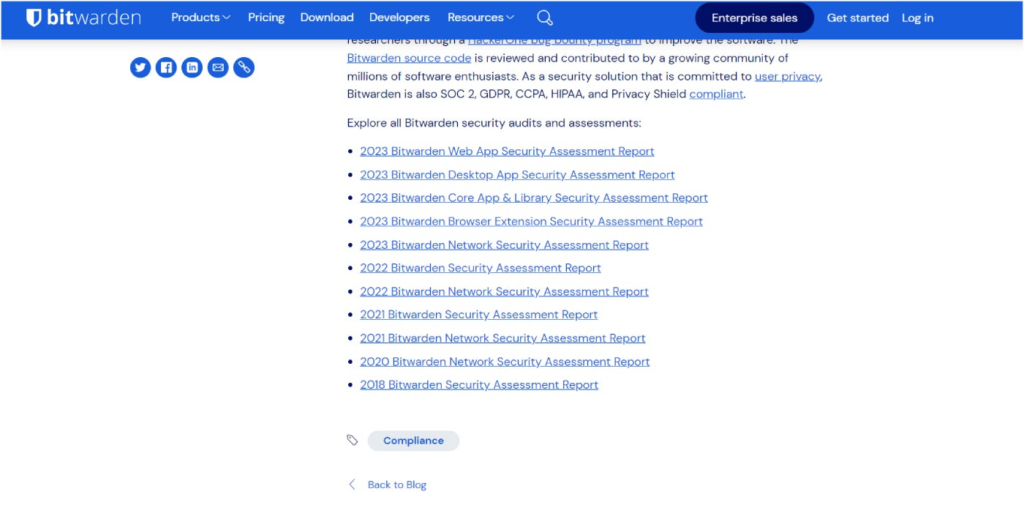
As two of the top password managers today, both Bitwarden and 1Password offer quality password management — albeit in different ways. Bitwarden is an open-source solution with a strong emphasis on affordability and transparency. Meanwhile, 1Password is a closed-source service that offers a streamlined user experience with top-tier security. In this article, we take a look at which password manager is best for you and your organization. Bitwarden: Best for users who need a high-quality password manager that’s both free and open-source. 1Password: Best for users who prioritize having an intuitive and well-designed user interface with many extra security features included. NordPass Employees per Company Size Micro (0-49), Small (50-249), Medium (250-999), Large (1,000-4,999), Enterprise (5,000+) Micro (0-49 Employees), Small (50-249 Employees), Medium (250-999 Employees), Large (1,000-4,999 Employees), Enterprise (5,000+ Employees) Micro, Small, Medium, Large, Enterprise Features Activity Log, Business Admin Panel for user management, Company-wide settings, and more Dashlane Employees per Company Size Micro (0-49), Small (50-249), Medium (250-999), Large (1,000-4,999), Enterprise (5,000+) Micro (0-49 Employees), Small (50-249 Employees), Medium (250-999 Employees), Large (1,000-4,999 Employees), Enterprise (5,000+ Employees) Micro, Small, Medium, Large, Enterprise Features Automated Provisioning ManageEngine ADSelfService Plus Employees per Company Size Micro (0-49), Small (50-249), Medium (250-999), Large (1,000-4,999), Enterprise (5,000+) Any Company Size Any Company Size Features Access Management, Compliance Management, Credential Management, and more Bitwarden vs 1Password: Comparison Bitwarden 1Password Our rating 4.6 out of 5 stars 4.3 out of 5 stars Starting price (monthly) $0.83 per month $3.99 per month Encryption AES 256 encryption AES 256 encryption Authentication options Authenticator apps, email, FIDO2 WebAuthn, YubiKey, Duo Security, face scan, fingerprint Authenticator apps, security keys like YubiKey and Titan Customer support Knowledge base guides and articles, email and ticketing system, community forum Knowledge base guides and articles, AI chatbot, email and ticketing system, community forum Platform support Windows, macOS, Linux, Chrome, Safari, Firefox, Vivaldi, Opera, Brave, Edge, Tor Browser, DuckDuckGo for Mac, iOS, Android, CLI Windows, macOS, Linux, Chrome, Safari, Firefox, Edge, Brave, Chrome OS, CLI, iOS, Android Free version Yes No Free trial Yes Yes Bitwarden vs 1Password: Pricing Both Bitwarden and 1Password divide their paid subscriptions into Personal and Business tiers. In terms of free plans, only Bitwarden has a free version, while 1Password doesn’t currently offer a dedicated free plan. Fortunately, both password managers have free trials for their paid subscriptions. Of the two, 1Password is more generous as it provides a 14-day free trial for all its plans, except for its Enterprise subscription. In contrast, Bitwarden has a respectable seven-day free trial for both its Bitwarden Teams and Enterprise subscriptions. Bitwarden pricing Bitwarden Personal: Free: Unlimited passwords, unlimited devices. Premium: $0.83 per month; unlimited devices; integrated authenticator, file attachments, emergency access, among others. Families: $3.33 per month; up to 6 users; unlimited sharing, unlimited collections, organization storage. Bitwarden Business: Teams: $4 per month per user; data sharing, event, and audit log monitoring, user groups, directory integration, among others. Enterprise: $6 per month per user; all Teams features plus enterprise policies, passwordless SSO integration, and account recovery capabilities. Custom quote: Contact sales for pricing; scalable subscription. If you want to learn more, read our full Bitwarden review. 1Password pricing Compared to Bitwarden’s monthly subscriptions, 1Password provides an option for either a monthly or an annual plan. Below is an overview of the pricing of 1Password’s plans for both contract options: 1Password Personal Plan Monthly Annual Individual $3.99 per month $2.99 per month, paid annually Covers 1 user, autofill capabilities, password sharing, end-to-end encryption Families $6.95 per month $4.99 per month, paid annually Covers 5 family members, all Individual features, plus simple admin controls and unlimited shared vaults 1Password Business Plan Monthly Annual Teams Starter Pack $19.95 per month $19.95 per month, paid annually Covers up to 10 users; actionable security alerts, domain breach report, 1Password Developer Business $9.99 per user per month $7.99 per user per month, paid annually Covers unlimited seats; includes all Teams Starter Pack features plus integration with Okta, Entra ID, and others; advanced reporting, granular admin controls Enterprise Contact sales for a quote Contact sales for a quote All Business features plus a dedicated account manager, tailored onboarding, quarterly and annual business reviews, and priority for new business features If you want to learn more, read our full 1Password review. Bitwarden vs 1Password: Feature comparison Security and encryption Winner: Tie Both Bitwarden and 1Password offer high-end security with their respective password managers. In terms of encryption, both services utilize the AES-256 encryption algorithm, which is widely considered the industry standard in the space. In addition, I’m happy to report that both Bitwarden and 1Password take third-party testing seriously. In the realm of security software, safety and security claims can only do so much. That’s why independent security audits are a critical feature to look out for. For Bitwarden, they’ve shown a strong commitment to third-party testing with its suite of security audits dating back to 2018. It’s also SOC 2, GDPR, and HIPAA-compliant. Its most recent third-party audit was an assessment of its Web App conducted by security firm Cure53 back in August 2023. Bitwarden’s third-party audits. Image: Bitwarden On the other hand, 1Password likewise offers an impressive portfolio of third-party audit results. As of May 2024, 1Password has 24 third-party audits covering various aspects of its password management service. Compilation of 1Password audits. Image: 1Password 1Password has also achieved SOC 2 type 2, ISO 27001:2022, 27017:2015, 27018:2019, and 27701:2019 certifications — showing it meets industry and international standards for information security. On August 6, 2024, 1Password shared that a vulnerability on 1Password 8 for Mac (versions before 8.10.36) was discovered, possibly affecting the application’s platform security. Per 1Password, the issue “enables a malicious process running locally on a machine to bypass inter-process communication protections.” 1Password for Mac issue. Image: 1Password Fortunately, 1Password has patched the issue with 1Password for Mac version 8.10.36 and has said that there have been no reports of the issue being exploited by anyone else. In this instance, I commend 1Password for

Bitwarden vs 1Password: Battle of the Best Read More »

US Chip Export Rule Proposes Limits to Thwart Chinese GPUs

The federal government on Jan. 13 proposed a global policy to limit the distribution of powerful, U.S.-made GPUs, an effort to promote U.S. dominance over China in the AI chip industry. “To enhance U.S. national security and economic strength, it is essential that we do not offshore this critical technology and that the world’s AI runs on American rails,” the White House’s announcement reads. The White House moved forward with the proposal despite pushback from several tech giants, including NVIDIA and Oracle. If the rule is implemented, it will be enforceable after 120 days, after a comment period. The incoming administration will determine whether the rule will go into effect. What’s hot at TechRepublic Proposed rule sorts countries into allied, restricted, or limited categories The Interim Final Rule on Artificial Intelligence Diffusion proposes restrictions on U.S. chip distribution to secure U.S. market share against competing technologies in China. Issued under the Commerce Department’s Bureau of Industry and Security, the rule mitigates national security risks exacerbated by generative AI, including cyberattacks. The rule has six main parts: 18 U.S. allies will have unlimited access to chip sales. “Chip orders with collective computation power up to roughly 1,700 advanced GPUs” are exempt, the White House said. Therefore, most universities and medical and research institutions can place chip orders without roadblocks. Trusted partners known as “Universal Verified End Users” have U.S. permission to place a small percentage of their global AI computational capacity globally. Countries on neither the U.S. “country of concern” nor close ally list that meet certain security requirements can be listed as “National Verified End Users.” This designation allows them to purchase computational power equivalent to up to 320,000 advanced GPUs from the U.S. for use within neutral countries over the next two years. (The “countries of concern” are China and its Special Administrative Regions, Hong Kong and Macau.) Foreign governments, health care providers, and businesses outside of the U.S. or its close allies not designated National Verified End Users can purchase up to the equivalent of 50,000 advanced GPUs from the U.S. per country. Governments that sign arrangements with the U.S. to specify export control, clean energy, and technology security efforts can double their allotted number of chips. China will be restricted from advanced U.S. technology in general and AI foundation model weights. Russia also remains blocked from purchasing advanced chips from the U.S. Which countries have unlimited access to U.S. AI chips? The 18 ally countries with unlimited access to U.S. AI chips under the policy are: Australia. Belgium. Canada. Denmark. Finland. France. Germany. Ireland. Italy. Japan. Netherlands. New Zealand. Norway. Republic of Korea (South Korea). Spain. Sweden. Taiwan. United Kingdom. As CNN points out, the categories of countries with caps on how much U.S. chip technology they can access could help prevent China from acquiring U.S.-made chips or getting its foothold in the advanced tech industry in those countries. Israel and Mexico are among the countries with limited access. Depending on the size of their operation, companies outside the U.S. could see delays in their supply chains or limited opportunities to add AI features to their products due to the policy. “Although administration rulings and export controls produce a narrow, short-term advantage, they may produce a broader, long-term loss to American technological leadership,” Benjamin Lee, University of Pennsylvania professor of engineering and computer science, told TechRepublic in an email. “In the short-term, export controls will slow some country’s deployment of the most advanced GPUs and the largest AI data centers. But in the long-term, export controls will cause other countries to develop their own hardware architectures or software models.” NVIDIA, Oracle strongly oppose the move NVIDIA Vice President of Government Affairs Ned Finkle disagrees with the new rules on two major points. He says that distributing powerful AI chips is a matter of national security and that restricting AI purchasing in some countries will benefit the U.S. “While cloaked in the guise of an ‘anti-China’ measure, these rules would do nothing to enhance U.S. security,” Finkle wrote. “The new rules would control technology worldwide, including technology that is already widely available in mainstream gaming PCs and consumer hardware.” SEE: The EU approved a major merger between simulation software company Ansys and chip design software provider Synopsys. Ken Glueck, executive vice president of Oracle, acknowledged the importance of some restrictions around AI use in cases such as weapons of mass destruction and super-intelligent AI. However, he also opposes the new White House policy, calling the rule “highly complex and wildly overbroad” in a blog post on Jan. 5. “In a single confusing action, the BIS retroactively regulates global cloud GPU deployments; shrinks the global market for U.S. cloud and chip suppliers; establishes volume restrictions; tells 20 countries they can be trusted only if they agree to new unilaterally imposed terms—including certification and semi-annual reporting requirements—and likely pushes the rest of the world to Chinese technology,” wrote Glueck. However, in a statement to the Associated Press, Microsoft President Brad Smith was less critical: “We’re confident we can comply fully with this rule’s high-security standards and meet the technology needs of countries and customers around the world that rely on us.” source

US Chip Export Rule Proposes Limits to Thwart Chinese GPUs Read More »

Arc Browser Review (2025): Should You Make the Switch?

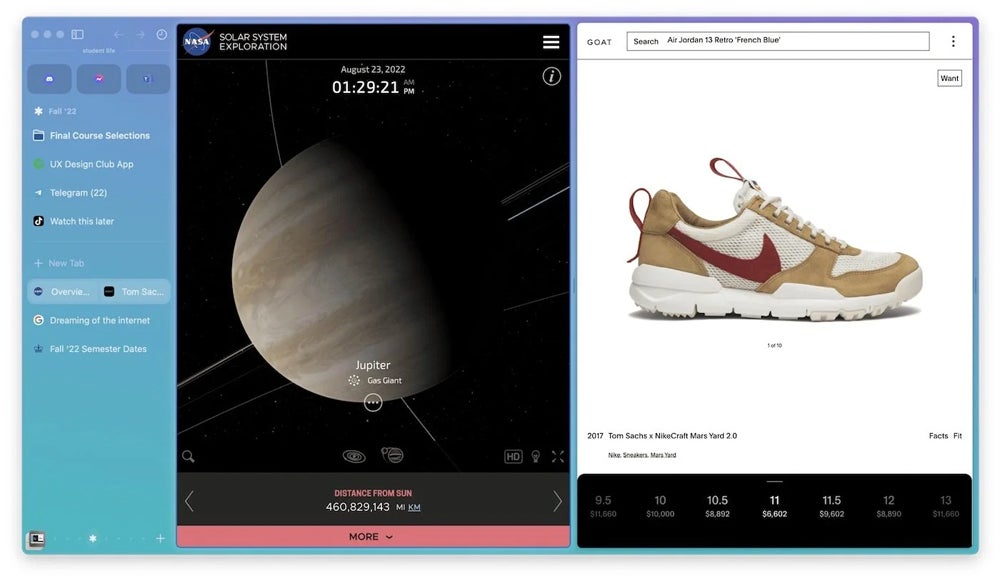
Arc Browser: Fast facts Key features: User-centered, highly customizable design, rich in features, integrates apps with web browsing to create an all-in-one multitasking experience. Pricing: Free. Best for: Users looking for a modern, customizable, and private browser. Web browsers have always been a sector dominated by big names, but Google’s Chrome, Apple’s Safari, and Microsoft’s Bing have a new competitor in Arc. The concept behind this hyper-personalized browser, developed by The Browser Company, is to provide a customizable web experience and act as the web’s operating system, integrating online content with apps and files. Pricing Arc is a freeware web browser. It’s available for free to all Mac and Windows users. Arc is also available for iPhone,  iPad, and Android users in a stripped-down version. Is Arc available for Windows, Mac, Linux, Android, and iOS? As of January 2025, Arc is available for Mac and Windows but not Linux. Arc is mainly designed as a desktop browser; therefore, its mobile iOS version for iPhones, iPads, and Android has some limitations. SEE: The U.K.’s competition watchdog in November alleged Apple’s WebKit browser engine restricts competition and consumer choice. Key features of the Arc browser Not only has The Browser Company invested in a modern design, but Arc has a wide range of features for advanced and nonadvanced users. Going vertical with tabs The main features of most web browsers are always positioned at the top in a horizontal structure, but in Arc, everything a user needs is on a left panel.  This includes the search bar, tab list, bookmarks, apps, and more. The vertical placement of the browser’s features creates an original design and frees up space while allowing users to multitask. For example, a user could browse in Arc during a video meeting. Arc can be customized and organized extensively. Tabs can be pinned, and “Spaces” can be created to manage tabs. The browser also offers split-screen mode. Split-screen mode in Arc. Image: Arc Design, design, design Everything in Arc is oriented toward user experience. From colors and themes to layouts, users can play with the browser’s settings intuitively, remixing components effortlessly. Arc’s user interface is a modern, decluttered, minimalistic, clean design. Image: Arc Browser Boosts With Arc’s Boosts, users can save and share their themes and customizable browsing experiences with other users. Arc shares the best Boosts users create in a central gallery. More advanced users with HTML, CSS, HTML, and JavaScript knowledge can modify known websites and even remove entire sections of sites such as YouTube, TikTok, and Gmail. The original websites aren’t modified; the only aspect that changes is how users see that website when they deploy a Boost. Arc Boost for YouTube created and shared by a user on the main gallery. Image: Arc Currently, Arc hasn’t faced legal problems due to giving users the power to change websites; however, media like Engadget have referred to this feature as capable of ” … vandalizing any website.” Rapid onboarding Setting up Arc Browser is a fast and intuitive process that only takes a few steps. From the start, users are asked to choose a color and theme, create their account, and import bookmarks and other web browser data if they want. The browser can also sync between devices with its proprietary functionality. Arc Sync. A browser or an OS? Why not both? The Browser Company wants its browser to be the “web’s operating system.” To meet this goal, the company innovates and creates different apps integrated within the web browser. Apps can be used without ever leaving the browser. Apps and Easels Arc can integrate known apps such as Gmail and Google Calendar and present them to users as apps instead of web pages by placing quick access on the left panel. Arc’s vertical tabs include apps and bookmarks. Image: Arc Additionally, the browser has its own apps. The Easel feature is used to create smart whiteboards; users can draw, write, add images, take screenshots, and collect and share ideas while browsing the internet. The Easel features include tools for typing and drawing and each Easel can be kept private, shared with others, and even posted online. Arc has a notebook app that can be accessed from the left panel. Other apps and features of the Arc Browser include: Little Arc: A small floating window that allows users to quickly browse new tabs without cluttering their workspace. Proactive tab management: This feature automatically closes tabs that haven’t been used in a while, keeping the browser tidy, and cleanup time can be customized. Ad blocker: This feature blocks ads to improve browsing experiences and safety while speeding up the browser. Smart picture-in-picture: Users can watch videos in a floating window while multitasking. Listen to music while browsing: Users can play music or podcasts when browsing the web and integrate apps such as Spotify into their browsers. Arc Search: This is a version of the Arc browser for mobile devices. Users can sync Spaces and pinned tabs between Arc Search and the main browser. Tidy Tabs: Organize tabs with one click. Instant Links: Use Search + Shift after typing a query in the search bar to bring up the top results for that query. Peek: A preview of a Pinned or Favorited Tab will appear when a user clicks on the link from the tab. Multitasking in the Arc browser with the integrated Spotify app. Image: Arc Mobile Companion Arc has a mobile version called Mobile Companion, a stripped, lightweight app for users to take their Spaces and Tabs anywhere. The mobile app is available for iPhones via the Apple App Store or Android phones via Google Play. Profiles Using Arc, users can create customized Profiles. The Profile feature allows users to switch from work to school or personal mode with only one click. Each profile can store multiple login credentials and save browsing history and cookies. The Profile feature can also be customized with themes, colors, Spaces, and tabs. Privacy Besides the ad blocker, Arc has strong

Arc Browser Review (2025): Should You Make the Switch? Read More »

7 Key Benefits of Effective Project Management

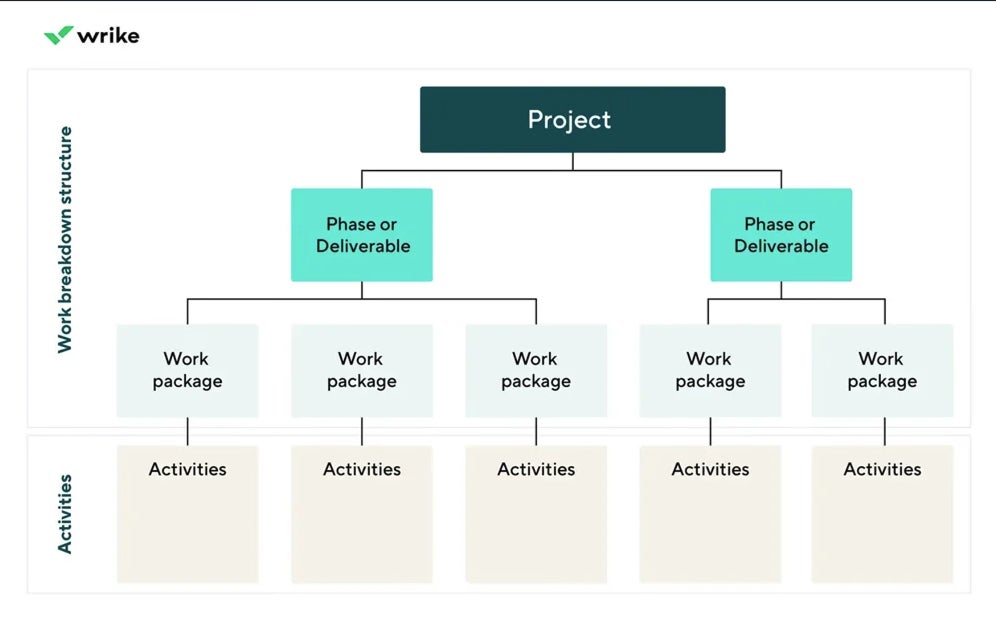
Project management involves coordinating resources, managing timelines, and ensuring objectives are met efficiently. When effectively implemented, structured project management can benefit your team and help make the most of your resources. Below I outline the top advantages of project management and offer tips for choosing the right tools to streamline your work. Benefits of Project Management Improved organization and prioritization Organizing tasks and projects using a strategic approach makes it easier for teams to stay focused and prioritize work. Define deliverables: Divide larger projects into smaller, more manageable tasks. Prioritize: Teams can accurately assess and focus on the highest priority items. Manage schedules: Calendar and timeline tools help teams keep track of deadlines. Visualize progress: Tools like Gantt charts and kanban boards clearly depict project stages and resources. Work breakdown structure organized with the Critical Path Method. Image: Wrike The example above would be particularly advantageous to a software development team using the Critical Path Method (CPM) project management strategy to identify tasks and allocate resources. SEE: For more on structuring projects effectively, check out our Critical Path Method Guide for Project Management. Enhanced collaboration and communication Clear and easy communication between team members fosters better teamwork and produces better project results. Project management software can help streamline this communication and maintain transparency. Centralize information: When the team is all communicating in one place, there is no need to worry about who was cc’d on an update or try to remember who attended a meeting. Facilitate communication: Use integrated messaging and file-sharing tools to maintain an easily accessible work history. Align team efforts: Ensure everyone is working toward common goals. By providing a centralized platform, team members can easily share information, documents, and updates on their progress. This visibility allows for more effective communication, faster decision-making, and better issue resolution. An example of a kanban board for agile project management communication. Image: monday.com Teams that adopt agile project management benefit from daily standups, collective information and status monitoring, and iterative feedback loops to continuously improve. SEE: To learn more about agile project management, read our article, What is Agile Project Management? A Comprehensive Guide. Accurate budget tracking and financial control Managing budgets is a critical aspect of any project. Utilizing project management tools can help ensure financial control and organize information. Cost estimation: Predict costs before the start of the project using AI forecasting features. Expense tracking: Monitor costs in real-time against the available budget. Financial reporting: Generate reports to keep track of project spending and financial performance. This level of financial control and visibility helps projects stay within budget and supports better resource planning for future projects. For example, a marketing team can use project management software to track ad spend and ROI to more accurately plan costs for future campaigns. Increased accountability and transparency Project management software increases accountability and transparency both within teams and throughout a larger organization. Task assignments: Clearly define who is responsible for which aspects of the project. Collective visibility helps team members understand their roles and take ownership of their work. Progress tracking: Monitor the ongoing status of tasks or project phases. This allows for real-time progress tracking, making holding individuals accountable for meeting deadlines and completing tasks easier. Activity logs: Keep track of all actions within the project. Teams that work with outside clients can utilize these logs to show that project expectations were met. This improved accountability fosters a sense of ownership and responsibility within the team, leading to better overall project outcomes. For teams that are particularly focused on efficiency, using scrum project management techniques structures works in sprints, improving time management and productivity. An example of a scrum sprint planning project. Image: Smartsheet SEE: If you want to know more about how Scrum can improve your productivity, read What is Scrum? Methodology Overview for Project Planning. Effective risk management and problem-solving Managing risks and unforeseen circumstances is essential for smooth project execution. Project management software helps your team stay proactive and minimize issues throughout the project lifecycle. Risk identification: Spot potential issues early with timeline overviews and bug reports. Contingency planning: Adjust project plans according to identified risks, with clear communication and documentation of changes for all participants to see. Issue tracking: Use automation features to monitor issues in real-time and assign them to the right people to address. Feedback loops: Implement systems for continuous improvement for following iterations. For example, construction projects often use risk assessments to plan for weather delays or supply shortages. Working in event or emergency response project management requires creating branching contingency plans for potential problem scenarios. Project management tools help centralize and organize this planning process. Efficient time and resource management Project management helps teams plan, view, manage, and adjust their resources, including time, money, personnel, and supplies. Time tracking: Monitor how much time is spent on each task and adjust processes as needed for efficiency. Workload balancing: Track which tasks are assigned to each team member or department and shift the workload so that no one is over or under-utilized. Resource allocation: Use project overview features to assign resources where they’re most needed. By monitoring progress and identifying bottlenecks through project management tools, managers can make informed decisions and reallocate resources as needed to keep projects on track. Example of a resource utilization dashboard. Image: Microsoft Project Streamlined reporting and analysis Project management tools assist teams in making data-driven decisions based on a combination of past performance, current resources, and risk forecasting. Customized reports: Generate insights on demand that include the specific data relevant to your current project or issue. Data visualization: Use dashboards to interpret data quickly and streamline status updates. Trend analysis: Utilize AI tools to identify patterns to improve future projects. By providing insights into project performance, teams can identify areas for improvement and implement changes, ensuring projects stay on track and meet objectives. How to choose the right project management software If you first identify what type of project management style your team will use, the right

7 Key Benefits of Effective Project Management Read More »

5 Emerging AI Threats Australian Cyber Pros Must Watch in 2025

Australian cybersecurity professionals can expect threat actors to exploit artificial intelligence to diversify tactics and scale the volume of cyberattacks targeting organisations in 2025, according to security tech firm Infoblox. Last year, cyber teams in APAC witnessed the first signs of AI being used to execute crimes like financial fraud, while some have linked AI to a DDoS attack in the financial services sector in Australia. This year, Australia’s cyber defenders can expect AI to be used for a new breed of cyber attacks: AI cloning: AI could be used to create synthetic audio voices to commit financial fraud. AI deepfakes: Convincing fake videos could lure victims to click or provide their details. AI-powered chatbots: AI chatbots could become part of complex phishing campaigns. AI-enhanced malware: Criminals could use LLMs to spit out remixed malware code. Jailbreaking AI: Threat actors will use “dark” AI models without safeguards. Infoblox’s Bart Lenaerts-Bergmans told Australian defenders on a webinar that they can expect an increase in the frequency and sophistication of attacks because more actors have access to AI tools and techniques. 1 New Relic Employees per Company Size Micro (0-49), Small (50-249), Medium (250-999), Large (1,000-4,999), Enterprise (5,000+) Any Company Size Any Company Size Features Analytics / Reports, API, Compliance Management, and more 2 Wrike Employees per Company Size Micro (0-49), Small (50-249), Medium (250-999), Large (1,000-4,999), Enterprise (5,000+) Medium (250-999 Employees), Large (1,000-4,999 Employees), Enterprise (5,000+ Employees) Medium, Large, Enterprise Features 24/7 Customer Support, 360 Degree Feedback, Accounting, and more 1. AI for cloning Adversaries can use generative AI tools to create synthetic audio content that sounds realistic. The cloning process, which can be done quickly, leverages data available in the public domain, such as an audio interview, to train an AI model and generate a cloned voice. SEE: Australian government proposes mandatory guardrails for AI Lenaerts-Bergmans said cloned voices can exhibit only minor differences in intonation or pacing compared to the original voice. Adversaries can combine cloned voices with other tactics, such as spoofed email domains, to appear legitimate and facilitate financial fraud. 2. AI deepfakes Criminals can use AI to create realistic deepfake videos of high-profile individuals, which they can use to lure victims into cryptocurrency scams or other malicious activities. The synthetic content can be used to more effectively social engineer and defraud victims. Infoblox referenced deepfake videos of Elon Musk uploaded to YouTube accounts with millions of subscribers. Using QR codes, many viewers were directed to malicious crypto sites and scams. It took 12 hours for YouTube to remove the videos. More Australia coverage 3. AI-powered chatbots Adversaries have begun using automated conversational agents, or AI chatbots, to build trust with victims and ultimately scam them. The technique mimics how an enterprise may use AI to combine human-driven interaction with the AI chatbot to engage and “convert” a person. One example of crypto fraud involves attackers using SMS to build relationships before incorporating AI chatbot elements to advance their scheme and gain access to a crypto wallet. Infoblox noted that warning signs of these scams include suspicious phone numbers and poorly designed language models that repeat answers or use inconsistent language. 4. AI-enhanced malware Criminals can now use LLMs to automatically rewrite and mutate existing malware to bypass security controls, making it more difficult for defenders to detect and mitigate. This can occur multiple times until the code achieves a negative detection score. SEE: The alarming state of Australian data breaches in 2024 For example, a JavaScript framework used in drive-by download attacks could be fed to an LLM. This can be used to modify the code by renaming variables, inserting code, or removing spaces to bypass typical security detection measures. 5. Jailbreaking AI Criminals are bypassing safeguards of traditional LLMs like ChatGPT or Microsoft Copilot to generate malicious content at will. Called “jailbroken” AI models, they already include the likes of FraudGPT, WormGPT, and DarkBERT, which have no in-built legal or ethical guardrails. Lenaerts-Bergmans explained that cybercriminals can use these AI models to generate malicious content on demand, such as creating phishing pages or emails that mimic legitimate services. Some are available on the dark web for just $100 per month. Expect detection and response capabilities to become less effective Lenaerts-Bergmans said AI threats may result in security teams having intelligence gaps, where existing tactical indicators like file hashes may become completely ephemeral. He said “detection and response capabilities will drop in effectiveness” as AI tools are adopted. Infoblox said detecting criminals at the DNS level allows cyber teams to gather intelligence earlier in the cybercriminal’s workflow, potentially stopping threats before they escalate to an active attack. source

5 Emerging AI Threats Australian Cyber Pros Must Watch in 2025 Read More »

CyberGhost VPN Review (2025): Features, Pricing, and Security

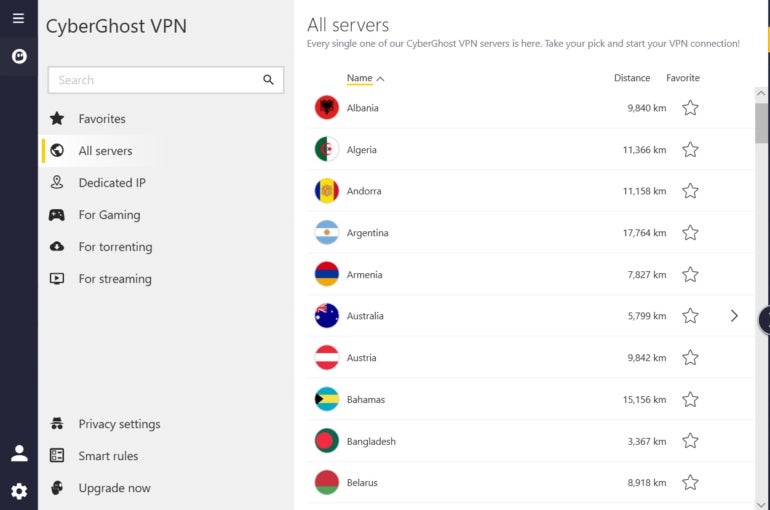
CyberGhost VPN fast facts Our rating: 4.3 stars out of 5Pricing: Starts at $6.99 per month (6-month plan)Key features: Offers servers in 100 countries and 125 locations. Includes streaming, torrenting, and gaming servers. Has generous free trial options. CyberGhost VPN has an impressive server fleet spaning 100 countries and 125 locations, an affordable starting price, and specialized servers for streaming, torrenting, and gaming. It also supports Windows, macOS, Linux, iOS, Android, Android and Apple TV, and even gaming consoles. While its complicated company history may cause some concern, the overall VPN package you get with CyberGhost makes it a worthy VPN choice of the year. Semperis Employees per Company Size Micro (0-49), Small (50-249), Medium (250-999), Large (1,000-4,999), Enterprise (5,000+) Large (1,000-4,999 Employees), Enterprise (5,000+ Employees) Large, Enterprise Features Advanced Attacks Detection, Advanced Automation, Anywhere Recovery, and more ESET PROTECT Advanced Employees per Company Size Micro (0-49), Small (50-249), Medium (250-999), Large (1,000-4,999), Enterprise (5,000+) Any Company Size Any Company Size Features Advanced Threat Defense, Full Disk Encryption , Modern Endpoint Protection, and more ManageEngine Log360 Employees per Company Size Micro (0-49), Small (50-249), Medium (250-999), Large (1,000-4,999), Enterprise (5,000+) Micro (0-49 Employees), Small (50-249 Employees), Medium (250-999 Employees), Large (1,000-4,999 Employees), Enterprise (5,000+ Employees) Micro, Small, Medium, Large, Enterprise Features Activity Monitoring, Blacklisting, Dashboard, and more CyberGhost VPN pricing Plans Price One month $12.99 per month (14-day money-back guarantee) Six months $6.99 per month (45-day money-back guarantee) Two years $2.03 per month (45-day money-back guarantee) While some VPNs offer different features at varied price points, CyberGhost’s pricing is straightforward. It provides three prices depending on your preferred service length — either one month, six months, or two years. The monthly option is billed every month, while the six-month option is billed every six months at $41.94 and the two-year option is billed for the first two years at $56.94 then annually thereafter. In terms of affordability, you will get the most out of your money with their two-year plan. At $2.03 per month, CyberGhost is one of the most affordable VPN options out right now. This is especially true once we take into account the number of servers you get at this price. Keep in mind, however, that this contract locks you in for two years so you won’t have the flexibility of being able to switch providers quickly. If you’re looking to test out the VPN for a month, CyberGhost VPN’s $12.99 is on the pricier end compared to its competitors like Proton VPN, with its one-month Plus plan currently priced at $9.99 per month. You also don’t get CyberGhost VPN’s in-house NoSpy servers for free with the one-month plan. With that, I do wish that CyberGhost offered at least a one-year option for its paid plans instead of its six-month subscription. This would give consumers more leeway with cost and less of the time commitment. Annual plans are also standard offerings for most VPN providers. In my view, having a one-year option would help CyberGhost provide a better one-to-one pitch against its competition. Comparing it to other VPNs, Surfshark’s mid-tier One subscription for one year is priced at $3.39 per month, while NordVPN’s Plus plan is $5.49 per month. At $6.99 per month for only six months, I feel like CyberGhost may seem like less of a bargain when looking at what other VPNs have to offer. CyberGhost VPN does have a fairly generous free trial program. For Windows and macOS users, you can get a 24-hour free trial without providing any payment or credit card information. Android users also have access to a three-day trial, while iOS users get free seven-day access. While the 24-hour Windows and Mac trial is short, accessing all the premium features without handing off any financial information is a worthwhile trade-off. Is CyberGhost VPN safe? CyberGhost VPN offers all the industry-standard security protocols we expect from a decent VPN in 2023. It has the OpenVPN, IKEv2, and WireGuard protocols, as well as AES-256 encryption. It also has a kill switch, DNS leak protection, and split tunneling capability. On its website, CyberGhost boasts that its headquarters are based in Romania — a country with strong privacy laws. This is a big plus for users who are wary of government interference. However, it is worth noting that CyberGhost is owned by Kape Technologies, formerly Crossrider. Crossrider had formerly been associated with malware and adware controversies before it purchased CyberGhost back in 2017. While CyberGhost has maintained that it acts as an independent entity of Kape, the company history is important to mention when it comes to security and privacy. CyberGhost does have a no-logs policy, which states that they don’t log user data such as browsing history, IP addresses, session durations, and the like. This no-logs policy has been confirmed by an independent audit conducted by Deloitte in 2022. In April 2024, CyberGhost completed a second independent audit of its server network and management systems. The assessment was conducted by Deloitte Audit Romania, which said that it found no evidence to conclude that CyberGhost’s “configuration of IT systems and management of the supporting IT operations” were not in accordance with its No-logs Policy No-Logging Safeguards. I commend CyberGhost for continuing its commitment to undergoing third-party audits. I especially appreciate how recent their latest audit was, providing an additional layer of confidence to users interested in purchasing a CyberGhost subscription today. The VPN service also regularly publishes quarterly Transparency Reports that cover police requests and malicious activity reports they receive. This is an admirable level of transparency that definitely adds to CyberGhost VPN’s overall credibility. With its complicated history, prospective users may be hesitant to consider CyberGhost VPN at first. However, I do feel that the company is doing enough to alleviate security concerns customers may have. Key features of CyberGhost VPN CyberGhost VPN provides an alluring package of features for its price, making it a solid choice. Let’s take a look at some key features one by one. Extensive server network CyberGhost

CyberGhost VPN Review (2025): Features, Pricing, and Security Read More »

UK Considers Banning Ransomware Payments

The U.K. government is considering banning ransomware payments to make critical industries “unattractive targets for criminals.” It would apply to all public sector bodies and critical national infrastructure, which includes NHS trusts, schools, local councils, and data centres. Currently, all government departments nationwide are banned from paying cyber criminals to decrypt their data or prevent it from being leaked. This rule intends to protect the services and infrastructure the British public relies on from financial and operational disruption. The health sector is classified as CNI, so withholding ransomware payments could impact patient care. According to Bloomberg, the attack on pathology company Synnovis last June, which led to months of NHS disruption, resulted in harm to dozens of patients, with long-term or permanent damage in at least two cases. SEE: Number of Active Ransomware Groups Highest on Record Organisations must also report ransomware attacks within three days On top of the ban, the proposed legislation will make it mandatory for organisations to report ransomware attacks within 72 hours of becoming aware of it. This is so law enforcement remains up-to-date on whom is being targeted and how which aids their investigations into organised crime groups and enables them to publish helpful advisories. The Home Office also wants to instate a ransomware payment prevention regime involving educating businesses on responding to a live threat and criminalising unreported payments. It is hoped that this will both increase the National Crime Agency’s awareness of attacks and reduce the number of payouts made to hackers, especially in exchange for data suppression. On Jan. 14, the Home Office opened a consultation on these three proposals, which will run until April 8. Ultimately, the goal is to reduce the sum of cash criminals extract from U.K. companies and boost understanding of the ever-changing ransomware landscape to aid prevention and disruption efforts. “These proposals help us meet the scale of the ransomware threat, hitting these criminal networks in their wallets and cutting off the key financial pipeline they rely upon to operate,” security minister Dan Jarvis said in a press release. The proposed approach to improving the country’s cyber security appears to echo that of the U.S. The federal government mandates compliance with its cyber security initiatives for federal agencies and regulated industries, hoping other businesses will voluntarily follow suit. Must-read security coverage Blanket ban could disproportionately impact small businesses and non-critical sectors Within the documentation outlining the proposals, the Home Office acknowledges the potential for the legislation to disproportionately impact small and micro-businesses “which cannot afford specialist ransomware insurance, or clean up specialists.” These SMBs will have less employee capacity during an attack to engage with the government and meet reporting deadlines. As a result, they may feel that the only option to retain their business is to pay to decrypt data. SEE: 94% of Ransomware Victims Have Their Backups Targeted Alejandro Rivas Vasquez, the global head of Digital Forensics and Incident Response at security firm NCC Group, said in a statement that the blanket rule could create “unfair and administrative burdens that become complex and unmanageable” for smaller businesses. He said: “Instead of a one size fits all approach, we’d recommend the government explore a less burdensome obligation that could be applied to smaller businesses, or focus on incentivising businesses to improve their security posture, rather than punitive action.” Vasquez added that applying the ban only to public sector bodies and CNI could impact other industries. “A blanket ban could place a larger target on sectors not included in the ban, such as manufacturing, which doesn’t currently fall under the scope,” he said. Manufacturing was the second most targeted industry for ransomware last year, after services, and saw a 71% year-on-year increase. Furthermore, the legislation would not impact hackers who are motivated by factors other than money. As Vasquez said: “In geopolitically motivated attacks, which can be launched by nation states, ransomware is a tool to cripple critical national infrastructure and steal sensitive data – money is not the objective. Banning payments would be futile in stemming such attacks – the hackers would already have the data they need.” U.K.’s cyber risks are ‘widely underestimated’ In December, Richard Horne, head of the U.K.’s National Cyber Security Centre, warned that the country’s cyber risks are “widely underestimated.” He said that hostile activity had “increased in frequency, sophistication, and intensity,” largely from foreign actors in Russia and China. According to the NCSC’s Annual Review 2024, the agency handled 430 incidents this year compared to 371 in 2023. Of these, 13 were “nationally significant” ransomware incidents threatening essential services or the wider economy. SEE: Microsoft: Ransomware Attacks Growing More Dangerous The report called ransomware the most pervasive threat to U.K. businesses, especially in academia, manufacturing, IT, legal, charities, and construction. According to the NCSC, the pervasion of generative AI has been found to increase the risk of ransomware by providing “capability uplift” to attackers. Amateur attackers can use it to craft social engineering materials, analyse exfiltrated data, code, and reconnaissance, which essentially lowers the barrier to entry. source

UK Considers Banning Ransomware Payments Read More »

5 Best Free Merchant Account 2025: Top Providers & Fees

Best value: Square Best for low processing fees: Helcim Best for online businesses: PayPal Best for multichannel payment platforms: Stripe Best for invoicing: Wave Disclaimer: When I say “free,” I mean “no upfront costs, no monthly subscription fees, and no contracts.” I do not mean “no processing fees.” Every time a transaction is made electronically, whether online or in-person, a lengthy chain of stakeholders is involved in processing the transfer of funds, and each one takes a cut. So, there’s no truly free way to accept payments  — except cash, that is. That said, these merchant account providers all offer no monthly fees, long-term contracts, or monthly minimums; and, they offer competitive transaction fees. See our detailed comparison below. Top free merchant account providers compared Our rating (out of 5) Best for In-person transaction fee Online transaction fee Free card reader? Square 4.58 All-in-one solution 2.6% + $0.10 2.9% + $0.30 Yes, 1st magstripe reader Helcim 4.24 Low processing fees 1.83% + $0.08 (average) 2.27% + $0.25 (average) No PayPal 4.19 Online-only businesses 2.29% + $0.09 2.99% + $0.49 Yes, 1st card reader discounted Stripe 4.11 Selling in person and online 2.7% + $0.05 2.9% + $0.30 No Wave 3.83 Collecting payments via invoicing N/A From 2.9% N/A (online payments only) Square: Best value Our rating: 4.58 Image: Square We’re talking free, right? Well, what if we want free stuff in addition to free services? Well, that’s why Square is at the top of my list. To be clear, Square has many advantages, not just the free reader they send to new accounts when they sign on. Square often makes our best-of lists because of its convenient services and all of the payment tools it offers for free. Here are some of the things you can claim for signing up with Square for no cost other than what you pay in processing fees: A free magstripe card reader peripheral. Access to in-person card payment processing via Square’s POS. Access to virtual POS functionality and manual-entry transaction processing. Access to free website building, hosting, and online storefront support. Access to invoicing including “click to pay” buttons for your customers to pay online. Why I chose Square I mentioned several of the freebies Square throws your way in the list above. In addition to the freebies, the fees Square does charge are flat-rate, transparent, and easy to budget for. Bottom line: Square comes up so frequently because brands that sell in person, especially sole proprietors or small operations, stand to benefit dramatically from these much lower barriers to entry. And in this economy, any leg up when starting a business is welcome. Pricing Pricing plans Free — $0/month plus processing fees. Plus — $29/month plus processing fees. Premium — $89+/month plus processing fees. Processing fees In-person — 2.6% + $0.10. Online — 2.9% + $0.30. Manually entered — 3.5% + $0.15. Invoices — 3.3% + $0.30. Add-ons tools: From $5/month. Features Free Square account includes POS, online store/checkout, virtual terminal, invoicing, and more. Square includes a free mobile card reader with every signup; in-person rates are industry standard. Loads of add-ons and upgrades with valuable features at inexpensive prices. Square account balance example. Image: Square Pros and cons Pros Cons Lots of freebies, including free hardware. Less suited to businesses that accept most of their payments as card-not-present. Options for B2B services like marketing and business banking. Processing fees are not the lowest available. Custom processing rates available for high-volume sellers. SEE: Best cloud POS systems Helcim: Best for low processing fees Our rating: 4.24 Image: Helcim If the account is free, then the biggest expenses you’re likely to contend with are the processing fees. You can’t get around those fees, but you can minimize their impact by finding the ones most amenable to your organization. Helcim cuts down the costs across the board, but the numbers have to get kind of complicated to make it happen. Where Square and Stripe flatten transaction processing fees to a single price, Helcim doesn’t. The former two can only achieve a flat fee format by varying their own profit margin, meaning they sometimes take a bigger cut. Helcim does the opposite, applying the same (rather thin) profit margin to every transaction. In practice, it looks like your fees are all over the place — because they are — but you’re never paying extra just to get the flat fee. You only ever pay the interchange fees plus their flat margin. That’s why it’s known as “Interchange Plus pricing.” Why I chose Helcim In addition to interchange-plus rates, Helcim also offers pass-through fees; which allows customers and donors to pay processing fees and send you the full transaction amount. This isn’t commonly done in retail sales or other for-profit contexts. But if you’re running a nonprofit, a charity, or anything else that takes donations rather than selling goods/services, this can be quite the lifesaver. Donors are already looking to help you make the most of the money they’re giving, so the majority are happy to keep the fees from eating into what you receive. Interchange Plus and pass-through fees alone qualify Helcim for this list. Pricing No monthly fees. No contracts. Interchange Plus: Helcim’s processing fees are the base interchange rate plus its flat margin rate — .0.40% + $0.08 for in-person transactions, and 0.50% + $0.25 for online and manual entry. Features Interchange Plus pricing means you’ll pay less for processing fees with Helcim than anywhere else. Pass-through fees option so you can set up your processing to give the payee the option to eat the cost of those fees themselves. Volume-based discounts help you save more the more you sell. Helcim for Professional Services. Image: Helcim Pros and cons Pros Cons Super low processing fees, though calculations are a bit more confusing. You save less if you process mostly high-interchange transactions (e.g., AmEx). Better suited to businesses processing high volumes, nonprofits accepting donations, and organizations doing lots of ACH transactions. Fewer add-ons and

5 Best Free Merchant Account 2025: Top Providers & Fees Read More »