Tech Republic

The 6 Best Encryption Software (Updated for 2024)

Encryption secures information by translating it into computer code that’s unreadable to those who don’t have the means to access the information. These means of access can include passwords, credentials, and authentication of some form. Though encryption could still be broken or cracked, strong encryption is nearly impenetrable. SEE: Best Encryption Key Management Software (TechRepublic) Securing data both stored and in-transit through encryption is essential as part of an organization’s cybersecurity strategy. There are various encryption options out there. Here are our top picks. Semperis Employees per Company Size Micro (0-49), Small (50-249), Medium (250-999), Large (1,000-4,999), Enterprise (5,000+) Enterprise (5,000+ Employees), Large (1,000-4,999 Employees) Enterprise, Large Features Advanced Attacks Detection, Advanced Automation, Anywhere Recovery, and more Top encryption software: Comparison table Product Name Price Offers Support Offers Password Manager On-the-Fly Decryption Enterprise-Grade Encryption VeraCrypt Free No No Yes No BitLocker Free with Windows OS Yes Unknown No Yes AxCrypt Premium $12.00 per month, per user for AxCrypt Business plan Yes Yes Yes Yes Trend Micro Endpoint Encryption Contact vendor but a license supporting 251 to 500 endpoints averages about $77-$83 per month Yes No No Yes NordLocker NordLocker Business for 1-year 2TB is priced at $29.99 per month Yes No Yes Yes Advanced Encryption Package Fully unlocked version: one-time fee of $49.95 No No Yes Yes ESET PROTECT Complete Contact vendor but can start at $462.16 for 5 devices, 1 year. Yes No Yes Yes Top encryption software VeraCrypt: Best overall Image: VeraCrypt VeraCrypt is my pick as my best overall encryption solution. It’s a free disk encryption software that you can use on Linux, macOS, and Windows systems. It’s also an open-source service, which forks off the TrueCrypt project, adding features to help with secrecy. VeraCrypt is my prime recommendation for privacy enthusiasts and tech-savvy consumers. I particularly like VeraCrypt due to it being open-source, wherein its source code is publicly available for easy spotting of vulnerabilities and points for improvement. Businesses that prioritize transparency and regular code audits in an encryption solution should have VeraCrypt high on its list. Why I picked VeraCrypt I chose VeraCrypt as my top solution for its easy hiding of encrypted data in sight, making internal resources more secure against prying eyes. In addition, it utilizes popular encryption algorithms and has wide support for multiple platforms. Pricing Free. Features Offers the ability to create encrypted containers. Can create hidden volumes. Supports nested encryption. Automatically protects files. Mounting a drive on VeraCrypt. Image: VeraCrypt Documentation VeraCrypt pros and cons Pros Cons Supports multiple encryption algorithms including Kuznyechik, AES and Serpent. Supports multiple platforms. Allows for easy hiding of encrypted data in sight. Dated GUI. No file-sharing option. Isn’t integrated for cloud storage. No formal support. BitLocker: Best for Windows environments Image: BitLocker For Windows-centric businesses, I recommend BitLocker. BitLocker is available on server and business editions and contains various encryption tools. The Redmond solution focuses on encrypting files and drives on a device right out of the box. I appreciate how you can set up recovery keys to retrieve data if you get firmware problems or errors. Personally, I think it’s an excellent choice for encryption software for Windows. As a Microsoft product, you’ll typically need a Microsoft account or will need to link a device to a Windows domain to use it. You can also configure it for a corporate environment using Group Policy. The settings help you decide which drives you want to encrypt and how to distribute your keys (certificates). Additionally, the computer must have a Trusted Platform Module that can support the encryption process. Why I picked BitLocker I chose BitLocker for its easy integration with Windows environments. This is on top of a user-friendly interface and full disk encryption. For users that are already deep into the Windows ecosystem or are planning to adopt a Windows-centered environment, BitLocker is my top recommendation. Pricing Free as part of Windows software. Features Encrypts full drives and other media. Supports Microsoft account-linking and domain-linking. Built into Windows software. Accessing a drive via BitLocker. Image: Microsoft Learn BitLocker pros and cons Pros Cons User-friendly. Comes built-in on Windows software. Offers whole-disk encryption of files and folders. Only works on Windows platform. AxCrypt Premium: Best for local storage encryption Image: AxCrypt If you plan to encrypt locally, I encourage you to try AxCrypt Premium. AxCrypt Premium allows users to encrypt files locally using the AES-256 encryption algorithm. Sharing is possible with its key-sharing option. The solution protects classified and sensitive information and provides access to a master password generator. SEE: Asymmetric vs Symmetric Encryption: What’s the Difference? (TechRepublic) Why I picked AxCrypt I selected AxCrypt for users that want to prioritize local storage encryption above all else. I also like that it uses the gold standard AES-256 encryption, has file and key-sharing support, and works well with the most popular operating systems and platforms. Pricing There’s a one-month trial period across its Password Manager, Premium, and Business subscriptions. But for organizations and businesses, AxCrypt’s Business plan is priced at $12.00 per month, per user. However, customers can get 20% off, or $10.42 per month per user, if they choose annual billing. Features Allows file and key sharing. Supports encryption and decryption of files on Android and iOS devices. Offers master password management. Using a master key in AxCrypt. Image: AxCrypt Info page AxCrypt pros and cons Pros Cons Good support options for enterprises. Compatible with Android, iOS, macOS, and Windows. Doesn’t support Windows and Linux phones by default. Locked files aren’t typically encrypted. Pricing A license supporting 251 to up to 500 endpoints averages about $77-$83 per month. Features Folder Lock allows for remote locking in case of stolen or lost devices. Provides transparent key management. Centralized encryption management. Automated enforcement of policy-based encryption. Encryption deployment. Image: Trend Micro Documentation Trend Micro Endpoint Encryption pros and cons Pros Cons Extends to user-owned devices. Offers pre-boot authentication. Recovery console available on Windows devices. Enforces the compliance requirements through detailed audits and more. Encrypts

The 6 Best Encryption Software (Updated for 2024) Read More »
NordVPN vs. ExpressVPN: Which VPN Is Best?

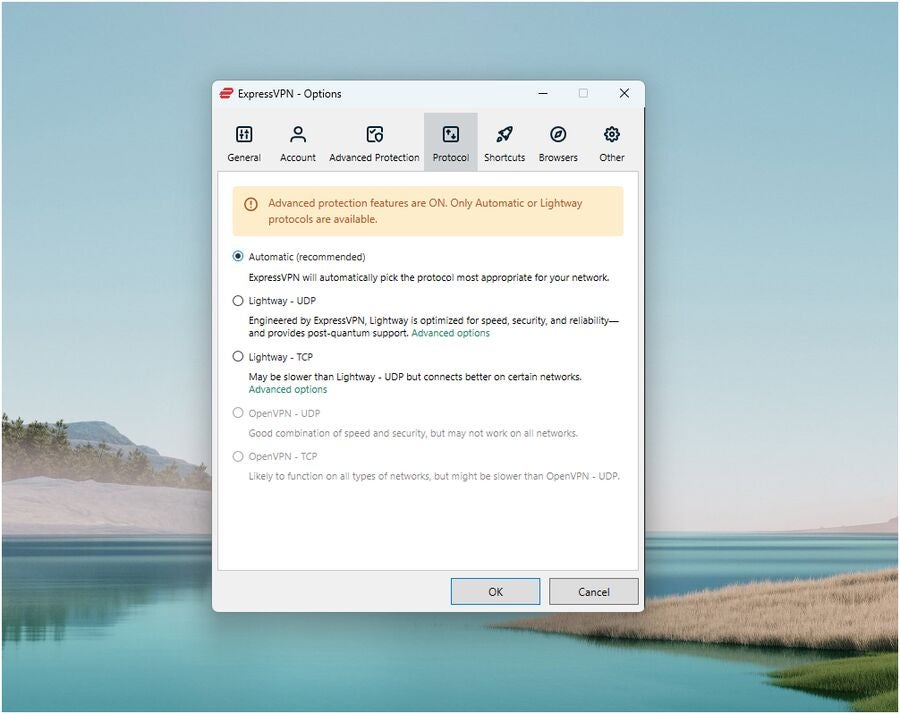
NordVPN and ExpressVPN both sit at the top of the food chain when it comes to modern VPN providers. Both VPNs are known for fast speeds, large server suites, and a strong reputation for quality. However, there are key differences between the two. NordVPN comes with impressive security and privacy-focused features, such as its Meshnet encrypted file-sharing system and Threat Protection against malware and ads. Meanwhile, ExpressVPN has a clean and easy-to-use interface and an impressive portfolio of third-party security audits. In this article, we figure out which VPN is best for you and your business. NordVPN: Best for most users that want a large server network and a variety of extra security features. ExpressVPN: Best for users that prioritize having a user-friendly interface and fast VPN download and upload speeds. Semperis Employees per Company Size Micro (0-49), Small (50-249), Medium (250-999), Large (1,000-4,999), Enterprise (5,000+) Enterprise (5,000+ Employees), Large (1,000-4,999 Employees) Enterprise, Large Features Advanced Attacks Detection, Advanced Automation, Anywhere Recovery, and more ESET PROTECT Advanced Employees per Company Size Micro (0-49), Small (50-249), Medium (250-999), Large (1,000-4,999), Enterprise (5,000+) Any Company Size Any Company Size Features Advanced Threat Defense, Full Disk Encryption , Modern Endpoint Protection, and more NordVPN vs ExpressVPN: Comparison Table NordVPN ExpressVPN Our rating 4.7 out of 5 stars 4.6 out of 5 stars Security protocols OpenVPN, NordLynx (based on WireGuard) OpenVPN, Lightway No. of servers 6,200+ 3,000 (reported) VPN server locations 111 countries 105 countries Simultaneous device locations 10 8 Supported platforms Windows, macOS, Linux, Android, iOS, Chrome, Firefox, Edge, Android TV, Apple TV, routers, game consoles Windows, macOS, Linux, Android, iOS, Chromebook, Chrome, Firefox, Vivaldi, Brave, Edge, Amazon Fire tablet, routers, media consoles, game consoles Free trial 7-day free trial via Android (can sign in on other platforms afterwards) 7-day free trial for iOS and Android only Starting price(annual plan $4.99 per month $6.67 per month NordVPN and ExpressVPN: Pricing NordVPN pricing NordVPN’s paid plans have three subscription tiers, namely NordVPN Basic, Plus, and Ultimate. Take note, I noticed that in some regions, NordVPN Ultimate will sometimes be called NordVPN Complete or Ultra. This means the top plan may be different depending on your location. Below is an overview of pricing and feature differences with each tier: Basic Plus Ultimate Monthly $12.99 per month $13.99 per month $15.99 per month 1 year $4.99 per month $5.99 per month $7.99 per month 2 years $3.09 per month $3.99 per month $5.99 per month Features Main VPN service All Basic features plusThreat Protection against ads, malware, and trackers; access to NordPass password manager; data breach scanning capabilities All Plus features plus 1TB encrypted cloud storage; identity threat recovery; cyber extortion protection Out of NordVPN’s plans, I feel its Plus subscription for one year brings the best value. It provides a good balance between a reasonable monthly fee while having a healthy amount of NordVPN’s additional security features. Among these are its Threat Protection feature that protects against malware and ads, as well as its data breach scanner. SEE: The Top 7 NordVPN Alternatives for 2024 (TechRepublic) Meanwhile, I commend NordVPN for including Nord Security’s dedicated password manager, NordPass, to its Plus subscription tier. This is essentially a second service on top of the main VPN — all in a single subscription. To me, this is a meaningful value-add, especially for users that are also in the market for a password manager. While NordVPN doesn’t currently have a free version, it has a seven-day free trial via Android. Once you sign up for the trial, you’ll be able to try NordVPN on desktop as well. While I laud Nord for offering a trial, I hope it opens this up for iOS users as well. This would allow more users to try and test NordVPN out. Fortunately, NordVPN has a 30-day money-back guarantee for all its paid subscriptions. With this, you can pay for an initial plan and request a refund if you find it isn’t the right fit. Just make sure to request the refund within the allotted time period. If you want to learn more, read our full NordVPN review. ExpressVPN pricing Compared to NordVPN, ExpressVPN has more straightforward pricing that’s only divided depending on contract length. 1 month: $12.95 per month. 6 months: $9.99 per month. 1 year: $6.67 per month. As a consumer, I like this approach since it simplifies the whole buying process. However, this does mean that ExpressVPN carries less feature packages compared to NordVPN — a topic we’ll discuss more in-depth later. SEE: CyberGhost vs ExpressVPN (2024): Which VPN Is Better? (TechRepublic) Coincidentally, ExpressVPN also includes its own password manager, ExpressVPN Keys, to its paid subscriptions. While I find NordPass to be the more powerful password manager, I’m still happy that ExpressVPN bundles it with all the paid plans. Like NordVPN, ExpressVPN offers a 30-day money-back guarantee on all paid plan options. While ExpressVPN also has a seven-day free trial, this is only available for its mobile apps on Android and iOS. If you want to learn more, read our full ExpressVPN review. NordVPN vs ExpressVPN: Feature comparison Security protocols and encryption Winner: Tie Both NordVPN and ExpressVPN provide top-tier encryption and quality VPN protocols. In both services, we get the industry standard AES-256 encryption algorithm — well recognized as one of the most secure algorithms available. SEE: NordVPN vs Proton VPN (2024): Which VPN Should You Choose? (TechRepublic) For VPN protocols, NordVPN carries OpenVPN and its proprietary NordLynx protocol based on the speed-oriented WireGuard. On the flipside, ExpressVPN also offers the OpenVPN protocol and its own Lightway protocol, similarly built for speed. ExpressVPN’s VPN protocols. Image: Luis Millares I appreciate how, for both NordVPN and ExpressVPN, users have the option to choose from a security-focused protocol or one that provides more speed. For context, OpenVPN is known for its security as an open source protocol, while WireGuard is faster and more modern. In this way, you get the best of both worlds and aren’t confined to just prioritizing

NordVPN vs. ExpressVPN: Which VPN Is Best? Read More »

8 Easy Content Calendar Templates You Can Use for Free

A content calendar is a great way to visualize your publishing schedule. From blog posts and social media content to email campaigns and YouTube videos, keeping track without one is a pain to say the least. It gets even more challenging when you’re publishing across multiple platforms and managing a team of creators, editors, and producers. These are some of my favorite content calendar templates for staying organized. monday.com: A multi-purpose content calendar template Looking for a flexible and powerful way to manage content and other types of work in one place? monday.com is one of the top project management solutions I’ve used. The free plan is great for up to two users and is more than enough to try monday.com’s free content calendar template. However, paid plans come with far more functionality and are better suited for teams needing automation, formulas, integrations, and dashboards. Learn more about monday.com: monday.com review | monday.com’s newest features. This monday.com template gives you project tracking and a powerful content calendar in one solution. Image: monday.com This content calendar template is great for teams that need a way to plan and execute content alongside other types of projects. It’s great for high-level or short-term planning, but it really shines when you use it as a way to assign tasks and get work done. With tons of built in project management functionality, you can easily set due dates, trigger notifications, and track progress too. It works just as well for any type of content, from social media and videos to long-form blog posts. You can view all of the work as a simple table, Kanban view, calendar, timeline, or interactive dashboard (depending on your plan). Although the template itself is relatively simple, the extensibility of monday.com as a tool means you can add on or combine it with other templates to create an entire business operations system that runs your entire department or company. Notion content calendar templates Although Notion has project management features, it can do a whole lot more than that. It’s essentially a blank slate with the ability to create any type of system or workspace you need. It works particularly well for things you need to keep track of. In our context, it works great for content. But it’s also excellent for notes, budgeting, HR, finance, and more. If you’re a solo user, the free plan will get you by for a long time. Teams can try Notion with the free plan, but you’ll have to upgrade to a paid plan to continue using it. Learn more about Notion: Notion review | Notion vs monday.com | Notion vs Confluence. A basic content calendar template and Kanban board Notion makes it easy to switch between calendar and Kanban view to queue up months’ worth of content in advance. Image: Notion.so Notion’s basic content calendar template is a great place to start because it requires zero effort to set up. Out of the box, you’ll get pre configured calendar and Kanban views you can add content to right away. The calendar is great for ensuring a consistent publishing schedule while the Kanban board makes it easy to keep track of production along the way. You can brainstorm ideas using the built in “idea” status and move items to “in progress” when you’re ready to get to work. Don’t like an idea? All you have to do is delete it. Each item lets you attach media files so you can gather everything you need to publish in one place. This template works just as well whether you’re working by yourself or with a small team. A Notion template for managing social media content Use a single template to plan, organize, and schedule upcoming posts across all of your social media channels. Image: Notion.so Notion’s simple social media content calendar works really well if you repurpose existing content across multiple channels. Rather than creating four items for a single video, you can create it once and tag the item for YouTube, Instagram, LinkedIn, and TikTok. Like other Notion templates, you can easily set up a wide range of views, one of which is a calendar that makes it easy to see each piece of content and the platforms it will go on. As soon as an item has a date, it shows up on your calendar. This is true even if it’s still in the process of being created. But color coding on the calendar view is based on each item’s status, giving you an immediate visual of what’s on track or running behind. Because Notion is so flexible, you can easily update either template or expand on them to make them work for you and your team. ClickUp content calendar templates ClickUp isn’t as flexible as monday.com or Notion, but it has more built in functionality. Instead of building what you need, it already exists and can be used right out of the box. On top of that, the free plan is far more generous. You can have an unlimited number of users plus you get unlimited tasks, collaborative docs, team chat, custom fields, and multiple project views. Advanced features, like automations, Gantt view, calculations, time tracking, goals, workload management, and advanced permissions are all available on paid plans when you’re ready. Learn more about ClickUp: ClickUp review | ClickUp vs monday.com | ClickUp vs Notion.  An advanced all-purpose content management template Manage all of your blogs, social posts, videos, emails, and more, all from one content calendar. Image: Clickup.com ClickUp’s marketing content calendar template is one of the most fully-featured and versatile options on my list. It’s flexible enough for solo marketers and mid-sized teams alike, Plus, you don’t have to do much to get started. It comes with eight unique statuses, ten custom fields, and team collaboration tools so you can assign tasks and track the progress of all your content. Depending on your plan, the template includes eight views, giving everyone on your team the opportunity to see their work

8 Easy Content Calendar Templates You Can Use for Free Read More »

OpenAI Launches ChatGPT Search, a Direct Competitor to Google

ChatGPT Plus subscribers, Team subscribers, and SearchGPT waitlist members can use OpenAI’s generative search engine starting today, the AI giant announced on Oct. 31. That might be a Halloween scare for Google Search, as OpenAI directly targets pulling users away from Google’s algorithm. OpenAI created a Chrome extension to set ChatGPT search as the browser’s default search engine. ChatGPT search also competes with Microsoft’s Bing Chat in the Bing search engine. ChatGPT search will open up to enterprise and education users “in the next few weeks,” OpenAI said in a blog post. Free tier users will see the new functionality “in the coming months.” What is ChatGPT search? OpenAI’s ChatGPT search is a generative AI search function that returns text written by a large language model and links to external websites. It runs on a fine-tuned version of GPT-4o in concert with some outputs from OpenAI o1-preview. OpenAI first introduced ChatGPT search as SearchGPT in a preview in July. More must-read AI coverage OpenAI wants to provide a ‘better answer’ than the competitors Google Search ranks results based on their initiatives to put forward “people-first” content. However, the results aren’t always relevant or helpful. In the past few years, finding older content or content not intended to answer a question directly has become more difficult. OpenAI wants to eliminate “digging through links” by using the context from the natural-sounding conversations a ChatGPT user might have with the AI. “Go deeper with follow-up questions, and ChatGPT will consider the full context of your chat to get a better answer for you,” OpenAI wrote. ChatGPT search can be accessed through a backslash command, which conveniently shows OpenAI’s taxonomy for the functions of its current models. Image: OpenAI Like Google’s AI Overviews, ChatGPT search will show sources for its information in a sidebar on the right column. ChatGPT search offers weather, stocks, and sports scores. OpenAI does not currently have plans to incorporate ads. SEE: Google opened its AI Overviews search assistant up to more countries in late October. The use of news media in AI search results is controversial OpenAI partnered with news media, including Associated Press, Reuters, The Atlantic, and Time. According to the Washington Post, ChatGPT search will direct election-related questions to well-established news sites like the Associated Press and Reuters. Non-affiliated sites can control whether or not they appear in ChatGPT search results by allowing or disallowing OpenAI’s OAI-SearchBot in their robots.txt file. Some newspapers, including The New York Times, have sued OpenAI for infringing on the copyright of their content. Meanwhile, other media groups see allying with OpenAI as a valuable business strategy in an era of proliferating generative AI. “ChatGPT search promises to better highlight and attribute information from trustworthy news sources, benefiting audiences while expanding the reach of publishers like ourselves who produce premium journalism,” said Vox Media president Pam Wasserstein in OpenAI’s blog post. source

OpenAI Launches ChatGPT Search, a Direct Competitor to Google Read More »

Operation Magnus: Law Enforcement Operation Targets Infostealers

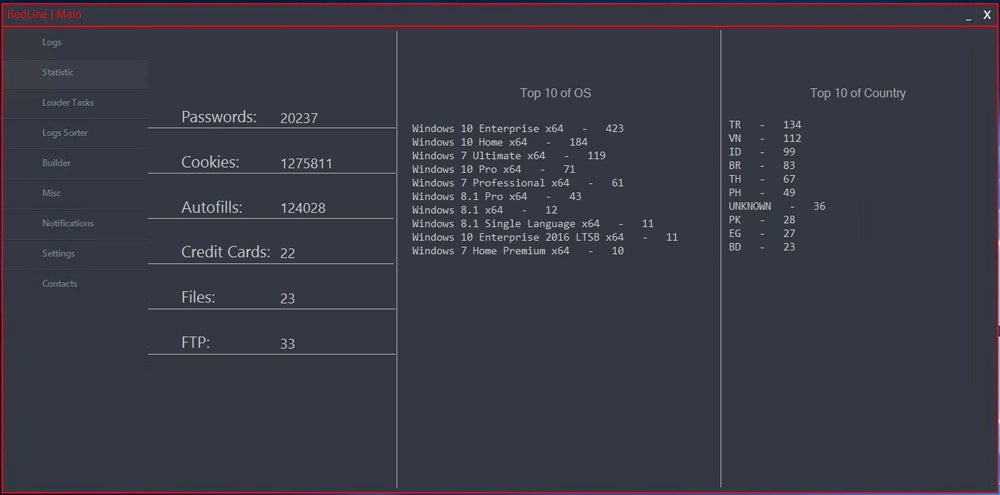
In a sweeping international effort, the U.S. Department of Justice, Federal Bureau of Investigation, and multiple global law enforcement agencies have exposed “Operation Magnus,” targeting two of the world’s most notorious information-stealing malware networks, RedLine Stealer and META. According to a press release published on Oct. 29, the operation led to the seizure of multiple servers, the unsealing of charges against a RedLine Stealer developer, and the arrest of two suspects in Belgium. RedLine and META information stealers RedLine Stealer and META are two distinct types of malware known as “information stealers,” or “infostealers,” designed to capture sensitive user data. The existence of RedLine Stealer was initially reported in 2020, while META first appeared in 2022. In an interview, a representative of the META malware revealed that its development initially relied on portions of RedLine Stealer’s source code, which had been acquired through a sale. Both malware are capable of stealing sensitive information from infected computers, such as: Usernames and passwords for online services, including e-mail boxes. Financial information such as credit card numbers or banking accounts. Session cookies to impersonate users on online services. Cryptocurrency wallets. SEE: How to Create an Effective Cybersecurity Awareness Program (TechRepublic Premium) Both malware also provide the capability to bypass multi-factor authentication. The stolen information can be used by the controller of the malware but can also be sold as files called “logs” in underground cybercriminal forums or marketplaces. RedLine Stealer and META have infected millions of computers worldwide — and have stolen even more credentials. Specops Software, a company focused on password security, reported that RedLine Stealer captured more than 170 million passwords in only six months, while META stole 38 million passwords during that same period. RedLine Stealer has also been used to conduct intrusions against major corporations, according to the DOJ press release. Malware-as-a-Service (MaaS) business model Both malware families are sold through a Malware-as-a-Service business model, where cybercriminals purchase a license to use variants of the malware and then launch their own infecting campaigns. This can be done via infecting emails, malvertising, fraudulent software downloads, malicious software sideloading, and instant messaging. Different cybercriminals have used various social engineering lures and tricks to infect victims, including fake Windows updates. 2023 Statistics Panel for RedLine Stealer. Image: Flare.io Must-read security coverage Several servers, communication channels shut down A warrant issued by the Western District of Texas authorized law enforcement to seize two command and control domains used by RedLine Stealer and META. Both domains now show content about the operation. New page for the RedLine Stealer and META seized C2 servers. Image:TechRepublic Three servers have been shut down in the Netherlands, and several RedLine Stealer and META communication channels have been taken down by Belgian authorities. Additionally, a website about Operation Magnus informs and supports victims. A video shown on the website sends a strong message to cybercriminals who have used RedLine or META, exposing a list of nicknames said to be VIPs — “Very Important to the Police” — and ends with the image of handcuffs and a message: “We are looking forward to seeing you soon!” The website also offers an online scanner for RedLine/META infections from cybersecurity company ESET. The U.S. DOJ has also unsealed charges against Maxim Rudometov, one of the developers and administrators of the RedLine Stealer malware, who regularly accessed and managed the infrastructure. Rudometov is also associated with various cryptocurrency wallets used to receive and launder payments from RedLine customers. Two other individuals were also taken into custody in Belgium, although one was released without further details available to the public. How to protect from information stealers Information stealers can infect computers in myriad ways — which is why all systems and software must be updated and patched to prevent an infection that would leverage a common vulnerability. In addition, companies can protect from cybercriminals by: Implementing Security software and antivirus on all systems. Deploying multi-factor authentication also adds a protective layer of security for services needing authentication. Changing all passwords if a system is compromised. This must be done as soon as the stealer is removed from the system. Further, users should never use the same password for different services. The use of password managers is highly efficient to use a single complex password for every service or tool and should be mandatory in organizations. Disclosure: I work for Trend Micro, but the views expressed in this article are mine. source

Operation Magnus: Law Enforcement Operation Targets Infostealers Read More »

Best AI-Powered CRMs for 2024: Features and Pricing

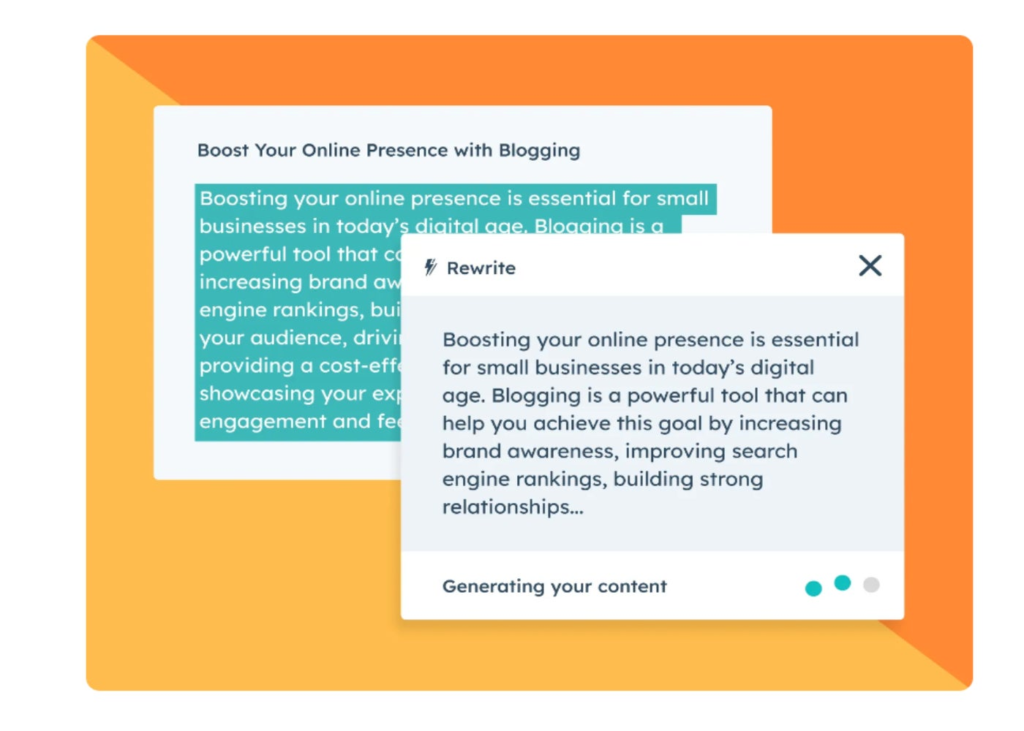
Best free AI tools: HubSpot Best for AI-powered predictive forecasting: Zoho CRM Best for AI-recommended integrations: Pipedrive Best for writing emails with AI: Capsule Best for generating formulas and reports: monday CRM Best for AI-powered project management: ClickUp Best for AI task management: Bitrix24 In addition to core and advanced technical offerings, the top customer relationship management software (CRM) now implements more artificial intelligence features. These AI-powered tools provide valuable automations, insights, and analytics that can streamline an organization’s end-to-end sales process. AI CRM software can also create marketing content, implement lead nurturing strategies like emails or dialing, and pull detailed reports in moments. What is AI CRM? AI CRM refers to CRM solutions that have AI technology integrated throughout the system for users to access. CRM software with AI features can streamline workflows and sales processes by generating reports, summaries, and marketing content on behalf of individual users. Depending on the provider and since AI tools are constantly evolving, features are often released in beta and can be accessed through different paid plans. In this era of AI software, most CRMs have it incorporated into their tool in one way or another. 1 monday CRM Employees per Company Size Micro (0-49), Small (50-249), Medium (250-999), Large (1,000-4,999), Enterprise (5,000+) Any Company Size Any Company Size Features Calendar, Collaboration Tools, Contact Management, and more 2 Zoho CRM Employees per Company Size Micro (0-49), Small (50-249), Medium (250-999), Large (1,000-4,999), Enterprise (5,000+) Any Company Size Any Company Size Features Calendar, Collaboration Tools, Contact Management, and more 3 HubSpot CRM Employees per Company Size Micro (0-49), Small (50-249), Medium (250-999), Large (1,000-4,999), Enterprise (5,000+) Micro (0-49 Employees), Medium (250-999 Employees), Large (1,000-4,999 Employees), Small (50-249 Employees) Micro, Medium, Large, Small Top AI CRM software comparison The top CRM solutions that offer notable AI tools for marketing and sales automations are, as expected, also top general CRM providers, including HubSpot, Zoho CRM, monday CRM, and ClickUp. In addition to the core CRM features users might expect from these technical CRM software, top features worth calling out are pipeline management, native or third-party integrations, AI-powered reporting or analytics, and the availability of a mobile application for users to access on the go. Software Star rating Pipeline management AI assistant AI-powered analytics Generative AI Free tier Starting price* HubSpot 4.4/5 Yes No Yes Yes Yes $15 per user per month Zoho CRM 4.3/5 Limited Yes Yes Yes Yes $14 per user per month Pipedrive 4.4/5 Yes Yes No Yes No $14 per user per month Capsule 4/5 Limited No Limited Yes Yes $18 per user per month monday CRM 3.5/5 Yes Yes No Yes Limited $12 per user per month ClickUp 4.1/5 Yes Yes Limited Yes Yes $7 per user per month Bitrix24 4.1/5 Yes Yes Limited Yes Yes $49 per 5 user per month *Pricing is based on annual subscription rates for paid tiers. HubSpot features Lead management and prospecting: Manage leads and their associated activities for reps to easily engage and nurture them closer to a sale. Playbooks: Create process outlines for reps to reference, such as scripts, competitor battlecards, positioning guides, and more. AI blog writing: Generate fresh and branded content with an AI-powered blog writing tool that users can edit for added customization. HubSpot’s AI blog writing and editing tool. Image: HubSpot HubSpot pros and cons Pros Cons 24/7 email and chat support. No free trial. Offers an intuitive user interface. Pricey paid tiers compared to others. Over 1,500 apps available for integration. No live support available for users of the free tier. Zoho CRM: Best for AI-powered predictive forecasting Image: Zoho CRM Zoho CRM is a powerful CRM tool that supports customer-facing teams with personalized automations and solutions. As a collaborative and analytical CRM, Zoho CRM offers a comprehensive analytics suite that gives users a bird’s eye view of their business with custom dashboards. The AI assistant, Zia, offers advanced predictive forecasting that can suggest both company-wide and individual targets based on historical data. The tool can inspire healthy, competitive sales by visualizing achievable targets for reps. Why I chose Zoho CRM Zoho CRM continues to be among our top-ranking CRM software due to its competitive pricing, core features, and customization opportunities. Its team collaboration, marketing, and project management tools make it a great option for organizations that want a strong platform with AI sales and marketing functionality. Zoho CRM’s artificial intelligence tools, specifically the AI assistant Zia, are only available in the top two pricing tiers, Enterprise and Ultimate. If you’re looking for a provider with AI accessibility in its free or standard subscriptions, check out HubSpot. SEE: For more information, check out our full review of Zoho CRM. Zoho CRM pricing Free CRM: Free for up to three users and comes with lead and document management and a mobile app. Standard: $14 per user per month, billed annually, or $20 per user when billed monthly. Professional: $23 per user per month, billed annually, or $35 per user when billed monthly. Enterprise: $40 per user per month, billed annually, or $50 per user when billed monthly. Ultimate: $52 per user per month, billed annually, or $65 per user when billed monthly. Zoho CRM features Sales process builder: Create a universal sales process with actionable steps for sales reps to follow in detail. Customer portals: Offer prospects a self-service tool where they can view an organization’s products or services to make purchasing decisions. Sales forecasting: Make accurate forecasts around future sales with AI predictions to measure success against current sales. Forecasted target account by Zoho CRM AI assistant, Zia. Image: Zoho CRM Zoho CRM pros and cons Pros Cons 15-day free trial. No available social media integration in the free tier. 24/7/365 data security. Some users report poor UI and UX. Offers workflow automations for each tier. AI tools are only available in higher-paid tiers. Pipedrive: Best for AI-recommended integrations Image: Pipedrive Users of Pipedrive can receive tailored AI app recommendations to integrate with the CRM software. The recommendations

Best AI-Powered CRMs for 2024: Features and Pricing Read More »

11 Marketing Strategy Templates You Can Download for Free

A marketing strategy is more than a document. It’s a high-level plan that defines how you’ll connect with customers, outcompete your competitors, and grow over months or years. Your strategy informs every decision you make about campaigns and who you hire. With the right one in place, you and your team have a clear path forward. Marketing strategy templates break down the process into manageable pieces, ensuring you end up with a strategy that’s measurable, ambitious, and achievable. ClickUp: A marketing strategy template with built in project management ClickUp is an aesthetically pleasing project management tool. Its templates help you go from planning to execution without needing any other software to manage work. Instead of a static marketing plan, you’ll end up with a solution that lets you track progress, adjust priorities, and keep your team aligned in real-time. ClickUp’s free plan is more than enough to try out some of their templates and see if it’ll work for you and your team. More on ClickUp: ClickUp review | Asana vs ClickUp | ClickUp vs Notion. ClickUp’s fully customizable marketing plan template is easy to use for all skill levels. Image: Clickup.com This template is a full system that’ll take you from strategic thinking to assigning work and tracking its progress to completion. It’s a great choice whether you’re a first-time marketer or seasoned pro. Built around objectives and key results (OKRs), you’ll be able to transform high-level goals into actionable tasks. It naturally takes you through the process of identifying opportunities and defining objectives to planning campaigns. Inside of each campaign, you can create subtasks that tie all the way back to your goals. Despite the rigid hierarchy, the template is flexible enough to handle real-time adjustments as needed. It pairs well with ClickUp’s comprehensive roadmap builder If you need a bit more help creating a marketing strategy or brainstorming campaign ideas, ClickUp’s whiteboard template is a great addition to the template above. Multiple people can edit together in real time, making it easy for everyone to share their ideas prior to turning them into concrete plans. Collaborative strategy planning isn’t always easy, but ClickUp helps keep everything organized. Image: Clickup.com There’s a specific section for brainstorming and an area to create a full fledged roadmap with an intuitive drag-and-drop builder. When done with the template above, everything can be connected together into a cohesive system. Plus, ClickUp lets you see all of your goals, campaigns, tasks, and subtasks in different views, like Gantt, calendar, or timeline. This makes it easy for everyone to see their work how they want to. monday.com: A budget and marketing plan template Like ClickUp, monday.com includes a full range of project management capabilities and has a free plan. While its free plan isn’t as comprehensive as ClickUp’s, you can invite up to two users and manage three projects at no cost. Unlike ClickUp, monday.com is far more flexible, allowing you to keep track of just about anything with its relational databases. More on monday.com: monday.com review | Trello vs monday.com |  Wrike vs monday.com.  This monday.com template includes built-in budget tracking, making it easy to stay on track from every angle. Image: monday.com One of the most relevant items you can track alongside your strategy is your budget. This template makes it easy to build a marketing strategy at a high level, break those plans into actionable tasks, assign work to your team, and keep track of your budget along the way. You’ll be able to set a quarterly, project-based, or campaign-based budget and track actual spend to ensure you never go over. It’s prebuilt with a color-coded system and a range of views, like Gantt chart, Kanban, and table view, depending on what you want to see. Overall, it’s a highly visual template, allowing you to see what’s going on at a glance. On top of that, monday.com has powerful automations you can use to send notifications, assign tasks to other people, mark tasks as complete, and even deliver weekly updates to your inbox. Wrike: A go-to-market strategy template Wrike is more rigid than ClickUp and monday.com. If you’re someone who doesn’t want to worry about having 18 different ways to set something up, it’s a great option. The free plan allows for unlimited users but limits you to 2GB per account and has active task limitations. You’ll likely outgrow it pretty quick, but there’s enough room to try it out with a few team members before making any decisions. More on Wrike: Wrike review | Smartsheet vs Wrike | Wrike vs Asana.  Plan your go-to-market strategy step-by-step with Wrike and watch it progress in real time. Image: Wrike.com Wrike’s go-to-market template is a great choice if you’re launching something new. Unlike a generic template, it’s laser-focused and you won’t have to do much customizing. Out of the gate, you can create a launch timeline with pre and post-launch activities and use Gantt chart to establish deadlines, phases, and potential conflicts before you get started. But perhaps the best part is that it comes with sample data and in-depth instructions on how to set up your strategy within the system. You’ll also be able to look at multiple projects, including high-level strategies with multiple campaigns underneath. In other words, you don’t have to guess how it works or build anything yourself. Airtable: A simple template for marketing goals and initiatives Airtable is one of the most powerful relational database solutions that doesn’t require an advanced degree to use. Fun fact, it’s what I use to run most of my business. Unlike other tools we’ve talked about, this one’s more of a blank slate. You have to build the systems you want to use. The beauty of that is that you get to customize every step to match your needs. The downside is that it takes time. More on Airtable: Airtable review | Airtable vs Notion | Smartsheet vs Airtable.  Use Airtable to plan and execute a simple high-level marketing strategy. Image:

11 Marketing Strategy Templates You Can Download for Free Read More »

Yes, You Can Trace a VoIP Call – Here’s How It Works

Traditional phone calls are easy to trace since they’re done through established carriers. Phone companies manage the physical phone lines and can trace the origin of each call. When you want to trace a VoIP call, it can get a lot more difficult. VoIP stands for Voice over Internet Protocol, and refers to the technology that lets people make phone calls over the internet instead of using a landline connected to the Public Switched Telephone Network. Fixed VoIP numbers are tied to a specific address, and they are no trouble to trace at all. The issue is that most unwanted calls come from non-fixed VoIP numbers, which are only tied to a user, which could be a burner email address set up with a fake identity. There are limits to what you can find out on your own if a caller takes steps to conceal their identity. But that doesn’t mean you’re powerless to take action. In this guide, we’ll show you how you can trace a VoIP call on your own and, if necessary, escalate your issue to law enforcement. The best way to trace a VoIP call If the caller has a registered IP address and caller ID, your service provider may be able to help you with tracing the VoIP call. This is your best bet for figuring out the caller’s identity. To start, make sure you have all the information your provider will need ready when you contact them. Here’s some of the information they may ask you for: Date and time of the call. If there were multiple calls from the same number, print or screenshot your phone log so you have the details at your fingertips when you’re talking to your service provider. Caller’s phone number or username (if available). Any other call detail records logged in your system. The call’s content or purpose. Once you’ve provided this information, your service provider can take several steps to trace the VoIP call: Review their call logs and records to try to identify the source of the call, including the associated caller ID and IP address. Detect where the call came from by analyzing network data and routing information, the service provider may be able to find the caller’s location. Help with legal requests, if it comes to that. They will collaborate with law enforcement to provide information needed for an investigation. On top of that, service providers will know how the call was routed through their network, so you can understand the path they took before reaching you. That said, even your service provider may not be able to trace a call, especially if the caller is using a VPN, if the IP address is used by several numbers, or if the number wasn’t registered in the first place. And on top of that, they may not be willing to give you the information you’re requesting. Privacy laws may prevent the service provider from handing over the details regarding the call. They’re far more likely to cooperate with law enforcement if it’s a serious issue. Should you contact authorities to trace a VoIP call? If you suspect the caller has malicious intent — potentially illegal or threatening — don’t try to play detective. Anytime calls are linked to harassment, scams, threats, or illegal activity, you should get law enforcement involved. Authorities have access to more advanced tools and legal processes set up to get the information you need. Put simply, the police can do several things that most people can’t: Get caller info with legal requests: Police can ask service providers for caller details and call records. Use warrants for monitoring: They can also get permission to listen to calls and track them in real-time with search warrants. Look into calls across different places: Officials can check calls that go between states or countries. The average person is going to hit a wall when they try to get help from upstream providers. Law enforcement will have much better luck getting the data you need, and they are much better equipped to analyze it. The next time you get calls involving unsolicited telemarketing spam or someone impersonating another company, it’s best to report them to the Federal Communications Commission (FCC). The FCC is a government agency responsible for managing communications and providing consumer protection. For example, if you’re on the National Do Not Call list, you should not be receiving sales or spam calls. If you still are, you can report this to the FCC so they can take action against scammers and protect consumers from deceptive practices. How to trace a VoIP call yourself If you have the time and desire to trace a VoIP call on your own, there are some steps you can take. Of course, doing it yourself requires some background knowledge. The more techy you’re willing to get, the more you can find out. However, a VoIP provider is still going to be able to find out a lot more. First I’ll cover some of the lingo you need to know, and then I’ll go through a few different methods you can use. Every VoIP call contains specific details which can give you insight into who the caller’s identity, such as: Caller ID: Caller ID helps trace a VoIP call by providing the caller’s number or username. However, some callers may hide or spoof their Caller ID, making it less reliable. Caller IP (Internet Protocol): This unique number is assigned to a device connected to the Internet. It helps trace the geographic location of the caller. CNAM (Caller Name): The CNAM is associated with a phone number in the caller records and can help you figure out their name or organization. Additional data: Beyond these core elements, VoIP calls may contain additional traceable data, such as call duration, call quality, background noises, and any network-related information that can give you clues. You can try to trace calls yourself first, but always contact your service provider if the following methods don’t

Yes, You Can Trace a VoIP Call – Here’s How It Works Read More »

PDF Editing Magic for Just $50

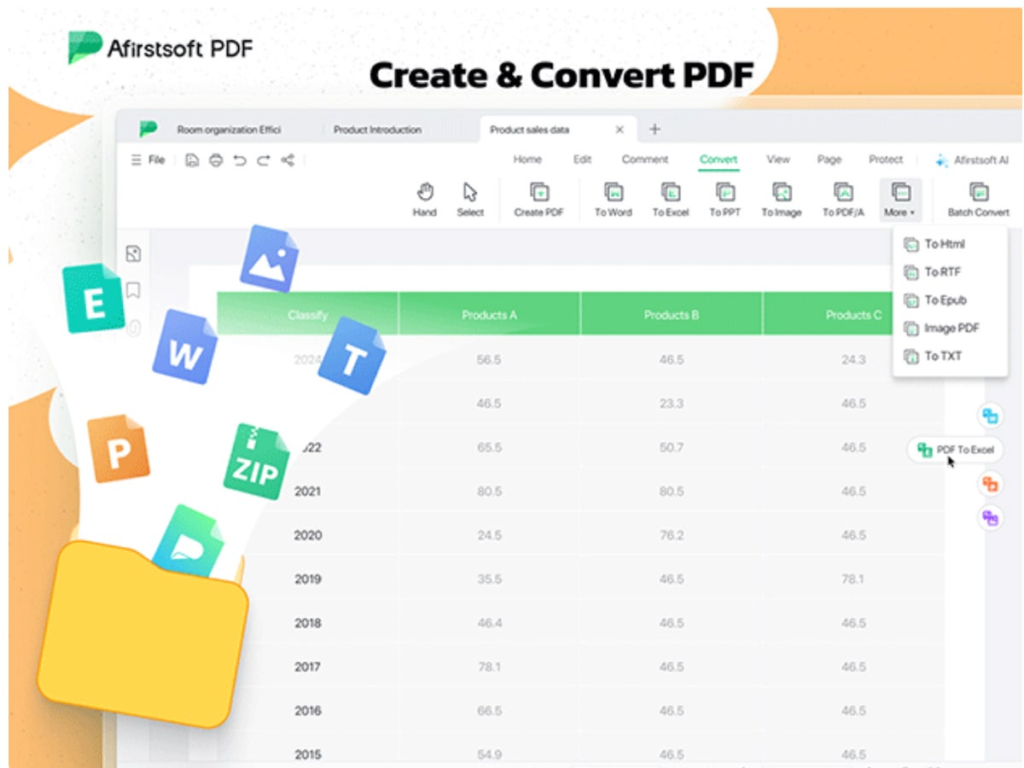
TL;DR: The Afirstsoft AI PDF Editor lifetime subscription is available for just $49.99 (reg. $179), providing powerful, AI-driven PDF editing across all platforms. In nearly any business environment (some more than others), working with PDFs efficiently is essential. Whether editing, converting, or organizing documents, having the right tools makes all the difference. The Afirstsoft AI PDF Editor gives you lifetime access to an all-in-one solution for just $49.99 (reg. $179), and it works seamlessly across Windows, Mac, iOS, and Android. With AI-enhanced features, this editor simplifies every aspect of managing PDFs, from text editing to AI-driven summarization. Features With Afirstsoft, editing PDFs is no longer a hassle. You can customize text, update images, and adjust fonts on the go — whether you’re at the office on your desktop or working remotely from your tablet. The AI-powered features, like summarizing long PDFs or answering questions from within documents, save you time and effort, allowing you to focus on what matters. This PDF editor also supports OCR (Optical Character Recognition), which means you can convert scanned documents into editable text, making it easy to update contracts, reports, or any other important files. The Afirstsoft AI PDF Editor is designed for true flexibility; no matter your device, you’ll have access to all the advanced PDF tools you need. Plus, with cloud integration and 20GB of cloud storage, your files are always in sync, ensuring you can access and edit them wherever you are. From zooming in for a detailed view to going full-screen for distraction-free reading, Afirstsoft provides an unparalleled PDF experience across devices. Add, remove, and adjust text and images, or highlight and annotate for collaboration. You can also merge, split, and organize documents effortlessly. Don’t miss this chance to get lifetime access to this all-in-one PDF editing tool at a 72% savings. A lifetime subscription to Afirstsoft AI PDF Editor is just $49.99 (reg. $179) for a limited time. Prices and availability subject to change. source

PDF Editing Magic for Just $50 Read More »