市場關注: 美聯儲2024年12月議息會議綜述

美聯儲2024年12月議息會議綜述 重要決策: 聯邦基金利率下調25個基點至4.25-4.50%繼續收縮資產負債表自峰值起累計降息100個基點預計2025年底利率為3.9%,2026年底為3.4% 經濟預測重大調整(12月相比9月): GDP增長:短期前景轉強(2024年:2.5%對比2.0%)通脹:持續性增強(2025年PCE:2.5%對比2.2%)失業率:就業市場更趨穩健(2024年:4.2%對比4.4%)利率路徑:2025-2026年走高(3.9%對比3.4%及3.4%對比2.9%)長期利率:中性利率上調(3.0%對比2.9%) 五大鷹派言論(謹慎降息立場): “過快或過度放寬政策可能阻礙通脹改善進程。”“若經濟保持強勁且通脹未能持續向2%目標靠攏,我們可能會放緩政策寬鬆步伐。”“因此在考慮進一步調整政策利率時,我們需要更加謹慎。”“這些中位數預測較9月有所上調,與更強勁的通脹預期相符。”“通脹相對於我們2%的長期目標仍然偏高。” 五大鴿派言論(支持降息立場): “隨著今天的行動,我們的政策利率已從峰值下調整整一個百分點,政策立場已明顯減少限制性。”“如果勞動市場出現意外轉弱或通脹降幅超預期,我們可以加快寬鬆政策步伐。”“我們一直在向更中性的政策立場邁進,以維持經濟的強勁表現。”“勞動市場並非重大通脹壓力的來源。”“過慢或過少地放寬政策可能會過度削弱經濟活動和就業。”   未來降息預測及數據依賴方針:聯儲會採取偏鷹派但依賴數據的方針,這從經濟預測修正中可見: 增長-通脹平衡: 更強勁的GDP增長預期意味降息缺乏迫切性更高的通脹預期要求保持謹慎失業率預期改善暗示勞動市場依然強韌,可能延緩進一步降息需求 利率路徑演變: 開始降息但2024年預測維持不變,顯示謹慎態度2025-2026年路徑較預期大幅上調,暗示更長期的限制性立場終端利率上調反映結構性變化   未來降息可能性仍高,但帶有鷹派傾向,取決於: 通脹持續向2%目標推進(現預期放緩)勞動市場穩定性(顯示更強韌性或出現顯著轉弱)經濟增長保持”穩健”步伐(預期上調)無意外衝擊   聯儲會似乎正為2025年2-3次額外降息做準備,但更高的利率路徑和通脹預期,加上勞動市場持續韌性,表明降息步伐可能較市場預期更為審慎。 LinkedIn Email Facebook Twitter WhatsApp source

市場關注: 美聯儲2024年12月議息會議綜述 Read More »

Top 11 SEO Project Management Templates (Free & Paid)

Optimizing your website for organic search isn’t something you can set and forget; it’s an ongoing initiative that requires your full attention and long-term planning. SEO project management templates give you space to plan all the work and make sure no tasks fall through cracks. Whether you’re doing SEO on your own or managing a team, these templates will help you stay organized, on track, and ahead of the curve. monday.com: An SEO content management template monday.com is a collaborative relational database solution with built-in project management capabilities. You can use it to keep track of just about anything, from your budget and tasks to resources, assets, and SEO projects. With more than 200 free templates to choose from, there are plenty of places to start if you don’t feel comfortable starting from scratch. Template features:  SEO briefs. Keyword planning. Ability to create related keywords as a “subitem” of a parent topic. Track monthly search volume and other key SEO metrics. Team tagging and status tracking. More monday.com coverage: monday.com review | Airtable vs monday.com | Notion vs monday.com.  With monday.com, you can turn keyword opportunities into content briefs with just a few clicks. Image: mondayspaces.com Because of its relational nature, you can set up multiple boards and tables that connect to each other rather than cramming everything into one place. Regardless of how you do it, your team can easily collaborate, manage their work, and switch between views at their leisure. My favorite monday.com SEO template is a content planning tool that lets you map content based on keyword research. It includes everything you need to go from keyword to published post, including brief creation, task management, and publishing activity. It’s a one-stop shop for content teams looking for a simple, yet effective way to organize operations. You’ll be able to add or import keywords and relevant data, create subtasks (like opportunities or specific optimizations), attach SEO briefs, and assign tasks through the publishing stage. While it doesn’t help with SEO audits or technical SEO, it’s a strong starting point. ClickUp’s SEO project management templates ClickUp is a powerful project management solution that’s customizable, feature-rich, and affordable. Beyond ready-made templates, you’ll get everything you need to manage projects at scale. From built-in team chat to Kanban boards, Gantt charts, and sprint management, ClickUp comes with a wide range of collaborative features to manage and scale your business. Plus, it offers a generous free plan and plenty of room to grow. More ClickUp coverage: ClickUp review | ClickUp vs monday.com | ClickUp vs Notion. SEO Project Management: An easy, yet feature rich template This free SEO template from ClickUp is perfect for a wide range of SEO projects. You can use it for assigning and tracking one-off tasks, like compressing images or auditing headers, or ongoing SEO efforts, like content creation. Template features:  Nested subtasks. Optimization SOPs. Board to organize urgent SEO tasks. Ability to add multiple assignees to a single item. SEO audit tables. ClickUp’s SEO project management template covers  audits, SEO tasks, time tracking, and more. Image: ClickUp.com Just like the tool itself, ClickUp’s template is full of functionality, letting users organize and view all work in one place while others monitor big picture progress without getting in the weeds. You can even track your budget, allocate resources, and collaborate in the same place. It also comes with 16 custom statuses and five custom views, taking out a lot of the upfront work to make systems like these work. While there’s plenty to customize if you choose to do so, you can start using it in a matter of minutes. SEO Checklist: A simpler alternative for tracking one-off tasks SEO optimization includes numerous small and intricate tasks you’ll likely have to repeat for different pages or pieces of content. Keeping track of these details can be a challenge, especially when you’re optimizing multiple URLs at the same time. ClickUp’s SEO checklist template solves this problem. Template features:  9 custom fields. 4 custom statuses. 4 custom board views. Beginner-friendly. Team collaboration features. ClickUp makes it easy to track all SEO tasks for individual pages, links, content, and your entire site as a whole. Image: ClickUp.com It comes pre-loaded with essential SEO tasks, which is great if you’re not sure where to start. You can also segment tasks into categories and prioritize work however you’d like. However, you can easily set up custom checklists for individual pages and build new lists for different types of pages, like home, blog posts, landing pages, and FAQ pages. It’s a great choice whether you know exactly what you want to do or you need some help figuring that out. Since the template only works with ClickUp, you’ll also be able to tap into its built-in project management and collaboration features. SEO Research & Management: An advanced ClickUp template This ClickUp template goes beyond basic keyword research. You can use it for your initial SEO planning and all the work involved with meeting your performance goals. It’s possible to use this template on your own, but it works best when you’re collaborating with a small team. It takes longer to set up than the others and comes with a bunch of built in capabilities you’ll have to figure out how to use. However, it’s worth it if you want granular tracking, assignments, due dates, and analytics. Template features:  Dependency warnings for related SEO tasks. Dashboards to visualize SEO data. 27 custom statuses. Supports end-to-end SEO project management. Unlimited Gantt charts (on paid plans only). This template combines high-level SEO goals with specific objectives to achieve them. Image: Clickup.com The best part about this template is how it walks you through breaking e a big-picture SEO goal into specific tasks. For example, I started by creating a goal to increase total organic traffic in Q1 of next year. From there, it helped me get more specific. I created a list of tasks and linked them back to my goal so I can track progress

Top 11 SEO Project Management Templates (Free & Paid) Read More »

Hostaway secures $365M to cash in on short-term rental boom

Short-term rental platforms like Airbnb have transformed travel. They’ve made it easier for tourists to access personalised, private accommodations and for property owners to monetise their spaces.   With global tourism now on track for a full recovery post-COVID, Hostaway has secured a cool $365mn at a $925mn valuation as it looks to cash-in on the boom in short-term rentals. Hostaway is a property management system (PMS) and software marketplace for the short-term rental industry. It will use the cash to enhance its dynamic pricing tools, further integrate AI, and expand its presence in new markets, focusing on France, Italy, and Spain.    “Expanding into different geographies and investing in innovative AI applications is something we’ve been hyper-focused on for over a year now,” said co-founder and CEO Marcus Räder in a blog post. “With this new strategic investment, we’ll be doubling down on these efforts and much more.”  How Startup Amsterdam Boosts Innovation and Growth at TNW Conference Discover how the City of Amsterdam partnered with TNW to amplify its startup ecosystem, attract global talent, and foster innovation that drives economic impact. The company said it was the first PMS to integrate ChatGPT into its platform. Going forward, it plans to add or improve upon AI-powered personalised messaging, content creation, and language translation. Räder co-founded Hostaway in Finland in 2015, alongside Mikko Nurminen (CFO) and Saber Kordestanchi (COO), at a time when companies like Airbnb were really starting to disrupt a travel industry dominated by hotel chains and guest lodges.  The founders saw that while short-term rental platforms were easy for customers to use, managing stuff like bookings, pricing, and communication was a bit of a headache for property owners. They launched Hostaway to help property managers automate and manage short-term stays across multiple platforms like Airbnb, Booking.com, and Vrbo.  The idea is that by automating tasks and putting the data on a single platform, Hostaway can save property managers time on admin, freeing them up to focus on customer service — critical in a review-based industry. The platform also recently adopted dynamic pricing tools to optimise rates, potentially increasing revenue.  “Hostaway has emerged as a category leader with a differentiated product addressing the distinct needs of short-term rental property managers, a dynamic and growing industry,” said Raph Osnoss, managing director at General Atlantic, a New York-based growth equity firm that led the funding round.  Hostaway also raised $170mn last year in its first big funding round. The company claims its platform is used by customers in over 90 countries. While Hostaway is officially based in Toronto, Canada, it employs a fully remote workforce of over 230 employees across 44 countries.  Hostaway is one of a cohort of tech startups raising big money to make things easier for the hospitality industry. One of them is UK-based Lighthouse, which raised $370mn in November to expand its data intelligence platform for hotels. Another is Amsterdam-based Mews which raised $110mn in March at a valuation of over $1.2bn, becoming the first Dutch unicorn of the year. Then in September, it bagged another $100mn, to further develop and expand its PMS software.     source

Hostaway secures $365M to cash in on short-term rental boom Read More »

CIO.com – Tech News, Analysis, Blogs, Video

video Zscaler protects data through unified classification engine A company’s data is everywhere – on devices, in the cloud, at rest and in motion. Protecting that enterprise data is a very complex challenge, requiring a more unified approach. Zscaler’s unified data protection platform aims to provide a single classification engine that lets CISOs and other IT leaders to protect data from every angle and location. Moinul Khan, SVP/GM for SSE/Data Protection at Zscaler, demonstrates some key features of the platform, including new features on generative AI protection. This episode is sponsored by Zscaler, which anticipates, secures and simplifies the experience of doing business for the world’s most established companies. Find out more at Zscaler.com Website: https://www.zscaler.com/products-and-solutions/data-protection Dec 17, 2024 18 mins Data GovernanceData ManagementData Privacy source

CIO.com – Tech News, Analysis, Blogs, Video Read More »

We’ve come a long way from RPA: How AI agents are revolutionizing automation

Join our daily and weekly newsletters for the latest updates and exclusive content on industry-leading AI coverage. Learn More In the past year, the race to automate has intensified, with AI agents emerging as the ultimate game-changers for enterprise efficiency. While generative AI tools have made significant strides over the past three years — acting as valuable assistants in enterprise workflows — the spotlight is now shifting to AI agents capable of thinking, acting and collaborating autonomously. For enterprises preparing to embrace the next wave of intelligent automation, understanding the leap from chatbots to retrieval-augmented generation (RAG) applications to autonomous multi-agent AI is crucial. As Gartner noted in a recent survey, 33% of enterprise software applications will include agentic AI by 2028, up from less than 1% in 2024. As Google Brain founder Andrew Ng aptly stated: “The set of tasks that AI can do will expand dramatically because of agentic workflows.” This marks a paradigm shift in how organizations view the potential of automation, moving beyond predefined processes to dynamic, intelligent workflows. The limitations of traditional automation Despite their promise, traditional automation tools are constrained by rigidity and high implementation costs. Over the past decade, robotic process automation (RPA) platforms like UiPath and Automation Anywhere have struggled with workflows lacking clear processes or relying on unstructured data. These tools mimic human actions but often lead to brittle systems that require costly vendor intervention when processes change. Current gen AI tools, such as ChatGPT and Claude, have advanced reasoning and content generation capabilities but fall short of autonomous execution. Their dependency on human input for complex workflows introduces bottlenecks, limiting efficiency gains and scalability. The emergence of vertical AI agents As the AI ecosystem evolves, a significant shift is occurring toward vertical AI agents — highly specialized AI systems designed for specific industries or use cases. As Microsoft founder Bill Gates said in a recent blog post: “Agents are smarter. They’re proactive — capable of making suggestions before you ask for them. They accomplish tasks across applications. They improve over time because they remember your activities and recognize intent and patterns in your behavior. “ Unlike traditional software-as-a-service (SaaS) models, vertical AI agents do more than optimize existing workflows; they reimagine them entirely, bringing new possibilities to life. Here’s what makes vertical AI agents the next big thing in enterprise automation: Elimination of operational overhead: Vertical AI agents execute workflows autonomously, eliminating the need for operational teams. This is not just automation; it’s a complete replacement of human intervention in these domains. Unlocking new possibilities: Unlike SaaS, which optimized existing processes, vertical AI fundamentally reimagines workflows. This approach brings entirely new capabilities that didn’t exist before, creating opportunities for innovative use cases that redefine how businesses operate. Building strong competitive advantages: AI agents’ ability to adapt in real-time makes them highly relevant in today’s fast-changing environments. Regulatory compliance, such as HIPAA, SOX, GDPR, CCPA and new and forthcoming AI regulations can help these agents build trust in high-stakes markets. Additionally, proprietary data tailored to specific industries can create strong, defensible moats and competitive advantages. Evolution from RPA to multi-agent AI The most profound shift in the automation landscape is the transition from RPA to multi-agent AI systems capable of autonomous decision-making and collaboration. According to a recent Gartner survey, this shift will enable 15% of day-to-day work decisions to be made autonomously by 2028. These agents are evolving from simple tools into true collaborators, transforming enterprise workflows and systems. This reimagination is happening at multiple levels: Systems of record: AI agents like Lutra AI and Relevance AI integrate diverse data sources to create multimodal systems of record. Leveraging vector databases like Pinecone, these agents analyze unstructured data such as text, images and audio, enabling organizations to extract actionable insights from siloed data seamlessly. Workflows: Multi-agent systems automate end-to-end workflows by breaking complex tasks into manageable components. For example: Startups like Cognition automate software development workflows, streamlining coding, testing and deployment, while Observe.AI handles customer inquiries by delegating tasks to the most appropriate agent and escalating when necessary. Real-world case study: In a recent interview, Lenovo’s Linda Yao said, “With our gen AI agents helping support customer service, we’re seeing double-digit productivity gains on call handling time. And we’re seeing incredible gains in other places too. We’re finding that marketing teams, for example, are cutting the time it takes to create a great pitch book by 90% and also saving on agency fees.” Reimagined architectures and developer tools: Managing AI agents requires a paradigm shift in tooling. Platforms like AI Agent Studio from Automation Anywhere enable developers to design and monitor agents with built-in compliance and observability features. These tools provide guardrails, memory management and debugging capabilities, ensuring agents operate safely within enterprise environments. Reimagined co-workers: AI agents are more than just tools — they are becoming collaborative co-workers. For example, Sierra leverages AI to automate complex customer support scenarios, freeing up employees to focus on strategic initiatives. Startups like Yurts AI optimize decision-making processes across teams, fostering human-agent collaboration. According to McKinsey, “60 to 70% of the work hours in today’s global economy could theoretically be automated by applying a wide variety of existing technology capabilities, including gen AI.” Future outlook: As agents gain better memory, advanced orchestration capabilities and enhanced reasoning, they will seamlessly manage complex workflows with minimal human intervention, redefining enterprise automation. The accuracy imperative and economic considerations As AI agents progress from handling tasks to managing workflows and entire jobs, they face a compounding accuracy challenge. Each additional step introduces potential errors, multiplying and degrading overall performance. Geoffrey Hinton, a leading figure in deep learning, warns: “We should not be afraid of machines thinking; we should be afraid of machines acting without thinking.” This highlights the critical need for robust evaluation frameworks to ensure high accuracy in automated processes. Case in point: An AI agent with 85% accuracy in executing a single task achieves only 72% overall accuracy when performing two tasks (0.85 × 0.85).

We’ve come a long way from RPA: How AI agents are revolutionizing automation Read More »

1. Number of countries with ‘very high’ government restrictions increases in 2022

Government restrictions on religion The Government Restrictions Index (GRI) gives a score from 0.0 to 10.0 to each country and territory analyzed in this study based on how much they limit or control religious activity such as public preaching or worship, and how much they harass or use force against religious groups. The first section below discusses countries with the highest GRI scores (i.e., those with the most extensive levels of government restrictions in 2022) and countries with large changes in their GRI scores from the previous year.  Among the 198 countries and territories analyzed in this study, 59 had either “high” or “very high” levels of government restrictions on religion in 2022. This figure was an increase from 55 countries in 2021 and a new peak level for the study. Of these countries, 24 had “very high” scores on the GRI, an increase from 19 countries in 2021. And 35 countries had “high” GRI scores, down from 36 countries the previous year. (A score of 4.5 to 6.5 – out of 10.0 – is classified as a “high” score for a country, while a score of 6.6 to 10.0 is classified as “very high.” For more information on how the “high” and “very high” categories are defined for the GRI, refer to the Methodology.) Countries with the most extensive government restrictions Seven countries moved from the “high” GRI category to the “very high” category in 2022, including Iraq, Israel, Mauritania, Morocco, Turkey, Vietnam and Western Sahara. Most of these countries had small changes in their GRI scores (increases of 0.1 to 0.9 on the index) that pushed them from one category to the other. For example, Mauritania’s score on the GRI rose by 0.5 points (from 6.1 to 6.6), due in part to the April arrest of a man in the border town of Rosso after his son brought Bibles and other Christian literature into Mauritania across the country’s border with Senegal. (The man claimed ownership of the materials as a way to deflect blame from his son, and was released from detention by the end of the year, according to the U.S. State Department.)   Israel’s GRI score increased by 1.0 point in 2022, from 5.7 to 6.7, partly due to new reports of violations of prisoners’ religious freedom, which said that Israeli authorities prevented prisoners from praying; ate in front of detainees while they were fasting during the Muslim holy month of Ramadan; and removed the headscarves of women prisoners.  In 2022, both Kazakhstan and Turkmenistan moved in the other direction on the GRI, from the “very high” category to “high.” Kazakhstan’s score fell by less than 1.0 point, from 7.0 to 6.3, while Turkmenistan’s score fell by more than 2.0 points, from 7.1 to 4.8. In Turkmenistan, unlike in the previous year, there were no reported arrests in 2022 of people for holding religious gatherings or for being conscientious objectors to military service, according to the sources analyzed for the study. Although religious people in the country still faced harassment and many religious prisoners remained incarcerated in Turkmenistan, minority religious groups reported facing fewer barriers to practicing their faith freely. For example, there were improved relations with authorities and fewer hurdles to register as religious groups, according to the U.S. State Department. For a full list of countries in each GRI category, refer to Appendix A. Changes in scores on Government Restrictions Index In 2022, a total of 97 countries had increases of 0.1 point or more on the GRI, while 63 countries had decreases of 0.1 point or more. Looking at changes in classification, about two-thirds of the countries analyzed (134 out of 198) had small changes (0.1 to 0.9) in their GRI scores in 2022: 85 were small increases, and 49 were small decreases. An additional 38 countries had no increase or decrease, while 25 had modest changes (1.0 to 1.9 points) in 2022, including 12 with modest increases and 13 with modest decreases. Only Turkmenistan had a large decrease (2.0 points or more). No country had a large increase in its GRI in 2022. Social hostilities related to religion The Social Hostilities Index (SHI) gives a score to each country based on reports of incidents of religion-related hostilities carried out by nongovernment actors (such as private individuals and social groups). These acts can include verbal and physical harassment, mob violence, tensions between religious groups, or violence carried out in the name of religion. This section of the report discusses countries with the most extensive levels of social hostilities and large changes in SHI scores from 2021 to 2022. In total, 45 countries had “high” or “very high” levels of social hostilities in 2022, compared with 43 countries in 2021. Among these countries, seven had “very high” SHI scores in 2022, the same number as in the previous year. A total of 38 countries had “high” levels of social hostilities, up from 36 in 2021. On the Social Hostilities Index, scores of 3.6 to 7.1 (out of 10.0) are categorized as “high,” while scores of 7.2 to 10.0 are considered “very high.” (Refer to the Methodology to learn about how these categories are defined.) Countries with the most extensive social hostilities Nigeria was one of the seven countries with “very high” levels of social hostilities in 2022. The U.S. State Department reported that “general insecurity was prevalent throughout the country” in 2022, with multiple reports of religion-related mob violence, kidnappings and mass killings of Muslims and Christians by armed gangs. In addition, the militant groups Boko Haram and ISIS-West Africa burned churches and mosques in the northeast part of the country. Of the seven countries with “very high” SHI scores in 2022, only one (Iraq) moved into this category. An additional country (Israel) moved out of the category and instead into the “high” category. In Iraq, part of the SHI increase was related to activities of sectarian armed groups such as the Iran-backed Popular Mobilization Forces (PMF), which detained religious minorities and kept

1. Number of countries with ‘very high’ government restrictions increases in 2022 Read More »

Nvidia and DataStax just made generative AI smarter and leaner

Join our daily and weekly newsletters for the latest updates and exclusive content on industry-leading AI coverage. Learn More Nvidia and DataStax launched new technology today that dramatically reduces storage requirements for companies deploying generative AI systems, while enabling faster and more accurate information retrieval across multiple languages. The new Nvidia NeMo Retriever microservices, integrated with DataStax’s AI platform, cuts data storage volume by 35 times compared to traditional approaches — a crucial capability, as enterprise data is projected to reach more than 20 zettabytes by 2027. “Today’s enterprise unstructured data is at 11 zettabytes, roughly equal to 800,000 copies of the Library of Congress, and 83% of that is unstructured with 50% being audio and video,” said Kari Briski, VP of product management for AI at Nvidia, in an interview with VentureBeat. “Significantly reducing these storage costs while enabling companies to effectively embed and retrieve information becomes a game changer.” Nvidia’s NeMo Retriever technology delivers a 35x improvement in data storage efficiency, as illustrated in a comparison of raw text storage, baseline vector embeddings, and reduced embedding dimensions. This breakthrough underpins the scalability of generative AI across enterprise applications. (Credit: Nvidia) The technology is already proving transformative for Wikimedia Foundation, which used the integrated solution to reduce processing time for 10 million Wikipedia entries from 30 days to under three days. The system handles real-time updates across hundreds of thousands of entries being edited daily by 24,000 global volunteers. “You can’t just rely on large language models for content — you need context from your existing enterprise data,” explained Chet Kapoor, CEO of DataStax. “This is where our hybrid search capability comes in, combining both semantic search and traditional text search, then using Nvidia’s re-ranker technology to deliver the most relevant results in real time at global scale.” Enterprise data security meets AI accessibility The partnership addresses a critical challenge facing enterprises: how to make their vast stores of private data accessible to AI systems without exposing sensitive information to external language models. “Take FedEx — 60% of their data sits in our products, including all package delivery information for the past 20 years with personal details. That’s not going to Gemini or OpenAI anytime soon, or ever,” Kapoor explained. The technology is finding early adoption across industries, with financial services firms leading the charge despite regulatory constraints. “I’ve been blown away by how far ahead financial services firms are now,” said Kapoor, citing Commonwealth Bank of Australia and Capital One as examples. The next frontier for AI: Multimodal document processing Looking ahead, Nvidia plans to expand the technology’s capabilities to handle more complex document formats. “We’re seeing great results with multimodal PDF processing — understanding tables, graphs, charts and images and how they relate across pages,” Briski revealed. “It’s a really hard problem that we’re excited to tackle.” For enterprises drowning in unstructured data while trying to deploy AI responsibly, the new offering provides a path to make their information assets AI-ready without compromising security or breaking the bank on storage costs. The solution is available immediately through the Nvidia API catalog with a 90-day free trial license. The announcement underscores the growing focus on enterprise AI infrastructure as companies move beyond experimentation to large-scale deployment, with data management and cost efficiency becoming critical success factors. source

Nvidia and DataStax just made generative AI smarter and leaner Read More »

Three Things To Know About How Security Team Toxicity Can Increase Breach Risk

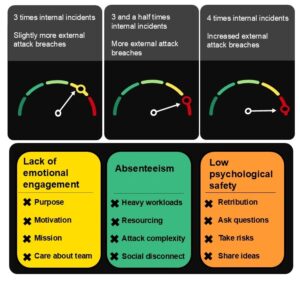
When Forrester published research on toxic security team culture in 2020, we revealed that an unhappy security team can result in infighting, unhappiness, and aggression. Not only will this toxicity cultivate an unpleasant environment, it also has the potential to put your organization at risk. Our 2023 research into burnout in cybersecurity called out that burnout is not only a human issue — it’s a cyber risk. What we didn’t know at the time was the extent to which toxic and burned-out teams result in more breaches. Our latest research into security team toxicity, Security Team Toxicity Leads To More Breaches, shows that engaged, healthy, psychologically safe, and collaborative security teams experience fewer breaches. We now have tangible data to stop us from brushing human-centered issues, such as burnout and toxicity, under the “soft” skills carpet, choosing instead to focus on the known and familiar — technology. Security leaders should know that: Security teams whose members aren’t emotionally engaged with or attached to their work report nearly three times the internal incidents and slightly more external attacks than those who feel attached to their work. Security teams that suffer unacceptable levels of absenteeism — possibly due to burnout, heavier workloads, condensed resources, shorter timelines, and increasingly complex attacks — report more internal and external breaches at their organizations. Security teams that fear retribution if they raise issues that affect the organization’s risk posture may leave damaging issues unaddressed. Teams that lack this psychological safety report more breaches, including 3.5 times more internal incidents than the global average. The health and culture of a team and its members is more than just a nebulous or benevolent idea to strive for — it has a direct impact on how effectively you can function and defend your organization. It’s time to redress the balance from tech to ensure that you foster a positive team culture and workplace environment. This isn’t just as a human issue — it’s a cyber risk imperative. Forrester clients can schedule a guidance session or inquiry with me to discuss the risks associated with security team toxicity and how you can build a security team culture to be proud of.   This blog was written with the assistance of Research Associate, Chiara Bragato. source

Three Things To Know About How Security Team Toxicity Can Increase Breach Risk Read More »

Compliance Lessons From Raytheon's $1B FCPA Settlement

By Andrew Levine, Winston Paes and Andreas Glimenakis ( December 19, 2024, 3:28 PM EST) — A recent Foreign Corrupt Practices Act action involving aerospace and defense company RTX Corp. and its Raytheon Co. subsidiary underscores the importance of risk management related to retaining and overseeing third parties, especially in higher-risk jurisdictions, and the promotion of a companywide culture of compliance…. Law360 is on it, so you are, too. A Law360 subscription puts you at the center of fast-moving legal issues, trends and developments so you can act with speed and confidence. Over 200 articles are published daily across more than 60 topics, industries, practice areas and jurisdictions. A Law360 subscription includes features such as Daily newsletters Expert analysis Mobile app Advanced search Judge information Real-time alerts 450K+ searchable archived articles And more! Experience Law360 today with a free 7-day trial. source

Compliance Lessons From Raytheon's $1B FCPA Settlement Read More »

OpenAI updates ChatGPT Search with voice queries, faster results, mobile maps integration

Join our daily and weekly newsletters for the latest updates and exclusive content on industry-leading AI coverage. Learn More On the eighth day of Christmas…er, the eighth day of “12 Days of OpenAI” (a series of holiday-themed announcements from the company behind ChatGPT), OpenAI took to its now-familiar livestream on YouTube to announce a series of search-related updates for its signature AI chatbot. Specifically, OpenAI just unveiled three major updates to its web search experience within ChatGPT, which was officially rolled out back in October 2024 after running as a separate, invitation-only preview website called SearchGPT for several months prior. Here’s what’s changed: ChatGPT Search is now available to all users globally, even free users — when logged in. You’ll need to create a free account to get it, but once you do, you can click on a tiny globe icon in the bottom of the “compose” bar to activate it and get updated information live from the web in your responses, as opposed to before, when it was only available to paid subscribers on the ChatGPT Plus and above (Pro, Edu, Team, Enterprise) plans. OpenAI has updated the search results experience in ChatGPT so that prominent links to webpages such as Netflix’s or travel booking websites will appear before the rest of the generated, text-based answers written by the chatbot. Arguably the most impressive and biggest update is that users can now search by voice queries when they have Advanced Voice Mode activated (turn it on by pressing the audio waveform button in the compose bar at the bottom, which looks like a series of parallel vertical lines). This allows a user to ask for up-to-date information on travel destinations, the latest weather forecasts, and even ideas for activities (as well as, presumably, well, anything else in the world that’s not sexually explicit — ChatGPT Search doesn’t offer that functionality). ChatGPT’s Voice Assistant will respond in the voice you’ve selected for it to use among the 10 pre-set voice style options. Also part of the second update: OpenAI has made it so that the ChatGPT mobile apps for iOS and Android devices now integrate with those platforms’ respective maps, so that if you search for restaurants nearby, it will use the system map app on your device (Apple Maps or Google Maps, respectively) to show the list of results. Altogether, it was a series of useful if not blockbuster improvements, and should help ChatGPT users on-the-go most of all. Already, OpenAI’s presenters teased that tomorrow, on the ninth day of 12 Days of OpenAI, there will be news to share for third-party developers building atop OpenAI’s platform and application programming interfaces (APIs). Stay tuned, and we’ll keep you posted on the latest. source

OpenAI updates ChatGPT Search with voice queries, faster results, mobile maps integration Read More »