AI's Key Role in the Emerging Bio Revolution

Like the industrial revolution of the late 19th and early 20th centuries, today’s emerging bio revolution is based on a convergence of technologies, including computing, automation, and perhaps most critically, artificial intelligence.  Both artificial intelligence and biotech are exponential technologies, says Mike Bechtel, Deloitte Consulting’s chief futurist, in an email interview. “The convergence of AI and biotech creates a double exponential field,” he states. “Combined AI-fueled biotech has the ability to disrupt the drug discovery process, accelerate clinical trials, and better predict health outcomes for billions of people.”  Multiple Applications  AI is driving the bio revolution, and we’re seeing that impact across several key areas, says Sid Rao, CEO and co-founder of scientific computing services provider Positron Networks. AI is a game-changer, he states via email. “AI is being used to automate the creation of personalized agents for curing diseases.” He points to mRNA vaccines as an example. “When a patient’s cancer cells are sequenced, AI models [can] design the specific mRNA agents to target that patient’s tumor cells,” Rao says. “We’re talking about medicine tailor-made for individuals, made possible by AI.”  Rao notes that AI is also transforming drug discovery. “It’s determining which molecules can act as catalysts for critical biological pathways, identifying potential drug targets, or optimizing clinical trials,” he says. “With AI, we can predict patient responses or even simulate trial outcomes before they ever happen.”  Related:How CIOs Can Prepare for Generative AI in Network Operations Bechtel observes that AlphaFold, AI software developed by DeepMind, an Alphabet subsidiary, performs predictions of protein structure and “is saving trillions in drug research costs and yielding new breakthroughs with digital twins, allowing advanced protein structure prediction and design prior to physical synthesis.”  Other potential applications identified by Bechtel include:  Genome analysis: Genome sequencing costs have dropped from $14 million to about $1,000.  Clinical trials: InClinico is achieving 80% accuracy in predicting phase two and three trial successes, leading to more efficient trial processes. The firm utilizes massive amounts of data related to targets, diseases, clinical trials, and even scientists involved with the study at the preclinical and clinical stages.  Development speed and success: Pharmaceutical manufacturers leveraging AI have reduced drug development time by 40% and decreased drug failure rates by 70% through AI simulations and integrated processes.  Related:It Takes a Village: New Infrastructure Costs for AI — Utility Bills Predictive health: AI-powered analyses of health metrics can detect diseases before symptoms appear.  While emerging technologies can speed research while reducing costs, Bechtel notes that a growing number of current and potential adopters are starting to realize that AI can also help them perform current tasks better and more efficiently. “This elevation from efficiency to effectiveness stands to radically re-engineer historically tedious and time-consuming processes.”  Bechtel points to genetic sequencing and drug development as examples. “Both have historically required scarce specialized skills and expensive brute-force solutions,” he explains. “Given AI’s particular facility with pattern recognition and simulation, we’re accelerating today’s techniques and beginning to generate tomorrow’s altogether new approaches.”  Risky Business  AI-fueled biotech holds incredible promise for people, products, and the planet, but there are inherent risks that we need to be mindful, Bechtel says. Consider, for example, CRISPR-Cas9 technology. Its ability to genetically modify human embryos could one day eliminate inherited diseases, but it also raises serious ethical questions. The idea of “designer babies” and the unintended consequences that could be passed down through generations is something we have to approach with extreme caution. “We need ethical, perhaps even global, frameworks to guide how we might best navigate these breakthroughs.”  Related:Digital Mindset: The Secret to Bottom-Up GenAI Productivity The risks are many, says Tad Roselund, managing director and senior partner with the Boston Consulting Group. “For example, unequal distribution of benefits is a potentially major issue and particularly important here given the fact that we are dealing directly with things like extending lifespans, increasing resistance to diseases,” he observes in an online interview.  Leaving aside the potential of intentional misuse, companies must put the right governance, policies, guardrails, and controls in place, Roselund says. “Regulators’ expectations regarding this are clear, even if in many jurisdictions the details are still to be determined.”  There are also safety implications for both individuals as well as society as a whole, Roselund warns. “These technologies are modifying extremely complex and interconnected systems,” he notes, adding that the impact of an unintended failure could be significant. “This risk is exacerbated by the pace of development.”  Looking Forward  Rao predicts that the bio revolution will only achieve its full, transformative potential when every biologist has access to the knowledge, the infrastructure, the data, and the tools required to leverage AI. “When we close this gap — and we will — we’re talking about real, lasting benefits to society at large.”  source

AI's Key Role in the Emerging Bio Revolution Read More »

AI to shake up Salesforce workforce with possible shift to sales over IT

Over the course of the past year, there were indications that the restructuring could be more extensive than originally planned. In August 2024, SAP spoke of 9,000 to 10,000 jobs that would be affected by the restructuring. Most of these would involve voluntary programs and internal retraining measures, it said. The program should therefore be completed in early 2025 and cost around three billion euros. In absolute terms, SAP reported a slight increase in personnel numbers for 2024. At the end of 2023, the company still employed a good 106,000 people worldwide, but by the end of 2024, this figure had risen to over 107,000. Interesting side note: While areas such as cloud and software, research and development, services, and others increased their workforce slightly, SAP — unlike Salesforce — cut back on personnel in sales and marketing. At the end of last year, this department employed around 750 fewer people than a year earlier. source

AI to shake up Salesforce workforce with possible shift to sales over IT Read More »

Product Lifecycle Management Evolves To Underpin Smart Manufacturing

Three Steps To Prepare For Your PLM Evolution This time last year, we found that more than half of manufacturers planned to replace or upgrade their product lifecycle management (PLM) platforms. Why? Because massive changes in markets, regulations, and technology drive the need to develop distinctive competencies in product innovation. To help with this transition, we have recently published research on three needed steps to transform PLM. Below is a summary of a three-step process that tech leaders should follow by reviewing their PLM practices, platforms, and partners. Step 1: Overhaul PLM Practices You should review your existing PLM practices first and: Decompose engineering artifacts from documents to data. To boost concurrent design, modern PLM decomposes documents and models into atomic elements. You should selectively encapsulate data for collaboration. Explore modeling languages to simplify complex system design. Consider the example of Ford using modeling language SysML to specify, analyze, design, and document complex systems. Step 2: Review PLM Platform Options Once you have reviewed your PLM practices, you should review your PLM platform options, namely thinking about their support for concurrent design and engineering change management. Concurrent design accelerates time to market but depends on platform support for scalable multi-enterprise and -disciplinary collaboration. You should: Understand vendors’ offerings. Vendors’ adoption of systems engineering standards will help you migrate to the cloud as well as integrate PLM and other enterprise applications such as product information management. Boost product introduction success rates with AI-ready composability. Review the incidence of late-stage engineering changes because of unexpected test results. Consider dynamic test and retest process reconfiguration capabilities to help maintain a competitive new product introduction cadence. Scale product innovation from personal to planetary. Review platform providers’ cloud deployment roadmaps. You should use them to underpin your own global collaboration and inform your plans for role-based user-experience personalization, extensibility, and integration. Refocus PLM processes from engineering to enterprise. Select a data architecture that enables product and business model innovation. You need vendors’ support for open API specifications — from groups such as OSLC — that capture the meaning of data shared with other apps, like sales teams’ quote-to-order solutions. Explore platforms’ compatibility with API frameworks and data catalogs. Consider managing data and metadata across engineering disciplines using general-purpose data cataloging and API frameworks for both data cataloging and event monitoring. Now that manufactured products and assets include mechanical, electrical, electronic, and embedded software elements, platforms must also support multidisciplinary engineering change management (ECM). You should: Rethink engineering change management. Rethink your ECM process using your chosen vendor’s platform to synchronize engineering changes across multiple suppliers in different supply chain tiers and across engineering disciplines. Focus on platforms’ potential to support changes in manufacturing volumes and variety. Perpetual ECM means that you need a product data model embracing desktop and departmental data accumulated over years of legacy PLM work-arounds and customization. Check platforms’ ability to link asset lifecycle events to data authoring and consumption. Think about the way that critical PLM events — from staging and construction to commissioning and operating — trigger different parties to author, approve, or consume product or asset data. Assign data stewardship responsibilities early in your PLM evolution planning. Step 3: Enlist PLM Partners When you are finished with modernizing your PLM practices and reviewing your PLM platform options, you should recruit systems integrators (SIs) to help: Pave the path to PLM paradise. Review SIs’ tool and expertise offerings that mitigate the dull daily challenges of locating and maintaining data. Identify authoring applications. SIs can help identify all the “author” applications that engineering and testing roles use to generate structured or unstructured data and content for aggregation and consumption by manufacturing, marketing, and service roles. Apply the lessons of cloud mobile architecture. Work with SIs to develop role-specific applications that consume PLM data. Reflect regulatory and legal requirements. SIs label legacy data by taking account of context such as the client’s regulatory framework to establish selective viewing and editing authorizations. Please schedule an inquiry with me if you would like to discuss your own path to PLM paradise. Also, look out for our March 2025 refresh of the PLM landscape report. source

Product Lifecycle Management Evolves To Underpin Smart Manufacturing Read More »

How to Add Fingerprint Authentication to Your Windows 11 Computer

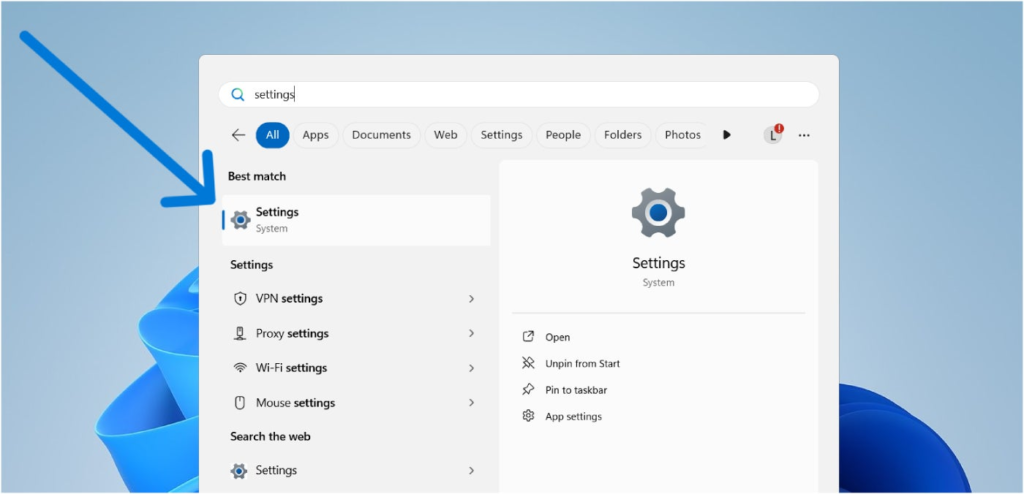
If you’ve recently purchased or received a Windows 11 computer, one of the first things I recommend you do is to add fingerprint authentication as one of your sign-in options. This provides your computer or laptop with an additional layer of security and makes the login process much faster than a regular password. While Windows machines can vary in how fingerprint authentication is implemented, setting up fingerprint logins is more or less consistent across all computers running Windows 11. In this article, I will show you how to add fingerprint authentication to your Windows 11 computer, answer some frequently asked questions, and provide a few benefits of fingerprint unlock for your machine. NordPass Employees per Company Size Micro (0-49), Small (50-249), Medium (250-999), Large (1,000-4,999), Enterprise (5,000+) Micro (0-49 Employees), Small (50-249 Employees), Medium (250-999 Employees), Large (1,000-4,999 Employees), Enterprise (5,000+ Employees) Micro, Small, Medium, Large, Enterprise Features Activity Log, Business Admin Panel for user management, Company-wide settings, and more Dashlane Employees per Company Size Micro (0-49), Small (50-249), Medium (250-999), Large (1,000-4,999), Enterprise (5,000+) Micro (0-49 Employees), Small (50-249 Employees), Medium (250-999 Employees), Large (1,000-4,999 Employees), Enterprise (5,000+ Employees) Micro, Small, Medium, Large, Enterprise Features Automated Provisioning ManageEngine ADSelfService Plus Employees per Company Size Micro (0-49), Small (50-249), Medium (250-999), Large (1,000-4,999), Enterprise (5,000+) Any Company Size Any Company Size Features Access Management, Compliance Management, Credential Management, and more How can I set up fingerprint recognition on Windows 11? Before we begin, I must mention that this tutorial applies to laptops or computers with access to a fingerprint sensor. These days, many consumer and business laptops already include a fingerprint sensor built into the device itself. For those without a sensor, there are a variety of USB fingerprint sensors that can be purchased as a separate add-on. These sensors plug into your laptop’s USB ports and add fingerprint functionality without adding much bulk to your machine. With that out of the way, let’s begin setting up fingerprint recognition on your Windows 11 computer. 1. Go to the Windows 11 Settings app. The first step in enabling fingerprint authentication is to access the Settings app within Windows 11. There are many ways to access the Windows Settings app. Personally, I feel the fastest way is to press the Windows Key on your keyboard and start typing “settings.” This will automatically pull up the Settings app on your Start menu. Typing “settings” on the Windows 11 Start menu. Image: Luis Millares You can also access the Settings app by going to the Start menu and navigating through your apps. The Settings app will typically be found at the bottom of the list, as apps are organized in alphabetical order by default. 2. Navigate to the Accounts menu from the sidebar. Once you’ve opened your Settings app, look to the sidebar at the left and select the Accounts menu. Accounts menu on Settings app sidebar. Image: Luis Millares The Accounts menu houses all configurations regarding accounts on your Windows 11 computer. This includes your personal info, email and accounts, device access, and the like. It also features all settings related to Sign-in options — which is our next step. 3. Click Sign-in options. From the Accounts menu, select Sign-in options. This menu contains all the possible methods to sign in to your device. Sign-in options button on the Accounts menu. Image: Luis Millares The usual sign-in methods found here are sign-in via password, PIN, and security key. If your laptop or computer supports it, this is also where you’ll find Windows Hello, with the option to sign in using either facial or fingerprint recognition. Windows Hello is the main biometric authentication feature included in the Microsoft Windows operating system since 2015. First introduced in Windows 10, it’s now the primary way to add fingerprints in Windows 11. 4. Select Fingerprint recognition (Windows Hello) and “Set up.” From the Sign-in options, we can now select Fingerprint recognition using Windows Hello. When you click Fingerprint Recognition, a “Set up” button will appear. Fingerprint and Set up buttons are in the sign-in options menu. Image: Luis Millares Select the Set up button, and the process for inputting your fingerprint will start. First, Windows will ask you to provide your PIN or ask you to make one if you don’t already have one set up. Windows asking for PIN before fingerprint set up. Image: Luis Millares It’s important to remember your PIN as it serves as your backup authentication if your fingerprint isn’t read properly. After a set number of failed fingerprint attempts, Windows 11 will ask for your PIN instead, allowing you to log in when there’s a glitch with your fingerprint sensor or if you cannot use that method at certain times. Once you’ve added your PIN, Windows Hello will ask you to contact your device’s fingerprint sensor and add your biometric data to the system. Windows Hello prompts the user to touch the fingerprint sensor. Image: Luis Millares Expect that Windows Hello will instruct you to touch the fingerprint sensor multiple times with different areas of your fingerprint. This is so it can get an accurate print reading and enable you to sign in with your fingerprint at various angles. Inputting your fingerprint on Windows Hello multiple times. Image: Luis Millares Once you’ve completed the necessary amount of fingerprint inputs, Windows Hello will inform you that your fingerprint was successfully added, and you’re done! Successful fingerprint added to Windows 11. Image: Luis Millares You can now sign in to your laptop or desktop computer via fingerprint authentication. Must-read security coverage Frequently asked questions about Windows 11 fingerprint log-in Can I use multiple fingerprints to log in to Windows 11? Yes, Windows 11 lets you add multiple fingerprints to log into your computer. In practice, this means you can have both your right and left index fingerprints as a means to unlock your computer. If you’re wondering if there’s a maximum number of fingerprints for Windows Hello, some Microsoft support pages have said

How to Add Fingerprint Authentication to Your Windows 11 Computer Read More »

2. Views of Trump administration, congressional leadership

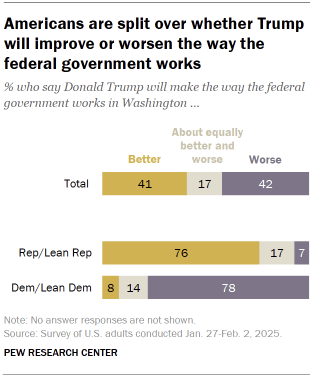
Americans are split over what impact Donald Trump will have on the way the federal government works: About as many say he’ll improve it as say he’ll make it worse. And more Americans expect ethics and honesty in government to fall (rather than rise) with his administration. The public is also split – and divided along partisan lines – in its assessments of Vice President JD Vance, Trump’s other high-level appointments and most congressional leaders. Elon Musk is viewed more negatively than positively. Trump’s influence on the way government works When it comes to the way the federal government in Washington works, 41% of Americans say Trump will make things better, while a nearly identical share (42%) say he will make things worse. Far fewer (17%) say his impact will be an equal mix of better and worse. 76% of Republicans and Republican-leaning independents say Trump will improve the way government works. By contrast, 78% of Democrats and Democratic leaners say Trump will worsen the way government works. More Americans expect ethics and honesty in the federal government to fall, rather than rise, with Trump as president Nearly half of Americans (47%) think the overall level of ethics and honesty in the federal government will fall with Trump as president, while 31% say ethics and honesty will rise. Roughly two-in-ten (22%) say the level of ethics and honesty in the federal government will stay about the same. Republicans and Democrats diverge over how the level of ethics and honesty in government will shift during Trump’s administration: 59% of Republicans say it will rise with Trump as president, 29% say it will not change and 11% say it will fall. By comparison, 82% of Democrats say it will fall with Trump as president, 12% say it will stay the same and 5% say it will rise. Views of Trump’s Cabinet and other high-level selections Public approval of Trump’s Cabinet picks and other high-level appointees closely tracks his overall approval rating: 46% of Americans say they approve of Trump’s selections, while 52% disapprove. Roughly eight-in-ten Republicans (83%) approve of Trump’s choices, compared with just 11% of Democrats. Public evaluations of Trump’s staffing choices today are similar to views of his choices on the eve of his first term. In a phone survey conducted in the weeks before he first took office eight years ago, 41% of Americans said they approved of Trump’s appointments. By contrast, clear majorities of Americans approved of the Cabinet and high-level appointments of Trump’s recent predecessors in surveys conducted as each began their terms: George H.W. Bush (59% approved), Bill Clinton (64%), George W. Bush (58%), Barack Obama (66%) and Joe Biden (57%). Views of Vice President JD Vance Americans are divided over Vice President JD Vance’s qualifications to be president: 47% say he is qualified, while 49% say he is not. Evaluations of former Vice President Kamala Harris were also fairly evenly split as she took office in early 2021 (50% qualified, 47% not). Former Vice President Mike Pence was, on balance, seen as qualified by the public (54% qualified, 30% not) in a phone survey conducted shortly after the 2016 election. Evaluations of Vance largely track with partisanship: 80% of Republicans say Vance is qualified for the job of president, while 82% of Democrats say he is not. Vance’s influence in the administration A majority of Americans (58%) say Vance will have about the right amount of influence within the Trump administration. About three-in-ten (28%) say he will have too little influence, and even fewer (13%) say he will have too much. Republicans overwhelmingly expect Vance to have the right amount of influence within the administration: 82% say this. Democrats are divided in their views: 43% say Vance will have too little influence, 34% say he will have the right amount of influence and 22% say he will have too much. Favorability of congressional leadership House Speaker Mike Johnson Three-in-ten adults rate House Speaker Mike Johnson favorably, while about as many (33%) view him unfavorably. Roughly a third (35%) say they have never heard of Johnson. (Congressional leaders weren’t identified by title or party in the survey.) Johnson’s ratings have improved somewhat since spring of last year, when 24% rated him positively and 37% rated him negatively. This improvement is largely due to shifting Republican views: 51% of Republicans now rate Johnson favorably, up from 39% last year. Senate Majority Leader John Thune Of the top congressional leaders, new Senate Majority Leader John Thune is the least well known: 60% of Americans say they have not heard of him. Those who do know Thune are divided in their evaluations of him: 17% of all adults view him favorably, 20% unfavorably. House Minority Leader Hakeem Jeffries Ratings of Democratic House leader Hakeem Jeffries are also relatively evenly split (28% favorable, 26% unfavorable). More than four-in-ten Americans (44%) have never heard of Jeffries – down from 51% who had never heard of him a year ago. Senate Minority Leader Chuck Schumer Ratings of Chuck Schumer, who has led Senate Democrats since 2017, remain more negative than positive: 28% view him favorably, while 46% view him unfavorably. A quarter have not heard of Schumer. Views of Robert F. Kennedy Jr. and Elon Musk Robert F. Kennedy Jr. The public is split in its evaluations of Robert F. Kennedy Jr., Trump’s nominee to lead the Department of Health and Human Services: 47% have a favorable opinion, 45% an unfavorable opinion. Kennedy, a former Democrat, is viewed negatively by nearly three-quarters of Democrats (74%), while 77% of Republicans view him positively. Elon Musk Trump recently appointed Elon Musk – the owner of Tesla, SpaceX and X (formerly Twitter) – to lead the new Department of Government Efficiency, a team within the administration. Musk is viewed more negatively than positively overall. More than half of Americans (54%) express unfavorable views of the billionaire, while 42% view him favorably. 73% of Republicans view Musk favorably, while about a quarter (24%) view him

2. Views of Trump administration, congressional leadership Read More »

Musk's Access To Records Blocked In DOGE, Treasury Suit

By Sarah Jarvis ( February 6, 2025, 4:38 PM EST) — A Washington, D.C., federal judge on Thursday approved a consent order blocking Elon Musk and additional Department of Government Efficiency employees from accessing the federal government’s payment systems, although a “special government employee” will have limited access as the Treasury Department and suing plaintiffs spar over a preliminary injunction…. Law360 is on it, so you are, too. A Law360 subscription puts you at the center of fast-moving legal issues, trends and developments so you can act with speed and confidence. Over 200 articles are published daily across more than 60 topics, industries, practice areas and jurisdictions. A Law360 subscription includes features such as Daily newsletters Expert analysis Mobile app Advanced search Judge information Real-time alerts 450K+ searchable archived articles And more! Experience Law360 today with a free 7-day trial. source

Musk's Access To Records Blocked In DOGE, Treasury Suit Read More »

Is QuickBooks Checking Worth It? Unbiased Review & Insights

Many are familiar with QuickBooks products, and one of them is the QuickBooks Checking account. It used to be available only to QuickBooks Online users but has since been offered free through QuickBooks Money. The QuickBooks business account does not charge a monthly fee or require an initial deposit or minimum balance. It has a high annual percentage yield (APY) of 5.0% through its savings envelopes feature. Businesses can also benefit from its cash flow forecasting, customized invoicing, and high FDIC insurance protection. However, free ATM withdrawals are limited to four per month and cash deposits are not allowed. QuickBooks’ fast facts Our rating: 4.09 out of 5 Starting price: Free business checking account Key features for QuickBooks Business Checking: No monthly fees or required balances. No opening deposit. Instant deposit. Four fee-free ATM withdrawals monthly. 5.0% through savings envelopes. Syncs with other QuickBooks software. QuickBooks Online, QuickBooks Payments, QuickBooks Payroll, and more Image: QuickBooks Many small businesses integrate with QuickBooks Online for accounting, payroll, and payments. Companies may want to learn how linking up with a QuickBooks business checking account can help streamline the management of their funds. With budgeting, forecasting, and invoicing tools, QuickBooks supports small businesses in organizing their finances and maximizing the use of other QuickBooks products for efficiency. Let’s evaluate QuickBooks Checking’s standout features and pricing structure to learn how it compares with other financial providers. QuickBooks Checking Reviews: What Users Think of QuickBooks 1.5/5 There are limited QuickBooks Checking reviews on third-party sites. On Trustpilot, its rating is 1.2 out of 5 from over 800 reviews. Many complained about the new QuickBooks subscription prices and considered the product overpriced. Others also reported their frustration over reaching customer support since they had to wade through multiple questions. They said they were transferred to different agents, and no clear resolutions were offered to their issues. Some reviewers stated that the software is counterintuitive and slow. Another recounted that a direct deposit error took a week to fix and required constant callbacks with the customer service team. Others claimed that their refund requests were denied. Very few gave positive feedback about the quality of customer support they received. QuickBooks Checking Pricing Structure 3.96/5 Previously, you needed to subscribe to QuickBooks Online to open a free QuickBooks Checking account. Now, you can sign up for free through QuickBooks Money, which lets you access money management tools like cash flow forecasting. The lack of standard business account fees makes it an attractive online account option for small business owners, especially QuickBooks Online users. QuickBooks Checking account: No monthly fees or required balances. No opening deposit. No automated clearing house (ACH) and overdraft fees. Four fee-free ATM withdrawals monthly. $3 per withdrawal and nonnetwork ATMs past the free limit. Free incoming domestic wire transfers only. QuickBooks only offers one type of checking product. It is ideal for those who like transacting online as cash deposits are not accepted. Free ATM withdrawals have a limit of four monthly. Beyond that, you will incur a fee of $3 per transaction. Would Our Expert Use QuickBooks Checking? 4.7/5 If most of your transactions are online or you already use QuickBooks Online software, I recommend opening a QuickBooks Checking account. You won’t need to pay monthly maintenance fees, initial deposits, or maintain a minimum balance. If your funds are above $250,000, it is FDIC-insured for up to $5 million through its sweep program. I like the substantial APY of 5.0% that you can access through savings envelopes. You can also send customized invoices and receive instant deposits without paying processing fees as long as you connect your debit card with QuickBooks Payment. However, if your business is cash-reliant and you need to deposit and withdraw cash regularly, consider heading to a traditional bank like Chase. For free bookkeeping tools, an excellent option is Found. Before opening an account, see our article on how to open a business bank account to learn the step-by-step process. QuickBooks Checking Pros Fee-free checking: No monthly fees, minimum balances, or initial deposit requirements. Instant deposits: Using QuickBooks Payments, deposits can be made into your QuickBooks Checking account in minutes. Competitive APY: Earn 5.0% APY when you set aside funds through savings envelopes. Seamless integration with QuickBooks Online: Users can sync QuickBooks accounting information in real time. QuickBooks Checking Cons Limited free withdrawals: QuickBooks Checking only allows four free ATM withdrawals at Allpoint ATMs monthly and charges $3 thereafter. Requires subscription to access accounting tools: To access bookkeeping tools, you must pay for QuickBooks Online. No brick-and-mortar branches: QuickBooks is an online-only platform and does not offer in-person banking services. More Banking Coverage Alternatives to QuickBooks Checking If QuickBooks Checking doesn’t fit all your needs, here are some alternatives to consider: Novo Business Checking Chase Business Complete BankingSM Found Business Checking Starting Price Free Free Free Key Features International payments via Wise Unlimited free invoicing Refundable ATM fees Many physical locations  QuickBooks integration Cashback bonus for new accounts Integrated bookkeeping and tax toolsNo ACH feesExpense tracking with receipt capture Key Distinctions Up to $7 ATM fee refunds monthly Branches in 48 lower states Free built-in bookkeeping software Learn More Visit Novo Visit Chase Visit Found Methodology I researched the QuickBooks business checking account online, comparing it to other financial providers for monthly fees, opening deposits, and minimum balances, including APY offerings. I also evaluated user reviews from third-party sites to gauge customer satisfaction. Conclusion QuickBooks Checking scores high on minimal fees, superior interest, and seamless integration with QuickBooks products. However, businesses that prefer to bank in person and often perform wire transfers and ATM withdrawals can look for other options. Frequently asked questions What are the fees associated with QuickBooks Checking? With a QuickBooks Checking account, there are no account opening fees, monthly fees, instant deposit fees, and ACH fees. You can also make four free ATM withdrawals at Allpoint ATMs. Beyond that, you will pay a $3 fee. Is QuickBooks Checking suitable for small businesses? Yes. QuickBooks Checking can be a good fit for small businesses, especially

Is QuickBooks Checking Worth It? Unbiased Review & Insights Read More »

Texas' Google Ad Tech Trial Delayed From March To August

By Jared Foretek ( February 6, 2025, 6:30 PM EST) — A Texas federal judge has pushed back the trial date for a group of Texas-led states’ antitrust suit against Google over its digital advertising business, moving the scheduled start from March to August…. Law360 is on it, so you are, too. A Law360 subscription puts you at the center of fast-moving legal issues, trends and developments so you can act with speed and confidence. Over 200 articles are published daily across more than 60 topics, industries, practice areas and jurisdictions. A Law360 subscription includes features such as Daily newsletters Expert analysis Mobile app Advanced search Judge information Real-time alerts 450K+ searchable archived articles And more! Experience Law360 today with a free 7-day trial. source

Texas' Google Ad Tech Trial Delayed From March To August Read More »

NBKC Business Checking Review: Features, Fees, and Insights

NBKC Bank offers small businesses superb savings with a fee-free business checking account. You save on monthly fees, incoming domestic wires, and overdraft fees. You’re also not required to make an initial deposit and maintain a minimum balance. Although NBKC has only four branches in Kansas and Missouri, opening an account online is available in all states. NBKC’s fast facts Our rating: 4.65 out of 5 Starting price: Free business checking account. Key features of NBKC Business Checking: No monthly fees or balance minimums. Fee-free account. Free debit card. Unlimited check deposits. Autobooks for invoicing. ATM fee rebates (up to $12 for nonnetwork). Image: NBKC Bank The NBKC Business Checking account is ideal for small businesses seeking to minimize the banking fees typically charged by most banks. You won’t need to worry about paying multiple fees since NBKC prioritizes offering customers a zero-cost business account. You can also access plenty of business solutions to streamline your cash management with several options to collect payments. Let’s explore the NBKC Business Checking features, pricing structure, and pros and cons to learn how it differs from what other financial providers offer. NBKC Business Checking Reviews: What Users Think of NBKC 4.85/5 NBKC received high user ratings, showing 4.8 on Trustpilot from around 800 reviews and 4.9 on WalletHub based on over 10,000 reviews. There were no specific NBKC Business Checking reviews written. Many praised the excellent customer service, specifically mentioning the bank representatives who assisted with mortgage loan approvals. Users also appreciated the rates provided by the bank. For NBKC’s mobile banking, app feedback is excellent. Several reviewers stated it was reliable and simple to navigate. However, a few users mentioned that they ran into issues such as slow loading of the app, even if they had already re-installed it. Some also found the app underwhelming, while others suggested additional features to improve it. NBKC Business Checking Pricing Structure 4.79/5 With NBKC, business customers can save on numerous banking fees, such as monthly fees, opening deposits, incoming domestic wires, overdrafts, and ATM fees. NBKC Business Checking account: No monthly fees and no initial deposit requirement. $0 incoming and $5 outgoing domestic wire transfers. $45 for all international wire transfers. No ATM fee for MoneyPass ATM usage. Up to $12 ATM fee rebates for nonnetwork. No overdraft fees. ACH credits and debits ($15 monthly or $150 yearly). Desktop deposits ($15 monthly or $150 yearly). Business fraud tools ($5 monthly or $50 yearly). NBKC Business Checking Key Features 4.1/5 NBKC helps businesses save through its fee-free business checking account. See the detailed features below to learn more about its competitive advantages. Key features for NBKC Business Checking: No monthly fees or balance requirements. Fee-free account. Unlimited check deposits. Autobooks for invoicing. Access MoneyPass ATMs & ATM fee rebates. No Monthly Fees and Balance Requirements An NBKC Bank Business Checking account does not charge a monthly fee or require a minimum balance. Fee-free Account Largely fee-free, NBKC lets you save on an initial opening deposit, overdraft fees, in-branch and mobile check deposits, eStatements, and incoming domestic wires. You can also enjoy Bill Pay and business online banking without paying for the service, including fee-free stop payments if you need to cancel one. Unlimited Check Deposits Transactions are unlimited with NBKC since it does not charge per-item fees, including check deposit fees. Autobooks for invoicing You can create invoices and track payments easily through Autobooks. Account holders can access a 30-day free Autobooks subscription and pay $10 monthly after the trial period. Access MoneyPass ATMs & ATM Fee Rebates You can transact at over 40,000 MoneyPass ATMs without fee charges. The bank also offers a $12 ATM fee rebate to cover third-party operator surcharges. Would Our Expert Use NBKC Business Checking? 4.85/5 Small businesses can save a lot with the NBKC Business Checking account since — aside from the typical monthly maintenance and initial deposit charges — it waives multiple fees. You also won’t need to pay for insufficient and overdraft fees, incoming domestic wire transfers, check and cash deposits, or stop payments. Customers can access rebates of up to $12 for third-party ATM surcharges. I recommend this account because it provides you with flexibility. You have the option to subscribe to the banking services that you need. In addition, I also like that you can access over 40,000 MoneyPass ATMs apart from the bank’s in-house machines, which makes depositing and withdrawing cash very convenient. However, the bank has limited integrations, and you need to pay $10 monthly for an Autobooks subscription to send invoices to your clients. The checking account also does not earn interest and international wire transfers can be steep at $45. In addition, NBKC has only four branches located in Kansas and Missouri. You may want to consider Bluevine, Mercury, and U.S. Bank as alternatives. Before opening an account, see our article on how to open a business bank account to learn the step-by-step process. NBKC Business Checking Pros Fee-free checking: Most standard banking fees at NBKC are free. You won’t pay monthly fees, opening deposits, incoming domestic wires, and overdraft fees. Unlimited check deposits: Some providers may restrict the number of cash or check deposits you can make, unlike with NBKC. Online account opening: The business account is available in 50 states since you can open it online easily. NBKC Business Checking Cons No interest earnings: NBKC’s Business Checking account does not earn a yield. Meanwhile, Bluevine Standard offers 1.5% APY for qualifying balances of up to $250,000. No free invoicing: You need to sign up for Autobooks at $10 monthly to track client payments and send invoices, whereas Mercury offers unlimited and free invoicing. Limited branches: NBKC only has four branches in Kansas and Missouri. For in-person banking services, consider U.S. Bank, which has branch locations in 26 states. More Banking Coverage Alternatives to NBKC Business Checking If NBKC Business Checking is not the perfect fit for your business, here are some alternatives to consider: Bluevine Standard Starting price: Free.

NBKC Business Checking Review: Features, Fees, and Insights Read More »

Roofing Co.'s Board Fights $11B Hostile Takeover Offer

By Grace Dixon ( February 7, 2025, 3:23 PM EST) — Beacon Roofing Supply Inc.’s board of directors is urging shareholders to reject an $11 billion hostile takeover bid by QXO Inc., noting the offer is no different from the technology and software company’s earlier proposal…. Law360 is on it, so you are, too. A Law360 subscription puts you at the center of fast-moving legal issues, trends and developments so you can act with speed and confidence. Over 200 articles are published daily across more than 60 topics, industries, practice areas and jurisdictions. A Law360 subscription includes features such as Daily newsletters Expert analysis Mobile app Advanced search Judge information Real-time alerts 450K+ searchable archived articles And more! Experience Law360 today with a free 7-day trial. source

Roofing Co.'s Board Fights $11B Hostile Takeover Offer Read More »