Nvidia using GenAI to integrate Omniverse virtual creations into physical AI apps

Join our daily and weekly newsletters for the latest updates and exclusive content on industry-leading AI coverage. Learn More Nvidia unveiled generative AI models and blueprints that expand Nvidia Omniverse integration further into physical AI applications such as robotics, autonomous vehicles and vision AI. As part of the CES 2025 opening keynote by Nvidia CEO Jensen Huang, the company said global leaders in software development and professional services are using Omniverse to develop new products and services that will accelerate the next era of industrial AI. Accenture, Altair, Ansys, Cadence, Foretellix, Microsoft and Neural Concept are among the first to integrate Omniverse into their next-generation software products and professional services. Siemens, a leader in industrial automation, announced today at the CES trade show the availability of Teamcenter Digital Reality Viewer — the first Siemens Xcelerator application powered by Nvidia Omniverse libraries. “Physical AI will revolutionize the $50 trillion manufacturing and logistics industries. Everything that moves — from cars and trucks to factories and warehouses — will be robotic and embodied by AI,” said Huang, in a statement. “Nvidia’s Omniverse digital twin operating system and Cosmos physical AI serve as the foundational libraries for digitalizing the world’s physical industries.” New models and frameworks accelerate world-building for physical AI Creating 3D worlds for physical AI simulation requires three steps: world-building, labelingthe world with physical attributes and making it photoreal. Nvidia offers generative AI models that accelerate each step. The USD Code and USD Search Nvidia NIM microservices are now generally available. They let developers use text prompts to generate or search for OpenUSD assets. A new Nvidia Edify SimReady generative AI model unveiled today can automatically label existing 3D assets with attributes like physics or materials, enabling developers to process 1,000 3D objects in minutes instead of over 40 hours manually. Nvidia Omniverse, paired with new Nvidia Cosmos world foundation models, creates a synthetic data multiplication engine that lets developers easily generate massive amounts of controllable, photoreal synthetic data. Developers can compose 3D scenarios in Omniverse and render images or videos as outputs. These can then be used with text prompts to condition Cosmos models to generate countless synthetic virtual environments for physical AI training. Nvidia Omniverse blueprints speed up industrial, robotic workflows Cosmos generates synthetic driving data. During the CES keynote, Nvidia also announced four new blueprints that make it easier for developers to build universal scene description (OpenUSD)-based Omniverse digital twins for physical AI. The blueprints are: Mega, powered by Omniverse Sensor RTX APIs, for developing and testing robot fleets at scale in an industrial factory or warehouse digital twin before deployment in real-world facilities Autonomous Vehicle (AV) Simulation, also powered by Omniverse Sensor RTX APIs, that lets AV developers replay driving data, generate new ground-truth data and perform closed-loop testing to accelerate their development pipelines Omniverse spatial streaming to Apple Vision Pro that helps developers create applications for immersive streaming of large-scale industrial digital twins to Apple Vision Pro Real-time digital twins for computer aided engineering (CAE), a reference workflow built on Nvidia CUDA-X acceleration, physics AI and Omniverse libraries that enables real-time physics visualization New, free “Learn OpenUSD” courses are also now available to help developers build OpenUSD-based worlds faster than ever. Market leaders supercharge industrial AI using Nvidia Omniverse Global leaders in software development and professional services are using Omniverse to develop new products and services that are poised to accelerate the next era of industrial AI. Building on its adoption of Omniverse libraries in its Reality Digital Twin data center digital twin platform, Cadence, a leader in electronic systems design, announced further integration of Omniverse into Allegro, its leading electronic computer-aided design application used by the world’s largest semiconductor companies. Altair, a leader in computational intelligence, is adopting the Omniverse blueprint for real-time CAE digital twins for interactive computational fluid dynamics (CFD). Ansys is adopting Omniverse into Ansys Fluent, a leading CAE application. And Neural Concept is integrating Omniverse libraries into its next-generation software products, enabling real-time CFD and enhancing engineering workflows. Accenture, a leading global professional services company, is using Mega to help German supply chain solutions leader Kion by building next-generation autonomous warehouses and robotic fleets for their network of global warehousing and distribution customers. AV toolchain provider Foretellix, a leader in data-driven autonomy development, is using the AV simulation blueprint to enable full 3D sensor simulation for optimized AV testing and validation. Research organization MITRE is also deploying the blueprint, in collaboration with the University of Michigan’s Mcity testing facility, to create an industry-wide AV validation platform. Katana Studio is using the Omniverse spatial streaming workflow to create custom car configurators for Nissan and Volkswagen, allowing them to design and review car models in an immersive experience while improving the customer decision-making process. Innoactive, an XR streaming platform for enterprises, leveraged the workflow to add platform support for spatial streaming to Apple Vision Pro. The solution enables Volkswagen Group to conduct design and engineering project reviews at human-eye resolution. Innoactive also collaborated with Syntegon, a provider of processing and packaging technology solutions for pharmaceutical production, to enable Syntegon’s customers to walk through and review digital twins of custom installations before they arebuilt. source

Nvidia using GenAI to integrate Omniverse virtual creations into physical AI apps Read More »

Appendix B: Political categorization

For this analysis, we grouped people into two political categories: those who support the governing political party (or parties) in their country, and those who do not. These categories were coded based on the party or parties in power at the time the survey was fielded and on respondents’ answers to a question asking which political party, if any, they identify with in their country. In countries where multiple political parties govern in coalition (as is the case in many European countries), survey respondents who indicate support for any party in the coalition were grouped together. In Germany, for example, where the Social Democratic Party governed with Alliance 90/The Greens and the Free Democratic Party at the time of the spring 2024 survey, supporters of any of the three parties were grouped together. In countries where different political parties control the executive and legislative branches of government, the party holding the executive branch was considered the governing party. Survey respondents who did not indicate support for any political party, or who refused to identify with one, were categorized as not supporting the government in power. Party identification was not asked about in the Philippines or Tunisia. The table below outlines the governing political parties in each survey country.  source

Appendix B: Political categorization Read More »

Key Insights From The Forrester Experience Optimization Solutions Wave, Q4 2024

Not long ago, we predicted that 2025 would be another year of customer experience (CX) mediocrity, but this rather gloomy outlook also provides an opportunity for bold leaders to buck the trend. Many will aim to do so by doubling down on digital experiences. According to Forrester’s Priorities Survey, 2024, adding or improving digital experience is the top action that business and technology professionals who indicated that improving the experience of their customers is a priority for their organization are taking to improve CX. Experience optimization (EO) solutions enable you to do exactly this: They help improve digital experience in real time by collecting and ingesting data, analyzing data to generate insights, and ideating and delivering thousands of different personalized digital experiences. Forrester defines EO solutions as: Solutions that enable the ongoing delivery of relevant, timely, and optimized digital experiences to meet evolving customer needs by leveraging cross-channel customer interactions. EO Solutions Support A Variety Of Use Cases That Win, Serve, And Retain Customers By helping digital teams understand and meet customers’ unique and evolving needs, EO solutions help their organizations win, serve, and retain customers. They also support a broad range of different use cases. The core use cases enabled by EO solutions are experimentation; next-best product, offer, or action; next-best experience; and experimentation with recommendations or personalization. Extended use cases focus on customer audience and segments, user experience/product/customer behavior understanding, cross-channel optimization, automatic optimization opportunities discovery, customer feedback and experimentation, and feature experimentation. EO Solutions Leverage GenAI To Help Companies Manage Personalization At Scale The EO market has evolved from basic online testing capabilities to offering AI-powered personalization and generative AI (genAI) applications, such as opportunities identification, creative assets generation, or segments creation. If you are looking to purchase or upgrade your EO solution, you can leverage our newly published report, The Forrester Wave™: Experience Optimization Solutions, Q4 2024, to evaluate the top 11 players and identify the best vendor for you. As you consider your options, pay attention to the following differentiators: GenAI. Providers with robust genAI capabilities have the potential to streamline the creation and optimization of digital experiences, thus facilitating a more tailored customer journey. Data integration. Advanced EO solutions stand out by integrating diverse data sources, not limited to digital interactions, to enable more effective personalization. Strategy support. Look to EO providers that offer not just technology but also strategic guidance, helping their clients refine and implement effective EO strategies. Don’t Just Count On EO Solutions To Satisfy Your Analytics Requirements Our research revealed a gap (and an opportunity) around digital analytics. Regardless of the vendor, EO customers complained about the analytics capabilities provided in their platforms. While they acknowledge the necessity of integrating EO solutions with their digital analytics solution to better inform EO activities as well as understand their performance, they’d like EO solution providers to strengthen native EO analytics capabilities. For instance, a multi-brand company told us that it’s currently unable to compare EO performance across its various brands within its EO platform. Instead, customers need to download the data from the EO solution and conduct this analysis separately. This isn’t surprising in the context of the history of EO solutions: Vendors in this space are focused on helping clients take action on data, and this is their core job, but they underestimate the importance of the analysis that informs EO. No one expects EO vendors to become the next Google Analytics, but improving analytics capabilities is a clear opportunity in two areas: 1) understanding the parts of the experience that need to be optimized, and for which customers and 2) understanding the performances of optimization activities to identify potential improvements. If you wish to understand the EO market better and which EO solution can be right for you, please schedule an inquiry or a guidance session with us. source

Key Insights From The Forrester Experience Optimization Solutions Wave, Q4 2024 Read More »

What is Operational CRM: Key Features and Benefits

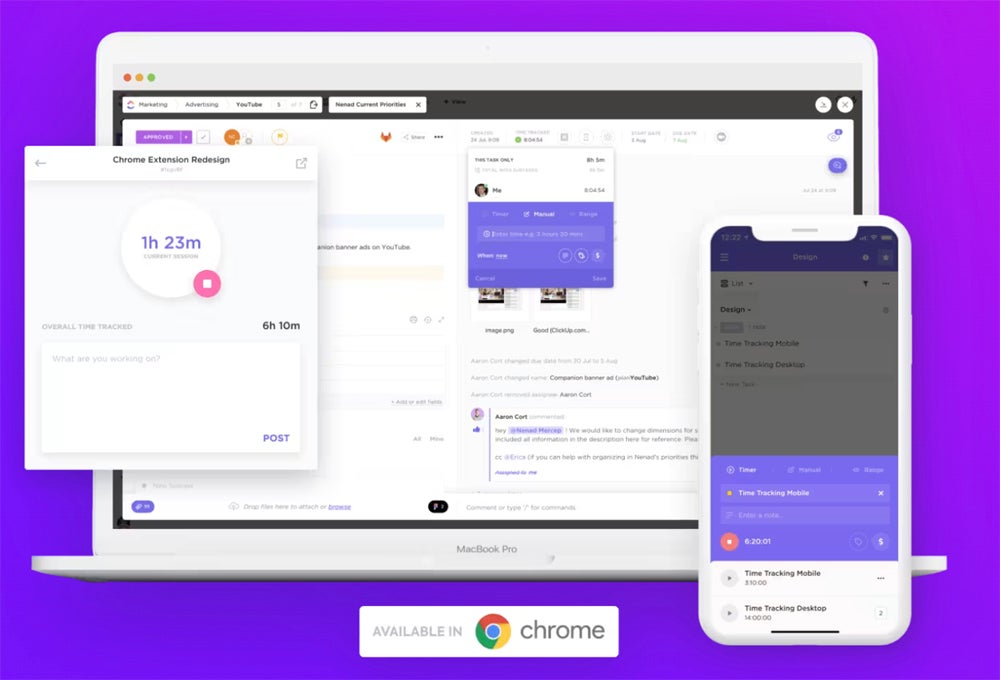
Operational customer relationship management tools offer advanced custom workflows, visual pipelines, and day-to-day operation management tools to provide the best client experience with minimal effort. Choosing a CRM emphasizing operations can help centralize business information and reduce manual work. 1 monday CRM Employees per Company Size Micro (0-49), Small (50-249), Medium (250-999), Large (1,000-4,999), Enterprise (5,000+) Any Company Size Any Company Size Features Calendar, Collaboration Tools, Contact Management, and more 2 Pipedrive CRM Employees per Company Size Micro (0-49), Small (50-249), Medium (250-999), Large (1,000-4,999), Enterprise (5,000+) Any Company Size Any Company Size Features Calendar, Collaboration Tools, Contact Management, and more 3 Creatio CRM Employees per Company Size Micro (0-49), Small (50-249), Medium (250-999), Large (1,000-4,999), Enterprise (5,000+) Medium (250-999 Employees), Large (1,000-4,999 Employees), Enterprise (5,000+ Employees) Medium, Large, Enterprise Features Dashboard, Document Management / Sharing, Email / Marketing Automation, and more What is operational CRM? Operational CRM is a type of CRM solution that supports a business’s day-to-day sales and marketing operations. These operations can include everything from marketing to lead nurturing to back-office management. CRMs that fall under this umbrella are typically generalized CRM solutions that can be adapted to fit a specific industry or company size. You’ll find that operational CRM solutions offer advanced automations to do a lot of the heavy lifting around updating statuses or other recurring tasks so sales reps can focus on nurturing customer relationships. There are three other types of CRM software, including marketing, collaborative, and analytical. Operational CRMs are best for businesses that need help with general customer relationship management, such as providing ongoing support post-sale. How does operational CRM software work? Operational CRMs work by streamlining the sales process in a transparent and secure digital system. While operational CRM features might overlap with core CRM features like lead nurturing, its purpose is to do so efficiently and effectively through automation. Features like time tracking, task assignment, and lead routing are all advanced operational features. These help sales managers and representatives track daily activities and progress toward goals. Same time tracking functionally on the go. Image: ClickUp Robust project management, workflow automations, automated marketing campaigns, and follow-up tools are also common operational CRM features. These all help teams deploy new strategies quickly and have a single source of truth when it comes to checking the status of any given project, deal, or lead. An operational CRM can also be optimized through integrations. When a business syncs its CRM with all other business tools, users can reduce the time spent jumping between programs. Example visual pipeline with nurturing stages. Image: Pipedrive TechRepublic Resources: CRM Feature and Services Comparison Best CRM Software Benefits of operational CRM The benefits of using a generalized CRM can also be seen in an operational CRM—with the added focus on the benefits of running automations and managing projects and tasks. Centralizes information Operational CRM software completely centralizes all customer data and information. With the ability to create custom pipelines and dashboards, users can view real-time information. This is the case for visibility around sales stages, customer profiles, and analytical reports. For example, any user can check the status of any ongoing deal, see who the last person was to engage with the lead or see what marketing email campaigns have been sent to a lead. This transparency helps reps confidently provide stellar client experience. Interdepartmental alignment Operational CRM software can align marketing, sales, support, and operations teams within one hub. Users can tag each other in lead updates, quarterly reports, and project updates within the tool for complete visibility into business initiatives. Internal communication is built into operational CRMs so reps can tag team members in updates or escalate support with just a few clicks. Reduce manual task completion This is a major benefit of operational CRM systems. With features like task automation, follow-up automation, or reporting automation, users don’t need to waste time manually checking off to-do lists, sending mass follow-up emails, or pulling daily reports. By building out triggers, workflows, and custom automations, operational CRM users can trust the platform to complete mundane tasks in the background. This will also eventually reduce sales cycle length and increase the turnaround time from lead generation to deal closing. Top operational CRM tools Star rating Starting paid price Forever free plan Total integrations Pipedrive 4.3/5 $14 per user per month No 400+ ClickUp 4.1/5 $7 per user per month Yes 1,000+ Salesforce 4/5 $25 per user per month No 3,000+ Pipedrive Pipedrive is a sales-forward CRM solution that can be adapted to various industries. As a scalable CRM software, users can build custom dashboards and pipelines reflecting their unique selling process. Pipedrive also helps with task and pipeline management, tracking activity, communication, and updates. ClickUp ClickUp is a powerful project management CRM solution. It offers unique product development and resource management tools for tracking business operations. Users can manage sprints, manage backlogs, and run reports quickly. Other day-to-day operation tools ClickUp offers include time tracking, workload views, and goal transparency. Salesforce Salesforce is a popular CRM solution that I recommend for enterprises or large organizations. As a top AI CRM software, users can build automation, generate copy, and receive predictive reports. In addition to AI functionality, Salesforce offers highly customizable dashboards that can reflect day-to-day operations. This all helps build sales efficiency and boost individual and team productivity. How to choose an operational CRM system I recommend following the same best practices when choosing a CRM solution, regardless of industry, company size, or ideal CRM type. To get started, I suggest researching the three options above to understand their ideal use cases and identify whether they can provide real solutions for your business. Here are some things to consider when choosing an operational CRM system: Does this CRM tool integrate with my existing tech stack, such as Outlook for email? Does this CRM tool offer the marketing tools that my business needs? Does this CRM offer a free version that comes with all the features I need? How

What is Operational CRM: Key Features and Benefits Read More »

The 5 Fastest VPNs for 2025

Ever wondered how to keep your sensitive business data safe while browsing on public Wi-Fi? Or maybe you’re tired of being blocked from accessing your favorite business tools because they’re restricted in certain countries? That’s where a virtual private network steps in. SEE: Can a VPN Be Hacked?  (TechRepublic) A VPN encrypts your internet connection, keeps your data safe, and allows you to access restricted content from anywhere in the world. Want to know which VPNs offer speed, protect your privacy, and keep cyber threats at bay? Here are the top five VPNs to help you out. 1 Semperis Employees per Company Size Micro (0-49), Small (50-249), Medium (250-999), Large (1,000-4,999), Enterprise (5,000+) Large (1,000-4,999 Employees), Enterprise (5,000+ Employees) Large, Enterprise Features Advanced Attacks Detection, Advanced Automation, Anywhere Recovery, and more 2 ESET PROTECT Advanced Employees per Company Size Micro (0-49), Small (50-249), Medium (250-999), Large (1,000-4,999), Enterprise (5,000+) Any Company Size Any Company Size Features Advanced Threat Defense, Full Disk Encryption , Modern Endpoint Protection, and more 3 ManageEngine Log360 Employees per Company Size Micro (0-49), Small (50-249), Medium (250-999), Large (1,000-4,999), Enterprise (5,000+) Micro (0-49 Employees), Small (50-249 Employees), Medium (250-999 Employees), Large (1,000-4,999 Employees), Enterprise (5,000+ Employees) Micro, Small, Medium, Large, Enterprise Features Activity Monitoring, Blacklisting, Dashboard, and more Top VPN comparison Picking a VPN isn’t just about getting a secure connection — it’s about aligning with a solution that supports your business’s needs now and in the future. Below is a quick summary of features offered by the best VPNs: Our rating (out of 5) Starting price Split tunneling Customer service Connections Servers NordVPN 4.7 $2.49/month (2-year plan) Yes, with a Double VPN Yes 10 6,400+ servers in 111 countries Surfshark 4.5 $2.19/month (2-year plan) Yes Yes Unlimited 3,200+ servers in 110+ countries Hotspot Shield 4 $6.66 every month Yes Yes 8 800 servers in 125+ locations Proton VPN 4.4 $5.99 /month Yes, with a Double VPN Yes 10 (pro plan) 3000 servers in 65 countries ExpressVPN 4.6 $8.33/month Yes Yes 5 3,000+ servers in 105 countries SEE: Is a VPN Really Worth It in 2024? (TechRepublic) NordVPN: Best overall Our rating: 4.8 out of 5 Image: NordVPN NordVPN keeps things secure and simple. With its no-log policy, your data is protected in Switzerland’s privacy-friendly jurisdiction, and the Secure Core network gives your traffic an extra layer of encryption as it passes through privacy-conscious countries. With more than 6,350 servers in 111 countries, it’s perfect for travelers needing steady, secure access worldwide. Why I chose NordVPN NordVPN is the heavy-hitter in a user’s toolkit when it comes to full-spectrum privacy. The CyberSec feature alone is invaluable as a robust firewall against trackers, ads, and malicious websites. Combined with Meshnet, I have an ultra-secure way to transfer files and access devices remotely — a huge bonus for someone who’s constantly moving between locations or working remotely. I’ve used it for remote work, video calls, and streaming, and it never drops the ball. At the same time, I didn’t encounter buffering or lag, even when I was on the other side of the world. And if you want to make sure none of your accounts have been compromised, Dark Web Monitor checks data leaks and alerts you if your info shows up. For more information, read the full NordVPN review. Pricing NordVPN splits its paid plans into Basic, Plus, and Complete, with flexible contracts of one month, one year, or two years. If you’re all in for the long haul, it’s only $3.09 per month for two years. Otherwise, you’re looking at $12.99 monthly or $4.99 monthly with the yearly plan. Features WireGuard-based, NordLynx Protocol to deliver low latency for gaming and video streaming. Double VPN to route your connection through two servers for additional privacy. Ads and malware blocker. In-built kill switch to safeguard your data from leaks. Enabling NordVPN for a safer internet experience. Image:NordVPN Pros and cons Pros Cons Excellent speed for gaming, streaming, and torrenting. Expensive than other VPN options Cross-platform compatibility, including routers. Limited simultaneous device connections (10). Unblocking geo-restricted content due to servers in 111 countries 24/7 live chat and responsive customer support. Surfshark: Best for value for money Our rating: 4.5 out of 5 Image: Surfshark Surfshark is one of those VPNs that offers a ton of features without breaking the bank. With over 3,200 servers across 100 countries, Surfshark ensures you have the flexibility to access content globally while maintaining fast speeds. What truly sets it apart, in my opinion, is the Surfshark Search feature, which allows me to search the web without the interference of annoying ads or trackers. It is not only affordable but also faster, as the blend of WireGuard and Nexus consistently provides high speeds. I’ve personally noticed little to no lag, even with heavy usage (streaming, data scraping, and cloud backups, for starters). Why I chose Surfshark Surfshark is affordable and customer-first, and the ability to connect unlimited devices means I never have to worry about juggling multiple accounts. The Nexus feature and Camouflage Mode give me flexibility and discretion when browsing in areas with heavy surveillance or restricted internet access. You can also use it to remove your data from people’s search sites in select countries and improve your digital footprint. For more information, read the full Surfshark review. Pricing Starts at $2.19 per user per month (2-year plan). Other plans: 1-Month plan: $15.45. 1-Year plan: $3.69 per month. Features Unlimited device connections useful for a family or a small team sharing the same VPN account. Nexus network technology for breaking up browsing patterns Camouflage mode to mask VPN usage and make it look like regular internet traffic Manage countries in Surfshark. Image: Surfshark Pros and cons Pros Cons Most affordable among other VPN options Limited data removal, available only in US, Canada, UK, and EU Wide server network Occasional speed dips during peak times. Private search engine with no ads or trackers No live chat support on weekends Data removal and breach

The 5 Fastest VPNs for 2025 Read More »

5 Signs You Need a Virtual Firewall to Secure Your Cloud

As businesses increasingly shift to cloud-based and virtualized environments, traditional network security approaches — particularly firewalls — are falling short. Virtual firewalls, purpose-built for environments like public and private clouds or Software-Defined Wide Area Networks (SD-WAN), have emerged as a critical solution. Their ability to scale dynamically and integrate deeply with virtual infrastructure enables security tailored to the demands of modern, distributed networks. Unlike hardware firewalls, virtual firewalls excel in protecting east-west traffic within virtual networks, safeguarding sensitive data, and enforcing precise policies in multi-tenant environments. They offer an agile, cost-effective approach to cybersecurity, making them indispensable for securing complex, cloud-native architectures while adapting to the ever-evolving cybersecurity landscape. 1 RingCentral RingEx Employees per Company Size Micro (0-49), Small (50-249), Medium (250-999), Large (1,000-4,999), Enterprise (5,000+) Medium (250-999 Employees), Large (1,000-4,999 Employees), Enterprise (5,000+ Employees) Medium, Large, Enterprise Features Hosted PBX, Managed PBX, Remote User Ability, and more 2 Talkroute Employees per Company Size Micro (0-49), Small (50-249), Medium (250-999), Large (1,000-4,999), Enterprise (5,000+) Any Company Size Any Company Size Features Call Management/Monitoring, Call Routing, Mobile Capabilities, and more 3 CloudTalk Employees per Company Size Micro (0-49), Small (50-249), Medium (250-999), Large (1,000-4,999), Enterprise (5,000+) Any Company Size Any Company Size Features 24/7 Customer Support, Call Management/Monitoring, Contact Center, and more Virtual firewall vs physical appliance Physical firewalls are hardware-based devices positioned at the network’s edge. A virtual firewall is software-based and operates in virtualized environments, such as cloud infrastructures, VPN or SD-WAN. Unlike traditional hardware firewalls, virtual firewalls are not tied to physical appliances. Instead, they run on virtual machines or hypervisors, inspecting and controlling network traffic between virtual machines, containers, or cloud services. When a physical firewall works well A hardware firewall acts as a gatekeeper for all incoming and outgoing traffic. These are most effective in traditional network setups where traffic flows through a central point. Consider a bank with a centralized data center that handles sensitive customer data and has extremely high volumes of transactions. A hardware firewall has specialized processors, offering consistent performance even under heavy traffic loads. By using a physical appliance, the hardware firewall ensures compliance with strict security standards while delivering the processing power needed to manage the bank’s demanding network traffic. It makes sense here because the firewall is protecting a centralized resource at a single location. When a virtual firewall works well Virtual environments, including public clouds, private clouds, Virtual Private Networks (VPNs), and SD-WAN, require a more adaptable and integrated approach to security. This is because their network resources and workloads aren’t always tied to physical locations, making traditional firewall placement less effective. Virtual firewalls, in contrast, are software-based solutions that integrate seamlessly into these virtual environments. They provide the same functionalities as physical firewalls but with the added flexibility to move and scale with the virtual network. Virtual firewalls are ideal for controlling access in virtual environments because they can be rapidly deployed, reconfigured, and scaled to meet specific security needs for different parts of the network. They integrate smoothly with cloud platforms, such as Amazon Web Services (AWS), Microsoft Azure, or Google Cloud Platform (GCP), and can enforce consistent security policies across hybrid and multi-cloud architectures. SEE: Check out this AWS review, our Microsoft Azure cheat sheet, and our guide to GCP to learn more about these platforms.  For example, in a cloud environment, a virtual firewall can secure specific applications or segments of the network, adapting as the cloud infrastructure evolves. It can also scale dynamically to meet the demands of growing workloads, making virtual firewalls ideal for environments that require flexibility, like cloud-native applications. For businesses with remote employees or multiple offices, virtual firewalls enable secure and direct access to network resources without the inefficiencies of routing traffic through a central HQ. This direct access approach reduces latency, improves performance, and maintains a high level of remote work security. So while physical firewalls are still foundational in traditional network architectures, virtual firewalls offer more agility and customization for modern, cloud-centric environments. Five signs you need a virtual firewall Virtual firewalls are great, but they’re not a must-have for everyone. If you’re just an average computer user, a basic home network firewall is going to be fine. Obviously, if you are a homebrew hacker with lots of assets in the cloud, you would want to look into a virtual firewall — but your average home user is not going to have to worry about this. For businesses, there are a few tell-tale signs that you do need the robust security of a virtual firewall. So here’s how to know whether you need this extra security measure or not. 1. You have multiple offices If you have a distributed enterprise that spans multiple geographical locations, relying on a centralized hardware firewall at your headquarters to manage all network traffic can lead to big challenges. It will often result in increased latency and bottlenecks, as all your data must travel through the HQ, regardless of its final destination. Virtual firewalls are a more efficient and effective solution. By deploying these firewalls across both the headquarters and branch offices, you can ensure a direct and secure connection to network resources for each office. This decentralized approach will reduce latency, improve overall network performance, and allow you to use consistent security policies across the whole organization. The extra flexibility of virtual firewalls also enables administrators to customize security settings for each office based on specific needs or risk profiles. For example, an office handling sensitive customer data or managing cloud point-of-sale systems might require additional layers of security compared to other offices, which might handle less vulnerable information. Virtual firewalls facilitate this level of customization, making them great if you have a business where security needs vary significantly from one location to another. For companies with multiple offices, virtual firewalls aren’t just a luxury but a necessity. They’re a streamlined, adaptable, and secure way to manage network traffic and protect against cyber threats. 2. Your business operates in a

5 Signs You Need a Virtual Firewall to Secure Your Cloud Read More »

CIO Leadership Live with Marykay Wells, CIO, Pearson at the CIO100

00:00 Hi, I’m Lee Rennick, executive director of CIO communities for cio.com, and I am thrilled to be here at the CIO 100 and Symposium in Colorado Springs with Marykay Wells. Marykay is the CIO of Pearson, and I’m really looking forward to interviewing you today. Marykay. So, I was hoping you might be able to introduce yourself and tell us about your your career for having me.00:00:32:31 – 00:01:04:01UnknownThanks. I really appreciate it. Thank you. Yeah. So I am a CIO, as you said at Pearson. Yeah, I’m part of the, executive management team and I’ve been working there now I can’t believe for ten years. So congratulations. A lot of change. Yeah. Pearson is, digital education company. Yeah. And, like I said, I ran the infrastructure for enterprise, technology and anything that’s common around our product platforms.00:01:04:01 – 00:01:26:57UnknownI we run that in our team. And I’ve really enjoyed my time there. Personally, I’ll just tell you a little bit. Yeah. Myself. I live in North Carolina and, have two, adult daughters and a wonderful husband. Oh. That’s wonderful. That’s very nice here. And I know you mentioned you’ve been in Canada quite a bit. I’m Canadian and you’ve traveled up to our country as well, which is fantastic.00:01:26:57 – 00:01:47:13UnknownI love Canada. Well, you’re welcome anytime to come visit. Well, I appreciate you being here today. Mary Kay, thanks so much for joining us. And congratulations on your CIO Award winning project. I’d love to learn more about it. It’s called meeting the challenge of technical debt through innovation. So a lot of the CIOs are talking about technical debt.00:01:47:13 – 00:02:10:10UnknownI’d love to hear more about the project. Yeah. So first of all, we are honored to be, awarded this, a CIO 100 award. It’s and it’s it’s really a collaborative effort across many people at Pearson. And so I’ll tell you where we started with the award. So, when we had a lot of there was a lot of chatter.00:02:10:11 – 00:02:40:03UnknownAnd at the end of 2022 around, you know, airlines having a lot of tech debt, you know, really impacting the business and the customers. And really we used that as a platform to say, you know, we talk about tech debt, but no one really measures it. So we wanted to really understand how we really attacked it. And to reduce the, the tech debt that we had a career center Pearson is 180 years old.00:02:40:08 – 00:03:02:59UnknownReally started out as a holding company when I joined. We own the Financial Times and a lot of a lot of properties that weren’t even education properties. And so typically companies have, the that that are really holding companies have done a lot of acquisitions really. You know, they acquired tech debt over a period of time, even though we’ve done a lot of transformation at Pearson.00:03:03:04 – 00:03:36:20Unknown So what we did is we said, you know, how do we really start to measure our technical debt. So we looked at our security posture, we looked at the number of customer impacting incidents. We looked at our ability to make changes to the technology and how quickly we could do that and be responsive. We looked at, end of life servers, what was in our data centers, and we came up with an algorithm to really understand, you know, we we, we formulated a score and that wasn’t just, wow, enterprise technology.00:03:36:20 – 00:03:58:23UnknownThat was for all of our technology across Pearson. And we we really got everybody on board with understanding, you know, making sure that we first of all measured our assets. We understood where our software did what our software did, what was what was facing customers, what was really, revenue generating and really critical to the business.00:03:58:23 – 00:04:23:20UnknownAnd we, we like I said, we formulated an algorithm and we we provided that tech that score out. And then we set goals for everybody to eliminate their tech debt. And so that was across the organization. And now we still we used ServiceNow as our platform. Yep. Right. And it was it’s a great platform to actually start to measure and run your technology organization.00:04:23:25 – 00:04:34:55UnknownAnd we’ve used ServiceNow for quite some time. So it was it was a great it was a great, platform for us to really innovate on and, and really start to measure our effectiveness.00:04:35:02 – 00:04:44:45 UnknownWell, it sounds like and I was just thinking, while you were saying that you’re an educational organization, and it sounds like this whole process was an educational process across the organization.00:04:44:45 – 00:05:09:39UnknownAnd correct, it absolutely was, because, you know, it’s it’s really easy to talk about. Yeah. And it’s really hard to really, you know, we need to really not just make everybody understand the critical nature of why it’s really important to make sure that your technology is current and we’re really yeah, nurturing our, our technology just like we would any other asset.00:05:09:44 – 00:05:29:44UnknownYeah. Company. And so we were able to really achieve, a tremendous amount of value from doing that exercise. So we reduced our incoming, our incoming tickets by 60%. Wow. And we. Wow. Are, are,00:05:29:44 – 00:05:40:29Unknown55% of our of our applications are products that we called, you know, had high tech debt because we had a cut cutoff, we reduced those to.00:05:40:29 – 00:06:07:08UnknownSo we were able to really, eliminate about 40% of our end of life servers. So and then we’re able to now be, a lot more responsive to customer issues. Wow. That’s fantastic. It just sounds like such a very important project to the business. And it’s been hugely successful. So congratulations and congratulations on the award. Okay, so I spoke to your colleague Nathan, who is helping set up this interview.00:06:07:08 – 00:06:29:03UnknownAnd we were talking about questions. And I said, well, I’d love to learn more about sort of diversity in technology. And he said, oh,

CIO Leadership Live with Marykay Wells, CIO, Pearson at the CIO100 Read More »

7 Simple Steps to Use Windows Fax and Scan

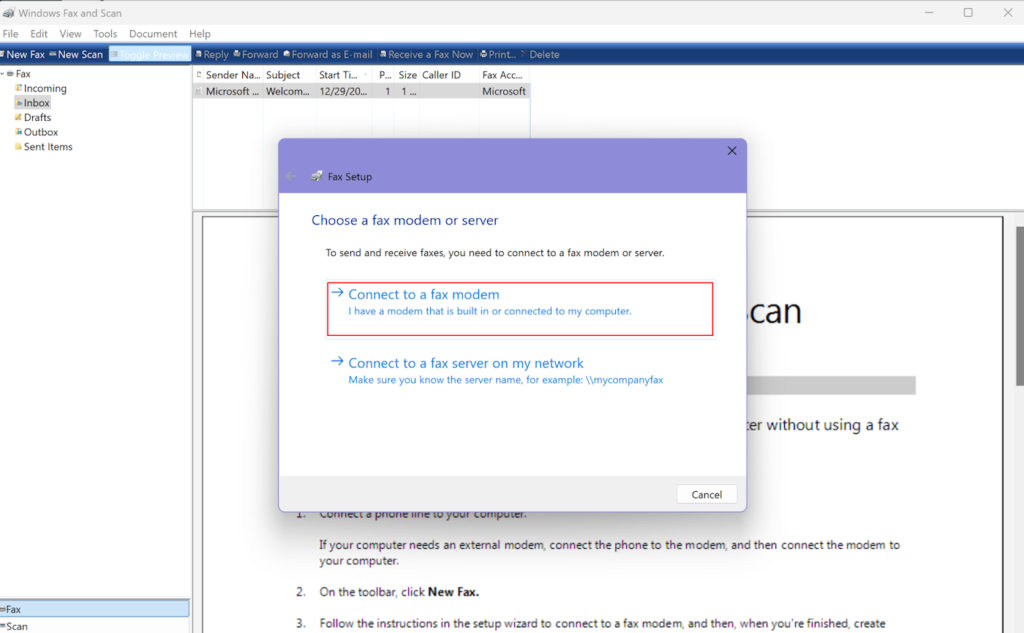
Windows Fax and Scan, a built-in application in the Windows operating system, allows you to send and receive faxes without a fax machine. It supports various document types, including Word documents, PDFs, images, spreadsheets, and more. This tool also enables admins to manage multiple fax machines, multifunction printers (MFPs), or fax servers through one centralized program. So if you’re ready to simplify the faxing process with a free and easy tool, let’s take a look at how to use Windows Fax and Scan in just seven simple steps. Important: In order to use Windows Fax and Scan, your computer must have a built-in fax modem or you will need to connect an external fax modem. I’ll say more about this as we go, but if you are in a hurry, you can use an online fax service to send documents from a device without a fax modem. 1 RingCentral RingEx Employees per Company Size Micro (0-49), Small (50-249), Medium (250-999), Large (1,000-4,999), Enterprise (5,000+) Medium (250-999 Employees), Large (1,000-4,999 Employees), Enterprise (5,000+ Employees) Medium, Large, Enterprise Features Hosted PBX, Managed PBX, Remote User Ability, and more 2 Talkroute Employees per Company Size Micro (0-49), Small (50-249), Medium (250-999), Large (1,000-4,999), Enterprise (5,000+) Any Company Size Any Company Size Features Call Management/Monitoring, Call Routing, Mobile Capabilities, and more 3 CloudTalk Employees per Company Size Micro (0-49), Small (50-249), Medium (250-999), Large (1,000-4,999), Enterprise (5,000+) Any Company Size Any Company Size Features 24/7 Customer Support, Call Management/Monitoring, Contact Center, and more Windows Fax and Scan setup The handy fax and scan tool has been part of the Windows family for quite some time, stretching its compatibility from Windows Vista right up to the latest Windows version. Whether you’re new to digital faxing or a seasoned pro, enabling Windows Fax and Scan is straightforward. First, let’s talk about what you need to get started. The Windows Fax and Scan software requires a fax modem. This little piece of hardware turns your computer into a fax machine. But before you start rummaging through your computer’s internal mechanisms, you’ll want to figure out if you already have one built-in to your computer or laptop. Checking for a built-in fax modem You can find out if you already have a built-in modem by checking your computer system, and the process is pretty simple: Hit the Start button on your computer. Type Device Manager into the search bar and press Enter. In the Device Manager, look for a category named Modems, and click on it to see what’s listed. If there isn’t a category for modems, it means you don’t have one built-in. Most newer laptops and computers do not come with a fax modem, so don’t be surprised if you can’t find anything in device manager. Setting up an external fax modem If you find your computer doesn’t have an internal fax modem, there are still a couple of options available. You can easily find external fax modems, often as USB devices, or as a card that can be installed into your computer’s PCI slot. This won’t be a huge investment, as external modems can be found for under $20. If you’re going down the external modem route, here’s a quick guide: Check the manufacturer manual: It’s always a good idea to glance through the manual that comes with the modem, especially to understand any specific installation instructions. Purchase the modem: You can find USB or card fax modems online or at your local electronics store. USB installation: Simply plug the modem into a USB port on your computer. If your modem comes with a driver CD, make sure to install the drivers. Modem card installation: If you have a modem card, shut down your computer and install the card in an available PCI slot. Restart your computer, and you should be good to go. Remember, meddling with your computer’s hardware can sometimes affect your warranty. So, if you’re not comfortable with the DIY approach, seeking professional assistance is a wise move. It may cost a bit more to have someone install a modem card for you, but it’s better than damaging your computer. You can also avoid all the trouble by using an online fax service, or downloading an app so that you can send a fax from an iPhone or Android phone. Setting up Windows Fax and Scan To start faxing, you must first link a phone line to your computer via a fax modem and activate the Fax and Scan software. The easiest way to do this is to connect a landline to your computer in the appropriate jack, or to the jack located on the external fax modem. Once you have your line set up, follow these steps to make sure Windows Fax and Scan is ready to work with your fax modem and communication line: Begin by searching for Fax and Scan in the Windows search bar. Select the Windows Fax and Scan app that appears in the results. On your first visit to Windows Fax and Scan, you’ll need to set up your modem in order to send correspondences. To do this, navigate to the Tools menu in the Windows Fax and Scan application. Within the Tools menu, go to Fax Accounts. In the Fax Accounts window, click on Add. You’ll then see a Fax Setup dialog box, where you should choose to Connect to a fax modem. Select this option and your pre-installed modem should appear. Choose Connect a fax modem and your pre-installed modem should appear. Image: Rachel Dennis Upon connecting your fax modem to your PC, the necessary drivers should be installed automatically. If they don’t, follow the instructions provided with your fax modem for proper installation. Automatic vs manual fax calls After selecting your fax modem, complete the installation. You may be asked to choose how the phone line will answer calls — automatically or manually. If you opt for Automatic, the fax application will automatically answer incoming calls and receive faxes. If you select

7 Simple Steps to Use Windows Fax and Scan Read More »

Nation-State Threats Persist with Information Breach of US Treasury

On Dec. 8, cybersecurity company BeyondTrust notified the US Department of the Treasury of a threat actor intrusion, according to a letter Treasury sent to the US Senate Committee on Banking, Housing, and Urban Affairs.   This incident joins the list of other attacks attributed to China state-sponsored advanced persistent threat (APT) actors. How was this attack executed, and what is the outlook for ongoing cyber threats from China?   The US Treasury Hack  The threat actor gained access to Treasury end user workstations via a compromise of BeyondTrust. The threat actor was able to use a stolen key to “… override the service’s security, remotely access certain Treasury DO user workstations, and access certain unclassified documents maintained by those users,” according to the letter.   As of Jan. 6, BeyondTrust fully patched vulnerabilities relating to the SaaS instances of BeyondTrust Remote Support, according to the company’s security advisory.   “BeyondTrust previously identified and took measures to address a security incident in early December 2024 that involved the Remote Support product. BeyondTrust notified the limited number of customers who were involved, and it has been working to support those customers since then,” a BeyondTrust spokesperson shared via email.   Related:How AI Can Speed Disaster Recovery The threat actor targeted the Office of Foreign Assets Control (OFAC), the Office of Financial Research (OFR), and US Treasury Secretary Janet Yellen’s office, The Guardian reports.   OFAC administers a number of sanctions programs; threat actors could have targeted OFAC to gain insight into forthcoming US sanctions.   “It’s a more targeted approach designed specifically to get an inside look [at], potentially, future US policy,” John Ghose, government investigations and enforcement attorney and special counsel at law firm Baker Donelson, tells InformationWeek.   It is also possible the hackers have other motivations. “Their intention will probably be to manipulate or degrade the integrity of the data associated with the sanctioned personalities in China,” says Tom Kellerman, senior vice president of cyber strategy at application security company Contrast Security. “Is there a process ongoing right now to verify the integrity of the data associated with the multitude of Chinese citizens that have been sanctioned by Treasury?”  Chinese Cyber Threats and US Response   Chinese officials frequently deny involvement in hacking operations, but the US linked China state-backed threat actors to several major intrusions, including the Treasury breach.   Related:Bridging a Culture Gap: A CISO’s Role in the Zero-Trust Era The major telecommunications hack discovered last year was linked to APT Salt Typhoon. China state-backed actors were also found responsible for the 2015 breach of the US Office of Personnel Management (OPM), which impacted the data of 35 million government employees. In 2020, the US Department of Justice charged four Chinese military-backed hackers for their involvement in the 2017 breach of credit reporting agency Equifax.   While the Treasury and telecommunications hacks have come to light recently, cyber threats from China are ongoing. “Cyber insurgency within US critical infrastructure is far deeper than just Treasury,” says Kellerman.   China-backed APT groups may be lurking in US government and company systems as a part of espionage campaigns, but there is growing concern about the potential for disruptive cyberattacks that cripple critical infrastructure if geopolitical tensions boil over into outright conflict. What can be done as nation state cyber threats continue to loom?  Sanctions are a common response. Shortly following the news of the Treasury hack, the federal department announced sanctions on a cybersecurity company based in Beijing, relating to its role in helping breach US communications systems between the summer of 2022 and 2023, The New York Times reports.   Related:The Biggest Cybersecurity Issues Heading into 2025 “At this point when it comes to actors like China and Russia and others that are so heavily blacklisted … to what extent do we have a response? We’re already limiting trade significantly,” he says. “The response would require just more sophisticated hardening of our information systems including all levels of the supply chain,” says Ghose.   Hardening of the supply chain requires an understanding of common threat actor tactics.   “We need to pay attention to the Chinese modus operandi, which is [to] island hop through other parties, whether it be cybersecurity vendors or whether it be through telecommunications carriers, and the fact that they’re developing zero days faster than any other nation state, which still allows them to bypass a lot of cybersecurity defenses,” Kellerman tells InformationWeek.   And zero-day exploitation is on the rise. Cybersecurity consulting company Mandiant, a part of Google Cloud, found that 70% of vulnerabilities exploited in 2023 were zero days, an increase compared to 2021 and 2022.   Hacks like the one of Treasury could prompt more focus on the supply chain and third-party reliance.   “Is it possible that this then results in more internalization, less reliance on third parties because of the difficulty of securing the supply chain?” Ghose asks. “That’ll be an interesting development to watch.”  The Treasury hack also comes just before the beginning of a second Trump administration, and President-elect Trump has been vocal about taking an aggressive approach to China.   “The timing is interesting just because we’re about to have an administration change,” Ghose points out. “So … the Treasury leadership is going to be turning over soon. So, OFAC policy could look very different in, say, a couple of months from now.”   The US response to nation state cyber threats, beyond OFAC, could change under a new administration. source

Nation-State Threats Persist with Information Breach of US Treasury Read More »

Semiconductor Co. Hit With Investor Suit Over Demand Slump

By Sydney Price ( January 10, 2025, 4:21 PM EST) — Semiconductor manufacturing company Micron Technology Inc. has been hit with a proposed shareholder class action alleging Micron began overstating demand for its products after two years of disappointing sales in order to keep share prices artificially inflated…. Law360 is on it, so you are, too. A Law360 subscription puts you at the center of fast-moving legal issues, trends and developments so you can act with speed and confidence. Over 200 articles are published daily across more than 60 topics, industries, practice areas and jurisdictions. A Law360 subscription includes features such as Daily newsletters Expert analysis Mobile app Advanced search Judge information Real-time alerts 450K+ searchable archived articles And more! Experience Law360 today with a free 7-day trial. source

Semiconductor Co. Hit With Investor Suit Over Demand Slump Read More »