Tech Republic

7 Simple Steps to Use Windows Fax and Scan

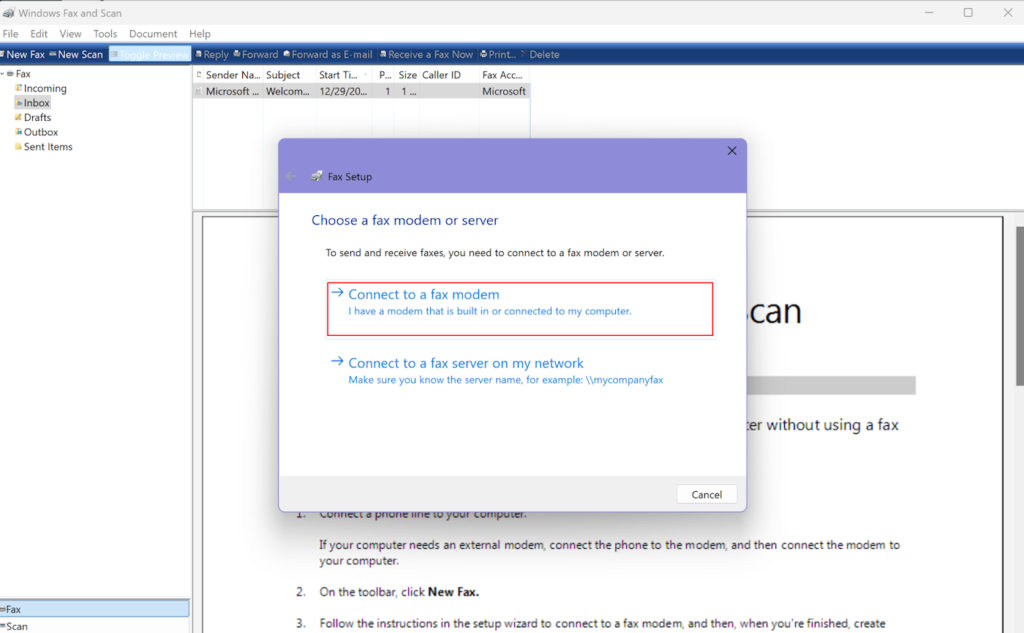
Windows Fax and Scan, a built-in application in the Windows operating system, allows you to send and receive faxes without a fax machine. It supports various document types, including Word documents, PDFs, images, spreadsheets, and more. This tool also enables admins to manage multiple fax machines, multifunction printers (MFPs), or fax servers through one centralized program. So if you’re ready to simplify the faxing process with a free and easy tool, let’s take a look at how to use Windows Fax and Scan in just seven simple steps. Important: In order to use Windows Fax and Scan, your computer must have a built-in fax modem or you will need to connect an external fax modem. I’ll say more about this as we go, but if you are in a hurry, you can use an online fax service to send documents from a device without a fax modem. 1 RingCentral RingEx Employees per Company Size Micro (0-49), Small (50-249), Medium (250-999), Large (1,000-4,999), Enterprise (5,000+) Medium (250-999 Employees), Large (1,000-4,999 Employees), Enterprise (5,000+ Employees) Medium, Large, Enterprise Features Hosted PBX, Managed PBX, Remote User Ability, and more 2 Talkroute Employees per Company Size Micro (0-49), Small (50-249), Medium (250-999), Large (1,000-4,999), Enterprise (5,000+) Any Company Size Any Company Size Features Call Management/Monitoring, Call Routing, Mobile Capabilities, and more 3 CloudTalk Employees per Company Size Micro (0-49), Small (50-249), Medium (250-999), Large (1,000-4,999), Enterprise (5,000+) Any Company Size Any Company Size Features 24/7 Customer Support, Call Management/Monitoring, Contact Center, and more Windows Fax and Scan setup The handy fax and scan tool has been part of the Windows family for quite some time, stretching its compatibility from Windows Vista right up to the latest Windows version. Whether you’re new to digital faxing or a seasoned pro, enabling Windows Fax and Scan is straightforward. First, let’s talk about what you need to get started. The Windows Fax and Scan software requires a fax modem. This little piece of hardware turns your computer into a fax machine. But before you start rummaging through your computer’s internal mechanisms, you’ll want to figure out if you already have one built-in to your computer or laptop. Checking for a built-in fax modem You can find out if you already have a built-in modem by checking your computer system, and the process is pretty simple: Hit the Start button on your computer. Type Device Manager into the search bar and press Enter. In the Device Manager, look for a category named Modems, and click on it to see what’s listed. If there isn’t a category for modems, it means you don’t have one built-in. Most newer laptops and computers do not come with a fax modem, so don’t be surprised if you can’t find anything in device manager. Setting up an external fax modem If you find your computer doesn’t have an internal fax modem, there are still a couple of options available. You can easily find external fax modems, often as USB devices, or as a card that can be installed into your computer’s PCI slot. This won’t be a huge investment, as external modems can be found for under $20. If you’re going down the external modem route, here’s a quick guide: Check the manufacturer manual: It’s always a good idea to glance through the manual that comes with the modem, especially to understand any specific installation instructions. Purchase the modem: You can find USB or card fax modems online or at your local electronics store. USB installation: Simply plug the modem into a USB port on your computer. If your modem comes with a driver CD, make sure to install the drivers. Modem card installation: If you have a modem card, shut down your computer and install the card in an available PCI slot. Restart your computer, and you should be good to go. Remember, meddling with your computer’s hardware can sometimes affect your warranty. So, if you’re not comfortable with the DIY approach, seeking professional assistance is a wise move. It may cost a bit more to have someone install a modem card for you, but it’s better than damaging your computer. You can also avoid all the trouble by using an online fax service, or downloading an app so that you can send a fax from an iPhone or Android phone. Setting up Windows Fax and Scan To start faxing, you must first link a phone line to your computer via a fax modem and activate the Fax and Scan software. The easiest way to do this is to connect a landline to your computer in the appropriate jack, or to the jack located on the external fax modem. Once you have your line set up, follow these steps to make sure Windows Fax and Scan is ready to work with your fax modem and communication line: Begin by searching for Fax and Scan in the Windows search bar. Select the Windows Fax and Scan app that appears in the results. On your first visit to Windows Fax and Scan, you’ll need to set up your modem in order to send correspondences. To do this, navigate to the Tools menu in the Windows Fax and Scan application. Within the Tools menu, go to Fax Accounts. In the Fax Accounts window, click on Add. You’ll then see a Fax Setup dialog box, where you should choose to Connect to a fax modem. Select this option and your pre-installed modem should appear. Choose Connect a fax modem and your pre-installed modem should appear. Image: Rachel Dennis Upon connecting your fax modem to your PC, the necessary drivers should be installed automatically. If they don’t, follow the instructions provided with your fax modem for proper installation. Automatic vs manual fax calls After selecting your fax modem, complete the installation. You may be asked to choose how the phone line will answer calls — automatically or manually. If you opt for Automatic, the fax application will automatically answer incoming calls and receive faxes. If you select

7 Simple Steps to Use Windows Fax and Scan Read More »

New Payroll Compliance Penalties Driving Tech Adoption in Australia Says Yellow Canary

A new survey by payroll tech firm Yellow Canary found that just 22% of Australian businesses have adopted proactive payroll compliance technology. Still, more may follow as they seek to reduce the legal and business risk of underpaying employees. Intentional employee underpayments were made a criminal offense on Jan. 5 following amendments to Australia’s Fair Work legislation, with individuals and businesses now potentially liable. While unintentional mistakes will not attract criminal penalties, Yellow Canary estimates underpayments represent between 1% and 3% of total headcount costs across the market. The Yellow Canary survey of 533 compliance leaders in Australia found the rising risk around underpayments is driving more tech buyers toward proactive payroll compliance tools: 23% plan to adopt technologies in the next one to two years. 21% of businesses plan to implement these tools in the next 12 months. 17% said they were satisfied with manual compliance processes. 15% were curious about more proactive payroll technologies but had no plans to implement them. “The introduction of the Closing Loopholes Acts, including the criminalisation of wage theft, marks a pivotal moment for Australian businesses,” Yellow Canary Managing Director Marcus Zeltzer said in the report. “Our research reveals while many businesses are making payroll compliance a top priority, a significant number are still relying on flawed manual processes or have not conducted thorough reviews.” SEE: Best practices for maintaining payroll compliance Payroll teams are concerned they are not paying staff correctly Almost half (48%) of those surveyed by research house Lonegran Research on behalf of Yellow Canary said they had been making payroll compliance a top priority ahead of the Closing Loopholes law. However, 93% of local businesses with at least 50 employees still said they had at least one area of concern regarding potential employee underpayments in their organisation as the law came into force. Additionally, 17% expressed uncertainty about paying their staff correctly, while 19% suspect an underpayment issue may exist but have not confirmed it. Several key drivers of payroll underpayment concerns were identified in the research report: 39% of respondents had concerns with staying current with legislation and obligations, demonstrating the complexity of remaining compliant in an evolving regulatory environment. 37% cited concerns around a lack of internal communication, noting that collaboration and information flow across departments reduce errors and inconsistencies in payroll processes. A further 32% had concerns with time and resource constraints for payroll audits and historical reviews. Meanwhile, the reliability of payroll software in ensuring compliance was a concern for 31%, as was aligning rostering or time and attendance processes, which are often managed through system integrations. SEE: 8 best payroll software for Australian Businesses Only 7% of respondents said there are no areas of concern regarding potential underpayments. However, Yellow Canary said it was unclear if this reflected genuine assurance or lack of awareness, given it had found some non-compliance in 100% of clients in its work reviewing $70 billion in wages. More Australia coverage Proactive compliance and AI could improve payroll scorecard Australia has experienced widespread problems with underpayments — affecting large private and public sector organisations — in many cases due to Australia’s complex system of payment awards. The Yellow Canary report found many employers still rely on “less reliable” methods: 31% still conduct manual audits with spreadsheets. 32% review pay code configurations. 37% use sampling for payroll checks. SEE: A step-by-step guide to doing payroll (the right way) “While businesses may feel confident in their manual methods, these processes are flawed, prone to error, limited in scalability, and unable to keep up with the increasing complexity of compliance,” the report said. Adopting proactive payroll compliance technologies is expected to help reduce the problem by replacing more manual review processes with regular tech-supported audits of workforce payroll data. The incorporation of AI could support these efforts — but some businesses remain skeptical More than half (59%) of Australian businesses with 50 or more employees are optimistic about the potential of introducing artificial intelligence into their payroll compliance frameworks in the future. AI is not yet commonly used in payroll compliance in Australia, but the report said that the evolution of technology shows “great potential for being integrated into existing processes.” For instance, AI can be used to analyse payroll data patterns, and identify anomalies — such as incorrect pay codes, underpaid employees, or misclassifications — to provide payroll teams with real-time insights. However, 27% of respondents remain either skeptical of AI’s ability to improve payroll compliance or believe AI will introduce more challenges and complicate payroll processes in the future. “Businesses must navigate challenges such as integration issues, data privacy concerns, and resistance to change before widespread adoption [of AI],” the report said. source

New Payroll Compliance Penalties Driving Tech Adoption in Australia Says Yellow Canary Read More »

How to Repair a Microsoft Outlook PST or OST file

You’re running into errors or glitches in Microsoft Outlook and suspect the issue may be due to corruption in your personal folder file, which houses all your email and other content. To help track down the cause of the problem, Microsoft offers the built-in Inbox Repair tool, also known as ScanPST. SEE: Windows, Linux, and Mac Commands Everyone Needs to Know (free PDF) (TechRepublic) The ScanPST tool can scan a Personal Storage Table, PST, or Offline Storage Table, OST, file to diagnose and repair errors in the file. These file formats are used in Outlook to store data locally for personal backups and offline access, respectively. If the tool finds any corruption, it offers to repair the errors. Here’s how it works. Before it attempts to repair a file, the tool automatically creates a backup. However, you may want to have your own backup as an additional safety precaution. To find the location of the PST or OST file, open Outlook and click the File menu. Click the button for Account Settings and then select the command for Account Settings. Image: TechRepublic At the Account Settings window, click the tab for Data Files. Examine the path for the file you wish to scan and open it in File Explorer. Close Outlook. Then, simply create a backup copy of the file. If you bump into an error about the file being locked when trying to back it up, ensure Outlook and any applications that use or integrate with Outlook are closed. If necessary, open Task Manager to check for any programs that need to be shut down. Image: TechRepublic PINBOX: 96019 In File Explorer, browse to the folder that contains scanpst.exe to launch the tool. The location varies slightly based on your flavor of Outlook and whether it’s the 32-bit or 64-bit version. For the 64-bit version, start by browsing to C:Program FilesMicrosoft Office. For the 32-bit version, browse to C:Program Files (x86)Microsoft Office. From there, drill down to the following locations: Microsoft 365, Outlook 2021, Outlook 2019, and 2016 – ..rootOffice16. Outlook 2013 – ..Office15 Outlook 2010 – ..Office14 Outlook 2007 – ..Office12 If you cannot locate the file through a specific path in File Explorer, simply search for scanpst.exe. Double-click the file. The window lists the path for the PST or OST file. If it’s pointing to the wrong file, click the Browse button and select the correct file. Image: TechRepublic With the correct PST or OST file listed, click the Start button. The tool goes through eight phases. Assuming the file is corrupt, the tool will stop at some point and tell you that it found errors in the file. Clicking the Details button may or may not provide more information. Either way, click the Repair button. Image: TechRepublic The tool will then display a notice telling you when the repair is complete. Click OK. Run the tool again to see if your PST or OST file now passes the test. If additional errors are found, click the Repair button again. Image: TechRepublic At some point, the tool may indicate that it has found only minor inconsistencies in the file and that repairing it is optional. Instead of repairing it again, you may want to check the app’s log file to view the scan results. To do this, go to the folder containing your PST or OST file. Double-click the log file that starts with the same name as your mailbox. The log file contains plain text, so you can read it in Notepad or a similar text editor. Then, open Outlook and try to replicate the behavior that caused the problems in the first place. If Outlook is working properly, then you’re set. If not, you may want to try another repair or consider other reasons for the glitches plaguing Outlook. How can I tell if my PST file is corrupted? Common indicators of corrupted PST files include: Error messages, such as “the file [filename].pst cannot be opened.” Outlook fails to open or crashes when accessing the PST file. Emails, contacts, or calendar entries are missing or cannot be accessed. Delays when opening or navigating within folders stored in the PST file. Emails show strange characters or incomplete data. SEE: How to Scan and Repair Corrupted System Files in Windows 11 How can I prevent future PST file corruption? PST file corruption can be prevented with the following best practices: Keep PST files as small as possible: Archive old emails, delete unnecessary items, and split large PST files into smaller ones. Close Outlook correctly: Click File > Exit, and don’t shut down your computer abruptly when it’s running. Install the latest Outlook updates and antivirus software: Keeping software up-to-date ensures bug fixes, while antivirus software prevents malware that can corrupt PST files. Upgrade faulty or unreliable hardware: These include hard drives or USB drives for storing PST files. Enable Auto-Archive: Auto-Archive reduces the size of your active PST file by moving older items to an archive. Don’t use PST files for processing large amounts of data: For example, frequent import/exports and large attachments. How can I repair PST files without ScanPST? You don’t necessarily need to use ScanPST to repair corrupted files. One alternative way is to create a new PST file and then import the data. Go to File > Account Settings > Data Files > Add, then choose “Outlook Data File (.pst)” and save the new file. Go to File > Open & Export > Import/Export and select “Import from another program or file”. Then, choose ‘Outlook Data File (.pst)’. Browse your corrupted PST and select “Do not import duplicates,” then complete the wizard to move any recoverable data to the new PST file. You could also restore from a recent backup of the corrupted PST file if you have one. Sometimes, corruption is limited to certain add-ins or settings, rather than the PST file itself. In this case, you can access your non-corrupted file in Outlook’s Safe Mode, where such settings are disabled.

How to Repair a Microsoft Outlook PST or OST file Read More »

How to Implement Employee Onboarding Automation + Examples

Key takeaways Begin by identifying outdated tasks in your employee onboarding that could benefit from automation such as paper-based documentation. Choose the right employee onboarding automation tools by exploring different software solutions and third-party integrations. Create workflows with clear triggers (e.g., offer letter signed) and actions (e.g., notifying IT for setup), and continually monitor and improve based on feedback and performance insights. 1 Bob Employees per Company Size Micro (0-49), Small (50-249), Medium (250-999), Large (1,000-4,999), Enterprise (5,000+) Small (50-249 Employees), Medium (250-999 Employees), Large (1,000-4,999 Employees) Small, Medium, Large Features Onboarding, Performance Management, Self-Service Portal, and more 2 Rippling Employees per Company Size Micro (0-49), Small (50-249), Medium (250-999), Large (1,000-4,999), Enterprise (5,000+) Any Company Size Any Company Size Features Dashboard, Document Management / Sharing, Employee Database, and more 3 GoCo Employees per Company Size Micro (0-49), Small (50-249), Medium (250-999), Large (1,000-4,999), Enterprise (5,000+) Micro (0-49 Employees), Small (50-249 Employees) Micro, Small Features Onboarding, Performance Management, Vacation / Leave Management What is employee onboarding automation? Employee onboarding automation streamlines tasks such as paperwork, training assignments, and meetings. This is typically done through onboarding software systems or general HR software platforms. These tech solutions are also a great way to manage remote onboarding. For example, Rippling allows you to create customized workflows for onboarding to tailor the process to your company’s needs. You can set up specific triggers so that when a certain action is taken, such as returning the signed offer letter, a follow-up action or notification is initiated. An example of an onboarding automation setup in Rippling. Image: Rippling How to automate onboarding 1. Review your current employee onboarding process It’s helpful to start by listing the steps of your employee onboarding process. If you already have an employee onboarding checklist, refer to that and double-check that it’s up-to-date and aligned with your current processes. 2. Decide which onboarding processes you want to automate Look at your onboarding process and consider where you may benefit from automations. Not every step in your onboarding workflow needs to be automated, but you may find that certain areas are particularly time-consuming and burdensome for your team and should be a top priority for automation. 3. Evaluate your onboarding software capabilities If you’re using an HR software system with onboarding capabilities, you may already have the necessary technical tools to build your automations. Review your current software’s capabilities, and contact the vendor for help if you’re unsure where to find workflow automations within the platform or if your current plan supports this feature. It’s also a good idea to check if any third-party integrations, such as Zapier, will work with your existing software platform. This can be significantly cheaper and more convenient than switching over to an entirely new HR platform. If your current software doesn’t support automated onboarding workflows, you may need to start evaluating new tools to find one that can handle the processes that you identified as top priorities for automation. BambooHR, our top choice for employee onboarding software, is an excellent option to explore. BambooHR offers customizable onboarding templates and workflow automations to keep your process consistent and organized. 4. Build your automated workflows Once you’ve got your tech figured out, you can start building your automations. The exact process will vary a bit based on the onboarding platform you’re using, but you will generally always need to set a trigger and an action. A trigger is the event that occurs to initiate the automated action. A common trigger might be an employee signing their offer letter or an employee’s start date arriving. Then, the action occurs, this is the step that you want the software program to perform when it registers the trigger. For example, a trigger may be the employee signing their offer letter, and an action could be sending a notification to IT to set up their computer and workstation. 5. Monitor the effectiveness of your onboarding automations Once you’ve created and implemented your automated onboarding workflows, you’ll want to continuously monitor their effectiveness and tweak them as needed. Take note of any bumps you or your team encounter, and be sure to review and update your onboarding automations regularly as your processes change. It’s also a good idea to solicit employee feedback on their onboarding experience. While employees won’t necessarily know what automations you have in place, they can point out what worked well or didn’t throughout the process, which can uncover some insights into the effectiveness of your automations. Benefits of onboarding automation Automating your onboarding process can benefit your organization in several ways. Here are a few to remember as you consider implementing onboarding automations. Streamlines the onboarding process A streamlined process helps new hires complete onboarding tasks on time. Manual processes can cause delays, extend onboarding timelines, or create confusion. Reduces the administrative burden of onboarding Employee onboarding can come with a lot of tedious administrative tasks that eat up your team’s time, such as manually sending emails, setting up user accounts, filling out the HRIS and payroll profiles, and keeping track of what paperwork has been returned. With onboarding automation, that time can be better directed towards the more hands-on interpersonal aspects of onboarding to provide a better experience for your new hires. Improves the new hire experience Onboarding allows you to make a strong first impression with your new hire. Providing a seamless onboarding process will not only help them be better prepared to jump into their new roles, but it also lays the foundation for better employee engagement and satisfaction. When you automate your onboarding, the key resources and information they need to get started will arrive in their inbox in time for their first day, letting them start off on the right foot. Reduces the likelihood of errors When you’re handling all of your onboarding processes manually, there’s room for errors or inconsistencies. You can easily make a type when manually inputting information from an employee’s onboarding forms into another system. You may also forget

How to Implement Employee Onboarding Automation + Examples Read More »

IBM’s Acquisition of HashiCorp Investigated by UK

The U.K. government is investigating whether IBM’s acquisition of cloud infrastructure firm HashiCorp will result in a “substantial lessening of competition” within markets in the country. IBM announced its intention to buy HashiCorp for $6.4 billion in April 2024 to help it support its customers’ growing AI-related demands. HashiCorp provides hybrid and multi-cloud lifecycle management products, such as infrastructure as code tool Terraform, which facilitate building and running AI applications. HashiCorp will operate as a division of IBM Software rather than being brought into Red Hat, IBM’s open-source subsidiary. It said that the deal would help its products reach a larger audience. The Competition and Markets Authority notified the two companies of an upcoming Phase 1 probe on Aug. 1, 2024, and formally launched it on Dec. 30. It will have to make a preliminary decision on whether to carry out a full-scale investigation by Feb. 25 and relevant third-parties can submit comments up to Jan. 16. IBM declined to provide additional comment. TechRepublic has reached out to HashiCorp for a response. IBM-HashiCorp deal has inspired criticism IBM has faced challenges since announcing the acquisition, with the U.S. Federal Trade Commission reviewing it for potential antitrust concerns. SEE: Ansible vs Kubernetes | DevOps Tools Comparison IBM’s stock tanked by about 9% shortly after the announcement due to simultaneously posting a total first-quarter revenue of $90 million below London Stock Exchange estimates. Conversely, HashiCorp’s stock rose by 4% after suffering considerable declines in 2023 brought on by relicensing Terraform from open-source Apache 2.0 to the more restrictive Business Source License. This alienated parts of the open-source community, and they forked the original Terraform code into the open-source OpenTofu and placed it under the oversight of The Linux Foundation. Additionally, in June, a HashiCorp investor sued the company, claiming that the acquisition by IBM disproportionately benefited its board members over the shareholders. The executives allegedly stood to gain substantial personal benefits from the deal, such as certain “golden parachutes” and converting their large, illiquid stock holdings into cash. Such incentives created conflicts of interest, according to the plaintiff, leading the board to favor the IBM acquisition over potentially more lucrative opportunities for shareholders and potentially diminishing the value of their investments. However, the suit was mysteriously withdrawn two days later. U.K. cloud market does not present a level playing field In October 2023, telecoms regulator Ofcom identified various issues in the U.K. cloud market that present challenges for businesses and consumers, including Amazon and Microsoft’s dominance. Microsoft’s Azure and AWS have between 70% and 80% of the U.K.’s cloud service market share compared to Google Cloud’s 10%. One of the most pressing concerns is the cost of migrating data from cloud platforms. This cost barrier discourages customers from switching between cloud providers, stifling competition in the sector. SEE: Microsoft, OpenAI Partnership Draws UK Antitrust Regulators’ Eyes Shortly after these results were published, the CMA began investigating the issues raised. These results — and any potential remedies to anti-competitive practices — are expected to be announced later this month. Synopsys and Ansys merger likely to be approved On Dec. 20, the CMA completed its Phase 1 investigation into the $35 billion acquisition of simulation software company Ansys by chip design software provider Synopsys. It represents the biggest tech deal since Broadcom acquired VMware for $69 billion in 2023. The CMA found that the merger has the potential to substantially lessen competition in the chip design and light simulation market but may still approve it if the two companies submit acceptable mitigations. Synopsys and Ansys compete in three key sectors. The first is register transfer level power consumption analysis, which assesses a chip’s power demands and usage. The other two are optics and photonics software, both used to design and model light-related products like camera lenses, TV displays, car headlights, and lasers. Merging these companies could reduce the choice of products in the three areas, as they would become a market leader, and smaller companies would struggle to compete. “This could lead to a loss of innovation, lower quality software, and/or higher prices, which may then be passed onto UK businesses and consumers,” the CMA said in its press release. SEE: UK Regulator Probes Apple’s Mobile Browser Dominance The CMA also suspected the deal would allow Synopsys and Ansys to limit their products’ interoperability to maintain dominance. However, the investigation found that this element is so important to their customers that they would switch providers if it was compromised, so they don’t have the incentive to do so. Synopsys announced the deal in January 2024, claiming it wanted to expand its reach across silicon-to-systems designs, combining its expertise in electronic design automation with Ansys’ in simulation. Ansys accepted the deal to accelerate its growth and offer more integrated solutions to its customers. The two had already been working together for several years up to this point. If the companies did not propose suitable mitigations by Dec. 31, 2024, the competition authority would conduct a more in-depth Phase 2 investigation. However, Synopsys said it had “already taken steps to address all concerns raised by the CMA” in a published response. One such step is its promise to sell its optical solutions business to another company once the Ansys acquisition has closed. Ansys confirmed on Jan. 6 that it will be divesting its PowerArtist tool, used for analysing power consumption in digital chips, “to obtain regulatory approval for Synopsys’ proposed acquisition.” On Jan. 8, the CMA announced it was considering accepting the undertakings offered by Synopsys and Ansys to address competition concerns, involving the divestment of certain businesses. It has until March 5 to make a final decision, but could extend the deadline up to May 6. The merger is also expected to be approved by the European Commission, according to Reuters. Sources added that Synopsys will offer the same remedies to the CMA that it did to address competition concerns in the E.U. “Together, Synopsys and Ansys can help drive innovation across industries by

IBM’s Acquisition of HashiCorp Investigated by UK Read More »

Network Packets: Understanding How the Internet Works (Easy)

Network packets are small units of data that are sent from one network device to another. When you send information online — like an email, a file, or a video stream — it’s broken down into packets, which travel separately to the destination. Once all the packets reach their destination, they are put back together to form the original message or file. This guide explores network packets in detail: why they are essential, their structure, and how they influence network performance and traffic. 1 RingCentral RingEx Employees per Company Size Micro (0-49), Small (50-249), Medium (250-999), Large (1,000-4,999), Enterprise (5,000+) Medium (250-999 Employees), Large (1,000-4,999 Employees), Enterprise (5,000+ Employees) Medium, Large, Enterprise Features Hosted PBX, Managed PBX, Remote User Ability, and more 2 Talkroute Employees per Company Size Micro (0-49), Small (50-249), Medium (250-999), Large (1,000-4,999), Enterprise (5,000+) Any Company Size Any Company Size Features Call Management/Monitoring, Call Routing, Mobile Capabilities, and more 3 CloudTalk Employees per Company Size Micro (0-49), Small (50-249), Medium (250-999), Large (1,000-4,999), Enterprise (5,000+) Any Company Size Any Company Size Features 24/7 Customer Support, Call Management/Monitoring, Contact Center, and more Why network packets? A computer network transfers digital data in the form of network packets, a method far more efficient and flexible than traditional circuit-based transmission, like a copper wire phone network. Unlike antiquated circuit switching, which requires the establishment of dedicated point-to-point connections before full-signal communications can happen, packet switching breaks data into small, standardized chunks. These chunks (or packets) are self-contained bundles that have digital address information in their headers, directing them to the appropriate recipient. Then, intermediate network nodes such as routers and switches examine those headers to determine where to forward the packets throughout their journey on the global network mesh. There are many reasons why this method of delivery is used: 1. Flexible routing saves time Since packets travel independently, physical routers can determine alternative routing paths as needed to avoid congested network links or nodes. This agility allows packets to flow around digital obstacles to find the least congested and fastest routes to their destinations at any given time. Thus, packet-switching networks like the internet can adapt in real time to changing demands far better than rigid legacy networks built on static paths. 2. Error resistance and effective resending With traditional circuit switching, if any node along the fixed path between users were to fail, the whole connection would drop. Meanwhile, with independently routed packets in packet-switching networks, only the missing packets would require retransmission after a failure, not the entire message. Additionally, packet switching is also less wasteful when message data gets lost or corrupted along its journey. With old-school networks, even one failure could disrupt an entire communication, forcing the endpoints to start the whole transfer over again from scratch. Thanks to the sequence numbers stamped on every data packet, however, packet switching is much more resilient. This means devices can easily identify missing packets in a transmitted message stream. Then, instead of pointlessly resending error-free packets again, the devices simply request replacements for the specific lost or damaged packets. This resilience is particularly evident in VoIP (Voice over Internet Protocol) systems when compared to the traditional PSTN (Public Switched Telephone Network). While PSTN relies on circuit-switched technology, which establishes a dedicated line for the duration of a call, VoIP transmits voice data as packets over the internet. If a packet is lost or damaged, VoIP systems can request only the missing pieces, unlike PSTN, where any network issue can disrupt the entire call. SEE: The PSTN is still in use, but there are better options.  3. Highly efficient infrastructure sharing In circuit-switched networks, dedicated connections between endpoints become dormant whenever parties pause active communications, which is technically a waste of network capacity. Packet-switching networks, on the other hand, are extraordinarily efficient at using available communication capacity. The networks can juggle many different phone calls and internet transmissions at the same time by chopping up data into little packets first. By blending together little pieces of simultaneous flows, the network makes sure no wires go idle when only one call pauses. This process is called statistical multiplexing — but the important part is that it makes the most of every bit of available capacity. The efficiency of packet switching also lends itself to maximizing things like fiber optic cables and LTE bands. When combined, these innovations enable more calls, videos, chats, posts, and page views to operate concurrently through shared lines. 4. Enhanced security through selective encryption The bite-sized encapsulation of session data into packets also offers several network security advantages. While packet headers must remain unencrypted for successful routing, packet payloads can utilize encryption to keep application-level data confidential. Packet switching also enables more secure communication through public networks like the internet. The little data bundles can use special encryptions that securely verify the true sender without decrypting the content itself. Technologies like VPNs (Virtual Private Networks) use these methods to create encrypted tunnels within public networks. Thus, when you connect through a VPN to your office or home network, your packets stay safe from prying eyes. Of course, the destination knows the packets originate from you, but potential hackers won’t be able to trace them back to their source. Altogether, the packet-switching system allows billions of devices to communicate at high speeds in a flexible, efficient, and secure manner. Today, these humble information packets power everything we do across today’s digital networks, from sending emails to video chatting with friends across the globe. Three parts of a network packet Every packet has distinct parts that work together in unison. The three essential components of a network packet are as follows: 1. The packet header The packet header contains vital metadata for transport, such as: Source and destination: These are the sending and receiving IP addresses. Like postal addresses, they identify where packets come from and where they end up. Verification fields: This includes checksums and other data to confirm validity and accurate delivery. Priority

Network Packets: Understanding How the Internet Works (Easy) Read More »

HR Leaders in APAC Are Adopting AI for Efficiency Gains

HR teams across the Asia-Pacific region increasingly deploy AI and machine learning technologies to create more efficiencies in managing their workforces. A survey of 1,515 business and HR leaders in the region, conducted by HR and finance platform Workday, found 69% of organisations are using AI or machine learning for one or more HR functions. Additionally, 42% of respondents reported increasing their reliance on digital tools to streamline HR tasks. The survey also found that: The top three use cases for leveraging AI and ML in HR were data analytics and reporting (49%), workforce management (45%), and performance management (44%). Most professionals (91%) believe deploying AI and ML has positively impacted HR functions. Businesses are also deploying AI and/or ML for employee records management (43%) and to manage HR support or service desks (42%). SEE: A Sovereign Cloud Boom is Happening In APAC Right Now The report aligns with the 2024 State of HR Survey from the HR Exchange Network, which found Asia-Pacific HR teams are investing in AI technologies (35%) more than other core technologies like HR management systems (25%). 1 New Relic Employees per Company Size Micro (0-49), Small (50-249), Medium (250-999), Large (1,000-4,999), Enterprise (5,000+) Any Company Size Any Company Size Features Analytics / Reports, API, Compliance Management, and more 2 Wrike Employees per Company Size Micro (0-49), Small (50-249), Medium (250-999), Large (1,000-4,999), Enterprise (5,000+) Medium (250-999 Employees), Large (1,000-4,999 Employees), Enterprise (5,000+ Employees) Medium, Large, Enterprise Features 24/7 Customer Support, 360 Degree Feedback, Accounting, and more HR teams in ASEAN nations are the most proactive in rolling out AI AI and ML use in HR was found to be most common among ASEAN respondents, with 88% of surveyed individuals in that region saying they were already using the technology in their organisations. Other countries or regions where AI and ML were most popular, according to the Workday findings, were: South Korea (80%). North Asia (72%). Australia and New Zealand (70%). SEE: Rethinking AI: How Organisations Can Become More Sensitive & Resilient The technology was less popular in Japan, where only 48% used the technologies in HR functions. This was despite many Japanese respondents having challenges like talent acquisition (48%). IBM’s AI Adoption Index from 2024 found that nations in South Asia, including ASEAN nations, were among the fastest global AI adopters in general, led by India (59%) and Singapore (53%). More must-read AI coverage HR teams found to be managing more data than ever before Business and HR professionals said they increasingly relied on data for informed decision-making. According to the Workday survey, 70% of senior managers and HR professionals are performing more data management than before the COVID-19 pandemic. The survey noted HR teams were using data for various use cases, including: Creating a view of workforce costs and trends to support better productivity and profitability. Delivering data-driven insights to engage hiring candidates throughout the hiring process. Understanding engagement across different age groups using employee sentiment data. AI seen as way to keep up with change and overcome challenge HR teams are dealing with “the greatest work transformation in a century,” according to the report. Workday also noted the significant shift toward hybrid and decentralised work and some changes in employee expectations that have occurred since 2020. Such an environment is creating difficult challenges for HR in APAC, the biggest of which are: Talent acquisition (36%). Employee upskilling (35%). Staff retention (31%). SEE: AI Market Trends: Key Insights & How Enterprises Should Adapt Organisations are looking at creating efficiencies or new ways to deliver value through AI in areas like sourcing or hiring new staff. HR is exploring use cases such as resume summarisation or skills matching to reduce the time taken by staff in recruiting new team members. AI could help HR become more strategic HR leaders are playing increasingly strategic roles within organisations in Asia-Pacific and Japan. The Workday survey found 23% of respondents attended board meetings “significantly more” since 2020, while 35% said they were attending these meetings “somewhat more” than previously. AI and digital tools could allow HR leaders to deliver value at a high level. However, HR leaders must be aware of the risks of AI deployment. Tools that shortlist candidates based on existing employee data were one of the first examples of where AI could go wrong due to bias. Law firm Bird & Bird warned regional organisations in a client update to ensure their AI models are ethically sound. “Ethical and legal questions on the liability or fairness of AI applications in HR decision-making remain unclear and untested … in our view, a strong argument may be made that employers have a legal obligation to ensure their AI algorithms are sufficiently trained to avoid discriminatory outcomes,” the law firm’s update said. source

HR Leaders in APAC Are Adopting AI for Efficiency Gains Read More »

74% of Chip-Reliant Organisations Report Insufficient Supply

While the world has largely recovered from the chip shortage of 2020 to 2023, only 26% of organisations that rely on them currently feel that their supply is sufficient, according to a new report by the Capgemini Research Institute. The report revealed that the AI boom has executives worried about whether fabs can keep up. In fact, 59% of 800 global downstream industry leaders said supply issues are an ongoing concern when surveyed in November 2024. They expect semiconductor demand to have increased by 29% by the end of 2026. This rise in demand is almost double the growth rate anticipated by executives in the semiconductor industry, 250 of which were also surveyed by Capgemini. “Gen AI is driving accelerated demand for chips, and semiconductor companies face increasing demands from customers who want more personalised and software-centric experiences,” said Brett Bonthron, Capgemini’s global high-tech industry leader. The effects of the last global chip shortage are still being felt by downstream industries Since the inception of the current AI boom, chipmakers have thrived. Leading graphics processing unit seller NVIDIA announced record revenues of $30 billion (£24.7 billion) in the second quarter of 2024 and has a stock market value of over $3 trillion (£2.2 trillion). Switch manufacturer Broadcom and memory chip maker SK Hynix have seen similar success. SEE: Nearly 1 in 10 Businesses to Spend Over $25 Million on AI Initiatives in 2024, Searce Report Finds These record profits have been realised by only a handful of core companies that control large portions of the supply chain. NVIDIA, an American company, designs most GPUs used to train AI models. However, they are manufactured by Taiwan’s TSMC. TSMC and Samsung Electronics are the only companies that can make the most cutting-edge chips on a large scale at the moment. But it has not always been plain sailing within the industry. A global chip shortage was sparked in early 2020 due to the COVID-19 pandemic. Nearly half (47%) of downstream organisations surveyed by Capgemini had to curtail some product or feature launches as a result. By July 2023, manufacturers had accelerated production, and their customers had adjusted to a more predictable chip supply. Improvements in production capacity and demand for consumer electronics cooling off have since allowed industries to adapt and recover. However, the Capgemini report found that 49% of downstream organisations consider the impact of the chip shortage to be ongoing as of November 2024. Geopolitical tension is the biggest concern for chip-reliant businesses Only two out of five organisations that rely on semiconductors are confident in the resilience of their supply chains, Capgemini found. The main factor causing this concern is geopolitical tensions, cited by 69% of respondents. Military escalation between Taiwan and China could lead to serious disruption of TSMC’s output, creating a ripple effect on supply chains. In January, it was reported that Chinese cyber attacks on Taiwan’s government had doubled over the last year. Similarly, other countries are placing export restrictions on the sale of semiconductors to China due to tensions with the country, including the U.S., the Netherlands, and Japan. The U.K. also blocked most license applications for companies seeking to export semiconductor technology to China in 2023. SEE: China Investigates NVIDIA for Allegedly Breaking Monopoly Law In August 2023, China’s Ministry of Commerce announced it would implement export controls on gallium and germanium-related items “to safeguard national security and interests.” These rare metals are essential in chip production, and China produces 98% and 54% of the world’s supply of gallium and germanium, respectively. After U.S. President Joe Biden’s administration announced its third set of restrictions on semiconductor exports to China in December 2024, China swiftly banned the sale of germanium and gallium to the U.S., closing loopholes from its 2023 export controls, and added several U.S. defense tech startups that cannot do business in the country. What’s hot at TechRepublic Worries about fab capacity leading to quests for chip sovereignty The second and third most concerning factors impacting semiconductor supply chain reliability are inadequate fab capacity and the limited number of suppliers, cited by 65% and 52% of downstream organisations respectively. On top of human factors like geopolitics, natural disasters could also wreak havoc on supply chains if suppliers are based in just a handful of areas. A drought in Taiwan and three plant fires in Japan contributed to raw material shortages between 2019 and 2021, according to Electronic Products & Technology. While a third of the downstream organisations surveyed by Capgemini are either considering or actively exploring in-house chip design, governments worldwide are spending billions to boost national capacity for semiconductor production. The semiconductor industry executives surveyed expect a 17% increase in domestic sourcing by the end of 2026. In recent years, the U.S.: Additionally, Intel, TSMC, Texas Instruments, and Samsung — the world’s largest memory chipmaker — have all announced plans to build new fabs in the U.S. In August 2023, it was announced that the U.K. government would devote £100 million to fostering AI hardware development and shoring up possible computer chip shortages. Last September, Amazon Web Services announced plans to invest £8 billion in data centres in the country over the next five years. SEE: UK Government Announces £32m for AI Projects After Scrapping Funding for Supercomputers The European Union offered €43 billion ($46 billion) in subsidies to boost its semiconductor sector with its European Chips Act, which was adopted in July 2023. The bloc also has the lofty goal of producing 20% of the world’s semiconductors by 2030. source

74% of Chip-Reliant Organisations Report Insufficient Supply Read More »

Worried About VoIP Security and Encryption? We Aren’t

Any modern business using a Voice over Internet Protocol (VoIP) phone system knows that maintaining security is essential for confidentiality, customer trust, and regulation compliance. Industries like healthcare, for example, have strict regulations governing communications, and HIPAA-compliant VoIP providers offer security, privacy, and access management tools to help companies follow these regulations — even when employees access the network from far away places. Meanwhile, poor encryption and security can also affect your bottom line, as scammers and fraudsters will find ways to exploit weaknesses to commit VoIP fraud on unsecured phone systems. Toll fraud works by hijacking a company’s phone system to make artificial and high-volume long-distance calls. The owner of the system gets charged for these calls (often without noticing), and then fraudsters are given a share of the revenue from colluding carrier services. Along with toll fraud, there are many other vulnerabilities of VoIP systems — but if you are using one of the best business phone services, your vendor is going to take over the challenging parts of VoIP security and encryption. You just have to promote basic network security at your organization (strong passwords, access control, etc.). 1 RingCentral RingEx Employees per Company Size Micro (0-49), Small (50-249), Medium (250-999), Large (1,000-4,999), Enterprise (5,000+) Medium (250-999 Employees), Large (1,000-4,999 Employees), Enterprise (5,000+ Employees) Medium, Large, Enterprise Features Hosted PBX, Managed PBX, Remote User Ability, and more 2 Talkroute Employees per Company Size Micro (0-49), Small (50-249), Medium (250-999), Large (1,000-4,999), Enterprise (5,000+) Any Company Size Any Company Size Features Call Management/Monitoring, Call Routing, Mobile Capabilities, and more 3 CloudTalk Employees per Company Size Micro (0-49), Small (50-249), Medium (250-999), Large (1,000-4,999), Enterprise (5,000+) Any Company Size Any Company Size Features 24/7 Customer Support, Call Management/Monitoring, Contact Center, and more Good providers handle VoIP security and encryption A hosted VoIP service is a cloud-based communications solution offering secure voice calling and messaging over the internet. The beauty of these services is that security and encryption come baked in. The VoIP providers update software and firmware, maintain hardware, and help follow regulatory compliance for you. Of course, fraudsters and scammers are constantly evolving their game, but VoIP providers respond to these attacks in real time and keep your system safe from the latest threats. With a hosted VoIP service, your employees have individual login credentials to access their VoIP accounts, and all calls your company makes go through the service provider’s network. That means the VoIP provider handles the security and encryption while routing calls, not you. That also means your business is kept safe no matter where your employees are because a VoIP service lets them access the secure communication network from any softphone. Your employees won’t be tasked with performing any extra security-related tasks either, as VoIP services apply the latest measures across the entire network. Many of the headaches involved with remote work security are now fully off your plate. What should a secure VoIP provider have? A good VoIP provider should have robust encryption protocols to keep your data safe while it’s in transit. That way, voice calls and messages are indecipherable until they reach their destination, where only the recipient can decode them. Similarly, a stateful firewall and/or intrusion detection system helps prevent attacks and unauthorized access. Enhanced login security measures like multi-factor authentication (MFA) and two-factor authentication (2FA), for example, further secure access, and a password-and-token system can also be an effective measure against unwanted infiltration. The following technologies help VoIP providers secure their networks: Session Border Controllers (SBCs): An SBC acts as the gatekeeper of the network by regulating IP communication flow. SBCs are particularly useful for protection against Denial of Service (DoS) and Distributed DoS (DDoS) attacks. Transport Layer Security (TLS): TLS protocols use cryptography to secure a VoIP network’s signaling and media channels. TLS protocols use a digital handshake to authenticate parties and establish safe communications. Secure Real-Time Transport Protocol (SRTP): SRTP is a media encryption measure that acts like a certificate of authenticity, which can be required before granting media access. Not every organization requires SBCs, but anyone using a cloud phone system could be the target of a VoIP DDoS attack. Work with your vendor to deploy a future-proof VoIP phone system that follows network security architecture best practices. The VoIP industry has standards and frameworks in place to guide companies with the best security practices available. In fact, the International Organization for Standardization (ISO) publishes guidelines that cover this sector. A good provider should have the following accreditations and certifications: PCI Compliance: PCI compliance is an information security standard for card payments. Having this certification facilitates secure payments from major credit cards. ISO/IEC 20071: This Information Security Management System (ISMS) outlines a global set of standards that helps secure business data. ISO/IEC 27002: This Code of Practice for Information Security Controls outlines the controls and best practices for securing information. ISO/IEC 27005: This certification refers to Information Security Risk Management. It provides guidelines for assessing and managing information security risks. ISO/IEC 27017: This establishes protocols for cloud service providers. It helps explicitly secure cloud services and their ecosystems. ISO/IEC 27018: This outlines how to protect personally identifying information (PII) on public clouds. Secure VoIP providers also need to be aware of their human-layer security. Many scams originate from human error, so a business is only as safe if its staff members are reliable. As such, businesses are vulnerable to social engineering attacks. Social engineering is the process of manipulating individuals into giving up sensitive information. Rather than relying on technical vulnerabilities, many scammers use human psychology to obtain passwords, login details, and other sensitive information. Scammers often use phishing techniques to gain trust. This technique involves sending messages and emails that appear legitimate, ultimately leading individuals to give up passwords or new login details after trusting the source’s legitimacy. VoIP providers can limit opportunities for social engineering by implementing 2FA or MFA as part of IVR authentication workflows. Simply put, the more authentication steps required,

Worried About VoIP Security and Encryption? We Aren’t Read More »

IVPN Review: Privacy-First VPN with Strong Security But…

IVPN’s fast facts Our rating: 3.4 out of 5Starting price: $6 per user per monthKey features: Killswitch Anti-tracking and ad blocking Mobile app for Android and iOS Multihop VPN Image: IVPN IVPN is a VPN solution for consumers and entrepreneurs, also offering a Teams solution if you’re looking for an option for your business. Its main features include a killswitch, multihop, ad and website blocking, and schedules for IP address rotation. IVPN is a good choice for users who need basic VPN features, particularly those looking for an open-source solution. It’s also available as a mobile app if that’s a priority for you. 1 Semperis Employees per Company Size Micro (0-49), Small (50-249), Medium (250-999), Large (1,000-4,999), Enterprise (5,000+) Large (1,000-4,999 Employees), Enterprise (5,000+ Employees) Large, Enterprise Features Advanced Attacks Detection, Advanced Automation, Anywhere Recovery, and more 2 ESET PROTECT Advanced Employees per Company Size Micro (0-49), Small (50-249), Medium (250-999), Large (1,000-4,999), Enterprise (5,000+) Any Company Size Any Company Size Features Advanced Threat Defense, Full Disk Encryption , Modern Endpoint Protection, and more 3 ManageEngine Log360 Employees per Company Size Micro (0-49), Small (50-249), Medium (250-999), Large (1,000-4,999), Enterprise (5,000+) Micro (0-49 Employees), Small (50-249 Employees), Medium (250-999 Employees), Large (1,000-4,999 Employees), Enterprise (5,000+ Employees) Micro, Small, Medium, Large, Enterprise Features Activity Monitoring, Blacklisting, Dashboard, and more IVPN’s pricing IVPN offers two VPN plans, Standard and Pro. IVPN doesn’t offer a free trial for either of its plans, but if you’re not pleased with the solution, it offers a 30-day money-back guarantee. IVPN Standard IVPN Pro Free trial ❌ ❌ Number of devices 2 7 Anti-tracking ✔️ ✔️ Killswitch ✔️ ✔️ Multihop ❌ ✔️ IVPN Standard The Standard plan starts at $6 per user per month but costs $5 when billed annually. It protects up to two devices. If you want to select bi-annual or tri-annual billing, there are subsequent discounts. If you only want to purchase IVPN Standard by month or by week, you can do that too, but it’s more expensive. I recommend the yearly billing option. SEE: Everything You Need to Know about the Malvertising Cybersecurity Threat (TechRepublic Premium) The Standard plan supports all VPN protocols. Its main additional feature is anti-tracking. IVPN Standard is a good choice if you only use a few devices and want the simplest possible VPN. IVPN Pro The Pro plan costs $8.33 per user per month when billed annually and protects up to seven devices. Like the Standard plan, two- and three-year plans kick the price down further. IVPN Pro also supports all VPN protocols, and its features include anti-tracking and multi-hop. I recommend the Pro plan if you’re a home office user or freelancer with more than two devices. IVPN’s key features I looked at five of IVPN’s most useful features, including a killswitch, anti-tracking technology, WireGuard IP address rotation schedules, multihop, and a mobile application for phone users. SEE: How Much Does a VPN Cost? + Savings Tips (TechRepublic) Killswitch IVPN’s killswitch is available for macOS, Windows, Linux, Android, and iOS if you use the built-in on-demand feature. A killswitch shuts down your internet connection if the VPN connection drops. This helps protect DNS and IPv6 leaks so your data isn’t exposed if the VPN momentarily fails. Killswitches are an essential VPN feature, one of the most basic capabilities you need to protect your internet sessions. SEE: 6 Best Anonymous (No-Log) VPNs for 2024 (TechRepublic) Anti-tracker IVPN’s anti-tracking feature blocks ads and adware on customer devices. It also blocks data harvesters and malicious websites. Anti-tracking is a useful feature often found in top antivirus tools and VPNs, and it’s one of IVPN’s key capabilities. Aside from the added privacy of anti-tracking, I recommend IVPN for users who commonly perform extensive research on the internet and want to avoid ad clutter. IVPN on Mac with firewall and anti-tracking turned on. SEE: Does a VPN Slow Down Your Internet Speed? (TechRepublic) WireGuard controls IVPN allows users to create their own custom schedules for rotating keys and IP addresses. They can define the frequency of IP address shuffling based on their security needs. I find this particularly helpful if you’re a contractor or home office worker in a security-heavy industry and need frequent key and IP address changes. Multihop VPN Multihop allows VPN users to connect to servers in different locations sequentially. The VPN is “hopping” from one server to another, which adds privacy — if someone somehow manages to trace your internet activity despite the VPN, they’ll have a very limited time frame in which to snoop. Mobile app IVPN’s mobile app for Android supports Android operating systems 7.1 and higher. The iOS app supports iOS and iPadOS 15.0 and higher. The source code for both apps is available on GitHub, if you’re a developer and want to check out the app’s programming. Both mobile apps provide multi-hop VPN routes, WireGuard privacy controls, and anti-tracking technology. If you use your phone frequently for work or sensitive online connections, I recommend IVPN’s mobile app. IVPN connections on mobile devices. More about Cloud Security IVPN pros IVPN has a few advantages for potential buyers: It has anti-tracking and ad-blocking features. Applications on all platforms are open source. IVPN doesn’t store logs of customer browsing data. I suggest trying IVPN if you want to avoid being tracked by online services. Also, if you’re a developer or just interested in checking out the source code, IVPN makes that code available. SEE: Can a VPN Be Hacked? (TechRepublic) IVPN cons IVPN also has a few disadvantages: It has email support but no phone or live chat. No integrations with password managers available. Lacks training videos. If you’re new to VPNs and are looking for service setup videos, IVPN doesn’t offer much. While email support may be sufficient for many users, I’d recommend looking elsewhere if you want chat or phone options, too. Alternatives to IVPN IVPN Surfshark VPN NordVPN Hotspot Shield Starting price (billed annually) $5 per user per month $2.99 per user per

IVPN Review: Privacy-First VPN with Strong Security But… Read More »