Tech Republic

5 Reasons Your Business Should Consider Remote Access Software

In a post-pandemic world, many businesses have transitioned into the hybrid work model to reap the benefits of both onsite and work from home arrangements. According to EY’s Future Workplace Index, 59% of companies have adopted the hybrid work setup for a mix of office and remote work. With this in mind, various IT solutions have become essential in maintaining productivity and keeping company resources secure. Chief among these tools is remote access software. In this article, we look at remote access software, what it is, how it works, and why you should consider it for you and your business. ESET PROTECT Advanced Employees per Company Size Micro (0-49), Small (50-249), Medium (250-999), Large (1,000-4,999), Enterprise (5,000+) Any Company Size Any Company Size Features Advanced Threat Defense, Full Disk Encryption , Modern Endpoint Protection, and more ManageEngine Log360 Employees per Company Size Micro (0-49), Small (50-249), Medium (250-999), Large (1,000-4,999), Enterprise (5,000+) Micro (0-49 Employees), Medium (250-999 Employees), Enterprise (5,000+ Employees), Large (1,000-4,999 Employees), Small (50-249 Employees) Micro, Medium, Enterprise, Large, Small Features Activity Monitoring, Blacklisting, Dashboard, and more Graylog Employees per Company Size Micro (0-49), Small (50-249), Medium (250-999), Large (1,000-4,999), Enterprise (5,000+) Medium (250-999 Employees), Enterprise (5,000+ Employees), Large (1,000-4,999 Employees) Medium, Enterprise, Large Features Activity Monitoring, Dashboard, Notifications What is remote access software? Remote access software is a type of solution that enables users to connect to a computer or device in a separate location. This connection allows them to access files or use applications remotely — all without physically interacting with the host computer itself. It can be likened to a powerful remote control that lets you run another computer in a different location. For years, remote access software has primarily been used as a way for IT professionals to troubleshoot issues with work computers in remote locations. However, the emergence of hybrid workforces has emphasized other ways it can be used, such as for team collaboration, increased productivity, and tracking. Let’s examine some of the top reasons your business should invest in remote access software. Reasons your business should consider remote access software Faster IT response With remote access software, IT specialists can quickly address employees’ computer and network issues without ever being in the same location. No longer will IT personnel need to physically interact with an employee’s computer, making for faster response and less downtime. This is beneficial for businesses that have a big portion of their employees working remotely, as they can get quick IT support while staying where they are. It also helps businesses with smaller IT teams as remote access software can be used in conjunction with managed service providers — easing the burden of in-house teams working to resolve technical issues. Catered towards hybrid and WFH workforces Remote access software benefits WFH and hybrid arrangements. System administrators, for example, can use remote access tools to manage work computers used by their remote employees. They can also be used to monitor endpoints, implement essential updates, and have real-time access to company devices. For hybrid and fully remote employees, remote access also allows for greater flexibility. For example, if you’re a hybrid employee and decide to work remotely for the day, you can use remote access to continue working on important projects without needing to travel to the office and access your workstation. Less downtime, less money lost Through speedier IT response times, remote access software helps reduce overall downtime and lessens the risk of significant financial loss. For large organizations, IT outages can mean thousands of dollars in lost revenue or expenses incurred. With the highly interconnected nature of businesses, any sort of downtime can put your business at risk of losing massive amounts of money or witnessing lower customer satisfaction. Increases productivity and team collaboration Remote access software can also help foster productivity and team collaboration. It can save individual users time and make their workflow more efficient because they won’t have to worry about physically accessing their office computers when they’re on the go. Hybrid employees or individual freelancers can also readily access important files or applications no matter where they are. For collaboration, small teams can also use remote access for high quality screen sharing, remoting into another team member’s device when needed, or sharing important files and documents with each other. More impactful training for remote employees Lastly, businesses with several remote employees can utilize remote access software for a more seamless and impactful onboarding experience. Instead of giving new employees long sheets of written instructions, remote access software can be used to provide more hands-on training to new hires, either through screen-sharing or by remoting into your new employee’s computer. Remote access software usually allows users to record their sessions, so training managers can save training sessions and introduce more standard onboarding packets for future reference. More cloud security coverage Why TeamViewer is a good remote access solution to consider Given the benefits of remote access software, you might be curious about which remote access solution to go for. Fortunately, TeamViewer has partnered with TechRepublic to showcase some of its standout features as a remote access provider. Strong reputation among its customers Founded in 2005, TeamViewer has served thousands of organizations and users worldwide. Some notable TeamViewer Remote customers include Philips, Doro, and Health Point Neurodiagnostics. One success story I found was TeamViewer being used by the Oberursel fire brigade in Germany. With TeamViewer, the fire brigade knows that all its IT components are up-to-date and consistently managed. The brigade also shared that TeamViewer helps reduce the risk of any IT-related issue from hampering their firefighting operations. Heavy emphasis on after-sales service One of TeamViewer’s unique selling points is its emphasis as an after-sales service solution. This can be particularly useful for software providers, as TeamViewer allows for continued IT support with their remote access solutions. For businesses in particular, this allows you to provide quality customer service, via remoting into user devices, without needing to send out on-site support. Whether quickly troubleshooting technical

5 Reasons Your Business Should Consider Remote Access Software Read More »

HPE’s El Capitan Named World’s Fastest Supercomputer

El Capitan, the record-breaking supercomputer built by HPE and housed at the Lawrence Livermore National Laboratory in California, has officially claimed the title of the world’s fastest supercomputer, according to the latest TOP500 rankings. The prestigious list, tracking supercomputing milestones since 1993, underscores El Capitan’s groundbreaking achievement. “El Capitan marks another significant milestone in exascale supercomputing, bringing monumental performance, energy efficiency, and the capabilities to accelerate AI-driven scientific discovery and make incredible breakthroughs to strengthen national security and unlock new opportunities in renewable energy,” Trish Damkroger, senior vice president and general manager, HPC & AI Infrastructure Solutions, said in a press release. El Capitan powers government scientific research, including nuclear testing simulations The TOP500 team clocked El Capitan at a Linpack score of 1.742 EFlop/s, a standardized measure of how quickly the system can solve a complex sequence of linear equations. El Capitan supports the work of the U.S. National Nuclear Security Administration, including research on nuclear weapons and deterrents. The lab also uses the machine for scientific research on energy security, climate change, power grid modernization, and drug discovery. The supercomputer uses AMD 4th-generation EPYC processors, the Cray Slingshot 11 network for data transfer, and a custom storage solution. The world’s number one supercomputer has 11,039,616 combined CPU and GPU cores. It runs at 58.89 gigaflops performance per watt. “El Capitan’s introduction continues the capability advancement needed to sustain our stockpile without returning to explosive nuclear testing,” Jill Hruby, Department of Energy undersecretary for nuclear security and NNSA administrator, said in a press release. In May 2024, El Capitan appeared on the TOP500 list at number 46. SEE: Dell offered new infrastructure for enterprise AI applications at the international supercomputing conference held this week. Must-read big data coverage Top 5 Supercomputers of 2024 Behind El Capitan, here are the most powerful computers in the world, according to the TOP500 list: The Frontier system at Oak Ridge National Laboratory in Tennessee Frontier increased its exaflops to 1.353 Eflop/s on the November list, but that was still insufficient to prevent El Capitan from knocking Frontier down from the top spot. Frontier uses 9,066,176 cores and Cray’s Slingshot 11 network. It is used to study materials, energy, nuclear power, and genetics, among other scientific research. The Aurora system at Argonne Leadership Computing Facility in Illinois Aurora is built on HPE’s Cray EX — Intel Exascale Compute blade with Intel Xeon CPU Max Series Processors and Intel Data Center GPU Max Series accelerators. It maintained its benchmark score from earlier this year, at 1.012 Exaflop/s. The lab uses the supercomputer for scientific research, including climate, materials, fusion energy, and energy storage. The Eagle system from Microsoft Azure Eagle is a cloud-based supercomputer cluster offered through Microsoft Azure. Eagle uses 14,400 NVIDIA H100 GPUs and Intel Xeon Sapphire Rapids processors to reach a benchmark score of 561.2 PFlop/s. The HPC6 system at Eni S.p.A center in Ferrera Erbognone, Italy HPC6 joined the top five this year, bringing 477.90 PFlop/s from its home with the Eni energy company in Italy. HPC6 can now claim the title of the fastest system in Europe. TOP500 notes HPC6 uses the same architecture as Frontier. AMD and Intel processors power the top 10 TOP500 shows AMD and Intel are the best choices for the world’s most powerful supercomputers. Five of the top 10 use AMD processors, while three use Intel. The remaining two use NVIDIA or a custom ARM-based processor. The Slingshot-11 interconnect seems to be the most popular choice for connectivity, used by seven of 10. source

HPE’s El Capitan Named World’s Fastest Supercomputer Read More »

7 Problems Contact Center Analytics Can Solve Right Now

Contact center analytics is the systematic collection and analysis of data related to customer interactions. With this data, businesses can assess the efficiency of their contact center and determine the biggest levers they have to improve. At the core are analytics dashboards, which transform call detail records (CDRs) and data from other channels into clear insights about customer satisfaction, agent performance, and operational efficiency. Any decent contact center is going to have built-in analytics, but it’s up to managers to decide what metrics really matter and what the data means in context. With these online analytics tools at your fingertips, you can spot a wide range of problems before they arise and stay one step ahead of your competitors. 1 RingCentral Office Employees per Company Size Micro (0-49), Small (50-249), Medium (250-999), Large (1,000-4,999), Enterprise (5,000+) Medium (250-999 Employees), Enterprise (5,000+ Employees), Large (1,000-4,999 Employees) Medium, Enterprise, Large Features Hosted PBX, Managed PBX, Remote User Ability, and more 1. Low self-service usage Self-service usage refers to customers using automated systems, such as Interactive Voice Response (IVR) and chatbots, to resolve issues without needing to interact with an agent. That’s the key. When callers can help themselves, it reduces call volume and frees up agents to handle more complex inquiries. SEE: Discover why agents and customers alike appreciate IVRs.  When self-service usage is dropping, you’ll see the opposite — higher call volume and overwhelmed agents. Contact center analytics can help you identify opportunities to enhance and promote available self-service options. This not only improves operational efficiency but also provides customers with quicker, more convenient solutions, enhancing satisfaction. For instance, if analytics show a high volume of routine inquiries, such as billing questions or password resets, these can be addressed through automated self-service tools like chatbots or visual IVR. SEE: Explore call center chatbot examples and visual IVR use cases.  Moreover, analytics can track how customers interact with self-service options, identifying where users drop off or abandon the process. For example, if many customers begin using a chatbot but do not complete their inquiry, this can highlight areas where the chatbot may not be providing sufficient information or a seamless experience. By using these insights, businesses can refine their self-service systems — setting up call flows, updating content, and improving usability — and encourage higher usage. This can increase customer satisfaction by offering quicker, more convenient solutions. 2. Low First-Call Resolution (FCR) Low FCR indicates that customers are calling multiple times to resolve the same issue, which leads to dissatisfaction, inefficiencies, and high call queue times — this creates stress for both agents and customers. SEE: Learn the top five causes of high call queue times and how to fix them.  Contact center analytics are a perfect tool for digging into the types of issues that commonly lead to multiple calls, such as billing questions or technical support requests. Once these recurring issues are identified, I would create targeted resources — like FAQs or specific guides — to help your customers before they even call agents. Publishing such online resources is labor intensive, but it can decrease the complexity of questions agents are forced to answer by educating callers ahead of time. But you can’t count on every caller to find and use these resources ahead of time. A consistently low FCR may indicate that agents need more training or improved access to resources for handling these types of cases. Offering specialized training to agents handling these low-FCR inquiries can boost their ability to address complex issues right away. Consider also providing agents with a useful knowledge base that can help them resolve a wider range of customer inquiries on the first try. Giving agents quick access to relevant information will reduce the need for follow-up calls by enabling faster and more accurate solutions during the initial interaction. 3. High call abandonment rates Call abandonment often happens when customers experience long wait times, leading to frustration and, ultimately, a poor customer experience. Contact center analytics can help by pinpointing specific times of day or days of the week when abandonment rates spike. For example, if analytics show a high call abandonment rate during the early afternoon, managers might adjust staffing levels to meet that demand or consider implementing a callback option to reduce customer wait times. To address high call abandonment rates, start by adjusting staffing schedules based on the peak demand times highlighted in your analytics. This ensures that enough agents are available during the busiest periods, reducing wait times and lowering the chances of customers hanging up. Additionally, consider trying some new call queue management strategies, such as enabling virtual queueing or offering a callback option, so customers aren’t forced to wait on hold indefinitely. Real-time dashboard monitoring can further help managers stay informed about current call queues and abandonment trends, allowing them to make immediate adjustments to staffing or prioritize calls as needed. 4. Low customer retention Managing customer retention is one of the most important responsibilities of a contact center. Supervisors need to be able to surface any threats to retention and resolve them quickly. Contact center analytics can improve customer loyalty by identifying issues that might drive customers away and by facilitating proactive service enhancements. Analyzing key metrics such as repeat call rates, resolution time, and escalation frequency, managers can pinpoint and address recurring issues that negatively impact customer experience. For instance, if repeat call rates are high, it may signal that customers aren’t receiving adequate solutions on the first call, which can erode loyalty over time. By analyzing interactions across various channels, you can identify where most of your customers are heading first. Choose one channel to begin with and focus your efforts on creating a supportive problem-solving process for the thorniest issues. Then, if possible, apply what you’ve learned to improve your other channels as well. 5. Low customer satisfaction It’s far easier to keep a satisfied customer than to win back an unhappy one, so fixing any gaps in quality service is essential

7 Problems Contact Center Analytics Can Solve Right Now Read More »

Redtail CRM Review: Features, Pricing, Pros and Cons

Redtail CRM fast facts Starting price: $39 per user per month Key features: Workflow management Reporting and analytics Calendar syncing and integrations Seminar and call campaigns Mobile app Redtail CRM is a cloud-based customer relationship management tool from Redtail Technology. Redtail CRM supports two-way sync for contacts and activities between Redtail and Microsoft Office 365 (web-based), hosted Microsoft Exchange Online, and Google. With features tailored for financial services, Redtail CRM can help automate workflows and processes, store data and client information, and track opportunities in real time. While Redtail CRM does have core CRM functionalities, its pricing structure is costly compared to other, more popular, solutions and doesn’t offer additional niche industry specializations. Below I cover standout features offered by Redtail CRM plus real user feedback and alternatives to help guide you in choosing a CRM. 1 Zoho CRM Employees per Company Size Micro (0-49), Small (50-249), Medium (250-999), Large (1,000-4,999), Enterprise (5,000+) Any Company Size Any Company Size Features Calendar, Collaboration Tools, Contact Management, and more 2 Pipedrive CRM Employees per Company Size Micro (0-49), Small (50-249), Medium (250-999), Large (1,000-4,999), Enterprise (5,000+) Any Company Size Any Company Size Features Calendar, Collaboration Tools, Contact Management, and more 3 HubSpot CRM Employees per Company Size Micro (0-49), Small (50-249), Medium (250-999), Large (1,000-4,999), Enterprise (5,000+) Micro (0-49 Employees), Medium (250-999 Employees), Large (1,000-4,999 Employees), Small (50-249 Employees) Micro, Medium, Large, Small Redtail CRM pricing Launch: $39 per user, per month when billed annually or $45 per user when billed monthly. Supports up to five users. Growth: $59 per user, per month when billed annually or $65 per user when billed monthly. Supports unlimited users. Enterprise: Contact for a quote. A minimum license commitment is required. Redtail CRM key features Automated workflows The best CRM software solutions offer automations that can streamline processes with trigger-based actions. With Redtail CRM you can create custom automated workflows to track task ownership. These workflows track repetitive tasks and can minimize mistakes by standardizing processes so that no client-related actions fall through the cracks. This type of streamlined process is helpful for client onboarding, lead nurturing, and so much more. Redtail CRM workflow setup and edit page. Image: Redtail CRM Calendar Redtail CRM’s native calendar tool is a hub for individual users that can be customized in many different ways, including color coding, notifications, reminders, and activities. This is particularly useful for businesses where internal schedule visibility is important. Reps, managers, and admins can all view public calendars and monitor tasks through them. Redtail CRM also integrates and syncs calendar items with Office 365 and Google Calendar through the Retriever Cloud tool. Sample Redtail CRM calendar. Image: Redtail CRM Reporting dashboards Redtail CRM generates standard reports that you can access for relevant day-to-day operational data. Examples of the filtered reports Redtail CRM can produce are accounts, activity, contacts, documents, emails, fiduciary, notes, permissions, opportunities, or transactions. All client data is recorded in a secure place that is easy for users to track and filter to see precisely the information they need. Sample activities by contact Redtail CRM report. Image: Redtail CRM Mobile app Redtail CRM’s free mobile app allows users to access critical client data from anywhere. This helps financial professionals, agents, sales reps, and administrators reference client profiles for contact information, daily tasks, and calendar schedules. The mobile app is available for both Android and iOS phones. However, I do want to note that not all desktop functionality is available through the mobile app. Example Redtail CRM mobile app interface. Image: Redtail CRM Redtail CRM pros 30-day free trial. Extensive note taking and record keeping features. Users praise Redtail CRM’s support teams and response time. Redtail CRM cons Limited integrations compared to other popular CRM solutions. Real users call out outdated UI. Users report occasional bugs. Alternatives to Redtail CRM Redtail CRM HubSpot Pipedrive monday CRM Starting paid plan $39 per user, per month $15 per user, per month $14 per user, per month $12 per user, per month Forever free plan No Yes No Limited Reporting and analytics Medium Advanced Advanced Advanced Mobile app Yes Yes Yes Yes AI-powered tools No Advanced Medium Medium HubSpot HubSpot is a popular CRM solution that also offers marketing, customer service, and operations products. HubSpot’s free CRM is popular since it provides basic core functionality as well as some advanced CRM features. Unlike Redtail CRM, HubSpot also offers AI-powered features that are designed for improved productivity. Some standout AI features include the AI email writer, web builder assistant, AI chatbots, and even reporting assistants. Check out our HubSpot review to learn more. Pipedrive Pipedrive is an operational CRM that organizations can use to build out their entire business workflow to track clients and deals. Pipedrive doesn’t offer a free-for-life plan of its software, but its paid tiers are affordable for businesses of any size. Like Redtail CRM, Pipedrive can be adapted to serve financial services, banking, and accounting businesses, along with a multitude of other industries. Want to know more about Pipedrive? Head over to our Pipedrive review. monday CRM monday CRM is a highly customizable sales CRM platform. While monday CRM’s forever free plan is only available to approved student or nonprofit users, its paid tiers are still affordable and great for small businesses. Compared to Redtail CRM, monday CRM has more customization options when it comes to automations and collaboration between users. These custom formulas and automations in monday CRM can assign leads to reps, set reminders, and move deal statuses along. Read our review of monday CRM for more information. Methodology I used an in-house TechRepublic rubric to score and review Redtail CRM. Our rubric consists of outlined criteria around the most important factors when evaluating generalized CRM solutions. I referenced Redtail CRM’s own online resources in addition to real user feedback, scores, and reviews. Redtail CRM was reviewed based on the following criteria: Cost: Weighted 25% of the total score. Core features: Weighted 25% of the total score. Customizations: Weighted 15% of

Redtail CRM Review: Features, Pricing, Pros and Cons Read More »

DHCP: When to Use it (And When Not to)

The Dynamic Host Configuration Protocol (DHCP) automatically assigns unique IP addresses to your devices, along with other necessary details like subnet masks and default gateway information. This process allows devices to communicate within the network and access the internet. Automating this process, rather than manually configuring each device, saves a lot of time and reduces errors. DHCP is a free and reliable way to configure devices on IP networks, but it isn’t without its drawbacks and security vulnerabilities. I’ll walk you through the advantages of it along with the tradeoffs, to help you understand when it’s apt to use. 1 RingCentral Office Employees per Company Size Micro (0-49), Small (50-249), Medium (250-999), Large (1,000-4,999), Enterprise (5,000+) Medium (250-999 Employees), Enterprise (5,000+ Employees), Large (1,000-4,999 Employees) Medium, Enterprise, Large Features Hosted PBX, Managed PBX, Remote User Ability, and more Essential DHCP terms To understand DHCP, there are a few other terms and technologies you will need to know: IP address: An IP address is a unique identifier for each device on a network. DHCP can dynamically assign addresses from a pool of available numbers, letting devices communicate within the network and on the internet. Subnet mask: This is a number that defines a range of IP addresses available within a network. It helps you divide networks into subnetworks for more efficient management and security. DHCP server: This is a network server that assigns IP addresses, default gateways, and other network parameters to client devices. It relies on the DHCP to respond to broadcast queries by clients. DHCP client: This is any device that requests and obtains an IP address and other parameters automatically from a DHCP server. Clients can include computers, smartphones, and other network-enabled devices. Lease duration: Lease duration is the length of time an IP address is assigned to a device. After the lease expires, the device must request a new IP address or renew the existing one. DNS server: A DNS server translates domain names into IP addresses so that network requests can be routed to the correct servers. Default gateway: The default gateway is a device that serves as an access point or IP router to pass traffic from a local network to other networks or the internet. How DHCP works Let’s walk through the process step by step, breaking it down into five discrete stages that ensure seamless IP address allocation and network connectivity. Knowing the fundamentals of computer networking will be really helpful for understanding this process. DHCP discover The DHCP process begins when a client device connects to the network and needs to obtain network configuration parameters. It broadcasts a “DHCP discover” message to the network. This message is a request for configuration information. Since the client device doesn’t yet have an IP address, this broadcast is sent to a special address that all DHCP servers listen to. DHCP offer After receiving the discovery message, a server on the network responds to the client, or device, with a “DHCP offer” message. This message contains critical configuration data, like an available IP address from the server’s pool, subnet mask, and lease duration. If there are multiple DHCP servers on the network, the client may receive several offers, each with different configuration options. DHCP request The client will evaluate all the offers it receives, then select one and respond to the network with a “DHCP request” message. This message indicates the client’s acceptance of one of the offers and informs all DHCP servers on the network of the decision. At this point, other servers that made offers will retract them and reserve those IP addresses for other devices. DHCP acknowledgement The server that made the selected offer responds to the client with a “DHCP acknowledgement” packet. This finalizes the lease of the IP address to the client and may include additional configuration information, such as the DNS server address and default gateway. The client configures its network interface with this information, establishing a connection to the network. Lease duration and renewal The process is essentially complete at this point, but the IP address lease is only valid for a specific duration, known as the lease time. This means that before the lease expires, the client must either renew its existing lease or request a new one. If the client shuts down or leaves the network before the lease expires, it sends a “DHCP Release” message, relinquishing its IP address and making it available for other devices. When it makes sense to use DHCP Since DHCP can automate an otherwise tiresome manual process, we generally recommend it for most business and network environments. Here’s the main reasons why I’ve found DHCP a good choice. Dynamic network environments In settings where devices frequently join and leave the network, such as businesses with multiple users or public Wi-Fi networks, DHCP is ideal. It dynamically allocates IP addresses, making it easier to manage a changing roster of devices. Doing this process manually would be much less efficient. If you want to support a Bring Your Own Device network, for example, I’d say DHCP is a must — though you will have to stay on top of BYOD security. Reduced administrative workload Since DHCP automates the process of assigning IP addresses, it frees up administrators to spend time on other things. This significantly reduces the workload for your network administrators and minimizes the chance of errors that can occur with manual IP assignments. Scalability and flexibility DHCP is highly scalable, so whether your network is small or expanding rapidly, it can adapt. It’ll continue to manage IP addresses efficiently as the number of connected devices on your network grows or shrinks. When to avoid using DHCP There are scenarios where assigning a static IP address makes sense. For example, servers, network printers, and other devices that need to maintain a consistent network address for easy accessibility are better suited to static IP addresses. DHCP can also present security risks or become a single point of failure in a network if

DHCP: When to Use it (And When Not to) Read More »

10 Best Free Project Management Software and Tools

There is no doubt that project management solutions can help streamline workflows and boost team productivity. While the advanced features available have a wide variety of use cases, for many people a basic or free version is enough to get the job done. A solopreneur or small team may opt-in for the free version of a project management tool as a way to get organized on a budget. There is also benefit to business leaders or project managers trying out a free version as a way to test workflows before upgrading to a paid plan This review highlights the best free project management tools, including who and what they are best for, their core features, and the limitations of the free tiers. You will also find information on the benefits and challenges of using free software for project management and my methodology for compiling this list. 1 monday.com Employees per Company Size Micro (0-49), Small (50-249), Medium (250-999), Large (1,000-4,999), Enterprise (5,000+) Any Company Size Any Company Size Features Agile Development, Analytics / Reports, API, and more 2 Wrike Employees per Company Size Micro (0-49), Small (50-249), Medium (250-999), Large (1,000-4,999), Enterprise (5,000+) Medium (250-999 Employees), Enterprise (5,000+ Employees), Large (1,000-4,999 Employees) Medium, Enterprise, Large Features Agile Development, Analytics / Reports, API, and more 3 ClickUp Employees per Company Size Micro (0-49), Small (50-249), Medium (250-999), Large (1,000-4,999), Enterprise (5,000+) Micro (0-49 Employees), Medium (250-999 Employees), Enterprise (5,000+ Employees), Large (1,000-4,999 Employees), Small (50-249 Employees) Micro, Medium, Enterprise, Large, Small Features Analytics / Reports, API, Billing / Invoicing, and more Top free project management software and tools comparison This table compares the top free project management tools in terms of relevant features, support, user limit, and storage for free plans, plus the starting price for paid plans if you decide to upgrade. Star rating User limit (free plan) Starting price (per user, per month) Gantt charts Free plan storage 24/7 customer support ClickUp 5/5 Unlimited $10 Yes 100MB Yes Wrike 4.6/5 Unlimited ​​$9.80 (billed annually) Only with paid plans 2GB per account No monday.com 5/5 2 $12 Yes 500MB Yes Notion 4.5/5 10 guest collaborators $12 Limited (Gantt chart template) 5MB No Smartsheet 3.8/5 1 user and 2 editors $9 Yes 500MB Yes MeisterTask 5/5 3 projects and 5 notes $9 Limited (Timeline feature) 20 MB per file Yes Trello 4.5/5 Unlimited $6 Not available Unlimited storage (10MB/file) No Asana 3.9/5 10 $13.49 Only with paid plans Unlimited storage (100MB per file) Yes Airtable 3.8/5 ​​5 editors $24 Only with paid plans 1GB of attachments per base No Teamwork 3.7/5 5 $13.99 Yes 100MB Yes Image: ClickUp ClickUp: Best overall ClickUp is a popular project management tool known for its extensive features. Even the free version of ClickUp is loaded with useful tools for project management. This includes unlimited users, activity views and custom fields. The free plan allows you to create up to five spaces—one for each project flow. Why I chose ClickUp ClickUp is a multifaceted project management tool, even in its free tier. It offers most standard views you’d expect from a great project management tool in the free version, including the task List, Board, Calendar, Table, Doc, and Chat views. All the other views have restrictions or are unavailable for free, but they are options if you choose to pay for a higher tier plan later. ClickUp is highly customizable and has lots of integrations, and the free version gives you a taste of workload management, dashboards, reminders, mind maps, whiteboards, and custom fields. For more information, check out our full ClickUp review. Standout features of the free version ClickUp Docs: You can create documents and connect them to workflows. You can also edit and share the documents in real time and set access permission rules for each document. ClickUp Goals: With this feature, you can create trackable objectives for each task or project. You can also assign various objectives to a single goal. Integrations: ClickUp boasts over 1,000 tools, with some of the top native ones including ClickUp API, Slack, GitHub, GitLab, HubSpot, Toggl, Harvest, Google Drive, Figma, and Microsoft Teams. ClickUp Agile board view. Image: ClickUp ClickUp pros and cons Pros Cons Feature-rich free plan. Maximum of 100 uses of custom fields. Unlimited free plan users. Free plan file storage is limited to 100MB. Easy to create and customize reports. What you get when you upgrade to the paid plans The table below includes the core features you will get when you subscribe to any of ClickUp’s paid plans. Unlimited Business Enterprise Monthly billing price per user $10 $19 Price available upon request Annual billing price per user $7 per month $12 per month Price available upon request Top features Everything in Free Forever, plus:– Unlimited storage– Unlimited integrations– Unlimited dashboards– Guests with permissions– Unlimited Gantt charts– Unlimited custom fields– Column calculations– Email in ClickUp– Teams (user groups)– Native time tracking– Goals & portfolios– Form view Everything in Unlimited, plus:– Google SSO– Unlimited teams– Custom exporting– Advanced public sharing– Advanced automations– Advanced project dashboard features– Advanced time tracking– Granular time estimates– Timesheets– Workload management– Timelines & mind maps– Goal folders Everything in Business, plus:– White labeling– Advanced permissions– Conditional logic in forms– Enterprise API– Unlimited custom roles– Team sharing for spaces– Universal search– Default personal views– MSA & HIPAA available– Single sign-on (SSO)– Custom capacity in workload– Live onboarding training When to use an alternative to ClickUp You need more file storage Though ClickUp offers a generous free plan, it only provides 100MB of file storage. If you need more storage space, you may need to consider using a ClickUp alternative that offers more storage capacity. Best ClickUp alternative: Asana The Asana free plan gives you unlimited file storage with a limit of 100MB per file. Image: Wrike Wrike: Best for individuals Wrike is an adaptable project management software suitable for all industries. It’s also highly customizable and offers robust collaboration tools. The free plan is ideal for solopreneurs and small businesses. Users

10 Best Free Project Management Software and Tools Read More »

Vonage Business Communications Review (2024): Is It Worth It?

Vonage’s fast facts Starting price: $19.99 per user per month. Key features: Unlimited calling and texting. Free number porting. Virtual receptionist. Intuitive admin portal. Communication APIs. Image: Vonage Vonage is an average business phone system if you just need something that supports basic calling and texting capabilities from your smartphone. If you’re looking for more functionality, it’s missing advanced features and team collaboration tools, despite having a higher price tag than many of its competitors. However, Vonage’s support for communication APIs (Application Programming Interfaces) to embed custom calling capabilities into apps and websites may be worth the lack of other features if that’s a priority for your business. 1 RingCentral Office Employees per Company Size Micro (0-49), Small (50-249), Medium (250-999), Large (1,000-4,999), Enterprise (5,000+) Medium (250-999 Employees), Enterprise (5,000+ Employees), Large (1,000-4,999 Employees) Medium, Enterprise, Large Features Hosted PBX, Managed PBX, Remote User Ability, and more Vonage’s pricing Vonage has three standard business phone system plans: Mobile: $19.99 per user per month for a few users who just need basic calling and texting capabilities. Premium: $29.99 per user per month for small teams that want internal messaging, video conferencing, and desk phones. Advanced: 39.99 per user per month for on-demand call recording, voicemail transcription, and call groups for teams. Vonage offers three plans to fit your business’s needs. Image: Vonage If you handle high call volumes, Vonage offers two contact center plans. Pricing isn’t available for either, but there are a ton of add-ons available, so you’re able to mix and match features to build the right plan for your business. There’s also a unique conversational commerce package that starts at $1,000 per month for up to 10 agents, with the option to add additional agents at $35 per month each. You’ll also have to pay a $5,000 set-up fee, making it a significant up-front investment. Pricing for communication APIs is based on usage: Domestic calls start at $0.0127 per minute. SMS messages start at $0.0062 per message. Video meetings start at $0.004 per minute. In-app messaging starts at $0.0007 per minute. You can also use number insights, dispatch, custom event, reporting, social media messaging, and verification APIs. Vonage’s key features Vonage’s standard phone system features include unlimited domestic calling, unlimited texting, free number porting, and a virtual receptionist (which is essentially an auto attendant). But its standout offering is its useful communications APIs. Unlimited calling and texting Every Vonage plan comes with unlimited domestic calling and texting. If you want a more cost-effective alternative to traditional carrier plans with usage-based billing, this is a great value. If you are a business with basic phone system needs, and you are thinking about switching from a landline to VoIP, Vonage should be on your shortlist. You can make and receive calls or send texts from your existing devices without having to purchase any additional hardware. Just download the Vonage app, and you can seamlessly transition between your personal and business lines. Schedule a conversation with Vonage to discuss the company’s business phone features in depth. Image: Vonage Free number porting If you’re interested in switching to a VoIP provider or you want to change business phone systems, Vonage makes this process easy. They’ll port your number to Vonage for free so you can maintain continuity with your customers without having to worry about number forwarding or missing calls. Local and toll-free number porting can take up to 21 business days to fully process, so it’s a good idea to keep your current subscription active until the number has officially been moved to Vonage. Virtual receptionist With Vonage’s virtual receptionist, all incoming calls get answered by the virtual auto attendant instead of a live agent. From there, callers are greeted by an automated recording or presented with a list of menu options — they make a selection and their call is routed smoothly to someone who can help. You can also set up your virtual receptionist to play different greetings based on the time, day of the week, and holiday hours. SEE: Learn how call routing impacts customers’ perception of your brand.  This is a standard feature available on all Vonage business phone plans. It’s not a full-blown Interactive Voice Response (IVR) system by any means, but the virtual assistant can handle typical business needs for a single location. From there, callers are presented with a list of menu options from which they’re able to select their reason for calling. This allows them to be quickly routed to someone who can help. You can also set up your virtual receptionist to play different greetings based on the time, day of the week, holiday hours, and more. This is a standard feature available on all Vonage business phone plans. Reduce agent workloads with Vonage’s virtual receptionist. Image: Vonage Intuitive admin portal Vonage’s user-friendly admin portal makes it easy to quickly manage and see what’s happening organization-wide with your phone system. You can monitor the system status, track team trends, add new phone extensions, and manage your numbers. It’s a clean interface that helps managers and system admins quickly complete tasks without having to spend hours scrolling and clicking around. The admin portal also gives you access to the audit log, where you can track changes and restore things to the original settings if necessary. This feature is only available to users with designated admin access. All regular Vonage users on your team can manage their own extension settings from their user portal, but not other system settings. Role-based access is one of many VoIP security best practices and this system makes it easy to adhere to it. Keep things simple and manage your entire phone system on one portal with Vonage. Image: Vonage Communication APIs Vonage offers voice, video, SMS, social media messaging, in-app messaging, dispatch, verification, number insight, custom events, and reporting APIs you can use to create truly custom environments for collaboration and customer interactions, such as: Sending real-time updates via SMS. Adding two-factor authentication (2FA). Providing video support. Detecting

Vonage Business Communications Review (2024): Is It Worth It? Read More »

When Customers Adore Queue Callbacks (+3 Times They Don't)

A queue callback offers callers the option to request a return call from an agent instead of waiting on hold. This saves customers time and helps you make your call center operations smoother and more efficient. I love it when companies offer this option. I think most people would rather get back to their life and receive a call later. Queue callbacks go by a ton of different names: automated callbacks, virtual holds, callback queues and other terms. It’s all the same thing. You will usually see it listed as a call center IVR feature, though some vendors offer it as part of standard business phone services. If customers are waiting on hold for more than 5 minutes, I recommend using queue callbacks. It’s not difficult to set up, and there are really only a small number of situations where it doesn’t make sense to use. 1 RingCentral Office Employees per Company Size Micro (0-49), Small (50-249), Medium (250-999), Large (1,000-4,999), Enterprise (5,000+) Medium (250-999 Employees), Enterprise (5,000+ Employees), Large (1,000-4,999 Employees) Medium, Enterprise, Large Features Hosted PBX, Managed PBX, Remote User Ability, and more The beauty of the callback Queue callbacks are one of the most efficient ways to reduce call queue times. So it’s a clear win on the operations side. Plus, they make customers feel like VIPs because the customers themselves get to request a return call. That might be over-egging it a little, but queue callbacks certainly provide a better experience for callers. Who wants to listen to hold music and pre-recorded messages? No one. Enhancing a caller’s experience is really important. Everyone is chasing that goal using complex strategies and expensive tools. Queue callbacks offer an easy way to win over customers and improve call center metrics at the same time. Why customers love queue callbacks It gives them part of their day back. They feel like they have more control over their call. They don’t have to listen to the hold music or a repetitive message. It shows them that you respect their time. It shows you are willing to actively pursue them. Why call centers love queue callbacks It sets up a more efficient workflow for your agents. Agents handle fewer callers that have been waiting on hold. It improves call queue metrics immediately. It increases customer satisfaction scores. Ideal uses for queue callbacks If you can’t tell already, I think that automated callbacks should be part of every call queue management strategy. These systems are a godsend in high-demand situations, and offer a way to improve service delivery without hiring more employees. SEE: Learn call queue management tips for making it through peak call volumes.  Here’s where queue callbacks can have the most impact: Peak times Queue callbacks can be great if your call center analytics reveal there are hours when customers are most likely to call. The same is true if you want to make sure that the crazy times between Black Friday and New Year’s are completely covered. They might not solve understaffing issues, but queue callback is a thousand times better than hiring new staff that will need to be onboarded and trained to solve temporary issues. Multilingual support Callback options can be configured to automatically connect customers to agents who speak their preferred language. This should be fairly easy to set up with skills-based call routing. Again, this is another way to more efficiently use the talents of the agents you have, rather than having to go out and hire more people. It may not work in every situation, but queue callbacks will help you maximize the time of your agents with specialized skills. Unexpected surges Maybe there’s a promotion going on, one of your products has been shipped out with defects, or perhaps it’s just a busy Tuesday. You can’t hire people to sit around and hang out just in case an unexpected surge occurs, nor can you make your customers wait for extended periods of time. What you can do is automatically turn callbacks on during unexpected surges. It will give your callers their time back while allowing your agents to regroup and organize themselves over time. Technical support If your Interactive Voice Response (IVR) or agents identify that a customer wants to talk about an issue that may require a long time to solve, you can have them request a callback for very specific use cases and technical support. SEE: Discover why employees and callers alike appreciate IVR.  This also helps reduce call transfers trying to get the customer to the right technical agent who can help them. With queue callback, you can make sure a technical specialist who knows the customer’s issue is the one on the line calling them. Tips for using queue callbacks Some best practices to keep in mind include: Offer an estimated wait time. Offer an estimated callback time. Allow the customers to choose between a callback or staying on hold. Train agents to be ready to handle callbacks right where the IVR left off. These are all small and important details to get right as you configure IVR call flows. Most of it can be automated so you are not manually updating wait times. That would be terrible. Having your call center integrated with your CRM software will go a long way toward prepping agents to jump back on the call. They’ll be able to see the customer details, purchase history, and potentially a lot more. Another thing to consider is using an outbound dialer to manage queue callbacks. Three scenarios where queue callbacks don’t work Routine inquiries When customers call with basic questions such as how much they have to pay on a bill or how they can get a refund for a product they returned, queue callbacks are just going to feel more frustrating than helpful for the customer. Plus, it’s a waste of time and resources in most cases. For routine inquiries, you can use an IVR menu system, a chatbot, email support, or other

When Customers Adore Queue Callbacks (+3 Times They Don't) Read More »

How to Use Gemini in Google Sheets: Basic & Advanced Use Cases

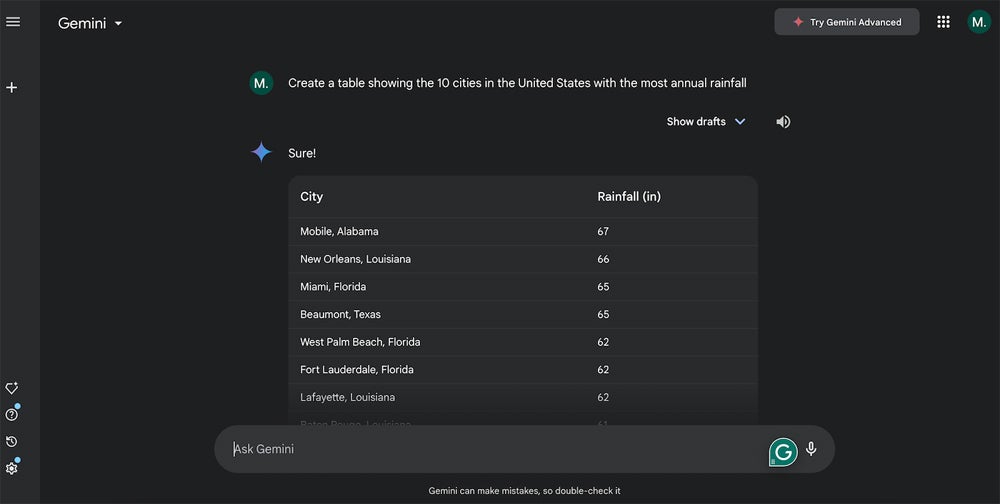
Google Gemini can help you create content and calculations for Google Sheets. Gemini can serve as a smart list generator that produces content in a table for you to export to a Google Sheet, or its responses can help you devise formulas and functions. These uses of Gemini offer capabilities that extend beyond the standard autofill and correction capabilities of Sheets. SEE: ChatGPT vs Google Gemini: An in-depth comparison (TechRepublic) For the actions below, you must be signed in to an active Google account authorized to use both Google Sheets and Google Gemini. If you use a Google Workspace account for work or school, you may need to contact an administrator to request access to Gemini. Once you have access, open Gemini in any modern browser to get started. Enter a natural language prompt, and Gemini will respond. Responses may differ — two people who enter the same prompt may not receive the same response. How to obtain content from Gemini for a Google Sheet With Gemini, you can prompt the system for various comparisons and lists. For example, a request to compare two or more products might produce a table with a column for each product and each row with a different comparison feature. You might also prompt Gemini for lists of people, places, or things. Since Gemini accepts sequences, you might first prompt: List the 10 cities in the United States with the most annual rainfall. Then, after you receive the initial response, prompt again with: Add a column for the population. Gemini can help you quickly obtain various comparisons and lists. When Gemini responds to a table, select Export To Sheets to create a new Google Sheet with the table contents. The tables Gemini can generate as a response vary much more than conventional autocomplete sequences available in Google Sheets with the Tools | Autocomplete | Enable Autocomplete Option enabled. In Google Sheets, you enter a predictable series of alphabetical letters, numbers, days of the week, months, or other standard patterns in two or more cells. Then select the cells and select-and-extend the corner of the box to cover the entire range of to-be-filled cells. For example, if you type Mon in one cell and Tue in an adjacent cell, you may select those two cells and then drag the dot to fill another five cells with the remaining respective three-character descriptions of days of the week in English. In contrast, the tables you can prompt Gemini to create may comprise a much wider range of listable data. SEE: Google Gemini Cheat Sheet: What Is Google Gemini, and How Does It Work? Choose Export To Sheets When a response includes a table, select the Export To Sheets option at the lower-right corner of the table. This exports the table to a new Google Sheet. The system will use your prompt as both the name of the newly created file and the initial sheet within the file. The table’s contents will be placed in the cells of the sheet, with the titles of the columns in Row A. Prompt “in a table” Gemini will often automatically format comparisons and lists in a table. When the system doesn’t do this, add the phrase “in a table” to your request. This would make the prompt listed above to be: In a table, list the 20 cities in the United States with the most annual rainfall. View other drafts or reset the chat Sometimes Gemini provides either a partial response or an oddly formatted response. For example, try the prompt: List all 50 U.S. states sorted by population. Gemini returned a table of 40 states, which is an incomplete response. In another example, a prompt for a: List of elements by name and atomic weight. In response, Gemini produced a list formatted as a code snippet, not a table. When a response isn’t what you expect, select the View Other Drafts button to access alternative drafts. Sometimes, one of those drafts will be formatted as a table rather than a code snippet. Another option when this sort of error occurs is to start a new chat and then try again with a rephrased prompt. This may return a more complete or better-formatted response. View other drafts to access alternatively formatted responses, which sometimes display data in a table rather than a list format. In some cases, selecting Reset Chat and trying your prompt again may return a response in the format you want. SEE: How to Use Google Gemini: A Comprehensive Guide More Google news & tips How to get help from Gemini with a Google Sheets calculation You may prompt Gemini to explain and provide examples of Google Sheets formulas and functions. Unlike Google Sheets help pages, which provide details and a static set of examples, you may ask Gemini for various examples and a detailed description of how a feature works. For example, if you want to learn a bit more about one of the new functions Google added to Sheets in March 2023, you might prompt: How do I use the WRAPCOLS function in a Google Sheet? Can you give an example of how I might use it to group a list of employee names into groups of 4 people each? The response from Gemini included, in sequence: A description of how the function is used. A sample formula to group a list into a set of four. An example with demo names. Additional tips, such as how to handle extra rows or combine WRAPCOLS with other functions. Gemini cannot only explain Google Sheets functions but also offer examples of how the function might be used. To explore additional Google Sheets functions, you might then prompt: Are there other Google Sheets functions that achieve something similar? Gemini tends to offer a few other functions that help with related aspects of your initial task. In addition, Gemini can help you create the exact formula you need, but it may be a bit of a process of trial and

How to Use Gemini in Google Sheets: Basic & Advanced Use Cases Read More »

AI Market Trends: Key Insights & How Enterprises Should Adapt

Ben Smith, chair of digital and analytics at global consulting firm Kearney, has witnessed several significant enterprise technology changes throughout his career. The first change came with the advent of the PC, followed by the client-server model, the HTTP browser, and the smartphone. As he surveyed the market at the end of 2024, he said the AI boom “is bigger than all of them.” “I think it’s going to lead to a lot of craziness, like we saw between ‘95 to ‘04,” Smith told TechRepublic, referencing the internet boom and the rise of Google. “So, from a vendor perspective, this is a unique time.” What’s in store for tech vendor competition in the age of AI? And what should organisations do about it? Smith and Anshuman Sengar,  Asia-Pacific’s lead for digital and analytics at Kearney, outlined key trends shaping the market into 2025. More must-read AI coverage The big forces shaping the future of enterprise AI Kearney’s experts argue five forces are shaping AI heading into 2025. A battle for regulatory advantage between large and small players Incumbent and regulatory capture occurs when established companies in a market use their influence over regulatory agencies to shape rules that favor existing business models and restrict competition. Regarding big players in the AI market, Smith explained that there is “a lot of effort to create fear in the market so that the incumbents are better positioned” into the future. While incumbents seek to reduce the chance of being disrupted by others moving more quickly, Smith said that regulatory agencies in the E.U. and U.S. are also showing “anti-acquisition” pushback. This may create an environment for start-ups and challengers to build businesses and grow rather than being acquired by larger organisations seeking to dominate. Sengar noted that there is potential for start-up innovation in the Asia-Pacific region at the application layer, building on the AI engines embedded into major platforms. He said local innovators, as do corporates like banks, through their own venture funds, have a role to play in competition with large global tech firms. A hunger for data centre semiconductor capacity for AI computing Smith said that society is experiencing the “largest off-cycle boom in semiconductor manufacturing fabrication facilities, or fabs, that we’ve seen in a long time.” Nationalism and governments are driving this surge, as many are building large data centres for AI computing. For AI users, this shift will cause “a massive decline in the next 12 to 24 months” in the cost of a token, making AI cheaper. In APAC, the drive for capacity results in large data centre transactions, such as private equity firm Blackstone’s acquisition of regional data centre company AirTrunk for AUD $24 billion. Sengar said companies across Asia are investing in data facility developments in Indonesia, and he expects India to launch its fab capability soon. A drive to understand, unpack, and use data for AI advantage Smith emphasised the importance of data in the emerging dynamics currently unfolding in the AI market. He noted that various players in the ecosystem are working to determine data ownership and usage in an AI context, whether the data resides within a company or externally. “I think the market is much more sophisticated this time as opposed to when the internet happened the first time,” Smith said. The unprecedented capital intensity funding the AI boom According to Smith, the capital intensity of AI — particularly in a high global interest rate environment — is a significant factor for technology players aiming to gain an advantage in the field. “If you look at the telco build out, or the fiber build out from ‘95 to 2002 … the amount of capital being deployed on GenAI data centers, swamps that by multiple factors. I mean, you will see data centres that cost hundreds of millions of dollars relative to the fiber build-outs we saw.” Smith predicts that, within the next few years, the world will see its first single data centre worth U.S. $1 trillion, which he expects to see built in either the U.S. market or in China. A geopolitical environment that is impacted by AI AI is connected to national economic security and national defense, making it different from previous technology innovations. Smith said this has created a “weird geopolitical environment,” with AI more of a political issue than the internet because of these national security implications. Three tips for navigating the forces shaping AI Kearney experts advise organisations to consider investing in and implementing AI based on their company and industry. Smith warns against getting caught up in the AI hype, while Sengar suggests data can be managed as a priority. 1. Avoid pursuing too many AI use cases Smith said one dangerous path is for enterprises to test every use case for AI. Instead, he said organisations should prioritise only those use cases that are most important for the business to pursue today. While some business use cases might be effective, they may also be much cheaper to do when the cost of an AI token decreases, so organisations would be better off waiting in some cases. 2. Will AI really will change your industry? Executive teams and boards should ask whether AI will fundamentally change the basis of competition in their industry. If it is, then they should move quickly, Smith said, giving the example of drug discovery and insurance markets, where he said AI is likely to dramatically impact how businesses compete. If it is not, he said investing heavily in AI, especially now at higher prices, may prove to be a mistake. 3. Do not wait to get control of your data Organisations can act immediately to take control of their data, whether they are pursuing AI heavily now or choosing to wait. Sengar said companies in APAC are struggling with their data, including customer data quality. “Getting control of your data, especially customer data, and ensuring you understand what you are capturing and that it is secure is something you

AI Market Trends: Key Insights & How Enterprises Should Adapt Read More »