Tech Republic

How To Improve Contact Center CX Without Buying New Tech

Customers expect seamless, efficient, 24/7 support. that level of contact center CX is table stakes for maintaining a positive brand image for today’s buyers. Providing a high-level contact center customer experience requires more than just quick responses — it demands thoughtful integration of technology, well-trained agents, and personalized service. This post will explore practical strategies to enhance CX across the board. I’ll focus on actionable steps you can take to create a more efficient, personalized, and secure experience for customers. 1 RingCentral Office Employees per Company Size Micro (0-49), Small (50-249), Medium (250-999), Large (1,000-4,999), Enterprise (5,000+) Medium (250-999 Employees), Enterprise (5,000+ Employees), Large (1,000-4,999 Employees) Medium, Enterprise, Large Features Hosted PBX, Managed PBX, Remote User Ability, and more Zero-spend ways to improve contact center CX These changes can streamline processes, reduce friction, and ultimately enhance customer satisfaction. Chances are, you have most of the tools you need to accomplish these strategies already. If you have to go out and invest in better contact center technology, so be it, but I’d try these cost-effective strategies first. 1. Support and empower your agents Burnout is common in contact centers, and attrition is high. So anything you can do to support your agents helps, and it’ll likely trickle down to improve your customer experience. SEE: Learn about the most pressing causes of call center burnout and how to fix them.  Regular and comprehensive training is the best way to support agents. Having experienced team members share tips in peer-to-peer training sessions is a beneficial and engaging way to build comradery amongst team members. I know that time is precious in a contact center. Pulling veteran agents away from their desk to talk with rookies isn’t always feasible. Consider using recorded calls to train agents where they listen to examples of good and bad customer service. Focus specifically on the customer experience and frame the lesson around how to improve it. In addition to training, see what you can do to help your agents work-life balance. This is one of the top reasons people will stay with an employer. Is it possible to offer flexible scheduling? Have you created a perfect PTO policy and created a culture where managers encourage employees to actually use their time off? When agents feel valued and well-equipped, they’re more likely to provide better service. Training, proper tools, and a positive work environment help agents handle customer issues more efficiently and empathetically, which leads to faster resolutions and higher customer satisfaction. When agents are confident in their role, they can focus on solving problems rather than struggling with limited resources or burnout, ultimately benefiting both the customer and the business. 2. Survey your customers Consider low-cost feedback mechanisms, like email follow-ups or quick phone surveys. These simple post-interaction surveys can provide valuable insights into customer satisfaction. Yes, you can spend a ton of money on customer surveys, but you can also get useful data by being scrappy. Basic analysis of customer feedback can be done manually or with standard office software. Over time, you’ll identify common themes, sticking points, and areas of concern. That said, for high-volume contact centers, investing in specialized call center quality assurance software might be justified. These tools can automate and streamline the feedback analysis process, providing real-time insights that are crucial for larger operations. SEE: Learn about critical call center quality assurance best practices.  But for smaller or medium-sized centers, manual methods and basic tools can be surprisingly effective in capturing and utilizing customer feedback to refine your CX strategy. 3. Streamline IVR menus Improving your customer experience could also begin the moment customers reach out to your contact center. How? By streamlining your Interactive Voice Response (IVR) system. A well-designed IVR menu can significantly improve customer experience. To streamline your IVR menus: Assess current IVR effectiveness: Start by evaluating your current IVR system. Identify points where customers frequently get stuck or opt to exit the IVR to speak to an agent. Analyzing call logs and dropout rates can provide insights into which parts of the menu are causing frustration. Simplify menu options: Experiment with reducing the number of options in each menu to avoid overwhelming your callers. Focus on the most common reasons customers call and ensure these are addressed early in the menu. Make sure you’re using clear, concise language. Prioritize quick resolution paths: Arrange the menu options in a way that the most frequently selected choices are presented first. If certain queries can be resolved without agent intervention, such as account balance inquiries or payment confirmations, make those options readily available. Regular updates based on feedback: Going back to our last tip, continuously gather feedback on the IVR system, both from customers and your agents. Use this feedback to make regular adjustments. For example, if a new product or service is leading to an increase in calls, update the IVR prompts to address this immediately. Test and iterate: Implement changes in stages and monitor their impact. You can experiment with A/B testing different versions of the IVR menu to determine which is more effective in improving caller experience and reducing call handling times. Along with these tactics aimed at improving CX, contact centers should run regular IVR testing to ensure that their system is fully functional, secure, and able to withstand spikes in traffic. SEE: Understand automated IVR testing and explore five IVR testing tools to help you get started.  4. Implement effective call routing Optimizing call routing in your contact center can go a long way toward improving CX. By ensuring that customers are connected with the most appropriate agent or department, you can reduce wait times and increase the likelihood of first-call resolution. Here’s how to maximize the effectiveness of your call routing. Analyze call patterns: Start by analyzing the types of calls your center receives. Are there patterns, peak times, or common queries? This analysis will help you understand how to categorize calls and route them more efficiently. Skill-based routing: Implement skill-based routing by assigning calls

How To Improve Contact Center CX Without Buying New Tech Read More »

NTT Data: CISOs Most Negative About Generative AI

Security and infrastructure are two of the top concerns for organisations rolling out generative AI, according to a recent report from IT company NTT Data. However, most companies are optimistic about its future potential. The Global GenAI Report, based on responses from 2,307 generative AI decision-makers and influencers, primarily from large organisations globally, found that CISOs are the executives most pessimistic about the technology. Many CISOs (45%) held negative sentiments about generative AI because they were “feeling pressured, threatened and overwhelmed” by it. Only 19% of total respondents from various roles shared the same sentiment as CISOs. “CISOs are uniquely positioned to anticipate risk — and it is clear they see it [in Generative AI],” the report stated. CISOs are more negative about generative AI than other executives including CIOs. Source: NTT Data Executives outline generative AI concerns Among CISOs, one in three said they are uncomfortable with the “black box” nature of some generative AI models and its “unclear decision-making algorithms,” the report found. However, CISOs aren’t the only group harboring concerns about AI: 90% of all executives said that legacy infrastructure greatly affected business agility and their ability to use generative AI. Nearly 8 in 10 respondents still remain unsure of the actual benefits of generative AI to their operations. Three in four respondents said their organisation’s generative AI ambitions conflicted with — or could be negatively affecting — its sustainability goals. 44% of total respondents agreed that their organisation had already established the optimal infrastructure to efficiently and cost-effectively scale generative AI in a cloud environment. Chief data officers are particularly hesitant about GenAI. Nearly half of them viewed a lack of transparency and the difficulty in explaining the reasoning behind complex generative AI models as issues affecting their own adoption. Additionally, 86% of all respondents and 96% of chief data officers agreed that algorithm bias remained pervasive in current models. SEE: Nearly half of security professionals believe AI is risky More must-read AI coverage Most generative AI decision-makers are optimistic about AI Despite some negative attitudes toward AI, the report found that most executives are positive about the technology overall: 60% believe it will be a “game changer” within two years. According to the report: Among COOs, 57% were positive about generative AI. 50% of CIOs and CTOs said they feel “excited” about generative AI, and 21% reported feeling “amazed” by the technology. 44% of all C-suite respondents strongly agree that the promise and potential returns of generative AI outweigh the potential security and legal risks. The C-suite overall is also expecting big impacts from generative AI; 97% of CEOs expect a material impact from the technology, while 99% of organisations are planning to invest more in AI. Only a very small number of organisations are choosing not to invest in AI. Source: NTT Data Organisations looking to 2025, as NTT Data declares “playtime over” NTT Data’s report claims that “playtime is over” for AI, as organisations shift from conducting less experimentation and more identifying tangible successes that can be taken into production. IT is playing the leadership role in generative AI rollouts across organisations. Source: NTT Data Nearly nine in 10 of the respondents surveyed said they were actually experiencing “pilot fatigue” and were shifting their focus to areas where generative AI has had a proven impact on business performance. SEE: 5 generative AI trends in 2025 Looking forward, NTT Data said six in 10 leaders expect a significant transformation from major investment in generative AI in 2025, but 83% accept return on investment will be unclear for the foreseeable future. “Focused spending plans will replace scattered experimentation as organisations look to improve internal operations through more precise experiments. These will aim to transform back-office and middle-office workflows and create new digital products and services with the potential to scale,” the report said. NTT Data predicts that successful experiments will reignite investment in generative AI as CEOs gain clearer evidence of its potential to boost revenue and productivity. source

NTT Data: CISOs Most Negative About Generative AI Read More »

A Complete Guide to CRM Analytics

Customer relationship management systems can provide extensive analytics and reporting capabilities for businesses to better understand their sales processes on a more comprehensive level. Secure data mining, data recording, and report generation translate this information into visual representations of KPIs. Popular metrics businesses generate and track include their sales cycle length, marketing ROI, sales rep performance, and deal forecasting. 1 HubSpot CRM Employees per Company Size Micro (0-49), Small (50-249), Medium (250-999), Large (1,000-4,999), Enterprise (5,000+) Micro (0-49 Employees), Medium (250-999 Employees), Large (1,000-4,999 Employees), Small (50-249 Employees) Micro, Medium, Large, Small 2 Zoho CRM Employees per Company Size Micro (0-49), Small (50-249), Medium (250-999), Large (1,000-4,999), Enterprise (5,000+) Any Company Size Any Company Size Features Calendar, Collaboration Tools, Contact Management, and more 3 Pipedrive CRM Employees per Company Size Micro (0-49), Small (50-249), Medium (250-999), Large (1,000-4,999), Enterprise (5,000+) Any Company Size Any Company Size Features Calendar, Collaboration Tools, Contact Management, and more What is CRM analytics? CRM analytics is internal programming that collects, organizes, and analyzes data around customers, sales, and revenue. Generating detailed reports like this is a top CRM feature that businesses of any size and market can benefit from. This data provides actionable insights for leaders, managers, and individual users that assists in making timely and data-based decisions. CRM analytics has also recently been integrated with AI functionality, allowing for more niche reports and suggestions to be generated on command. 5 key CRM metrics Sales cycle length A sales cycle length is the average time it takes a deal to be closed from beginning to end. This starts with a prospect converting to a lead, and that lead becoming a confirmed customer. The goal is to have the sales cycle length be as short as possible, so that leads aren’t lost to competitors, or their need for your solution dissipates. Measuring this metric will help identify opportunities where the sales cycle could be condensed. Customer churn rate A churn rate is a percentage metric that shows how many customers leave your sales pipeline or stop doing business with your company entirely. A high churn rate is something businesses try to avoid, and typically it can also identify where in your sales process the churn is happening. It’s always good to know where you’re succeeding, but equally important to understand where you are losing business in order to make immediate adjustments. Marketing ROI Marketing ROI directly tracks how resources that are allocated to marketing contribute to overall revenue growth. While CRM solutions are sales-oriented, marketing features are included in that. That includes social media communications, email marketing campaigns, and even web and landing page building. This is especially important for small to mid-sized businesses looking to invest more into marketing campaigns, because you need concrete data that supports such an investment. Rep performance Rep performance is tracked by monitoring their overall sales activities and close rates. Common activities that are monitored are sales calls, email performance, referral rates, and lead conversion rates. This tracking can be done on an individual scale, by team, according to location, or for an entire department—and can help with quarterly reviews. This transparency is important especially in a commission-driven environment. Business forecasting The best CRM solutions offer business and revenue forecasting as an advanced CRM metric. These reports take into account customer activity, sales length, churn rate, sales history, and more to come up with predictive analytics around projected revenue wins. While this information is always subject to change depending on any number of factors, having a projected idea of revenue QoQ or YoY helps immensely when planning bigger initiatives for a company. Top 3 benefits of CRM data analysis Increased productivity I recommend using a CRM software as a way to increase productivity around customer interactions, and data analysis helps do exactly that. Since there isn’t time being wasted on manually pulling and sorting data, users can focus on nurturing client relationships and closing deals. Trusted analytics make sure efforts are being put into the right place at the right time and optimize resource allocation. This way, reps, agents, or administrators are spending time doing tasks that are proven to be beneficial to the business. Improved customer satisfaction When you have detailed data analysis built around successful—and less successful—marketing and lead nurturing campaigns, it’s easier to understand what customers consider as positive interaction. With the help of personalized engagement and detailed analysis of metrics like email click rates, conversions, and more, businesses won’t need to guess which strategies actually move customers through their pipeline. This will build customer satisfaction with your business and improve customer retention. Competitive advantage Having strong analytics in a CRM software allows for businesses to keep a constant eye on market changes or trends. This way, they can anticipate those changes and plan accordingly. For example, these trackable trends help make informed decisions about where to invest more or invest less. If a company anticipates a seasonal increase in business, they should invest in marketing campaigns in advance to get ahead of their competitors. It also helps increase overall efficiency and allows for a flexible and agile business plan. CRM analytics use cases When choosing a CRM solution, opting for an analytical CRM tool means there’s an emphasis on data warehousing and mining, plus advanced forecasting. These are great for medium to large teams or businesses that need detailed, secure, and constant data monitoring. Identifying consumer trends In industries that are completely driven by consumer trends, having analytical CRM helps businesses stay ahead and anticipate major changes. Whether it’s financial forecasting, product and service trends, or mapping seasonal spikes, an analytical CRM will take complex data and turn it into understandable insights. For example, a retail business might use purchase history and trends from their consumers to help identify when in the fiscal year their products are in demand. They can then plan to invest in more marketing campaigns leading up to that timeframe in the new year. Scalability When your goal is to grow

A Complete Guide to CRM Analytics Read More »

Dell Unveils New AI-Powered Infrastructure at SC24 Conference

Dell announced a suite of new products and services—many intended to address roadblocks to companies adopting generative AI and LLMs—at the International Conference for High Performance Computing, Networking, Storage, and Analysis, held from Nov. 17 to 22 in Atlanta. Varun Chhabra, senior vice president of Infrastructure and Telecom Product Marketing at Dell, said the most pressing issues preventing AI adoption are quality of data, cost, and energy, power demands, and sustainability concerns. “Enterprises are pursuing AI to remain competitive in today’s digital landscape, but they need to harness their proprietary data to differentiate,” Dave Vellante, chief analyst at theCUBE Research, said in a press release. “We’re seeing a resurgence in interest for offerings like Dell’s AI infrastructure, solutions, and services that can help customers prepare their data to extract insights, automate tasks, and transform processes.” Three new server products focus on AI workloads Dell announced three new server products: the PowerEdge XE7740 and PowerEdge XE9685L, and updates to the Integrated Rack 5000 (IR5000) series. The PowerEdge XE7740 with Xeon 6 processors is appropriate for inference and fine-tuning. Eight front PCIe slots allow for high-speed network connections for GPU-to-GPU performance. “This is probably the best platform for enterprise adoption to start,” Chhabra said. The Dell PowerEdge XE9685L holds up to 96 NVIDIA Tensor Core H200 or B200 GPUs per rack for high-density computing needs, such as AI training. “Not only are we building the platform, we expect that we can deliver all of this in a rack-scale solution out-of-the-factory integrated,” Chhabra noted. Both PowerEdge products, which will be released in the first quarter of 2025, are available through the Dell Integrated Rack Scalable Systems program. Relatedly, Dell also debuted a turnkey solution in the Dell Integrated Rack 5000 series, an expansion of the rack 7000 series, which can be either liquid-cooled or air-cooled and can hold 96 GPUs per rack. It will be compatible with the upcoming NVIDIA GB200 Grace Blackwell NVL4 Superchip. The new server products join a lineup of scalable options. Image: Dell Must-read big data coverage Dell Data Lakehouse gains Apache Spark integration Also revealed at the conference, Dell Data Lakehouse will now support unified access control between the Trino query engine and the Apache Spark processing system. “Dell does the homework and the legwork of testing and validating the most common ecosystem options customers have for their AI workloads,” Chhabra said. “The continued reimagining and improvement of AI and HPC technologies is critical to accelerating discoveries across industries,” Dan Stanzione, executive director of the Texas Advanced Computing Center, said in a press release. “With Dell’s AI solutions, we are building complex HPC systems that allow innovation to thrive in research communities. Ultimately, these advances have the potential to reshape society and drive progress that benefits everyone.” Dell partners with NVIDIA on AI infrastructure initiatives In the realm of AI infrastructure, Chhabra said Dell is dedicated to optimizing its AI Factory by leveraging NVIDIA hardware. At the Supercomputing event, Dell revealed they’ll offer support for NVIDIA Tensor Core GPUs by the end of the year. This includes the H200 SXM cloud GPUs. “We spend a lot of time working with NVIDIA on integrating their software upgrades, testing and validating their software upgrades on top of our infrastructure,” Chhabra said. Dell plans to support the NVIDIA H100 NVL GPU in upcoming PowerEdge servers and offers a new solution for general professional users and data scientists: Dell Agentic RAG with NVIDIA. Its RAG agents handle company-specific data access and regulatory challenges. These are available now, while the GPU update will be available before the end of the year. Dell Data Management and other services create roadmaps for Dell products Lastly, Dell announced a handful of services available as of Nov. 18: Dell Data Management Services for data governance, insights, automated workflows, and on-ramps to using AI for data catalogs. Dell Services for Sustainable Data Centers provides advisory and implementation services for organizations that want to create data-driven sustainability, power utilization, cooling, and water solutions. Dell Design Services for AI Networking offers advisory and implementation services to optimize data use, networking, and the overall design and architecture of clusters and data centers for AI use. Dell Implementation Services for ServiceNow Assist is an on-ramp to AI services on Service Now. It helps potential customers understand or target use cases and integrate the Service Now Platform into their AI services, use cases, and LLM deployments. “As we continue into this new era of technological innovation,” Vellante explained, “it will be critical for enterprises to continuously learn and invest in innovation to realize the benefits AI promises.” source

Dell Unveils New AI-Powered Infrastructure at SC24 Conference Read More »

Learn Cybersecurity Essentials for Just $40 from Home

TL;DR: Get The 2024 Cybersecurity Essentials Bundle while it’s on sale for just $39.99 (reg. $1,000). Cybersecurity is a growing field with no signs of slowing down. According to an article in Forbes, the U.S. Bureau of Labor and Statistics estimates that it will grow by 32% through 2032. If you want to get in on this action or elevate your skills, the 2024 Cybersecurity Essentials Bundle is currently on sale for just $39.99. What’s included This bundle is designed to provide a comprehensive foundation in cybersecurity, catering to both beginners and those looking to enhance their existing knowledge. It consists of five courses totaling over 12 hours of content, offering both foundational knowledge and advanced strategies to help you navigate the complexities of cybersecurity. Whether you’re an aspiring cybersecurity analyst, security engineer, or IT auditor, this bundle offers the tools and insights you need to advance your career. Learn cybersecurity fundamentals to understand the core concepts, identify potential threats, and identify the essential prevention measures that form the backbone of any robust cybersecurity strategy. You’ll also be able to master the principles and practices of securing networks, which is vital for any business or organization that relies on secure data transmission. You’ll also gain hands-on experience in ethical hacking. Identifying vulnerabilities and weaknesses in systems is an essential skill for both defense and compliance. There’s also a focus on business cybersecurity, which helps you learn how to implement strategies tailored for business environments to help your organization’s data stay protected from internal and external threats. Don’t miss this opportunity to level up your skills from the comfort of your own home. Get the 2024 Cybersecurity Essentials Bundle while it’s on sale for just $39.99 (reg. $1,000) for a limited time. Prices and availability subject to change. source

Learn Cybersecurity Essentials for Just $40 from Home Read More »

Australian Businesses Urged to Invest More in Tech Adoption, Tech Council of Australia Reports

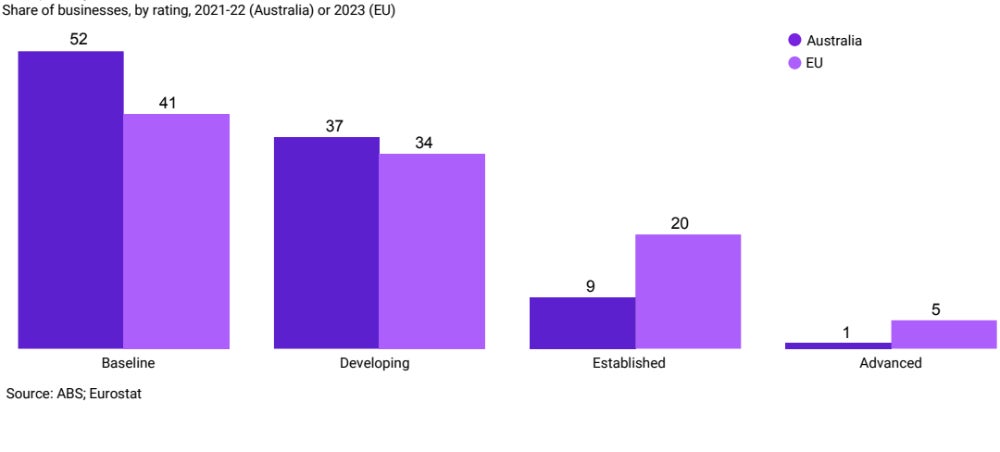
A new report by the Tech Council of Australia concluded that Australia’s large, mid-sized, and start-up businesses must increase spending on technology adoption to contribute to an economy-wide push to grow overall tech investment levels and ensure the country does not fall behind the rest of the world. The report, published in November, argues that Australia should adopt a national technology investment target. It suggests that increasing total tech investment from 3.7% to 4.6% of the country’s GDP could contribute AUD $39 billion in productivity gains by 2035. The boost would require an uplift in both technology adoption investment and tech research and development spending. Researchers said ramping up spending could enhance economic productivity and keep Australia competitive with global markets. Technology adoption is part of the pathway to productivity The Tech Council reported that Australian businesses currently invest $90 billion in technology adoption — equivalent to 2.2% of GDP, or approximately $2,100 per capita. While this figure has risen from $1,700 per capita in 2016-17, the share of GDP has remained unchanged. According to the report, investing in technology adoption involves acquiring technology that is new to the business but not necessarily to the industry, country, or rest of the world. This distinguishes adoption spending from R&D technology investment, which involves developing entirely new technology. The Tech Council argues at least a 0.4% GDP rise in tech adoption investment across large, medium, and small businesses, bringing the total to 2.6% of GDP in 2035. A 0.7% rise in R&D spending would bring tech investment spending to 4.6% of GDP — well ahead of a currently projected 3.5%. Researchers found that if Australia raises total technology investment even higher to 6.9% of GDP,  $167 billion in productivity gains could be unlocked by 2035. “Australians enjoy some of the highest living standards in the world,” Tech Council’s CEO Damian Kassabgi said in a press release. “To ensure we can keep growing, we need to see an uplift in productivity growth.” He added: “Australia’s productivity growth has been declining for some time, which is one of our most pressing economic challenges. Achieving the level of growth we need to turn this around and see our economy thrive requires greater tech development and adoption.” More Australia coverage Australia lagging in business technology adoption The report noted that Australian businesses lag behind the European Union in tech adoption. Australia and the E.U. compare their respective technology adoption levels using a Digital Intensity Index, which measures factors including digital skills, cybersecurity, digital business management, digital technology and infrastructure, and e-commerce and online presence. Australian businesses cluster more around the bottom rungs of the rating system. Just over half of all Australian businesses have a “baseline” level of tech use, compared with 41% of businesses in the E.U. Only 10% of Australian businesses were classified as either “established” or “advanced,” compared with 25% of firms in the E.U. Australian businesses are not using as much tech as E.U. businesses. Image: Tech Council of Australia This low figure comes despite tech adoption having practical benefits. Research from the Office of Innovation & Science Australia and AlphaBeta showed that the Australian Stock Exchange’s top 200 firms actively investing in tech adoption and R&D between 2005 and 2016 were more likely to survive and grow than other firms on the index that prioritised paying out dividends. A survey conducted by Ai Group in 2024 found that Australian businesses are addressing their tech adoption challenges. Eighty-four percent of businesses surveyed were found to be actively adopting new tech, including 100% of large businesses, 82% of medium-sized businesses, and 63% of small businesses. How much tech adoption is required across Australian businesses? The Tech Council is counting on increased adoption investment from large, medium, and small businesses. Given the current tech adoption levels shown in the E.U. comparison, researchers estimated that: Small businesses could contribute 0.19% of GDP in tech adoption investment by 2035 through more of them (12%) moving from a “baseline” status of digital intensity into a “developing” category. If a larger number (17%) of medium-sized businesses made the step from “developing” to “established,” helped by scaling innovative small businesses up to this size, they could add 0.16% to the GDP. An additional 0.05% of GDP could be gained from large businesses if 7% of them move from “established” to “advanced.” This would see 5% of local businesses labeled as “advanced.” Businesses of all sizes could help lift tech adoption. Source: Tech Council of Australia Economy-wide executive education could boost investment The Tech Council recommended Australia examine opportunities to create technology industry-led executive education programs for all types of businesses in the economy. The education programs could focus on opportunities for businesses to adopt technology and manage technology risk. “Managerial skills have been found to have a significant impact on productivity, partly through the role that managers have in facilitating innovation and harnessing the benefits of technologies,” the report said. Recent Gartner research found CIOs have more success when they uplift CXOs across businesses. Researchers also suggested that these programs should be established as “vendor-agnostic executive education programs,” avoiding them being associated with particular vested technology interests. This would encourage wider uptake in economy-wide tech upskilling to support future investment. “Tech investment enables companies to commercialise their research and create new business models, making our economy more productive and resilient,” Kassabgi said. “There are also practical benefits to increased tech adoption, which can accelerate the growth of both small and large businesses.” source

Australian Businesses Urged to Invest More in Tech Adoption, Tech Council of Australia Reports Read More »

Google Gemini Cheat Sheet (Formerly Google Bard): What Is Google Gemini, and How Does It Work?)

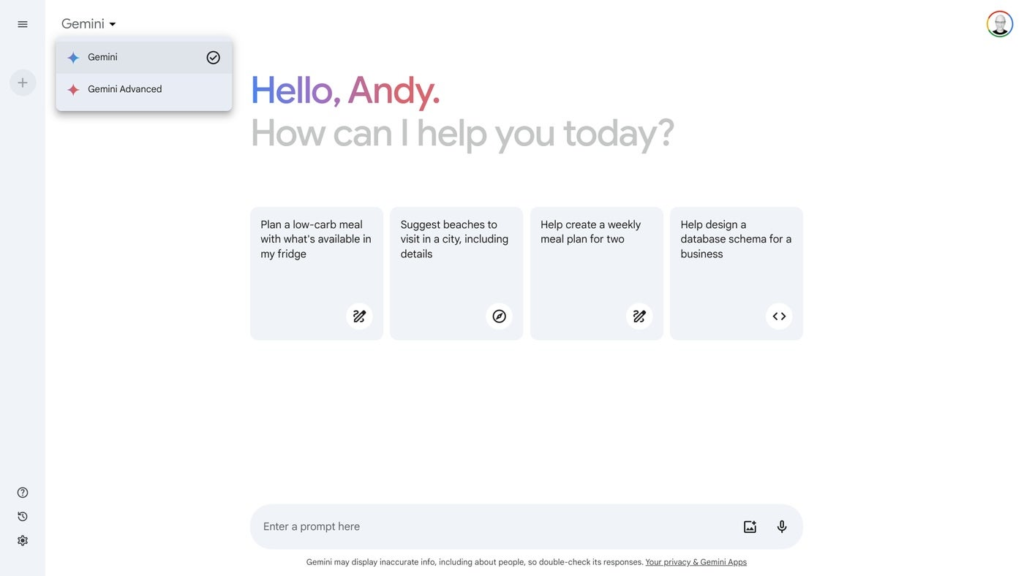
Gemini is Google’s artificial intelligence ecosystem, including a chatbot that generates responses to user-provided natural language prompts. In response to a prompt, Gemini can pull information from the internet and present a response. The large language model behind Gemini delivers the response in natural language — in contrast to a standard Google search, where a result consists of a snippet of information or a list of links. Google announced Gemini (as Bard) in February 2023 after OpenAI and Microsoft garnered attention for their AI chatbot systems. In May 2023, AI advancements featured prominently in Google’s I/O event. On Feb. 8, 2024, Google renamed the AI products formerly named Bard to Gemini. What is Google Gemini used for? Google Gemini is the overarching term for an ecosystem of generative AI models and services, including natural language querying, assistants, content generation, and code writing. Gemini’s prompt-response process can help you obtain answers faster than a standard Google search sequence. A classic Google search requires you to enter a natural language query or keywords, follow links, review content, and then compile the results or repeat the process with a refined search. SEE: Check out these Google AI search prompting tips. With Gemini, you enter a prompt and then review the response. If the response isn’t exactly what you want, three options exist: View other drafts to display alternatively formatted responses. Regenerate the response to have the system craft a new reply. Follow-up with another prompt. Gemini can handle all sorts of tasks, but many of the most common uses are covered by the categories of capabilities detailed below. Google Gemini can summarize As a generative AI assistant powered by a large language model, Gemini can adeptly summarize text. For example, provide a link to a web page and ask Gemini to summarize the contents, e.g.: Please summarize ​​https://blog.google/technology/ai/bard-google-ai-search-updates/. You also can suggest a specific length if you want a particular degree of brevity, such as “Please summarize in 100 words.” Google Gemini can compare Gemini can compare two or more items. In many cases, when you ask Gemini to compare things, the system will display some of the data in a table. For example, if you prompt Gemini: Compare a Pixel 7, Pixel 7a, and Samsung Galaxy S23. Similarly, you may ask Gemini to compare web pages. Google Gemini can suggest Gemini may serve as a suggestion engine for products, services, or activities. Enter the title of books, music, or movies you like, then ask Gemini to suggest others. This can be useful when you’re researching unfamiliar topics. For example, you might try: I am interested in learning the history of machine learning. Can you recommend 10 useful and highly respected books on the topic? Google Gemini can explain When you want to learn about a topic or historical event, you can ask Gemini to explain it to you. If you like, you may suggest a desired level in order to guide the system toward an explanation that may be either easier to understand or more detailed. For a general overview of a core technology that helps make Gemini work, you might ask: Can you explain the basics of how neural networks operate? Explain it to me as if I am in my first year of college. Google Gemini can brainstorm One of the best uses of a chatbot is to gather a long list of ideas. Ask Gemini to “Brainstorm ideas for…” followed by whatever topic you wish, such as a new project, promotional effort, or paper. Encourage Gemini to provide creative, unusual, or inventive ideas for additional variety in the responses. Google Gemini can code and debug In April 2023, Google added the ability to create and help debug code in more than 20 programming languages. When you ask for code, make sure to specify the programming language and describe the code you need in as much detail as possible. If the code generated doesn’t work, let Gemini know what went awry and ask for a suggested fix or help interpreting an error code. SEE: Explore other Google AI enhancements. Gemini can draft text Gemini can also help you write. As with most prompts, provide as much detail about the topic, length, format — blog post, poem, essay, book report, etc. — and style as possible. If you have a rough blog post outline, you might include the desired points in your prompt. For this section of text, for example, you might prompt: Using the following points as an outline, can you draft examples and explanatory text? “Gemini can summarize. Gemini can compare. Gemini can suggest. Gemini can explain. Gemini can brainstorm. Gemini can draft text. Gemini can code (and debug). Gemini can search.” The responses Gemini generated were reasonable and might have required only minor editing and correction to be usable. Google makes it easy to move Gemini text elsewhere. Select the response export button to move content to either a new Google Doc or Gmail. Alternatively, select the More button (the three vertical dots), then choose Copy to place the response text on the system clipboard for pasting into any app you choose. Using Gemini in Gmail or Docs requires the Google One AI Premium plan. Gemini can search Since Gemini can access internet content, many conventional keyword searches will also work in Gemini. Ask about current news topics, weather forecasts, or pretty much any standard keyword search string. However, Gemini will provide responses mostly in conventional text, sometimes supplemented with images, whereas Google search may show content in custom formats (e.g., weather forecasts often display a chart). When you seek a set of links, switch out of Gemini back to a standard Google search. As of September 2023, people who sign in to Gemini with personal Google accounts may optionally enable extensions. These extensions allow Gemini to draw data from other Google services, including Google Flights, Hotels, Maps, Workspace (Gmail, Docs, and Drive), and YouTube. Google Gemini can create images In August 2024, Google’s Imagen 3 image

Google Gemini Cheat Sheet (Formerly Google Bard): What Is Google Gemini, and How Does It Work?) Read More »

Slack Report: Is AI Adoption Heading for a Plateau?

The hype around generative AI may be starting to cool, according to a new Slack report. The survey of more than 17,000 desk workers worldwide, published on Nov. 12, revealed a disconnect between AI aspirations and adoption rates. The report focused on barriers to AI adoption at work and how leaders can clarify questions about it. The slight dip in global interest is notable after nearly a year of increased excitement around AI. “AI adoption isn’t just about enterprises, it’s also about employees,” said Christina Janzer, head of Slack’s Workforce Lab, in a press release. “With sentiment around AI dropping, businesses need to help employees accelerate their AI journey and address the cultural and organizational blockers standing in their way.” AI may not be fulfilling the hype Slack saw a steady rise in AI adoption from September 2023 to March 2024. At its peak in March 2024, about one-third (32%) of desk workers surveyed had used AI to do their jobs. This percentage began to show a decline or plateau in the last three months. Specifically: The U.S. saw just a single percentage point of growth in AI usage, from 32% to 33% of desk workers. “Excitement” about AI helping with work tasks among global workers dropped by 6%. Excitement about AI fell 9% over the last three months in the U.S. Excitement about AI fell 12% over the last three months in France. Nearly all (99%) of surveyed executives say they will make an investment into AI this year. More must-read AI coverage Nearly half of employees would be uncomfortable revealing AI use to managers While some companies create top-down initiatives to encourage the use of AI, many employees are reluctant to share their AI use: 48% of survey participants said they would be uncomfortable telling their managers they use AI. They feared a perception of AI use as cheating, a resource of the less competent, or laziness. Notably, Slack asked participants whether they would be uncomfortable sharing their AI use with their manager, not whether they are uncomfortable using AI at all. Survey-takers who are comfortable sharing that they use AI at work are likelier to use it. Still, the underlying fears reflect on both the technology and company culture. SEE: AI can introduce security risks to organizations and security teams. In general, the usage of much-hyped technologies tends to level out over time. Slack noted that the potential “lazy” and “cheating” accusations, the perception that AI is “not yet living up to the hype,” and a lack of training in using AI are the primary factors that affect employees’ viewpoints of the technology. Employees are concerned AI will not reduce administrative tasks AI advocates have long argued that the technology helps companies by automating rote tasks, thereby freeing up time for meaningful activities that support an organization’s bottom line. However, Slack’s report indicated that organizations haven’t seen reduced administrative tasks over the past few months. Instead, many employees suspect AI could lead to more drudge work and an increased workload. “Employees are worried that the time they save with AI will actually increase their workload — with leaders expecting them to do more work, at a faster pace,” Janzer said. “This presents an opportunity for leaders to redefine what they mean by ‘productivity,’ inspiring employees to improve the quality of their work, not just the quantity.” When asked what they would want to do with the time saved by AI, participants said they wanted time to engage in non-work activities and skill-building. But when asked what they would likely do with extra time, people listed administrative tasks and additional work on existing projects. How team leaders who want to promote AI can change minds Slack — which has its own AI assistant — recommends managers who want to promote AI: Run team-building exercises related to AI. Make AI use, and AI wins, visible to the entire organization through convenient communications channels. Model AI use in managers’ own work as appropriate. Focus on skill-building and training in how to use generative AI. Redefine what productivity means, tying goals to innovative or creative work projects to incentivize giving the drudge work to the AI. Remember that AI can’t replace real human connection. Approach your team’s connections and the ways people ask one another for assistance with “intentionality.” Slack also recommended that organizations train their employees to use AI via short, impactful sessions — also known as “microlearning.” “AI training programs don’t have to be a heavy lift,” said Chrissie Arnold, director of future of work programs at Workforce Lab. “At Slack, we’ve had pretty amazing results from just 10 minutes a day of AI microlearning.” source

Slack Report: Is AI Adoption Heading for a Plateau? Read More »

ChatGPT Cheat Sheet: A Complete Guide for 2024

ChatGPT Fast Facts What is ChatGPT? A generative AI that can answer questions in natural-sounding language.Who developed ChatGPT? OpenAI, Inc.Pricing: ChatGPT is free. ChatGPT Plus costs $20/month. ChatGPT Teams, which is the business subscription for at least two people, costs $25/month. The business world has embraced ChatGPT over the last year and found uses for the writing and image generation AI throughout many industries. This cheat sheet includes answers to the most common questions about ChatGPT and its competitors. What is ChatGPT? ChatGPT is an AI chatbot product developed by OpenAI and built on the structure of GPT-4. GPT stands for generative pre-trained transformer; this indicates it is a large language model that checks for the probability of what words might come next in sequence. A large language model is a deep learning algorithm — a type of transformer model in which a neural network learns context about any language pattern. That might be a spoken language or a computer programming language. OpenAI continues to update ChatGPT with faster, more capable AI models. In September, the company showed its next-generation model o1, which is optimized for complex reasoning in math and science. While o1 actually takes more time to process information than GPT-4o does, that slow and steady approach can produce more complicated code or mathematical processes. OpenAI o1 is available in preview to ChatGPT Plus and Team users. The model doesn’t “know” what it’s saying, but it does know what symbols (words) are likely to come after one another based on the data set it was trained on. The current generation of artificial intelligence chatbots, such as ChatGPT, its Google rival Bard, and others, don’t really make intelligently informed decisions. Instead, they’re the internet’s parrots, repeating words that are likely to be found next to one another in the course of natural speech. The underlying math is all about probability. The companies that make and use them pitch them as productivity genies, creating text in a matter of seconds that would take a person hours or days to produce. In ChatGPT’s case, that data set is a large portion of the internet. From there, humans give feedback on the AI’s output to confirm whether the words it uses sound natural. The public version of ChatGPT can call on current events information as recent as January 2022. ChatGPT Plus can call on current events information as recent as April 2023. In August 2023, OpenAI launched GPTBot, a web crawler meant to expand ChatGPT’s knowledge. The company provided technical details about GPTBot and ways to keep it from crawling a website. SEE: OpenAI’s probability assessments were trained on Microsoft’s Azure AI supercomputer. (TechRepublic) Several organizations have built chatbots into some of their software features. Microsoft, which provides funding for OpenAI, rolled out ChatGPT in Bing search and in Microsoft 365. Salesforce has added ChatGPT to some of its CRM platforms in the form of the Einstein digital assistant. Who made ChatGPT? ChatGPT was built by OpenAI, a research laboratory with both nonprofit and for-profit branches. At the time of its founding in 2015, OpenAI received funding from Amazon Web Services, InfoSys, and YC Research, and investors including Elon Musk and Peter Thiel. Musk has since cut ties with the company, while Microsoft provided $10 billion in funding for OpenAI in 2023. How much does ChatGPT cost? The base version of ChatGPT can strike up a conversation with you for free. For $20 per month, ChatGPT Plus gives subscribers priority access in individual instances, faster response times, and the chance to use new features and improvements first. For example, right now ChatGPT Plus subscribers will be running GPT-4, while anyone on the free tier will talk to GPT-3.5. For developers and organizations who don’t already have a specific contract with OpenAI, there is a waitlist for access to the ChatGPT API. In August 2023, OpenAI launched ChatGPT Enterprise, a subscription plan for business with more security enhancements and admin controls compared to the basic version. Organizations interested in pricing for ChatGPT Enterprise can contact OpenAI’s sales team. As of January 2024, 260 enterprise customers had signed up for ChatGPT Enterprise, according to Bloomberg. In January 2024, OpenAI opened ChatGPT Team, a subscription that allows access to OpenAI’s larger models and a collaborative workspace. It costs $25/month per user when billed per year or $30/month per user billed monthly. How to use ChatGPT It’s easy to use ChatGPT. Just follow these steps: Visit https://chat.openai.com/. Sign up for an account with OpenAI, which involves fetching a confirmation code from your email, or use ChatGPT without logging in. Type in the prompt box, where it says “Message ChatGPT,” to get started. For the Plus version, you’ll see an Upgrade To Plus button on the left side of the home page if you log in. OpenAI may use conversations with ChatGPT held without an account for AI training. There is a way to opt out of your conversations being used as training data if you are logged in: go to Settings and uncheck “Improve the model for everyone.” For businesses, ChatGPT can write and debug code, as well as create reports, presentations, emails, and websites. In general, ChatGPT can draft the kind of prose you’d likely use for work (“Write an email accepting an invitation to speak at a cybersecurity conference.”). ChatGPT can answer questions (“What are similar books to [xyz]?”) as well. Microsoft showed off these features in its announcement that OpenAI is coming to Word and some other parts of the 365 business suite. ChatGPT has historically not ‘remembered’ information from one conversation to another. However, starting on Feb. 13, free and Plus users can try out the experimental memory controls, which retain information about previous chats. Memory controls can be turned off by selecting Settings > Personalization > Memory, or by telling ChatGPT to forget. ChatGPT Plus members can use a feature called custom instructions to make sure the AI remembers certain things about them. For example, it can remember if a

ChatGPT Cheat Sheet: A Complete Guide for 2024 Read More »

Patch Tuesday: Four Critical Vulnerabilities Paved Over

On Patch Tuesday, Windows systems will be updated with a flood of security fixes. In November, Windows patched four zero-day vulnerabilities, two of which have been exploited. Patch Tuesdays are a good time for admin teams to remind employees of the importance of keeping operating systems and applications up to date. In the meantime, software makers like Microsoft and Adobe will have caught problems and closed backdoors. In addition, as XDA pointed out, sharp-eyed Windows users have a useful new option this month: remapping the Copilot key. This lets you use the AI button to launch the application of your choice instead. Microsoft patches two actively exploited vulnerabilities Microsoft patched two vulnerabilities attackers had already exploited: CVE-2024-49039 and CVE-2024-43451. An attacker running a bespoke application exploited a bug in the Windows Task Scheduler, CVE-2024-49039, to elevate their privileges to a Medium Integrity Level. From there, they could execute RPC functions to call processes from a remote computer. SEE: The November update to the Microsoft PowerToys quality-of-life suite included bug fixes, a new look for the utility menu, and more. With CVE-2024-43451, an attacker can trick a user into interacting with a malicious file, then discover that user’s NTLMv2 hash and spoof their credentials. “To stay fully protected, we recommend that customers who install Security Only updates install the IE Cumulative updates for this vulnerability,” Microsoft recommended. Must-read security coverage Other notable vulnerabilities target Windows domains and permissions Ben McCarthy, lead cybersecurity engineer at Immersive Labs, pointed out CVE-2024-43639 as “one of the most threatening CVEs from this patch release.” CVE-2024-43639 lets attackers execute code within a Windows domain. It originates in Kerberos, an authentication protocol. “Windows domains are used in the majority of enterprise networks,” McCarthy told TechRepublic in an email, “and by taking advantage of a cryptographic protocol vulnerability, an attacker can perform privileged acts on a remote machine within the network, potentially giving them eventual access to the domain controller, which is the goal for many attackers when attacking a domain.” An elevation of privilege vulnerability, CVE-2024-49019, originated in certain certificates created using the version 1 certificate template in a Public Key Infrastructure environment. Microsoft said administrators should look out for certificates in which the Source of the subject name is set to “Supplied in the request” and the Enroll permissions are granted to a broader set of accounts, such as domain users or domain computers. “This is typically a misconfiguration, and certificates created from templates like the Web Server template could be affected,” said McCarthy. “However, the Web Server template is not vulnerable by default because of its restricted enroll permissions.” Along with installing the patch updates, Microsoft said one mitigation for this vulnerability is to avoid applying overly broad enrollment permissions to certificates. Microsoft has not detected attackers using this vulnerability. However, “because it is related to Windows domains and is used heavily across enterprise organizations, it is very important to patch this vulnerability and look for misconfigurations that could be left behind,” McCarthy said. Microsoft repairs four critical vulnerabilities Four vulnerabilities this month were listed as critical: CVE-2024-43498, a Type Confusion flaw in .NET and Visual Studio applications that could allow for remote code execution. CVE-2024-49056, an elevation of privilege vulnerability on airlift.microsoft.com. CVE-2024-43625, an execution of privilege vulnerability in the Hyper-V host execution environment. CVE-2024-43639 is detailed above. A complete list of Windows security updates from Nov. 12 can be found at Microsoft Support. source

Patch Tuesday: Four Critical Vulnerabilities Paved Over Read More »