Tech Republic

The 8 Best International Banks for Business Reviewed for 2024

Choosing the best bank for international business is essential for managing global transactions, minimizing fees, and maintaining financial agility. In today’s connected world, businesses need banking solutions that offer speed, transparency, and flexibility across borders. This article explores top international banking options that empower businesses to operate smoothly, no matter where their partners, clients, or teams are located. I reviewed the 8 best banks for international business. Best overall bank for international business: Chase Best for high APY and reduced fees from higher-tier accounts: Bluevine Best for sending and receiving international wires through online banking: Grasshopper Best for transparent exchange fees and speedy fund access: Novo Best for multi-member teams needing more accounts and debit cards: Relay Best for fast transfers and conversion fee savings: Airwallex Best for multi-currency accounts and plan options: Revolut Best for cost-effective international payments: Wise Best international banks for business comparison Below is a summary of the top features I considered for the 8 financial providers. Here is our list of the best banks for international business. Chase: Best overall bank for international business Our rating: 4.30 out of 5 Image: Chase Chase is our top pick since it’s an established traditional bank providing a wide range of business banking products and services, such as business savings, certificates of deposit, financing solutions, credit cards, and merchant services. It offers nationwide branch banking and efficient built-in payment solutions and is in our top three list of financial providers in our best banks for QuickBooks integration. Why I chose it Chase lets you send international wires in over 40 currencies to more than 90 countries. See the latest JP Morgan’s Global Payments Guide. Opening a Chase business account is recommended since outbound FX wires can be sent at no charge if the wire is under $5,000 or $5 to $30 for wires over $5,000  when sent through online or mobile banking. There is a fee of $50 when an international wire is sent from a branch. These fees are affordable, making it one of the best business banks for international wire transfers. You can select among three business checking options, including a premier account. Chase Platinum Checking provides waivable monthly fees, dedicated concierge support, more fraud protection services, and free ATM usage at all Chase ATMs. Monthly fees Chase Business Complete Banking®: $15; waivable by having any of these: $2,000 daily ending balance during the statement period $2,000 Chase Ink Business Cards spend $2,000 in deposits from Chase QuickAccept or other eligible Chase Payment Solutions transactions Chase Private Client Checking account Qualifying proof of military status Chase Performance Business Checking®: $30; waivable by meeting an average beginning day balance of $35,000 or greater combined in qualifying business deposit accounts. Chase Platinum Business Checking®: $95; waivable by meeting an average beginning day balance of $100,000 or greater combined across qualifying business deposit and investment accounts. With a linked Private Client Checking account, the required average beginning day balance is $50,000. Features $0 or $30 wire fees for outbound FX transactions facilitated online or via Chase’s app Free associate and employee debit cards upon request Chase Bank QuickBooks integration Built-in card acceptance through its mobile app Fraud protection services Payment and invoicing services via Chase Payment Solutions Digital banking and branch locations in 48 All states except Alaska and Hawaii states Online and branch customer support Pros and cons Pros Cons No required opening deposit or minimum balance for basic checking No interest earnings Unlimited electronic transactions Only 20 fee-free paper transactions Up to a $500 bonus for new accounts (conditions apply) High balances to waive the monthly fees for premium checking accounts Bluevine: Best for high APY and reduced fees from higher-tier accounts Our rating: 4.20 out of 5 Image: Bluevine Bluevine is a solid fintech company with three business checking options, a credit card with unlimited cash back, and an outstanding line of credit. On top of that, it offers fast international business payments with a turnaround of 24 hours. Customers can send payments in 15 currencies to 32 countries, except for businesses based in Nevada or those categorized under finance, insurance, or mining. Bluevine pricing is transparent for overseas payments. You will be charged $25 for each USD payment, while a fee of $25, plus 1.5% of the payment in USD conversion, will be charged for FX transactions. Why I chose it Bluevine’s competitive interest rates easily set it apart from other financial providers. With an entry-level Bluevine Standard account, you can get 1.5% APY on balances up to $250,000 by either spending a minimum of $500 using your Bluevine debit or credit card or receiving $2,500 in monthly payments in your checking account. Once you meet higher balances, you can switch to premium accounts with more benefits, which include higher APY (2.70% to 3.70%) and lower fees (up to 50% off) for outgoing international USD and FX wire transfers. Monthly fees Bluevine Standard: $0 Bluevine Plus: $30; waivable by having: An average daily balance of $20,000 across your Bluevine checking account, including subaccounts A spend of $2,000 monthly using your Bluevine debit card or credit card. Bluevine Premier: $95; waivable by meeting: An average daily balance of $100,000 across your Bluevine checking account, including subaccounts A spend of $5,000 monthly using your Bluevine debit card or credit card Features International payments to 32 countries in 15 currencies Reduced wire transfer fees and same-day ACH fees for higher-tier accounts FDIC insurance of up to $3 million Unlimited transactions QuickBooks, Xero, and Wave integrations Compatible with Wise, Venmo, CashApp, and Square Lines of credit up to $250,000 at low rates Business credit card with a $0 annual fee Pros and cons Pros Cons Three business checking options with high yield (1.5% to 3.7%) Cash deposit fees at Allpoint+ ATMs ($1 plus 0.5% of the deposit amount) and Green Dot locations (up to $4.95) Fee-free, lowest-tier business checking account Charges $2.50 for non-network ATM use on top of operator surcharges FDIC insurance of up to $3 million

The 8 Best International Banks for Business Reviewed for 2024 Read More »

Business Loan Requirements & How To Qualify

When getting a business loan, lenders will have various requirements that you should keep in mind when preparing to apply for financing. This can include items such as a business plan, tax returns, bank statements, time in business, and collateral. They are reviewed when determining loan details and can influence factors such as interest rate, loan amount, and repayment terms. By understanding and preparing those requirements beforehand, you can help streamline the application process and better determine your loan options. 1. Business plan A business plan outlines how you plan to utilize loan funds for business purposes and the key characteristics of your business, including structure, industry, location, and services or products offered. It also includes the timeline of your operations and your growth plans. This can be used to demonstrate to the lender why you need financing, why you’re a good fit as a borrower, and how you plan to repay the loan. The stronger your proposal, the more likely the lender will be confident in issuing financing. Some essential elements of your business plan should include: Some essential elements of your business plan should include: Company description Company size and structure Growth projections Industry and market analysis Management and operations Products or services descriptions Sales information Marketing plans Tip: While a business plan won’t be a requirement of all lenders, it’s good to have on hand, especially if you’re a startup or planning on applying for a Small Business Administration (SBA) loan. 2. Financial statements A lender commonly requests financial statements to better determine your business’s financial position. These can include profit and loss statements, balance sheets, and income or cash flow statements. These documents represent how your business has managed its finances historically, and they can allow the lender to determine whether your operations fuel enough cash flow to afford any further debt obligations. 3. Tax returns Both business and personal tax returns will likely be requested by the lender. This is to ensure that you have sufficient repayment capabilities. Tax returns verify income and debt-to-income ratios and are another tool that the lender can use to review your creditworthiness and the overall financial position of your business. 4. Proof of ownership You’ll also want to provide items that demonstrate ownership and legal operations. Specifications can differ based on your location, as different states, cities, and counties may have varying requirements in regard to business activities. Generally, proof of ownership has to do with the following common items: EIN Employer Identification Number Professional licenses or certifications Corporate bylaws Franchise agreements Partnership agreements LLC Limited Liability Company operating agreement Articles of incorporation 5. Bank statements A business bank statement is a document that a lender can use to consider your business’s financial history. It allows them to view your bank account activity and provides a comprehensive view of the management of your finances. Essentially, lenders want to ensure that you can maintain cash flow and operations before they decide to issue funding. 6. Business debt schedule Before entering into further debt, lenders will factor in your existing debt obligations. This is to ensure you’re not biting off more than you can chew in terms of debt repayments. Tip: Your budget is an important factor when applying for financing, so review your debt schedule to help you plan accordingly when determining just how much you should request in financing. 7. Revenue and profitability Lenders will want to see your history of revenue and profitability to ensure that your business’s cash flow is steady and that you’re able to meet any debt obligations. Specific revenue requirements can vary based on the loan type and lender; however, strong profits may also allow you to receive more favorable rates and terms. Lenders commonly use the debt service coverage ratio (DSCR) to compare operating income with current debt obligations. It’s calculated by dividing annual operating income by total annual debt payments owed. Generally, lenders want to see a DSCR of 1.25x and above. 8. Time in business While not always the case, startups or other early-stage companies can be considered more of a risk when issuing funds. So, generally, lenders prefer working with businesses that have been operating for at least two years, although some will work with as little as six months. If you’re seeking startup funding, you may need to find lenders that are even more flexible or that specialize in that area. 9. Credit scores Both personal and business credit scores will likely be taken into account by a lender. Generally, you need good credit from both sides to qualify for financing. That said, minimum credit score requirements will vary per lender, with some being more flexible than others. With traditional bank or SBA loans, it’s common that you’ll need excellent credit to qualify. You may have more luck with credit unions or online lenders if your credit score is less than ideal. Credit scores are important, as they represent your ability to manage your debts and repay them promptly. Keeping your credit in mind when applying for financing can help you choose the right loan type and lender based on your qualifications. You can get a business credit report via the following: Dun & Bradstreet Experian Equifax Transunion FICO 10. Collateral Loans can typically be either secured or unsecured. Collateral requirements will differ depending on which loan type you choose, so it’s worth considering what you may have to offer as collateral. Common types include equipment, property, cash, investments, inventory, and invoices. Essentially, lenders want to use collateral to mitigate risk in the event of default, as having a form of collateral tied to the loan allows them to recoup their financial losses if necessary. You may also be presented with the request for a personal guarantee. This is common with unsecured loans that don’t have physical collateral to back the loan. 11. Industry and location Some business industries are more difficult to finance than others. In fact, some lenders may not finance certain industries at all if they pose too much

Business Loan Requirements & How To Qualify Read More »

Windows 11 Forces Microsoft Account Sign In & Removes Bypass Trick Option

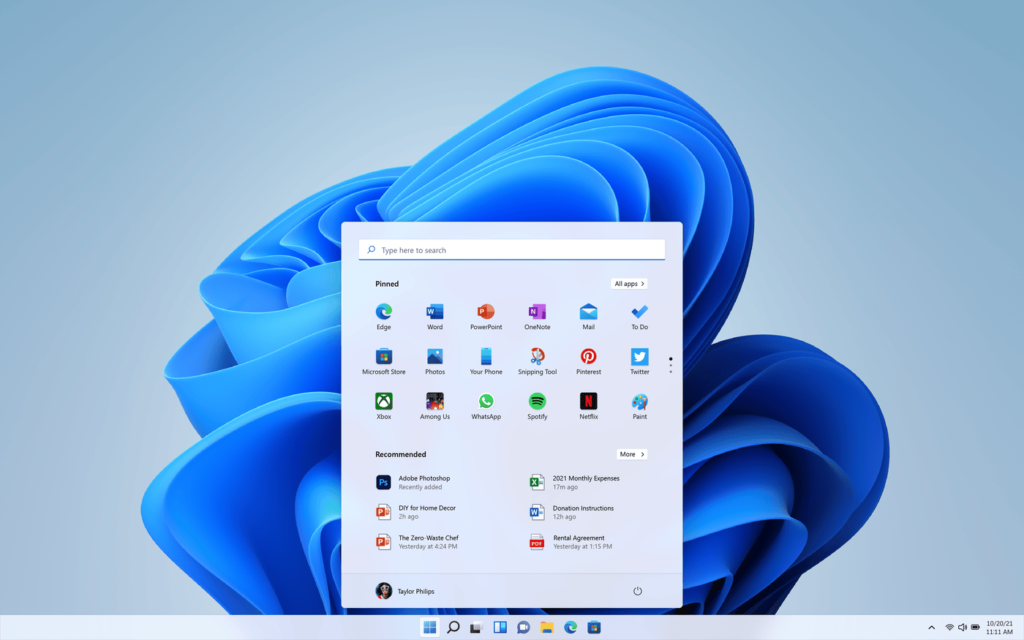
Microsoft is making it increasingly difficult to set up Windows 11 without signing into a Microsoft Account. A popular workaround that previously allowed users to bypass the mandatory login is being removed, effectively requiring an internet connection and Microsoft Account during the initial setup. Goodbye, bypass trick For years, Windows users who preferred local accounts — or simply didn’t want to link their PC to a Microsoft Account — relied on a simple command called “bypassnro.” By typing this during setup, users could skip the internet and Microsoft Account requirement, keeping their installation offline and independent. However, in the latest Windows 11 Insider build, Microsoft has removed this command entirely, calling it a move to “enhance security and user experience.” “We’re removing the bypassnro.cmd script from the build to enhance security and user experience of Windows 11,” said Amanda Langowski and Brandon LeBlanc, heads of the Windows Insider Program. “This change ensures that all users exit setup with internet connectivity and a Microsoft Account.” The new policy will require all users — even those with no intention of using Microsoft’s cloud-based services — to set up an account linked to the internet. While the company insists that forcing an online account ensures better security and smoother setup, critics argue it’s just another way to push users into Microsoft’s ecosystem. Remaining workarounds For now, tech-savvy users can still bypass the restriction by manually editing the registry during setup (using Shift + F10 to open Command Prompt and entering the command “reg add HKLMSOFTWAREMicrosoftWindowsCurrentVersionOOBE /v BypassNRO /t REG_DWORD /d 1 /f shutdown /r /t 0”). However, Microsoft could block this workaround soon, leaving only complex methods like unattended.xml installations, a hassle for average users but still an option for IT professionals. Why is Microsoft doing this? Microsoft has been gradually tightening Windows 11’s requirements, from forcing TPM 2.0 for installation to phasing out Windows 10 support. The push for Microsoft Accounts means users are more likely to use OneDrive, Microsoft 365, and other services, locking them deeper into the company’s ecosystem. While Microsoft claims this improves security, many users see it as a loss of control. Local accounts offer more privacy and fewer ads, but soon, they might be a thing of the past. When will this hit all users? The change is currently in testing with Windows Insiders, but it’s expected to roll out to all Windows 11 users in the coming weeks or months, likely with the 25H2 update later this year. For now, users setting up a new PC and want a local account, do it soon — before Microsoft slams the door shut for good. source

Windows 11 Forces Microsoft Account Sign In & Removes Bypass Trick Option Read More »

Corporate Transparency Act: Navigating the Latest Developments

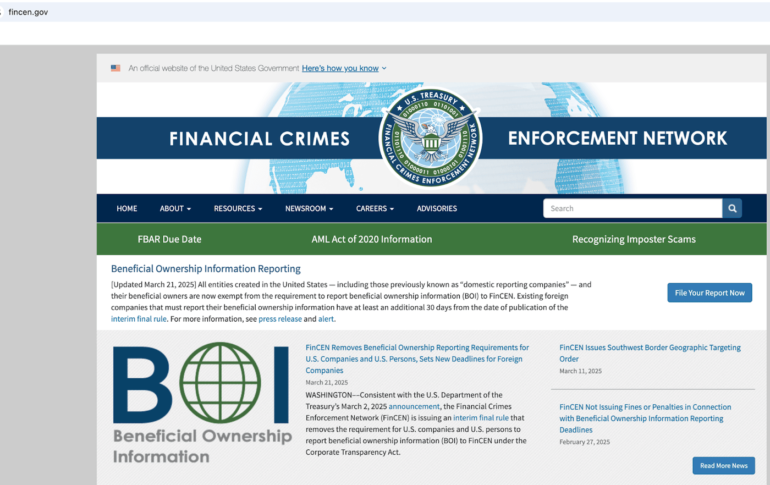
The past few months have brought so many changes to the Corporate Transparency Act (CTA) that it’s hard not to have whiplash. With all the plot twists and courtroom flip-flops, this saga feels like binge-watching a docu-soap. While the rest of the world is keeping up with the Kardashians, you might want to keep up with the CTA, as the reality for this landscape is still evolving. Are domestic US businesses still expected to file a BOI report? No, domestic US businesses and US citizens do not need to file the BOI report based on an interim ruling. However, certain businesses are still required to do so, as discussed in more detail below. The interim ruling is provisional and can only be relied on until the courts issue a final ruling, which is expected to be made available to the public by the end of 2025. Updates on BOI reporting requirements and deadlines (Source: FinCEN) What is the CTA? The CTA was established to deter the use of anonymous shell companies for money laundering, tax evasion, and other illicit purposes. It requires specific entities to report their BOI to the FinCEN. As of the most recent pronouncement, this information is then consolidated into a repository of data only for foreign entities or individuals who own or control companies operating within the United States. The FinCEN is a bureau within the US Department of the Treasury that helps protect the integrity of the US financial system. FinCEN is tasked with investigating financial crimes by gathering and analyzing financial data. It administers regulatory compliance for financial institutions and assists law enforcement by sharing the financial data gathered. Who must comply with the CTA? Under previous CTA legislation, many small businesses operating within the US would have been subject to onerous reporting requirements. Under FinCEN’s most recent announcement, only entities defined as “foreign reporting companies” are required to complete BOI reporting. A foreign reporting company is defined as any corporation, limited liability company (LLC), or other similar entity that is Formed under the laws of a foreign country; and Registered to do business in the US. Even though the US Treasury Department announced it would no longer enforce the CTA’s beneficial ownership for domestic businesses, the following applies: Foreign entities registered to do business in the US before March 21, 2025, must file BOI reports no later than 30 days from that date. Foreign entities registered to do business in the US on or after March 21, 2025, have 30 calendar days after the effective date of registration to file an initial BOI report. Penalties for non-compliance Entities that fail to comply with the CTA’s reporting requirements may face significant penalties. Civil penalties: Up to $592 per day for each day the violation continues. Criminal penalties: Up to $10,000 and imprisonment for up to two years for willful violations. Frequently asked questions (FAQs) Are small businesses exempt from BOI reporting under the CTA? Yes. Based on the legislation at the time of this publication, US-owned and operated businesses (large or small) do not need to file beneficial ownership information reports. Who needs to file the CTA reporting? Foreign businesses operating in the US must file BOI reports under the CTA. How do you file a BOI report? BOI reports are filed on boir.org. Reporting requirements shown on the website may take time to reflect recent legislative updates. How often do filings need to be updated? Entities must update their BOI reports within 30 days of any change in the reported information to ensure FinCEN’s records remain accurate. source

Corporate Transparency Act: Navigating the Latest Developments Read More »

Major Manufacturing Shake-up: Intel Agrees to TSMC Takeover of Chip Foundries, Sources Say

Intel foundry. Image: Intel Intel has tentatively agreed to let Taiwan Semiconductor Manufacturing Company (TSMC) take over some of its chipmaking facilities, according to The Information. TSMC will hold a 20% stake in the joint venture, contributing not cash, but value through sharing its chipmaking practices and training Intel staff, according to anonymous sources cited by the publication. Rumours of a possible takeover of Intel started swirling in February, with TSMC and Broadcom considering splitting the U.S. company’s manufacturing and design arms between them. The following month, TSMC reportedly offered a share in its proposed acquisition of the chip foundries to NVIDIA and AMD, as well as Broadcom. Both NVIDIA and Broadcom initiated manufacturing testing at Intel’s facilities at the time, sources said. However, Intel did not want to sell its chip design house separately from the foundry division, which manufactures custom chips for its customers. SEE: TSMC’s $100B Investment in US Data Centers Sets Foreign Investment Record Intel used to be a giant in the CPU industry, but the AI boom has led to recent struggles. Unlike its rivals, Intel chose not to focus solely on either manufacturing or designing chips and instead engaged in both. As a result, it saw its chip-making endeavours eclipsed by TSMC, who won NVIDIA as a customer. The U.S. manufacturing icon also had some struggles with quality in 2024, leading to its first reported net loss since 1986, and dropping from first to second on Gartner’s list of top global semiconductor vendors by revenue growth. Nevertheless, after The Information’s story was published, its shares received a boost. More about data centers Intel’s new CEO hits the ground running in bid to revive the company On February 28, Intel delayed the build of two chip factories in New Albany, Ohio by at least five years, which the general manager of Intel Foundry Manufacturing said was to “align the start of production of our fabs with the needs of our business and broader market demand,” as well as “​​manage our capital responsibly.” The $28 billion project was greenlit in 2022, under the leadership of former CEO Pat Gelsinger. He was removed by Intel’s board in December after his ambitious turnaround plan — which involved funnelling money into new fabs — failed to provide notable market share growth or profitability. Gelsinger was replaced by chip industry veteran Lip-Bu Tan in mid-March, who quickly announced that Intel would be spinning off assets that aren’t part of its core mission. He said the company would now be focusing efforts on AI and so-called “Software 2.0,” where language models and machine learning replace manually written code. Tan also revealed his intention to hire quality engineers, boost Intel’s chip foundry work, and potentially launch a custom semiconductor service. President Trump supports TSMC’s involvement with Intel U.S. President Donald Trump encouraged TSMC to assist in pulling Intel out of its slump with a joint venture, according to Reuters. He is keen to revive the former U.S. manufacturing icon while strengthening domestic production, so he does not want any part of Intel to be fully foreign-owned. As a result, TSMC is reportedly limiting its stake in Intel to under 50% to ensure regulatory approval under the Trump administration. source

Major Manufacturing Shake-up: Intel Agrees to TSMC Takeover of Chip Foundries, Sources Say Read More »

Gartner: Gen AI is in the 'Trough of Disillusionment,' Yet Spending Expected to Increase Through 2028

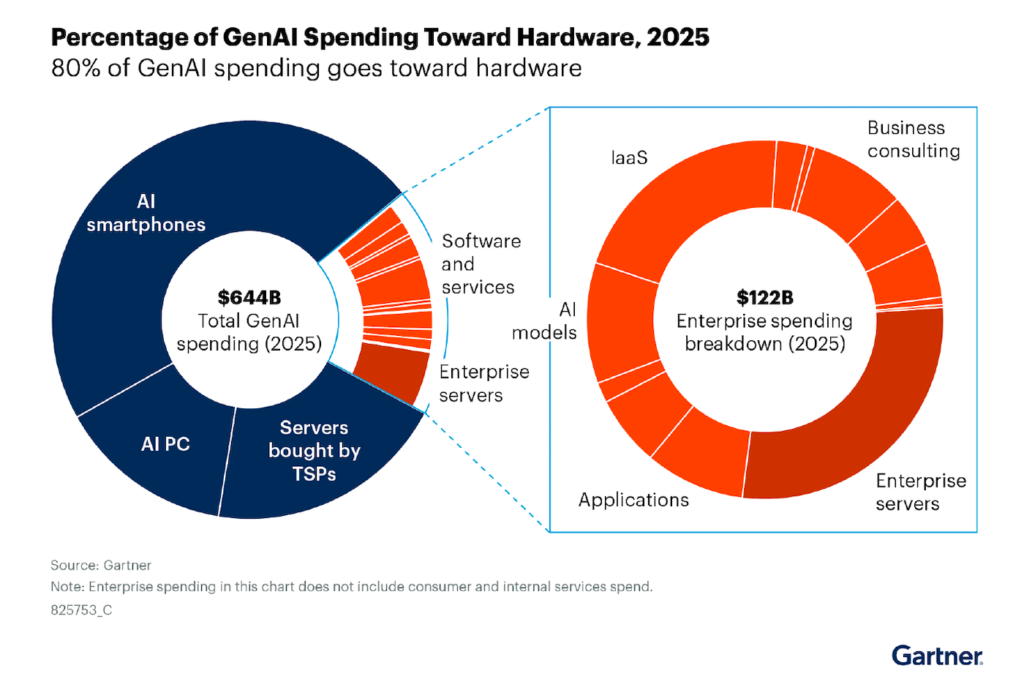
Global spending on generative AI will increase in 2025, but there will be fewer “ambitious projects,” according to a recent report from Gartner Distinguished VP Analyst John Lovelock. Generative AI spending will reach $644 billion in 2025. This is a jump of 76.4% from 2024’s numbers. In Gartner’s Hype Cycle, which roughly traces the rise, fall, and normalization of new technology, generative AI now finds itself entering the Trough of Disillusionment. Companies may have reached the limits of their experimentation with AI, and they may be disappointed with the outcomes. Gartner expects AI will remain in this phase until 2026, at which point transformational use cases will emerge to propel generative AI into the productivity stage. Generative AI spending expected to grow until at least 2028 After a period of stagnation in the Trough of Disillusionment, the only place to go is up. Gartner expects major growth in generative AI spending over the next five years despite current apathy. In particular, generative AI product adoption is expected to grow in the services sector, with compound annual growth rates (CAGRs) of 132.5% for generative AI applications and 131.8% for generative AI managed services. Highlights from Gartner’s research into IT spending related to generative AI and otherwise from 2023 to 2028 include: $438,434 million in generative AI on smartphones by 2026 $183,018 million in AI-optimized servers by 2026 $146,259 million in AI PCs by 2026 CAGR of 171.6% for generative AI on smartphones by 2028 CAGR of 139.9% for AI-optimized IaaS by 2028 Other use cases see relatively low CAGR, such as AI-optimized servers (34%), generative AI applications in software (64.7%), and generative AI infrastructure (69.2%). However, Gartner predicted, these use cases will still continue to grow in popularity until at least 2028. There could also be money to be made in what Gartner calls GenAI technology consulting, which has an 111.8% CAGR. GenAI technology consulting is teaching companies how to optimize AI-related business strategies and use AI for their benefit, not consulting with a generative AI model in order to come up with ideas. SEE: This Generative AI Customizable Policy from TechRepublic Premium Generative AI in hardware doesn’t necessarily correspond to consumer demand Many hot generative AI proofs-of-concept from 2023 failed, decreasing confidence in the technology. For example, the company Humane, which created a buzzy AI pin, shut down after failing to transform the way we interact with devices. Microsoft Copilot faced a backlash from consumers who found its security weak or its presence just plain creepy. Gartner predicts customers will continue to note dissatisfaction with generative AI functionality added to existing products. Companies may try to fix what isn’t broken by adding generative AI to the devices we use every day. SEE: OpenAI offered a feedback survey to developers to provide comments on an upcoming open-weight AI model. The GenAI market is driven by smartphone, PC, and other consumer device makers including generative AI as a default on their devices. As Lovelock pointed out, the number of purchases of AI-enabled PCs or smartphones is not necessarily a good indicator of consumer demand, as “consumers will be forced to purchase” these now-standard features whenever they pursue an upgrade. Image credit: Gartner Gartner’s Hype Cycle reminds us that most new technologies go through a stormy period as companies and consumers decide what really benefits their lives and businesses. Generative AI companies continue to pour billions into improving their AI models, Gartner pointed out. This “paradox,” as Lovelock called it, can be expected to maintain its delicate equilibrium through 2026. GenAI questions businesses will need to address For business leaders, 2025 and 2026 will present a lot of choices about generative AI. Should you use it for your business’ core functionality? For tasks that have to be done but feel like tedious roadblocks in front of the real work? For social aspects like composing quick emails or summarizing Slack messages when you come back from vacation? Or do you work in a creative field where the use of AI requires strict boundaries and policies so as not to dilute the quality of the work or open up potential legal trouble? Based on the Gartner report, we think 2025 and 2026 will be pivotal years for answering those questions. source

Gartner: Gen AI is in the 'Trough of Disillusionment,' Yet Spending Expected to Increase Through 2028 Read More »

North Korean Hackers Disguised as IT Workers Targeting UK, European Companies

Image: DC_Studio/Envato North Korean hackers who disguise themselves as IT workers are applying for work in the U.K., according to Google Threat Intelligence Group. Success in the U.S. is declining due to rising awareness of their tactics, indictments, and right-to-work verification challenges, prompting them to turn elsewhere. The attackers pose as legitimate remote workers, looking to generate revenue, access sensitive company data, or perform espionage operations through employment. Researchers observed them seeking out login credentials for job sites and human capital management platforms. “Europe needs to wake up fast,” Jamie Collier, Lead Threat Intelligence Advisor, Europe, Google Threat Intelligence Group, told TechRepublic in an email. “Despite being in the crosshairs of IT worker operations, too many perceive this as a U.S. problem. North Korea’s recent shifts likely stem from U.S. operational hurdles, showing IT workers’ agility and ability to adapt to changing circumstances.” SEE: UK Cyber Risks Are ‘Widely Underestimated,’ Warns Country’s Security Chief Hackers are targeting larger organisations and new territories Activity has increased since late October, according to Google, with attackers from the Democratic People’s Republic of Korea targeting larger organisations and new territories. It’s not just the U.K., either, as researchers have discovered evidence of a rise in activity in Germany, Portugal, Serbia, and elsewhere in Europe. Google’s researchers uncovered a fake CV listing degrees from Belgrade University in Serbia and fabricated residential addresses in Slovakia. Additionally, they found detailed instructions on how to navigate European job sites and secure employment in Serbia, including using the Serbian time zone for communication, as well as a broker facilitating the creation of fake passports. More aggressive tactics stem from desperation The North Korean IT workers are also using more aggressive tactics, such as moving operations within corporate virtualised infrastructure and threatening to release proprietary corporate data after being fired unless a ransom is paid. The researchers link this to desperation to maintain their revenue stream while law enforcement cracks down on their operations in the US. While workers once avoided burning bridges with employers after termination in the hope of being rehired, they now likely believe their dismissal stems from being caught, prompting them to threaten employers instead. “A decade of diverse cyberattacks precedes North Korea’s latest surge — from SWIFT targeting and ransomware, to cryptocurrency theft and supply chain compromise,” Collier told TechRepublic. “This relentless innovation demonstrates a longstanding commitment to fund the regime through cyber operations.” How the North Korean IT worker operations work Targeted industries include defence and government sectors, with the fake workers “providing fabricated references, building a rapport with job recruiters, and using additional personas they controlled to vouch for their credibility.” They are recruited through online platforms including Upwork, Telegram, and Freelancer. North Korean workers pretend to be from a diverse set of countries, including Italy, Japan, Malaysia, Singapore, Ukraine, the U.S., and Vietnam, using a combination of stolen personal details from real individuals and fabricated information. They have even been known to use AI to generate profile photos, create deepfakes for video interviews, and translate communications into target languages using AI writing tools. In exchange for employment, the North Korean infiltrators offer services in the development of web solutions, such as job marketplaces, bots, content management systems, blockchain, and AI apps, indicating a broad range of expertise. Payment is made in cryptocurrency and through cross-border transfer platforms like Payoneer and TransferWise, helping to obscure its origin and destination. The IT workers use certain “facilitators” to aid them in their pursuits. These are individuals or entities based in the target territories that help them find jobs, bypass verification checks, and receive funds fraudulently. The Google team has found evidence of facilitators in both the U.S. and U.K., locating a corporate laptop from New York that was operational in London. Must-read security coverage Bring Your Own Device environments are making life easier for the workers Many businesses with distributed workforces implement Bring Your Own Device policies, where employees can use their personal devices for work. The Google team believes that, since January, the North Korean IT workers have been identifying these companies as prime targets to gain employment. SEE: BYOD and Personal Apps: A Recipe for Data Breaches A company-owned device will likely be rife with security features, such as activity monitoring, and can be traced back to its user by the address the company shipped it to and its endpoint software inventories. Therefore, the attacker will be more likely to evade detection by using their own laptop to access internal systems through their employer’s virtual machines. source

North Korean Hackers Disguised as IT Workers Targeting UK, European Companies Read More »

Looking for New Career Opportunities? Study for the PMP® Certification with This Preparation Pack

TL;DR: For $19.99, you can get this lifetime resource to study up on project management tactics and prepare for the Project Management Professional (PMP®) certification. Are you looking for a more challenging or lucrative career opportunity? Whether you feel stagnant at your current job or are aspiring to work as a project manager, your credibility and job potential could benefit from earning the proper certifications. For anyone whose next goal is to land a position as a project manager, you’ll definitely need experience. If you don’t necessarily have enough, consider studying for the Project Management Professional (PMP®) certification. You could find resources online (which cost an arm and a leg), or you could prepare and stay up-to-date on project management tactics by training with this $19.99 (reg. $408) course pack. The PMBOK® 7 framework was recently released, meaning now may be your best opportunity to impress hiring managers with your certification and skills. In this bundle, you’ll gain access to over 20 hours of training across 52 lectures. This bundle’s courses are divided into five parts designed to maximize your learning experience and build upon each section. All courses are taught in a video format for more flexible and interactive learning, and since this bundle is yours for life, you can learn at your own pace. Check out some of the project management strategies you’ll dive into: Learn what the PMP® certification and PMBOK® 7 framework is all about to start your journey. You’ll get the latest insights to keep up with industry standards. Practical knowledge: You’ll study project performance domains, models, methods, and artifacts, all of which can be applied to real-world scenarios. You’ll also gain expertise in necessary project management skills. Effective exam strategies: These can help you gain familiarity ahead of the exam, and having these proven techniques at hand could help you pass the PMP® certification exam. Gain the necessary skills to take and pass the PMP® certification exam with this project management training bundle, now just $19.99. StackSocial prices subject to change. source

Looking for New Career Opportunities? Study for the PMP® Certification with This Preparation Pack Read More »

Were the White House’s Tariffs Calculations Done By AI?

Image: kckate16/Envato Elements Questions have swirled as to whether the U.S. government relied on generative AI to establish the tariffs that are expected to take effect April 5. When asked to calculate global tariffs, AI models including OpenAI’s ChatGPT, Google’s Gemini, xAI’s Grok, and Anthropic’s Claude all produced the same formula reportedly used by President Donald Trump in his newly unveiled trade reforms. Critics argue that tasking a generative AI with formulating a policy decision of global significance sets an alarming precedent — one that underscores both the superficiality of its calculations and the magnitude of its consequences. Increased U.S. tariffs could significantly raise the cost of consumer and business electronics. AI returns similar output to the Office of the U.S. Trade Representative’s calculations Early on April 3, economist James Surowiecki posted his investigation into the tariffs. The White House set out to impose “reciprocal tariffs.” However, Surowiecki noted, the document from the Office of the United States Trade Representative showing the equation used to determine those tariffs divides the U.S. trade deficit by each country’s exports to the U.S. This, Suroweicki said, is not reciprocal. Economist Wojtek Kopczuk asked ChatGPT to calculate tariffs to balance out the U.S. trade deficit. He received a similar answer to the White House’s documentation, showing the AI used “a basic approach” that divided the trade deficit by the total trade. Entrepreneur Amy Hoy ran a similar experiment, yielding identical results from AI models. The White House has not made a statement regarding potential AI use in the creation of the equation used to calculate the tariffs. So, we don’t know whether the equation was generated by AI or what prompt may have been used to create it; however, the uniform and straightforward response to a complex economic issue does bear the hallmarks of generative AI. Elon Musk, CEO of Grok maker xAI, is currently serving as a special government employee to the Trump administration. More must-read AI coverage Trump team suggests tariffs will encourage U.S. business The Trump administration has stated high tariffs could encourage U.S. manufacturing and create revenue for the government. The goal of the reciprocal tariffs is to “to ensure fair trade, protect American workers, and reduce the trade deficit,” according to the White House statement. Trump and his team, meanwhile, may see the high tariff percentages as a negotiating tactic, as Donald Trump’s son Eric Trump wrote on X on April 3. “The first to negotiate will win — the last will absolutely lose. I have seen this movie my entire life…,” Eric Trump wrote. Some countries are exempt from tariff adjustment Countries with steep Trump-era taxes on goods coming into the U.S. — notably Canada and Mexico — are exempt from the new wave of tariffs. Russia remains exempt due to existing sanctions, as do countries like North Korea and Cuba. source

Were the White House’s Tariffs Calculations Done By AI? Read More »

Apple Rolls Out iOS 18.4 With New Languages, Emojis & Apple Intelligence in the EU

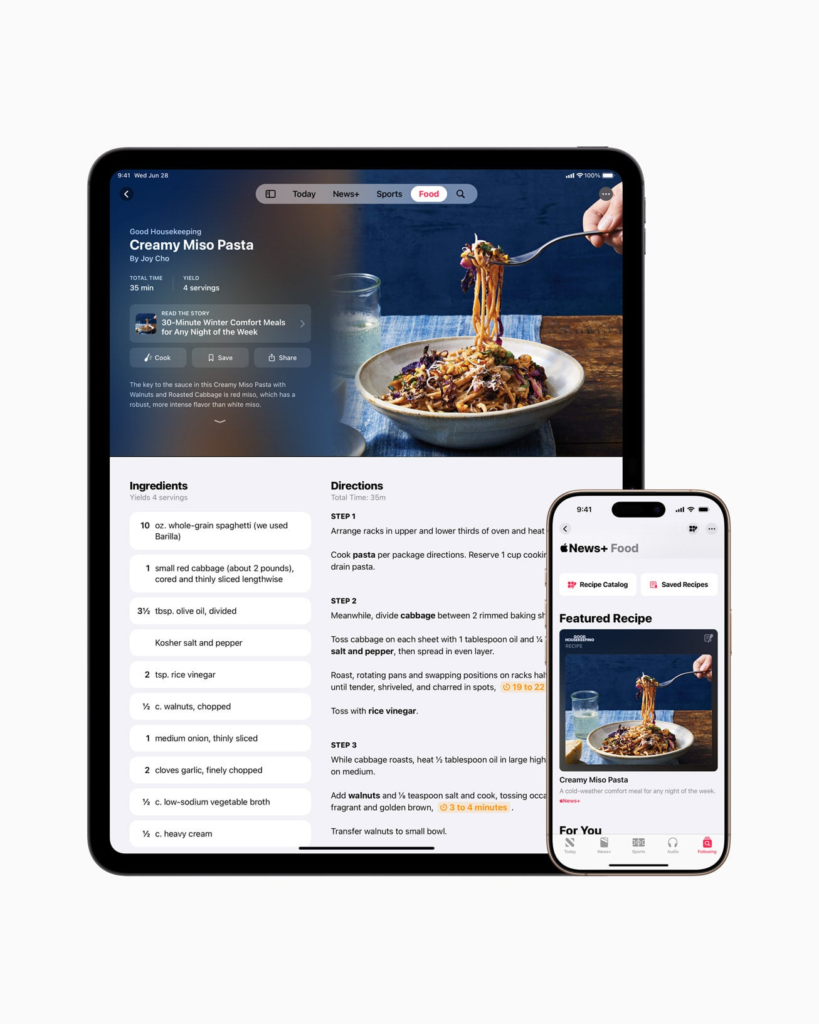
Photo of Apple News+ Food feed. Image: Apple Apple has deployed iOS 18.4 to all compatible iPhones. The software update adds support for eight new languages on Apple Intelligence, recipes to Apple News+, and seven new emojis. Users in the European Union can also set their default navigation app other than Apple Maps. You should be prompted about the update automatically, but if not, you can initiate the download manually by going to Settings, General, and then Software Update. Apple Intelligence features are only available on iPhone 16 models, iPhone 15 Pro, and iPhone 15 Pro Max. TechRepublic breaks down all the biggest new features coming to your iPhone with iOS 18.4. SEE: Apple iOS 19: Here’s What to Expect & When Apple Intelligence: New languages, EU access, Vision Pro integration Apple Intelligence now supports these additional languages: French, German, Italian, Portuguese (Brazil), Spanish, Japanese, Korean, Chinese (simplified), and localised English for Singapore and India. It is also now finally available to iPhone and iPad users in the EU after “regulatory uncertainties brought about by the Digital Markets Act” held up its release in the region. Apple Intelligence also now reads and prioritises your iPhone notifications, putting the most urgent alerts at the top, and a “Sketch” style option has been added to Image Playground. It also provides summaries of user reviews for apps listed in the App Store. New emojis iOS 18.4 has seven new emojis added to the iPhone keyboard to help you express yourself better in messages: Face with bags under eyes Fingerprint Leafless tree Root vegetable Harp Shovel Splatter New system languages support Ten new system languages are now available on iPhones with iOS 18.4: Bangla, Gujarati, Kannada, Malayalam, Marathi, Odia, Punjabi, Tamil, Telugu, and Urdu. Default navigation app choice for EU users iPhone users in the EU will be able to choose their default navigation app with this update from Apple Maps to alternatives like Google Maps or Waze; this will apply to both the handset and CarPlay. The option has been added in response to the EU’s Digital Markets Act, which requires Apple to allow more competition and give consumers greater control over app preferences. Apple first announced this and a number of other changes necessary for DMA compliance in August. SEE: EU Cracks Down on Apple for Anti-Competitive Behavior Vision Pro app For iPhone users with a Vision Pro headset, upgrading to iOS 18.4 will add the new Vision Pro app to your device. This helps users discover and download Vision Pro content, manage device settings, and set up Guest Mode. Apple News+ recipes For budding chefs, subscribers of Apple News+ will find a whole host of recipes in the app that they can search through and save for later. When you’re ready to cook, you can load the recipe in Cooking Mode, which displays each step clearly and individually. The new Food section also shows cooking tips and restaurant reviews. SEE: Apple’s Next Big Thing is AI on Smart Watches Photos: New filters and collection features The Photos app has been updated with new filters that let users show or hide images based on criteria such as whether they’ve been shared with others, synced from a Mac or PC, or included in albums. Albums can be sorted by Date Modified, and items in the Media Types and Utilities collections can be reordered to prioritise videos, selfies, or screenshots. Filters like Oldest First will be available across all collections, and the Recently Viewed and Recently Shared collections can be disabled. In addition, Hidden photos won’t be imported to a Mac or PC if Use Face ID is applied to unlock them. CarPlay: Big screen display and sports scores CarPlay has been updated with iOS 18.4. Now, if the screen in your car is large enough, the CarPlay Home screen will show three rows of apps rather than two. Sports scores can also appear on a new Now Playing interface, thanks to the updated API made available to sports apps. Parental controls updated Apple has simplified the process of creating a Child Account by automatically applying child-appropriate settings before the setup is fully complete, allowing parents to step away and finish later. It has also made it so that the Screen Time App Limits remain enforced even if a child uninstalls and reinstalls an app. source

Apple Rolls Out iOS 18.4 With New Languages, Emojis & Apple Intelligence in the EU Read More »