Cybersecurity under siege: How AI and ransomware are redefining threats in the Middle East

As Middle Eastern countries accelerate digital transformation through smart cities, AI adoption, and giga-projects, cybersecurity threats are evolving faster than defenses can keep up. In an exclusive interview with Abdul Ghaffar Setareh, Group Chief Risk Officer at Zain Group, he paints a stark picture of the region’s cyber battleground: AI-powered ransomware, 300 Gbps DDoS attacks, and hackers exploiting supply chain loopholes to target critical infrastructure. “AI is no longer just a tool for innovation, it’s a weapon,” says Setareh. “Hackers now use generative AI to craft hyper-targeted phishing campaigns, spread disinformation, and even automate attacks on telecom networks.” Recent incidents, like a 300 Gbps DDoS assault that temporarily crippled a GCC country’s connectivity services, underscore the scale of the challenge. “We once thought 20 Gbps defences were sufficient. Now, attackers deploy 15 times that volume,” he adds. The human factor remains equally critical. A widening cyber skills gap plagues the region, with ethical hackers and threat analysts in short supply. To counter this, Zain employs “ethical hackers” to scour the dark web for threats targeting the company or its customers. “Collaboration is non-negotiable,” Setareh emphasizes. “Partnerships are crucial in this ecosystem.” source

Cybersecurity under siege: How AI and ransomware are redefining threats in the Middle East Read More »

FCC Probes Chinese Cos. For Alleged Illicit US Operations

By Christopher Cole ( March 21, 2025, 7:34 PM EDT) — The Federal Communications Commission on Friday launched a new inquiry into Huawei, ZTE and other companies linked to the Chinese government examining whether they are still operating in the U.S. in violation of restrictions meant to curtail their operations here…. Law360 is on it, so you are, too. A Law360 subscription puts you at the center of fast-moving legal issues, trends and developments so you can act with speed and confidence. Over 200 articles are published daily across more than 60 topics, industries, practice areas and jurisdictions. A Law360 subscription includes features such as Daily newsletters Expert analysis Mobile app Advanced search Judge information Real-time alerts 450K+ searchable archived articles And more! Experience Law360 today with a free 7-day trial. source

FCC Probes Chinese Cos. For Alleged Illicit US Operations Read More »

How to Void a Check in QuickBooks: Step-by-Step Guide

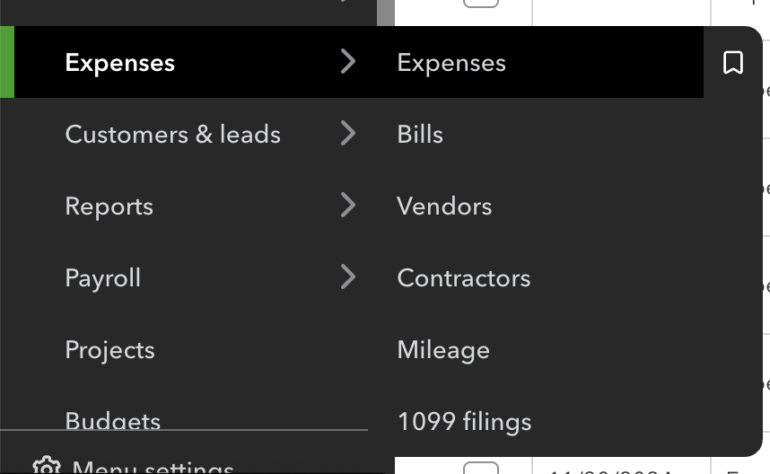
Voiding a cheque cancels the payment while keeping a record of the transaction. It changes the amount to $0.00 without deleting the details, ensuring accurate financial records and preventing reconciliation issues. This is useful for correcting errors, lost cheques, or canceled payments. 1 QuickBooks Employees per Company Size Micro (0-49), Small (50-249), Medium (250-999), Large (1,000-4,999), Enterprise (5,000+) Micro (0-49 Employees), Small (50-249 Employees), Medium (250-999 Employees), Large (1,000-4,999 Employees) Micro, Small, Medium, Large Features API, General Ledger, Inventory Management 2 Quicken Business & Personal Employees per Company Size Micro (0-49), Small (50-249), Medium (250-999), Large (1,000-4,999), Enterprise (5,000+) Micro (0-49 Employees) Micro Features Accounts Receivable/Payable, Invoicing / Billing, Mobile Capabilities, and more Here’s how you can void a check in QuickBooks Online and QuickBooks Desktop. How to void a check in QuickBooks Online Voiding a check in QuickBooks Online (QBO) changes its amount to $0.00 while keeping the details for record-keeping. It stays in reports but won’t affect reconciliations. If the check was never issued, deleting it might be a better option. 1. In the left menu sidebar, click Expenses. A dropdown menu will appear and select Expenses. QuickBooks Online menu with expense-related options (Source: QuickBooks) 2. You’ll arrive at the Expenses page. Find the check transaction you want to void. QuickBooks Online expenses table showing recent financial transactions (Source: QuickBooks) 3. Click the transaction to open the record. Once you see the details, click More at the bottom part of the screen. The “More” button in QuickBooks Online, which expands a menu for additional actions like voiding a check (Source: QuickBooks) 4. A dropdown menu will appear. Select Void to void the check. “Void” option highlighted in the QuickBooks Online menu (Source: QuickBooks) 5. A popout box will appear. Click Void transaction to confirm the action. Void transaction confirmation in QuickBooks Online (Source: QuickBooks) When you void a check in QuickBooks Online, the amount changes to $0.00, but all transaction details remain intact, creating a clear audit trail while maintaining your financial accuracy. Voided checks still appear in reports like the general ledger with zero-dollar amounts, ensuring past reconciliations stay untouched while preventing outstanding checks from affecting future ones. If the check was created in error and never issued, deletion might be more appropriate as it completely removes the transaction, whereas voiding preserves a record with a zero balance. How to void a check in QuickBooks Desktop To void a check in QuickBooks Desktop, locate it in the Check Register under the appropriate bank account. Voiding sets the check’s balance to $0.00 while keeping a record of the transaction. Once confirmed, the check remains in the system but won’t impact future balances or reports. 1. Go to the Check Register and select the bank account where you want to void a check. Accessing Check Register in QuickBooks Desktop (Source: QuickBooks) 2. Select the check you want to void. Reviewing Transactions in QuickBooks Desktop (Source: QuickBooks) 3. Click Void to zero out its balance then click Save & Close. Voiding a Check in QuickBooks Desktop (Source: QuickBooks) 4. Confirm your action by clicking Yes. Confirming Check Voiding in QuickBooks Desktop (Source: QuickBooks) Why you need to void a check in QuickBooks Voiding a check is a safer and cleaner way to handle mistakes and errors. It zeroes out the balance but still keeps a record of the transaction for auditing purposes. Here are some reasons when you need to void a check: 1. There are incorrect details If a check was written with the wrong payee name, amount, or date, voiding it ensures the incorrect transaction is adjusted while keeping a record of the issue. Instead of deleting the check, which removes all history, voiding it keeps the details intact while ensuring it won’t affect future reports or bank reconciliations. 2. Check is lost or stolen If a check has been lost in the mail or stolen, you’ll likely need to issue a replacement. Voiding the original check prevents it from being cashed while maintaining a record in QuickBooks. This helps avoid duplicate payments and ensures the lost check no longer impacts outstanding balances. 3. It is a duplicate entry Sometimes, a check may be entered twice by mistake. If the duplicate entry hasn’t cleared the bank, voiding it removes the incorrect record without disrupting your books. This prevents discrepancies in your bank reconciliation and financial reports. FAQs on how to void a check in QuickBooks Can I recover a voided check in QuickBooks? No, you can’t reverse a voided check in QuickBooks once it’s been voided. However, the transaction details remain in your records with a $0.00 amount. If you need to restore it, you’ll have to create a new check with the original details. Does voiding a check affect my bank balance? No, voiding a check does not change your bank balance. If the check was already cleared in a past reconciliation, its impact on the bank account remains. However, if the check was still outstanding, voiding it removes it from your list of pending transactions, preventing future discrepancies.   source

How to Void a Check in QuickBooks: Step-by-Step Guide Read More »

Anarchy In The UK: The UK Government’s Wild Ride With AI And Big Tech In 2025, And Its Only March

The UK government has declared that it will “take a ‘test and learn’ approach with spending on AI and digital to push innovation.” Staged funding, mission-driven prioritization, and outcome metrics — the civil service bringing some Silicon Valley mentality to play. In theory, I like it. In practice … hold that thought for now. The complex relationship between the UK government, big tech, transparency, and trust has been in the headlines over the last few weeks. If you’ve missed it, myself and Enza Iannopollo have been blogging almost weekly to help try to make sense of the rapidly emerging landscape. We’ve been invoking some classical and mythological imagery, and I’m drawn back to Odysseus testing and learning his way across the Aegean Islands on his voyage home from Troy. But this week, I’m jettisoning the classics for something more visceral. So to help you catch up, here’s a fast-paced 3-minute London punk playlist. Buckle up: Track 1: London Calling We started in mid-February by outlining how the UK government is ready to embrace AI; without trust, however, it risks disaster. Together with the US, the UK refused to sign an international agreement on AI at the global AI Action Summit in Paris, saying it failed to address global AI governance issues and leaves questions on national security unanswered. It simultaneously announced a partnership with Anthropic and the launch of a government AI playbook. Turn it up. Track 2: My Way As we dug further, it became apparent that, despite the UK government’s ambition to create an AI innovation hub and power public service transformation, a key part of the strategy was missing: guidelines for how to build trusted AI. While the EU AI Act clearly articulates prohibited, high, and low risk levels in AI use cases, the UK guidance shrugs its shoulders and leaves civil servants to do it their way. Track 3: Pretty Vacant Next, Apple announced that it was withdrawing Advanced Data Protection for UK users, removing end-to-end encryption of users’ data, files, photos, and messages in order to comply with the UK government’s demands to be able to access all of a user’s data (under certain circumstances). Given the low levels of trust that UK citizens have in their government compared to many other countries, this wasn’t a good look for Westminster or Apple. Track 4: I Fought The Law But then Apple decided to fight the power and took the case to an Investigatory Powers Tribunal. Ramping up its transparency play outside the UK, it also took the decision to remove or retain its diversity, equity, and inclusion (DEI) policies to its shareholders. Transparency Is At The Heart Of Trust You’d be forgiven for having missed some of these “shenanigans.” But wait: In a “death of irony” kind of moment, New Scientist applied a healthy dose of transparency last week when it used a freedom-of-information request to reveal how the UK tech secretary uses ChatGPT for policy advice — #FacePalmEmoji. Let’s focus on what’s at stake here: UK citizen trust in the government is low. A test and learn approach to delivering new AI applications means that mistakes are inevitable — it’s literally baked into the approach. When trust is high, our research shows that stakeholders are more likely to forgive mistakes. When trust is low, the impact can be dramatic. UK consumers trust Apple more than the government to keep their personal data safe. Some 35% of UK consumers trust Apple with their personal data, compared to 25% who trust the government. Further eroding its trust level with citizens by getting into battles with Big Tech over laws that reduce citizen privacy isn’t going to help the UK government build trust. Transparency is a key driver of trust. Based on our initial trust research in 2021 and 2022, customers who believed that a company was transparent were anywhere up to four times as likely to forgive its mistakes as those who believed that it wasn’t transparent. Trust isn’t a nebulous thing — it’s tangible, measurable, and quantifiable. It’s hard-won and easily lost. The UK government has a bold plan for change. These are generational missions, not projects. If this is going to work, the UK government needs citizens to trust it. We will be launching our Government Trust Index soon, in which we’ll look at the levers of trust in more detail. Stay tuned for more. source

Anarchy In The UK: The UK Government’s Wild Ride With AI And Big Tech In 2025, And Its Only March Read More »

Microsoft is set to hike its Power BI prices — will buyers jump ship or just take the hit?

A sign of the times — or a time to consider alternatives? Evelson reported that he is “inundated” with calls from clients concerned that their contracts are up for renewal and their BI vendors are jacking up their prices (by 10X or more). While Microsoft is doing the same, Power BI remains the least expensive BI tool on the market; also, he pointed out, the Pro license has been $10 per user per month for a long time, so this price increase was coming. “I do not see this as anything significant, other than, yes, alas, buyers will have to pay up,” he said, pointing out that migrating to another BI platform is a “costly, complex endeavor.” On the other hand, some note that Microsoft’s plan to drive more Microsoft 365 E5 adoption, and the associated accelerated average revenue per unit (ARPU) that comes with it, could backfire. source

Microsoft is set to hike its Power BI prices — will buyers jump ship or just take the hit? Read More »

2nd Circ. Seems Open To Restarting IBM Pension Fight

By Kellie Mejdrich ( March 20, 2025, 6:24 PM EDT) — The Second Circuit on Thursday seemed to lean toward reviving a proposed class action alleging IBM shorted retirees on pension payments through the use of outdated mortality data, with two judges asking questions about possible summary judgment proceedings in the case…. Law360 is on it, so you are, too. A Law360 subscription puts you at the center of fast-moving legal issues, trends and developments so you can act with speed and confidence. Over 200 articles are published daily across more than 60 topics, industries, practice areas and jurisdictions. A Law360 subscription includes features such as Daily newsletters Expert analysis Mobile app Advanced search Judge information Real-time alerts 450K+ searchable archived articles And more! Experience Law360 today with a free 7-day trial. source

2nd Circ. Seems Open To Restarting IBM Pension Fight Read More »

Medusa Ransomware: FBI & CISA Urge Immediate Action

Image: DC_Studio/Envato Elements Federal cybersecurity officials are raising red flags over a surge in attacks by the Medusa ransomware group. First detected in June 2021, the group has gained traction recently by using basic but effective methods — like phishing emails and exploiting outdated software — to break into systems and hold data hostage. In a joint advisory released last week, the FBI, Cybersecurity and Infrastructure Security Agency (CISA), and the Multi-State Information Sharing and Analysis Center (MS-ISAC) urged businesses and institutions to take immediate steps to protect their systems. The warning is part of the government’s ongoing #StopRansomware initiative. Must-read security coverage A growing ransomware-as-a-service business Originally a closed operation, Medusa has now adopted a ransomware-as-a-service (RaaS) model. This means the developers provide the ransomware software to partners, known as “Medusa actors,” who carry out the attacks. These affiliates are often recruited from online criminal forums and are sometimes paid bonuses to work exclusively for Medusa. “Potential payments between $100 USD and $1 million USD are offered to these affiliates with the opportunity to work exclusively for Medusa,” the advisory said. Medusa actors often gain access to systems through phishing emails or by exploiting known vulnerabilities, such as CVE-2024-1709, which affects the ScreenConnect remote access tool, and CVE-2023-48788, a flaw in Fortinet products. Once inside, they encrypt files and demand ransoms. The group’s ransom notes give victims 48 hours to respond via a live chat or encrypted messaging platform. If a victim does not respond, Medusa actors may escalate their extortion efforts, a tactic observed in other ransomware groups. What makes Medusa particularly menacing is its public-facing data-leak site, which displays victims alongside countdown timers. Once the timer runs out, stolen data is either released or sold to the highest bidder. In some cases, victims are given the option to buy extra time — a single day’s delay may cost as much as $10,000 in cryptocurrency. “As of February 2025, Medusa developers and affiliates have impacted over 300 victims from a variety of critical infrastructure sectors with affected industries including medical, education, legal, insurance, technology, and manufacturing,” the advisory notes. Medusa’s reach is global; past victims include Minneapolis Public Schools, where an attack in 2023 exposed sensitive information from over 100,000 students. How to protect your organization from Medusa ransomware The advisory urges organizations to take several key steps to protect themselves from Medusa. These include: Ensuring that all operating systems, software, and firmware are regularly updated and patched. Implementing multi-factor authentication across all services. Using strong, unique passwords. Additionally, CISA advises businesses to segment their networks to limit the spread of infections and filter network traffic to block unauthorized access attempts. CISA is urging IT teams to review their #StopRansomware: Medusa Ransomware advisory for detailed detection methods and threat indicators. source

Medusa Ransomware: FBI & CISA Urge Immediate Action Read More »

8 Ways Generative AI Can Help You Land a New Job After a Layoff

It’s hard to survive a layoff or a firing. It’s tougher now than ever given the long hiring cycles and the growing number of ghost jobs. Adding to the unemployment chaos are the massive White House and DOGE firings as well as expected upticks in layoffs correlating with a spike in tariffs. The future looks bleak for the unemployed.   “Layoffs aren’t just numbers but a form of economic trauma,” says Lars Nyman, CMO of CUDO Compute, a platform that powers many AI programs.  “Right now, the job market feels like an obstacle course rigged against the people running it. Generative AI isn’t a magic bullet and actually takes many jobs, but if you use it right, it can tilt the odds back in your favor,” Nyman adds.  But how do you use AI “right” to get another job. Here are eight ways to apply GenAI to your advantage.  1. AI as exorcist: expelling ghost jobs from your job hunt  Ghost jobs aren’t a fluke. They are an actual business strategy for companies seeking to accomplish goals that often have nothing to do with hiring anyone now.   “A whopping 40% to 50% of job postings are ghost jobs, meaning roles companies never intend to fill but leave up to look busy or fish for future talent. Generative AI tools can analyze patterns in job postings to flag likely fakes. Red flags would be vague descriptions, recycled listings, and positions staying open forever. If you’re seeing those, move on,” says Nyman.   Related:Tech Company Layoffs: The COVID Tech Bubble Bursts Use general generative AI tools like ChatGPT, Claude, Gemini, Copilot, or Perplexity AI to weed out ghost jobs. Sample prompts for GenAI tools connected to the Internet: “A ghost job is a job opening announcement which the company does not actually plan to fill now or maybe ever. The following are indicators that a job announcement is a ghost job: vague descriptions, recycled listings, and positions staying open (listed or relisted) for longer than 3 months in a one-year period. Analyze the following job announcement to determine whether it is a legitimate job opening or a ghost job [copy and paste job description here].”  2. AI as scam buster: identifying scam job postings  Desperate times call all the predators forth to feast on desperate people. Watch out for fake jobs. You might apply, be interviewed, get hired, fill out the onboarding forms with your personal data including your social security number and bank details. After that there’s only crickets. You’ve been scammed. This job didn’t exist.   AI can help identify fake jobs posted by scammers. But do research job listings further, too. AI can get you a false red or green flag.   Related:What CIOs Should Know About Post-Election Winners and Losers “Feed the job posting text into AI, asking it to flag suspicious phrases or inconsistent requirements,” says Sam Wright, head of operations and partnerships at Huntr.  You can add flags to the prompt too, like asking AI to check the email or web address in the job announcement against the web address and emails of the company advertised. Add any other red flags too, so AI can make a better assessment.   3. Use AI to automatically fill out job application forms  Autofill helps fill out some fields on online forms, but not very many. That leaves you to fill out the rest of job application forms online. If you’re smart and playing the numbers, you’re filling out a lot of job applications. That means entering the same data over and over and over again. AI can do that for you and much faster!  “I used this extension called: Simplify Jobs, it allowed me to fill most of the job applications within one minute, which allowed me to apply to 30+ jobs within an hour. Generally, it takes 15-30 minutes for each application if you manually do it,” says Devansh Agarwal, senior machine learning engineer at Amazon Web Services.  “I set up LinkedIn alerts for the companies and job types that I was interested in and every day I would receive mails with job posting alerts. Then I would use Simplify Jobs to apply to these roles,” Agarwal adds. He also says that all the views he expressed in this article are his own and do not reflect his current or previous employers.   Related:Key Attributes That Lead to an Ethical IT Department 4. Use AI to tailor resumes and cover letters  You can use a generative AI tool to create your resume. “When creating your resume, you need to be precise, as the recruiters spend less than 10 seconds looking at one. You need to write your experiences in the correct format, it takes time and is complicated to do it yourself. ChatGPT can help you rephrase things and write them in the proper format,” says Agarwal.  But then be sure to use AI to repurpose your resume and cover letter to fit the exact requirements for each job application. Go the extra mile and prompt the GenAI tool to use keywords that will trigger the AI on the other side to conclude an exact candidate match.  “You can automate job applications, and without looking like a bot. There are tools like LazyApply that mass-send applications, but the value is in using AI to customize your resume and cover letter — producing quality, accurate material at scale,” says Nyman. “AI can tweak tone, highlight specific achievements, and adjust language to better suit company culture.”  5. Use AI to boost your LinkedIn reach so more employers see you  Posting often on LinkedIn is a great way to build your following and profile views which can be helpful to your job search.   “During a job search there isn’t enough time to focus on posting content on LinkedIn but since it is the primary platform for job search it is important to increase your network on it. People use GenAI to post things on LinkedIn and increase their reach, by using GenAI it barely takes

8 Ways Generative AI Can Help You Land a New Job After a Layoff Read More »

Adapting To Private Practice: From SEC To BigLaw

By Jennifer Lee ( March 19, 2025, 4:14 PM EDT) — Attorneys frequently transition from government work to private practice during changes in administration, encountering challenges and surprises as they do so. In this Expert Analysis series, attorneys who made that move in the last few years reflect on how they adapted to law firm life, and discuss tips for others. If you are interested in writing about your experience, please email [email protected]…. Law360 is on it, so you are, too. A Law360 subscription puts you at the center of fast-moving legal issues, trends and developments so you can act with speed and confidence. Over 200 articles are published daily across more than 60 topics, industries, practice areas and jurisdictions. A Law360 subscription includes features such as Daily newsletters Expert analysis Mobile app Advanced search Judge information Real-time alerts 450K+ searchable archived articles And more! Experience Law360 today with a free 7-day trial. source

Adapting To Private Practice: From SEC To BigLaw Read More »

3. What is the best age to buy a home?

When asked about the ideal age to buy a home, people’s answers vary more than on other milestones we measured. Brazilian adults suggest the youngest age for this life event (saying 24.9 years old is best, on average), while Ghanaian adults suggest the oldest age (36.3). Across the 18 mostly middle-income countries surveyed, people think the best age to buy a home is 29.9. Adults in other Latin American countries agree with Brazilians that becoming a homeowner before 30 is ideal: People in Chile and Mexico, on average, say the best age for buying a home is around 27, while those in Argentina, Colombia and Peru say it’s around 28. As on every milestone we asked about, people within each country suggest a variety of ages for this life event. In Brazil, there are three age ranges that around a quarter of adults each see as ideal for first-time homebuying: ages 20 to 24, 25 to 29, and 30 to 34. In addition, 13% of Brazilians say the best time to buy a home is under age 20 – the highest share to say this among the countries surveyed. In other countries, there is clearer consensus on the best time in life to buy a home. For instance, 42% of Thai adults think that the best time to reach this milestone is between ages 30 and 34. Roughly one-in-five say the ideal age is 25 to 29, and a similar share say it’s 35 to 39. Conversely, roughly four-in-ten Ghanaian adults believe the best time to buy a home is at age 40 or older. That’s the highest share to suggest this age range in the survey. Views by age In eight out of 18 countries, the ideal age to buy a home differs slightly among younger and older adults. The largest difference is in Kenya, where adults under 35 say the ideal age to buy a home is 30.2, while those ages 50 and older say it’s 32.6. Notably, there are not consistent education or income differences on this question. source

3. What is the best age to buy a home? Read More »