2. How COVID-19 changed U.S. workplaces
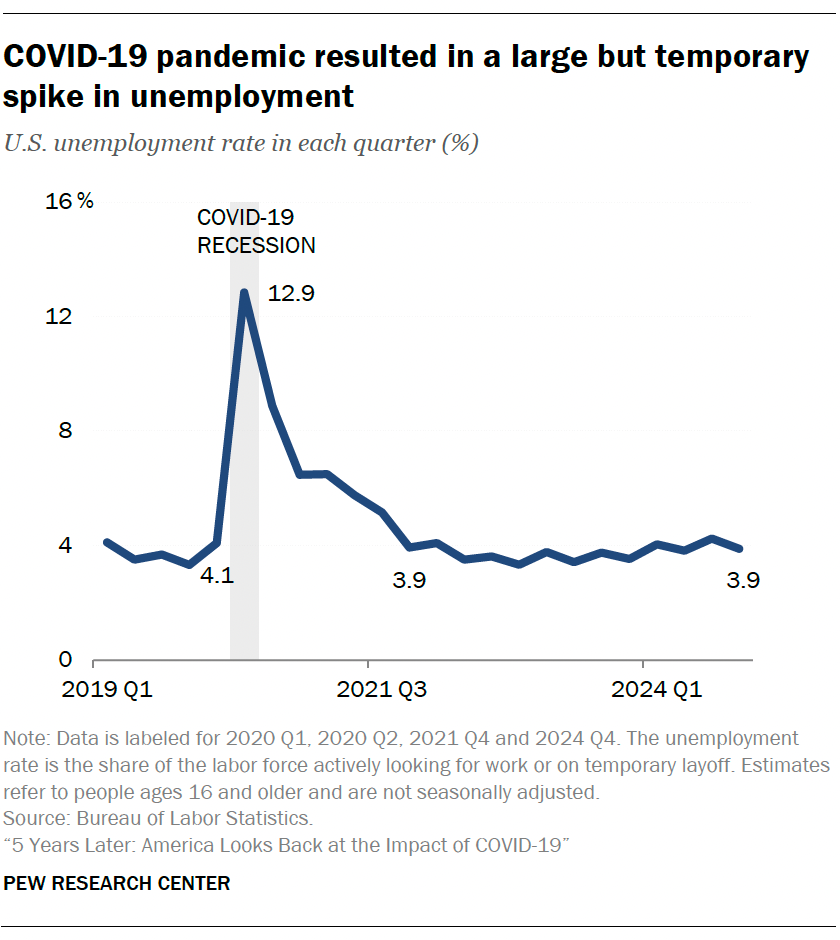
Kim Parker contributed to this chapter. The COVID-19 pandemic sent shockwaves through the U.S. labor market. Businesses shuttered, millions of Americans lost their jobs, and for many others their home became their workplace. We tracked these changes starting from the early months of the coronavirus outbreak. Our trends outline the journey workers have been through. And new data helps show where things stand now and the lasting impact the pandemic has had on the American workplace. Labor market impact The coronavirus outbreak had an immediate impact on employment in the U.S. In February 2020, before widespread lockdowns and stay-at-home orders took hold, the national unemployment rate stood at 3.8%. By April 2020 it reached 14.4%. The spike was intense but relatively short-lived. By the fourth quarter of 2021, the unemployment rate was back around 4%. Some groups were hit harder than others by the early job losses: Women Immigrants Young workers (ages 16 to 24) Workers who hadn’t completed high school Lower-income workers In addition, millions of workers withdrew from the labor force altogether. More women than men dropped out of the labor force during the first year of the pandemic. How workers experienced the pandemic from start to finish Our surveys traced the arc of experiences for American workers from the outset of the pandemic to what work life looks like now. In the sections below, we walk through the key takeaways from our last five years of polling on this topic. Jump to read about: The pandemic’s initial impact on workers | What things look like today | Looking back: The challenges working parents faced | What happened when workplaces began to reopen The pandemic’s initial impact on workers Not all workers had the option of working from home As the pandemic took hold, many workers were able to shift their duties from their office or workplace to home. But it’s important to keep in mind that a majority of workers (roughly 60%) do not have jobs that can be done from home. Many of these workers lost their jobs in the early months of the pandemic, as businesses and retail establishments temporarily shut down. Others had to continue to show up for work, even as they were at risk of contracting the coronavirus. Some demographic groups were more likely than others to not have jobs that can be done from home, a 2020 survey found: Men were more likely than women (64% vs. 58% said their job cannot be done from home). Workers without a four-year college degree were much more likely than those with a bachelor’s degree or more education (77% vs. 37%). Lower-income workers were more likely than middle- and upper-income workers (76% vs. 63% and 44%, respectively). In the fall of 2020, we asked workers with jobs that could not be done from home how concerned they were about being exposed to the coronavirus from people they interacted with at work; 53% said they were very or somewhat concerned about this. About four-in-ten (39%) said they were very satisfied with the measures their employer had put in place to protect them from being exposed. The swift transition to working from home Looking back, only 14% of workers whose jobs currently can, for the most part, be done from home – “teleworkable” jobs – say they worked from home all the time before the coronavirus outbreak. By October 2020, 55% of those with teleworkable jobs were doing so, according to a survey at that time. That share has since come down. As of October 2024, about a third (32%) say they are working from home all the time. Notably, the share working from home most or some of the time increased since the start of the pandemic as offices gradually began to reopen. Now, 43% of workers say they have this type of hybrid schedule, up from about a third in 2022. How did workers respond to the shift to telework? Our October 2020 survey found that most employed adults who were working from home said the transition had been relatively easy. Large majorities said it had been easy for them to have the technology they need, to meet deadlines and to have an adequate workspace. However, about three-in-ten or more said it had been difficult to be able to get their work done without interruptions and to feel motivated to work. Younger workers were especially likely to point to difficulty feeling motivated and being able to work without interruptions. What things look like today As we approach the five-year mark of the start of the pandemic, a growing share of hybrid workers are facing mandates from their employers to return to the office. Among those with teleworkable jobs who say they’re not currently working from home all the time, 75% say their employer now requires them to work from their office, workplace or job site a certain number of days per week or month. That share is up significantly from 63% in 2023. Advantages and disadvantages of working from home In our polling throughout the past five years – including in our most recent survey – workers have identified a couple of clear upsides to working from home. Work-life balance: Among workers with a teleworkable job who say they work from home at least sometimes, 73% now say their current arrangement has helped them when it comes to balancing work and their personal life. Only 9% say it’s hurt, and 17% say it has neither helped nor hurt. Productivity: 60% say their current work arrangement has helped their ability to get work done and meet deadlines. Only 7% say it’s hurt their ability to do this, and 33% say it’s neither helped nor hurt. And there are couple of downsides. Feeling disconnected from co-workers: 49% of those who are working from home at least sometimes say their current work arrangement has made it harder for them to feel connected with their co-workers; 11% say it’s helped them feel connected. A sizable share (39%)
2. How COVID-19 changed U.S. workplaces Read More »