Don’t sleep on Google Gemini’s Deep Research mode: 8 examples of informative reports
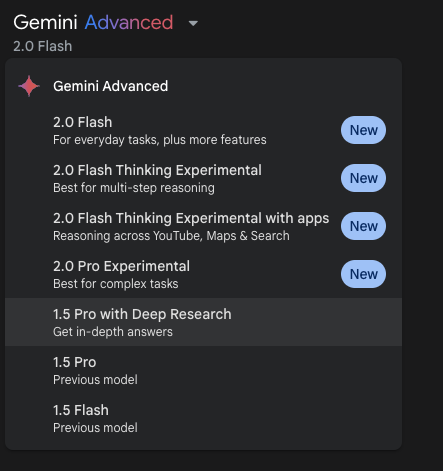
Join our daily and weekly newsletters for the latest updates and exclusive content on industry-leading AI coverage. Learn More Many of us in the AI and business worlds are focused — anecdotally and in terms of the number of articles and messages being written/posted — on OpenAI and DeepSeek, especially OpenAI’s o3-powered Deep Research mode, a new reasoning AI agent that performs extensive web research on behalf of the user and compiles it into neat and tidy, well-cited reports. This is natural since it’s a relatively new product (announced earlier this month) and OpenAI remains among the most highly-regarded and widely used AI model providers. Plus, CEO Sam Altman recently shared plans to make this product available outside of the current $200-per-month ChatGPT Pro subscription, at least on a limited trial basis. Yet for those seeking to use AI to perform Deep Research and have it write reports for you, there’s another model worth checking out without waiting for OpenAI’s Deep Research to make its way to more affordable subscription tiers or shelling out the $200-per-month for the ChatGPT Pro plan. Search giant Google’s own Deep Research mode, powered by its prior generation Gemini 1.5 Pro model, is available now on Google’s Gemini chatbot online through the Google One AI Premium plan (~$20 USD per month), and performs many of the same functionality as OpenAI’s Deep Research at 1/10th the monthly cost. Google actually offers the first month free, currently. It also allows you to export the resulting reports directly to Google Docs with one click. For those that use Google Workspace apps like Docs, this is an incredibly helpful and natural integration. How to use Google Deep Research to generate reports in minutes To access it, subscribe to the Google One AI Premium plan using the link above, then navigate to gemini.google.com, click the drop down menu labeled “Gemini Advanced” in the upper left corner, and select “1.5 Pro with Deep Research.” Every query you type into the entry bar at the bottom after this will now engage Deep Research mode. After the user enters the prompt, the Deep Research agent will draft a research plan for the user’s approval that looks something like this: The user can click to edit parts of the plan by prompting with new adjustments, or go ahead and click the “Start Research” button to begin the process. The Deep Research agent will compile a list of websites to perform the research on, and finally, a report in the form of a response that the user can quickly export to Google Docs with the “Open in Docs” button at the top right of the response box. Whether it’s researching scholarly topics such as conflict throughout history, or the science of new materials like graphene, or market fluctuations, or coming up with concrete business plans for mass producing a new physical small consumer goods product, my own extensive hands-on usage of Google’s Deep Research over the last few days has produced informative reports on a wide range of subjects, complete with citations and well-constructed explanations of the topics discussed. Even such controversial subjects that other AI models often refuse to engage with whatsoever — such as the recent Israeli military campaign in Gaza and whether or not it qualifies as a genocide, or the treatment of transgender people throughout history and in recent times — Google’s Deep Research will attempt to address using evidence from a variety of reputable sources, albeit with a bit of prompt engineering to get around initial resistance. I would strongly encourage all and any business leaders, especially those in “knowledge work” or manufacturing fields, to try Google Deep Research: have it produce reports on subjects related to your industry, and ask it to identify new opportunities or helpful insights to grow your business and gain efficiencies, which you might have missed. Basically treat it like a new helpful researcher on your team, give it some instructions in the form of a paragraph (or a few), and let it compile the report for you — mine took anywhere from seconds to less than 10 minutes. I strongly believe you will be impressed with the results, and may find it changes your workflow and approach for the better. Take a look at examples of 8 reports I generated with Google Deep Research below, complete with initial prompt, and try it for yourself. These are all unedited, raw reports produced directly by Google’s Deep Research powered by Gemini 1.5 Pro. I should hasten to add I’m not being paid by Google for this post or any other work, and am simply a tech journalist/geek by constitution who enjoys testing out new products and services and seeing how, if at all, they can be useful to me and my own personal knowledge repository. 1. Sleep research Prompt: “Compile me a report cross referencing various and any recent applicable studies and other scientific information about sleep length per night, and why some people may need less or more sleep than others, any genetic basis for this, and health effects of low sleep as well as whether low sleepers tend to suffer these or have genetics that protect them from the effects of low sleep.” Result: “Sleep Duration, Individual Variability, and Health Consequences: A Comprehensive Review“ 2. Economic boom and bust research Prompt: “Markets globally and for individual countries and commodities are known for having peaks and valleys, with sudden “black swan” events that often drive economic activity down. Research these throughout history, from the Tulip Craze of Amsterdam to the Great Depression and Global Financial Crisis and subsequent Global Recession, plus any other notable examples you can find, and discuss any overlapping commonalities in causes for market decline and resurgence, and also which markets continued to grow and thrive in depression and recessionary environments.“ Result: “Peaks, Valleys, and Black Swans: An Analysis of Market Crashes and Thriving Sectors in Economic Downturns“ 3. Making a new mass produced consumer product Prompt: “I have an idea
Don’t sleep on Google Gemini’s Deep Research mode: 8 examples of informative reports Read More »