Tech Republic

Huawei's Pura X Ditches Android for HarmonyOS, Debuts AI Assistant With DeepSeek

Image: Huawei Huawei just flipped the script on foldable phones — literally. The Chinese tech giant has launched the Pura X, a sleek, square-shaped foldable smartphone with a wider screen, a powerful AI assistant, and no trace of Google’s Android in sight. Unveiled on March 20 in Shenzhen, the Huawei Pura X starts at 7,499 yuan (about $1,037) and marks a major milestone for the company. It’s the first phone to run HarmonyOS 5, Huawei’s fully self-developed operating system, signaling a complete break from Android — and from U.S. tech reliance. A flip phone, but make it wide At first glance, the Pura X looks like your regular flip phone — small, square, and pocket-friendly when closed. But once opened, it reveals a 6.3-inch inner display with an unusual 16:10 aspect ratio that gives users more screen space than they’re used to. The outer display is a 3.5-inch square screen that lets you check messages, take calls, or snap photos without unfolding the device. Mobility must-reads Powered by Harmony, not Android The Pura X is Huawei’s first phone to completely ditch Android, launching instead with HarmonyOS 5, the latest version of its in-house operating system. The shift marks a bold move for Huawei, which has been under U.S. sanctions since 2019 and cut off from Google’s services. The device also debuts Xiaoyi, Huawei’s AI assistant powered by its Pangu model and enhanced by DeepSeek AI. It can do everything from voice commands to next-gen features such as eye-tracking page turns. Serious cameras and battery life Under the hood, the Pura X carries a 4,720-milliamp-hour battery with 66watt fast charging and 40W wireless charging. It supports Wi-Fi 7, Bluetooth 5.2, and NFC, and the collector’s edition includes satellite communication support. For photo lovers, you get a 50MP main sensor, a 40MP ultra-wide lens, a 3.5x optical zoom, and a dedicated color sensor, all optimized by Huawei’s imaging tech. Whether folded or unfolded, you can capture pro-grade photos and 4K video. The bigger picture To Huawei, the Pura X isn’t just another phone — it’s a statement. The company is stepping fully away from Android, betting big on its own software and AI. The Pura X comes in several stylish options: Moon Shadow Gray, Zero Degree White, Phantom Night Black, and two collector’s editions with more premium finishes and up to 1TB of storage. The highest-end version tops out at 9,999 yuan (around $1,500). Though the Pura X is currently exclusive to China, given its bold design and software independence, it’s a device the global market will be watching closely. source

Huawei's Pura X Ditches Android for HarmonyOS, Debuts AI Assistant With DeepSeek Read More »

FBI 'Increasingly Seeing' Malware Distributed In Document Converters

Image: iStockphoto/domoyega Threat actors may attempt to distribute malware, including ransomware, by offering free document converters, according to a March 7 report from the FBI’s Denver office. “Agents are increasingly seeing” this type of scam. The scheme has been deployed globally, the FBI warned. How the document conversion scam works Threat actors behind the document converter scam disguise malicious software as a legitimate tool for file conversion. The software may claim to convert .doc files to .pdf files, merge multiple .jpg files into a single .pdf file, or download MP3 or MP4 audio files. In most cases, the downloaded software performs the advertised conversion. However, it also grants the attacker access to the victim’s computer. Once installed, the malware allows threat actors to download additional malicious software or access files submitted for conversion. If these files contain identifying information —  such as dates of birth, social security numbers, or phone numbers — the threat actor may exploit them for identity theft. The attacker could scrape the submitted files for banking information, seed phrases and other information associated with cryptocurrency wallets, email addresses, and passwords. Must-read security coverage How to protect yourself from malware Avoiding a malware-filled download comes down to taking basic cybersecurity precautions. Download software only from trusted websites affiliated with reputable companies. Avoid clicking on sidebar ads, downloading files from anonymous forums, or trusting social media offers that seem too good to be true. Keep antivirus software updated and scan any file before downloading it. In many cases, online converters are unnecessary. Most word processors offer a built-in “export to pdf” function. SEE: Rich Communication Services (RCS) standards will eventually allow encrypted messages between iMessage and Google Messages. What to do if your computer is infected A ransomware infection may be indicated by a message stating that the computer has been locked or by the presence of suspicious financial transactions. In such cases, the victim should inform their financial institution of any fraudulent transactions. The bank may temporarily freeze the affected accounts. The user should switch to an uninfected device to change the passwords on important accounts and accounts that seem to have been affected. Internet crimes can be reported to the U.S. government at IC3.gov. The FBI report recommended taking the affected device to a computer repair center or other professional organization that performs virus and malware removal services. source

FBI 'Increasingly Seeing' Malware Distributed In Document Converters Read More »

How to Void a Check in QuickBooks: Step-by-Step Guide

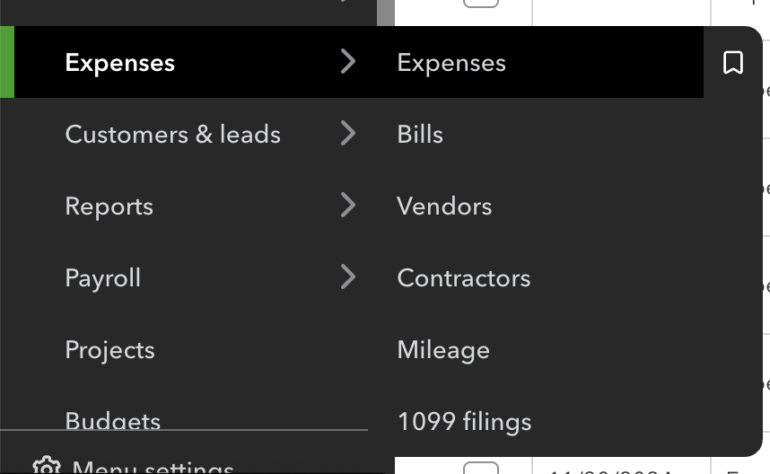
Voiding a cheque cancels the payment while keeping a record of the transaction. It changes the amount to $0.00 without deleting the details, ensuring accurate financial records and preventing reconciliation issues. This is useful for correcting errors, lost cheques, or canceled payments. 1 QuickBooks Employees per Company Size Micro (0-49), Small (50-249), Medium (250-999), Large (1,000-4,999), Enterprise (5,000+) Micro (0-49 Employees), Small (50-249 Employees), Medium (250-999 Employees), Large (1,000-4,999 Employees) Micro, Small, Medium, Large Features API, General Ledger, Inventory Management 2 Quicken Business & Personal Employees per Company Size Micro (0-49), Small (50-249), Medium (250-999), Large (1,000-4,999), Enterprise (5,000+) Micro (0-49 Employees) Micro Features Accounts Receivable/Payable, Invoicing / Billing, Mobile Capabilities, and more Here’s how you can void a check in QuickBooks Online and QuickBooks Desktop. How to void a check in QuickBooks Online Voiding a check in QuickBooks Online (QBO) changes its amount to $0.00 while keeping the details for record-keeping. It stays in reports but won’t affect reconciliations. If the check was never issued, deleting it might be a better option. 1. In the left menu sidebar, click Expenses. A dropdown menu will appear and select Expenses. QuickBooks Online menu with expense-related options (Source: QuickBooks) 2. You’ll arrive at the Expenses page. Find the check transaction you want to void. QuickBooks Online expenses table showing recent financial transactions (Source: QuickBooks) 3. Click the transaction to open the record. Once you see the details, click More at the bottom part of the screen. The “More” button in QuickBooks Online, which expands a menu for additional actions like voiding a check (Source: QuickBooks) 4. A dropdown menu will appear. Select Void to void the check. “Void” option highlighted in the QuickBooks Online menu (Source: QuickBooks) 5. A popout box will appear. Click Void transaction to confirm the action. Void transaction confirmation in QuickBooks Online (Source: QuickBooks) When you void a check in QuickBooks Online, the amount changes to $0.00, but all transaction details remain intact, creating a clear audit trail while maintaining your financial accuracy. Voided checks still appear in reports like the general ledger with zero-dollar amounts, ensuring past reconciliations stay untouched while preventing outstanding checks from affecting future ones. If the check was created in error and never issued, deletion might be more appropriate as it completely removes the transaction, whereas voiding preserves a record with a zero balance. How to void a check in QuickBooks Desktop To void a check in QuickBooks Desktop, locate it in the Check Register under the appropriate bank account. Voiding sets the check’s balance to $0.00 while keeping a record of the transaction. Once confirmed, the check remains in the system but won’t impact future balances or reports. 1. Go to the Check Register and select the bank account where you want to void a check. Accessing Check Register in QuickBooks Desktop (Source: QuickBooks) 2. Select the check you want to void. Reviewing Transactions in QuickBooks Desktop (Source: QuickBooks) 3. Click Void to zero out its balance then click Save & Close. Voiding a Check in QuickBooks Desktop (Source: QuickBooks) 4. Confirm your action by clicking Yes. Confirming Check Voiding in QuickBooks Desktop (Source: QuickBooks) Why you need to void a check in QuickBooks Voiding a check is a safer and cleaner way to handle mistakes and errors. It zeroes out the balance but still keeps a record of the transaction for auditing purposes. Here are some reasons when you need to void a check: 1. There are incorrect details If a check was written with the wrong payee name, amount, or date, voiding it ensures the incorrect transaction is adjusted while keeping a record of the issue. Instead of deleting the check, which removes all history, voiding it keeps the details intact while ensuring it won’t affect future reports or bank reconciliations. 2. Check is lost or stolen If a check has been lost in the mail or stolen, you’ll likely need to issue a replacement. Voiding the original check prevents it from being cashed while maintaining a record in QuickBooks. This helps avoid duplicate payments and ensures the lost check no longer impacts outstanding balances. 3. It is a duplicate entry Sometimes, a check may be entered twice by mistake. If the duplicate entry hasn’t cleared the bank, voiding it removes the incorrect record without disrupting your books. This prevents discrepancies in your bank reconciliation and financial reports. FAQs on how to void a check in QuickBooks Can I recover a voided check in QuickBooks? No, you can’t reverse a voided check in QuickBooks once it’s been voided. However, the transaction details remain in your records with a $0.00 amount. If you need to restore it, you’ll have to create a new check with the original details. Does voiding a check affect my bank balance? No, voiding a check does not change your bank balance. If the check was already cleared in a past reconciliation, its impact on the bank account remains. However, if the check was still outstanding, voiding it removes it from your list of pending transactions, preventing future discrepancies.   source

How to Void a Check in QuickBooks: Step-by-Step Guide Read More »

Medusa Ransomware: FBI & CISA Urge Immediate Action

Image: DC_Studio/Envato Elements Federal cybersecurity officials are raising red flags over a surge in attacks by the Medusa ransomware group. First detected in June 2021, the group has gained traction recently by using basic but effective methods — like phishing emails and exploiting outdated software — to break into systems and hold data hostage. In a joint advisory released last week, the FBI, Cybersecurity and Infrastructure Security Agency (CISA), and the Multi-State Information Sharing and Analysis Center (MS-ISAC) urged businesses and institutions to take immediate steps to protect their systems. The warning is part of the government’s ongoing #StopRansomware initiative. Must-read security coverage A growing ransomware-as-a-service business Originally a closed operation, Medusa has now adopted a ransomware-as-a-service (RaaS) model. This means the developers provide the ransomware software to partners, known as “Medusa actors,” who carry out the attacks. These affiliates are often recruited from online criminal forums and are sometimes paid bonuses to work exclusively for Medusa. “Potential payments between $100 USD and $1 million USD are offered to these affiliates with the opportunity to work exclusively for Medusa,” the advisory said. Medusa actors often gain access to systems through phishing emails or by exploiting known vulnerabilities, such as CVE-2024-1709, which affects the ScreenConnect remote access tool, and CVE-2023-48788, a flaw in Fortinet products. Once inside, they encrypt files and demand ransoms. The group’s ransom notes give victims 48 hours to respond via a live chat or encrypted messaging platform. If a victim does not respond, Medusa actors may escalate their extortion efforts, a tactic observed in other ransomware groups. What makes Medusa particularly menacing is its public-facing data-leak site, which displays victims alongside countdown timers. Once the timer runs out, stolen data is either released or sold to the highest bidder. In some cases, victims are given the option to buy extra time — a single day’s delay may cost as much as $10,000 in cryptocurrency. “As of February 2025, Medusa developers and affiliates have impacted over 300 victims from a variety of critical infrastructure sectors with affected industries including medical, education, legal, insurance, technology, and manufacturing,” the advisory notes. Medusa’s reach is global; past victims include Minneapolis Public Schools, where an attack in 2023 exposed sensitive information from over 100,000 students. How to protect your organization from Medusa ransomware The advisory urges organizations to take several key steps to protect themselves from Medusa. These include: Ensuring that all operating systems, software, and firmware are regularly updated and patched. Implementing multi-factor authentication across all services. Using strong, unique passwords. Additionally, CISA advises businesses to segment their networks to limit the spread of infections and filter network traffic to block unauthorized access attempts. CISA is urging IT teams to review their #StopRansomware: Medusa Ransomware advisory for detailed detection methods and threat indicators. source

Medusa Ransomware: FBI & CISA Urge Immediate Action Read More »

Gmail’s AI Update Resembles Mail for iOS 18

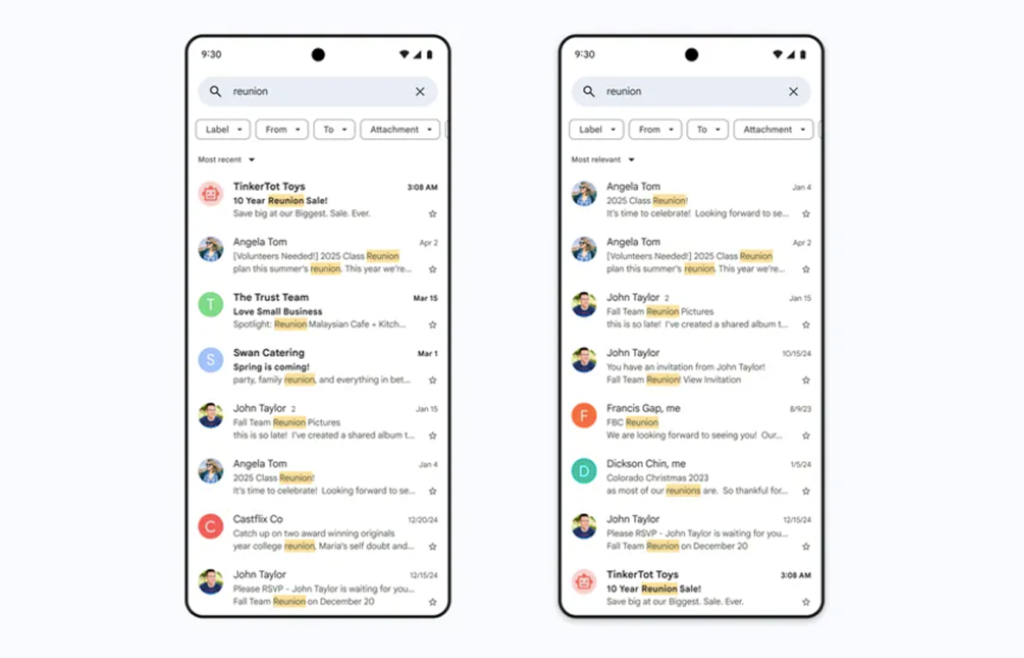
Image: Google Google is integrating artificial intelligence into your Gmail inbox, whether you like it or not. As of Thursday, it is rolling out an AI-powered “smarter search” layout globally, which prioritises what it thinks you most want to see. When you input a search term, Gmail will no longer list the related emails in chronological order, from newest to oldest; instead, it will list the emails based on its own relevancy ranking, which takes into account recency but also the most-clicked emails and frequent contacts. “Most relevant” will be available for users with personal Google accounts accessing their inbox on the web and in the official Gmail app for Android and iOS. Business users will be granted access later on. You will still have the option to turn this “most relevant” feature off and show “most recent” instead by using the new dropdown menu just below the search bar. “With this update, the emails you’re looking for are far more likely to be at the top of your search results — saving you valuable time and helping you find important information more easily,” Google said in a blog post about Gmail’s upgraded search features. SEE: How to Mass Delete Emails on Gmail: Best Way to Declutter More Google news & tips Will this Gmail update be better received than similar Mail app changes? The fact that the Google announcement opens with “if you’ve ever struggled with finding information in your overflowing inbox, you’re not alone” is fairly ironic. The search features in both Gmail and Outlook inboxes have been a point of contention for years. Users complain they find it difficult to locate emails even when using hyper-specific search terms. However, Apple recently made a similar change to the Mail app with the iOS 18 update to mixed reactions. The Categories inbox layout has four tabs: Primary, Transactions, Updates, and Promotions. Mail decides which category each email falls into, with Primary containing the most important ones and acts as the default category. Users complained that if Mail mistakenly deems an important email as, say, a newsletter or payment receipt, they might miss it, especially as it was hard to see when new emails were received in categories other than Primary. Gmail may encounter similar grumbles if its AI decides whether an email is relevant or not, independent of the user. Gmail’s bigger AI push goes beyond search This isn’t the only AI feature Google has added to Gmail in the past few months. Users can chat with Google’s chatbot, Gemini, about the content of their inbox or draft a response. They can also use Gemini to add events to a Google Calendar directly from an email. In October, Gmail introduced “summary cards,” which appear at the top of an open email and enable users to perform related actions directly within their inbox. These include tracking packages, checking in for flights, and paying bills. source

Gmail’s AI Update Resembles Mail for iOS 18 Read More »

TechRepublic EXCLUSIVE: New Ransomware Attacks are Getting More Personal as Hackers ‘Apply Psychological Pressure”

Image: rthanuthattaphong/Envato Elements Experts warn that desperate ransomware attackers are shifting focus from businesses to individuals, applying “psychological pressure” with personal threats that bring digital extortion into the physical world. In one stunning recent example, Guy Segal and Moty Cristal from ransomware negotiator and incident response firm Sygnia said a threat actor personally called an executive’s mobile phone and referenced sensitive details extracted from the company’s internal system. “During the call, they referenced personal information, underscoring just how much data an employer may hold on its employees,” Cristal — a tactical negotiator — told TechRepublic. “Ransomware attacks aren’t just about encrypted files; they can become invasive in other ways.” Ransomware payments decline, but threats escalate While ransomware has been a problem for decades, global payouts in 2023 surpassed $1 billion for the first time, marking a historic escalation in cyber extortion. Attackers have continuously refined their tactics, finding new ways to extract maximum payments from victims. New data revealed last month that ransomware payments decreased by 35% in 2024. Experts attribute the decline to successful law enforcement takedowns and improved cyber hygiene globally, which have enabled more victims to refuse payment. In response, attackers are adapting, acting faster to initiate negotiations and developing stealthier, harder-to-detect ransomware strains. SEE: Most Ransomware Attacks Occur When Security Staff Are Asleep, Study Finds Targeted individuals are often C-level executives or work in legal fields. The stolen personal data can include information about where their children live or go to school or even photos of loved ones. Cristal added that it is “extremely rare” for an attacker actually to act on these physical threats, but the success of the attack only requires the victim to believe they could. “It can become deeply personal to encourage a knee-jerk reaction from the victim,” he said. Cristal added that about 70% of ransoms do not get paid. The majority of the time, the attacks are not personal. But when attackers escalate threats by promising to leak sensitive data, they also demonstrate their effectiveness within the cyber crime community—if they do not receive payment, they can sell the valuable data on the black market for a last-minute payday. Must-read security coverage The risks of using AI in ransomware negotiations Modern ransomware attacks are using AI in new ways, with attackers using freely available chatbots to write malware, craft phishing emails, and create deepfake videos to trick individuals out of valuable information or money. As a result, these tools have lowered the barrier to entry for staging a cyber attack. However, the Sygnia ransomware negotiation teams have also witnessed victims trying to use tools like ChatGPT to help them say the right thing to escape their ordeal. “Typically, AI is not sensitive enough to pick up on human emotion or provide the necessary nuance required to connect with threat actors and diffuse the situation, and this is where it can escalate,” Cristal told TechRepublic. It can encourage victims to break the golden rules of not using “negative language” or telling the threat actor outright that they won’t pay the ransom. SEE: UK Study: Generative AI May Increase Ransomware Threat Attackers “can be extremely polite, even friendly to begin with,” Sygnia’s Vice President of Corporate Development Guy Segal said. But they may get more “aggressive and threatening” if they don’t get what they want quickly — which would be the case if all hope of payment was extinguished. It is not uncommon for attackers to leave backdoors in malware that let them retaliate with additional encryption, or even by wiping all data, especially if they sense a lack of respect or that they’re being strung along. Therefore, negotiators try to remain “approachable,” Cristal said. “Defensive behavior will create a more hostile atmosphere,” he told TechRepublic. Negotiators may be able to steer the conversation to extract more information from the attackers, such as what data they hold, how they breached the system, and the likelihood that they may return or publish data. “Every threat actor has their motives and life experiences that make them who they are — conversing is important to understand how we approach the situation,” he said. “Do they have enough data to damage the company? Could they cause real-world damage, particularly for critical infrastructure clients, or impact people’s lives? The threat actor may well be happy with a smaller ransom payment than their initial request because they just need the money.” The debate over banning ransomware payments In January, the U.K. government announced it was considering banning ransomware payments to make critical industries “unattractive targets for criminals,” reducing the frequency and impact of incidents in the country. The ban would apply to all public sector bodies and critical national infrastructure, which includes NHS trusts, schools, local councils, and data centers. SEE: Starbucks, Supermarkets Targeted in Ransomware Attack The Office of Foreign Assets Control has identified several sanctioned ransomware groups linked to Russia or North Korea that U.S. companies and individuals are legally prohibited from paying ransom to. Segal and Cristal say that ransomware bans are not a straightforward fix, noting that they have seen evidence of attacks increasing and decreasing. While some threat actors may be discouraged, others are forced to raise the stakes with more aggressive or personal threats. Some are driven by data theft or disruption for geopolitical reasons, not money — the ban does not affect them. But the Sygnia negotiators agree that bans on ransom payments within governments are positive on the whole. “A blanket decision to never pay ransom is a privilege that governments can afford,” Segal said. “But it is far less applicable in the business sector.” Indeed, in the documentation outlining the U.K.’s ban proposal, the Home Office acknowledged the potential for the legislation to disproportionately impact small and micro-businesses “which cannot afford specialist ransomware insurance, or clean up specialists.” These businesses will find it harder to recover from any financial losses incurred through operational disruption and the ensuing reputational damage. Such consequences may encourage some businesses to covertly pay

TechRepublic EXCLUSIVE: New Ransomware Attacks are Getting More Personal as Hackers ‘Apply Psychological Pressure” Read More »

Dashlane Review: Features, Pricing, Security, Pros & Cons

Dashlane fast facts Our rating: 4.4 stars out of 5Pricing: Starts at $4.99 per monthKey features Secure password vault encryption. No recorded data breaches. Well-designed and intuitive user interface. Dashlane has become one of the most popular password managers available — and for good reason. It has top-tier zero-knowledge encryption for its password vault, a ton of convenient usability features, and a very intuitive user-interface. While there are more affordable options available, Dashlane’s feature-packed take on password management makes it one of the best all-around choices in the space. NordPass Employees per Company Size Micro (0-49), Small (50-249), Medium (250-999), Large (1,000-4,999), Enterprise (5,000+) Micro (0-49 Employees), Small (50-249 Employees), Medium (250-999 Employees), Large (1,000-4,999 Employees), Enterprise (5,000+ Employees) Micro, Small, Medium, Large, Enterprise Features Activity Log, Business Admin Panel for user management, Company-wide settings, and more Dashlane Employees per Company Size Micro (0-49), Small (50-249), Medium (250-999), Large (1,000-4,999), Enterprise (5,000+) Micro (0-49 Employees), Small (50-249 Employees), Medium (250-999 Employees), Large (1,000-4,999 Employees), Enterprise (5,000+ Employees) Micro, Small, Medium, Large, Enterprise Features Automated Provisioning ManageEngine ADSelfService Plus Employees per Company Size Micro (0-49), Small (50-249), Medium (250-999), Large (1,000-4,999), Enterprise (5,000+) Any Company Size Any Company Size Features Access Management, Compliance Management, Credential Management, and more Does Dashlane have a free version? Yes, Dashlane has a free plan. However, it is very limited as it only allows for a maximum of 25 passwords stored in user vaults. This makes it an unrealistic option for people looking to use a free password manager long term, especially since I expect the average user to have more than 25 passwords. If you’re looking for a free password manager to use as your main solution, Bitwarden and NordPass are two password managers I recommend, as they both have free plans that offer unlimited password storage. In May 2024, Dashlane also announced that Dashlane Free users who exceeded the 25-password limit would be converted to read-only and would no longer have autofill capabilities unless they upgrade. In my view, this shows that Dashlane is primarily focusing on their paid users and probably have their free plan set up as a test drive tool only. Again, for people looking for a viable, free password manager, there are quality alternatives out there. While this is unfortunate, Dashlane does offer a 30-day trial for its Premium plan. This way, you get a clearer picture of Dashlane’s paid features and user experience, without the limitations that come with the free plan. For more info, we have a Dashlane Free vs Premium feature that dives more extensively into the difference between the two plans. Dashlane Pricing Dashlane has two subscription tiers for individual and business customers, namely Personal and Business. Personal: Personal plans Free plan Premium Friends & Family Price Free $4.99 per month (billed annually) $7.49 per month for up 10 members (billed annually) No. of devices 1 device Unlimited Unlimited Feature differences Maximum of 25 passwords, password sharing Unlimited passwords and passkeys, password sharing, dark web monitor, VPN, real-time phishing alerts All Premium features (VPN only for plan admin) Dashlane’s costs are on the pricier side compared to other password managers. Unfortunately, its Premium plan has raised in price to $4.99 per month compared to its $3.33 monthly price back in 2023. This makes it a fairly pricey option compared to the likes of Bitwarden and Roboform, which have starting plans at $0.83 and $1.66 per month respectively. That’s not to say that Dashlane doesn’t include features to back up its monthly fee. In fact, its starting plan is fully-featured as it includes unlimited device support, unlimited passwords and passkeys, a dark web monitor, and even a built-in VPN. Having a bundled VPN is not something often seen with password managers and a convenient tool that gives Dashlane users additional security. Meanwhile, its Friends and Families plan is also on the expensive end at $7.49 per month. However, it’s important to mention that it’s one of the only password manager family subscriptions that covers 10 people in a single plan. Most other family plans cover 5-6 people, at around $3-6 per user, per month. So in this aspect, I think Dashlane’s Family subscription falls right in the middle compared to other similar offerings. Business: Business plans Standard Business Business Plus Price $20 for 10 users (billed annually) $8 per user, per month (billed annually) $5 per employee, per month (billed annually)Starts at 100 employees No. of devices Unlimited Unlimited Unlimited Feature differences Dark web monitor, password health dashboard, dark web insights All Standard features plus VPN, SSO integration, SCRIM Provisioning, SIEM integration All Business features plus Credential Risk Detection Looking into its business subscriptions, Dashlane’s Standard plan at $20 per month for 10 seats is on trend with other password managers’ similar subscriptions. This plan is ideal for small teams that want a centralized password management solution. If you want a more affordable option, NordPass offers a Teams option of $1.79 per user per month, max 10 users, that’s good for two years. For businesses, Daslane’s Business tier of $8 per seat per month is a good choice, with all Standard plan features plus single-sign on and SIEM integration included. If the higher price tag is out of your budget, Dashlane now offers a Business Plus plan that’s more affordable at $5 per seat, per month, provided your company has a minimum of 100 users. Both plans provide on-demand phone support, real-time phishing alerts, and their built-in VPN. Is Dashlane safe? As it deals with highly sensitive data in passwords, it’s important to know if Dashlane is actually a safe and secure service to use. I’m happy to report that Dashlane checks all of the boxes in terms of security. Dashlane operates on zero-knowledge architecture, which means only the user knows their Master Password and the data stored within their vault. It utilizes AES 256-bit encryption, the industry standard encryption algorithm, to encrypt all passwords and credentials in the vault. It even encrypts all the data

Dashlane Review: Features, Pricing, Security, Pros & Cons Read More »

Efficient Site Monitoring and Accurate Analytics Is Possible with This Tool

TL;DR: Monitor your site and user analytics to run your site and servers more efficiently with Webilytics, now available for $29. Have you just started your own business? You’ve likely already created and published your website to gather a greater following, whether you’re offering a service or a product. However, there’s one thing missing for your site: a website monitoring tool that offers actionable analytics. Any business owner or solopreneur can benefit from proper analytics, which are made convenient and accessible by Webilytics. This tool can help you track user behavior, monitor site uptimes and downtimes, and offers plenty more to benefit any site for only $29 (reg. $395). What does Webilytics offer? It’s not just any website monitoring tool — Webilytics provides business owners with website, domain, and server monitoring, ensuring your site remains online, responsive, and optimized for performance. Check out some of the insights you can take advantage of by adding this tool to your business: User behavior tracking: See how your site visitors interact with your page through session recordings and heat maps. This could help you enhance their experience and eliminate conversion blockers. Site uptime and downtime monitoring: Sites can often crash or not respond properly, which is why tracking these analytics can help visitors enjoy a more pleasant visit to your page. Server resource monitoring: prevent performance bottlenecks by keeping an eye on server usage and resource consumption. Demographics: Knowing where your users are based, their browsing habits, and device preferences can help you optimize your site and other content. Status pages: Create branded status pages to inform visitors about site availability and any ongoing maintenance that may interrupt their browsing experience. Along with those site-monitoring and optimization features, you’ll be able to get instant notifications about your site through email, Webhook, Slack, Discord, Telegram, and WhatsApp, allowing you to stay on top of your site’s performance. Optimize your business’s site by grabbing lifetime access to Webilytics’ site monitoring and user analytics tools, now $29 while supplies last. Webilytics Site Monitoring & User Analytics: Lifetime Subscription StackSocial prices subject to change. source

Efficient Site Monitoring and Accurate Analytics Is Possible with This Tool Read More »

Agentic AI’s Role in the Future of AppSec

Solving Application Security Challenges With AI-Powered Agents Agentic AI involves using artificial intelligence agents to autonomously perform tasks and solve problems, and it has many exciting use cases in application security. Agentic AI can be used to generate tailored reports, run threat models before and after a significant release, and support developers with code reviews and security training. AI agents help over-stretched AppSec and DevSecOps engineers with the most tedious manual tasks in their workflows, enabling faster remediation and more secure software. Agentic AI’s Potential to Transform AppSec AI agents can be used for numerous application security tasks that typically require tedious manual work. Examples include: Reporting Agentic AI can generate specific, tailored reports on application security that align with specific compliance standards, such as SOC 2, PCI, or HIPAA. Rather than manually sorting through data from various security scanners to pull the specific information needed for compliance reporting, AppSec engineers can have an AI agent automatically perform the same task in a matter of minutes. Threat Modeling Agentic AI can run threat models before and after the release of a major feature to help the AppSec team better understand what the specific architectural security risks could be. An AI agent can perform threat modeling much faster than human engineers to reduce the impact on ultra-tight development timelines. Code Reviews Agentic AI can also support development teams by providing automatic code reviews and integrated code security training. It can evaluate specific code changes in pull requests and security best practices and provide very fast feedback on the security of new code within the context of the larger code base. Remediation Recommendations When an AI agent detects a vulnerability in code, it can provide steps for a developer to take to resolve the issue, streamlining the remediation process. These recommendations can be tailored to the context of the runtime environment and the specific compliance requirements. Agents can also provide multiple options for developers to choose from depending on the context of the situation. Why Development and Security Teams Are Turning to Agentic AI Application security and DevSecOps engineers have extremely hectic lives, with a never-ending backlog of problems to manage. In addition to triaging security issues and assigning them to the relevant team, they’re also responsible for understanding the potential security risks of new features within the larger product. They perform threat modeling to proactively seek out security weaknesses in the architecture of the application, and also conduct developer training and awareness programs to help development teams understand code security best practices. They’re constantly drowning in all of these different tasks that often involve very tedious manual work, especially when it comes to assessing the risks of services, and understanding what vulnerabilities need to be resolved. Agentic AI can be extremely helpful in offloading a lot of the manual work needed to secure applications. AI agents excel at automating the really tedious stuff that bogs down human engineers, such as understanding the top risks in a hundred different services very quickly, and providing the compliance context for each risk. They free up valuable time for overworked AppSec teams so that humans can focus on making critical security decisions. The Benefits and Drawbacks of Agentic AI in AppSec As discussed above, the primary benefit of agentic AI for application security teams is the time saved on tedious, manual work. This in turn means that issues are resolved faster, allowing development teams to release secure software at a much quicker pace. Agentic AI’s threat modeling capabilities also help AppSec teams proactively identify risks with greater speed and accuracy, streamlining the development process while improving application security. One hurdle to successful adoption is that AI agents need to train on large quantities of data to be able to tell an AppSec team why certain security issues matter in the context of everything else happening in the organization. They need access to data from ticket management systems, cloud environments, network traffic, and access control systems, for example. Handling all these integrations can be tricky, and this level of access must be managed securely to prevent sensitive data exposure. A major drawback is a lack of trust in AI agents from developers and AppSec engineers. It’s important to recognize that agentic AI isn’t meant to solve all security use cases, and keep humans in the loop. It’s inadvisable to let AI agents automatically make code fixes and push updates without developer intervention. Rather, agentic AI should provide multiple ideas and options for developers to resolve issues themselves. Learn More About AppSec Automation With Jit Jit is an AppSec automation tool designed to empower developers to remediate security issues with a streamlined, integrated experience. It unifies all the security scanners needed for secure development in a single platform, including built-in SAST, secrets detection, DAST, and SBOM. Jit’s Context Engine helps development teams prioritize and focus on high-risk issues while filtering out the noise. Its dev-native UX empowers developers to resolve issues with features like change-based scanning and automatic fix suggestions. Jit’s dashboards make it easy for dev teams to monitor the security posture of their services and prioritize risks, and its Security Plans help align product security with business objectives like SOC2 compliance or Minimum Viable Security. Plus, Jit easily integrates with all the tools in your pipeline to provide a simplified developer experience. Start a Free Trial of Jit To Begin Seeing Results in Minutes source

Agentic AI’s Role in the Future of AppSec Read More »

These $140 iPads Are Perfect for Work, but Selling Out Fast

TL;DR: Get a refurbished iPad 7th Gen and faux leather case for $139.99 while supplies last — fewer than 50 are left in stock (reg. $249.99). Not every business needs top-of-the-line tech. Sometimes, practical and affordable wins the race. If you or your team need affordable tablets, consider shopping refurbished devices. You’ll save hundreds of dollars and help out the environment, too. Take this Apple iPad 7th Gen as an example. While it originally retailed for $249.99, you can get one for just $139.99 — only until they’re sold out. At a price this low, we expect them to go fast, so order yours before they’re gone. More about this refurbished iPad deal You’re saving $110 on this iPad because it had another life before arriving at your door, but that doesn’t mean it’s used. The iPads are in grade “A” condition, the highest rating we give to devices, meaning you may not even notice a single scratch. Besides, this iPad delivers what you or your employees need, whether the tablet will be used in the field, as a POS device, for note-taking, or simply attending meetings remotely. While the 7th Gen iPad isn’t the newest model available, it updates to the latest iPadOS for continued security improvements. It also has the basic Apple Home Button and a large screen to keep things simple for those who aren’t super tech-savvy. Take a look at the rest of this iPad’s features: 32GB of storage. Up to 10 hours of battery life. High-quality front and rear cameras. Faux leather cases included with purchase. Don’t miss out: Get your refurbished iPad deal for $139.99 before they’re sold out (reg. $249.99). Apple iPad 7th Gen (2019) 32GB Wi-Fi Space Gray with Case & Charger (Refurbished) – $139.99 StackSocial prices subject to change. source

These $140 iPads Are Perfect for Work, but Selling Out Fast Read More »