Tech Republic

Why the Rate Center Matters When You Buy or Port Numbers

A rate center is a particular geographic area that’s crucial for businesses relying on phone services, whether they’re using traditional PSTN (Public Switched Telephone Network) or making calls over the internet with VoIP (Voice over Internet Protocol). These centers outline the rules for local calling, billing, and assigning phone numbers. Essentially, they determine whether a call is local or long-distance based on its origin. By familiarizing yourself with rate centers, you may be able to choose your phone numbers more thoughtfully. Essentially, you can use this knowledge to ensure your business appears local and accessible to customers, which means they’re more likely to want to work with you. It also prevents your customers from facing long-distance charges, which is especially important if your business involves regular phone interactions. By strategically aligning your communication channels with customer needs, you can simultaneously make your customers happier while reducing costs on both sides of the phone call. Understanding rate centers Rate centers are particular areas that help phone companies figure out how to organize and charge for calls. Each rate center is like a neighborhood for phone calls. If a call is made within this neighborhood, it’s usually seen as a local call and has its own set of charges. Here are the key terms you need to know: Local Exchange Carrier (LEC): These are the phone companies that handle your local calls. They take care of the phone lines in a certain area. Local Access and Transport Area (LATA): This is an area defined by the government. It decides where phone companies can give their services. Rate centers are often named after the places they serve, like a city or a town, making them easy to identify. They also have specific physical locations, pinpointed by coordinates, which are essential for accurately billing calls. The combination of the area code (NPA) and prefix (NXX) further identifies a rate center’s location and the phone numbers associated with it. The area code is the three digits you dial before a phone number, and the prefix is the next three digits. Together, they help pinpoint the rate center’s location and the phone numbers that belong to it. Let’s use Seattle as a real-world example to better understand how rate centers work. Seattle is a large city with a lot of different neighborhoods. Think of each rate center as a separate neighborhood in Seattle. Every neighborhood (or rate center) has its own rules for how phone calls are made and charged. Some calls might be local within the same rate center, but they could be long-distance if they cross into another rate center. This is essential for businesses that rely heavily on phone services. It helps them understand where they might get charged more for calls and how to choose their phone numbers wisely. Business implications of rate centers For businesses using traditional phones, the rate centers play a large role. For those using business phone services that run over the internet (i.e. VoIP), rate centers play less of a role, but they are still relevant. I’ll cover implications for traditional phones first, and then we’ll look at the implications for VoIP phone systems. Choosing phone numbers strategically Selecting phone numbers in specific rate centers can reduce call costs or enhance customer engagement. For local businesses like retail stores or restaurants, having a number in the same rate center as most customers means they can reach you at local rates, appealing to those who prefer local interactions. Conversely, online businesses, which typically engage customers nationally or globally, may prioritize different aspects of telecom services. Understanding advantages of toll-free numbers Toll-free numbers offer a unique advantage as they aren’t limited by geographic rate centers. This makes them ideal for businesses looking to attract a broader customer base, such as online education platforms, telehealth services, or any business aiming for national reach. Customers can call these numbers without long-distance charges, regardless of their location relative to your business. SEE: Learn more about toll-free vs. local numbers. Navigating number porting with rate centers When you move your business phone number from one provider to another (a process called number porting), rate centers play a crucial role. This process can vary significantly between PSTN and VoIP solutions. If you’re porting an existing phone number to VoIP, the new provider might not support the rate center of your old number. This could prevent you from keeping your existing number. Make sure you check with the new provider to see if they support your current rate center before making a switch. Reviewing number allocation regularly The telecom landscape is constantly changing. New rate centers can emerge, and providers may update their services. It’s a good idea to review your phone number allocation regularly. This ensures that your numbers are still serving your business needs effectively, whether that’s saving on call costs or maintaining local customer engagement. VoIP and rate centers While a landline depends on rate centers for determining call routing, billing, and assigning phone numbers based on physical geography, VoIP operates with far more flexibility. VoIP providers use rate centers to assign numbers with specific area codes and prefixes. This allows businesses to choose numbers tied to particular geographic locations, even if the business itself is not physically present there. This feature is especially useful for establishing a local presence virtually. For customers, the geographic association of a number — defined by the rate center — can impact their willingness to call or view the business as local and accessible. A VoIP number tied to a local rate center can enhance customer trust and accessibility. Importantly, VoIP bypasses the traditional billing structures tied to rate centers. Calls are routed via the internet rather than physical exchanges, eliminating long-distance charges and offering greater cost efficiency for businesses and their customers. SEE: Learn more about the differences between a landline and VoIP. How to look up a rate center Finding the rate center for a particular geographic area is relatively straightforward, thanks to

Why the Rate Center Matters When You Buy or Port Numbers Read More »

How to Fix Network Jitter (for Good) in Under 10 Minutes

If you’re experiencing choppy phone or video calls, pixelated conferencing, or disjointed VoIP audio connections, your network jitter may very well be above acceptable levels. Jitter refers to the variation in the arrival times of data packets across a network. There is always going to be a little variation, but if the jitter rate is too high, you will experience disruptions like choppy audio, lagging video, or dropped calls. Network jitter is measured in milliseconds (ms). Here’s a fairly standard breakdown of jitter rate: Good jitter: Less than 30 ms – Typically causes no noticeable disruptions in real-time communication. Moderate jitter: Between 30-50 ms – May result in slight delays or distortion but is generally manageable. High jitter: Above 50 ms – Can cause severe issues like robotic voices, video freezes, and frequent disconnections. High jitter is going to negatively impact any real-time communication over the network. Voice calls will be terrible quality and video conferencing will be even worse. The good news is that with the right troubleshooting approach, many network jitter issues can be reduced or eliminated in under 10 minutes flat. The best call center software and business phone services have built-in tools for addressing jitter and many other network issues. 1 RingCentral RingEx Employees per Company Size Micro (0-49), Small (50-249), Medium (250-999), Large (1,000-4,999), Enterprise (5,000+) Medium (250-999 Employees), Large (1,000-4,999 Employees), Enterprise (5,000+ Employees) Medium, Large, Enterprise Features Hosted PBX, Managed PBX, Remote User Ability, and more 2 Talkroute Employees per Company Size Micro (0-49), Small (50-249), Medium (250-999), Large (1,000-4,999), Enterprise (5,000+) Any Company Size Any Company Size Features Call Management/Monitoring, Call Routing, Mobile Capabilities, and more How to know if network jitter is the problem Although there are plenty of reasons why your network may not be working properly — like faulty routers, poor internet connection, and other network-specific issues — there are some telltale signs that point to jitter being the problem. Static sounds and dropped calls point to jitter If you’re experiencing disruptions like static and robotic sounds on your VoIP calls or video conferencing sessions that end abruptly, jitter could be the culprit. High jitter means that there is high variation in packet arrival times over your network, which disrupts the smooth delivery of audio and video. These inconsistencies can create choppy, delayed, or distorted streams. Static, robotic sounds, and dropped calls are often symptoms of jitter, but they can also be caused by other factors, such as mismatched VoIP codecs, insufficient bandwidth, or packet loss unrelated to jitter. SEE: Learn about other causes of dropped calls and how to fix them. Confirm jitter with a ping test To figure out if jitter is impacting your connection, a quick and easy diagnostic you can run is a network ping test. This test sends data packets to measure latency and jitter directly. Keep in mind that you don’t need any fancy software or advanced technical knowledge to test for jitter. There are plenty of excellent free speed test apps that can report on jitter, latency, and a whole lot more. Acceptable jitter should be under 30ms. How to fix network jitter for good If you’ve identified that your jitter is above acceptable levels, resolving it starts with understanding the underlying causes and taking targeted action. A common issue that causes jitter is the use of a wireless connection, which is more prone to interference. Switching to a wired Ethernet connection can significantly reduce jitter, providing a more stable and reliable network experience by removing environmental disruptions that affect wireless signals. It’s not always possible to switch to a wired connection, but it is one of the most reliable VoIP troubleshooting tactics out there for restoring clear calls. Outdated or underperforming network equipment is another frequent cause of jitter. Routers, firewalls, and network switches that can’t handle high-speed traffic may struggle to deliver consistent packet delivery, especially with real-time applications. Upgrading your hardware and ensuring it’s running the latest firmware can help improve performance and reduce jitter. Network congestion, where bandwidth is shared among too many devices or high-traffic applications, often leads to packet delays. To mitigate this, reducing non-essential traffic or increasing your available bandwidth can help smooth out the delivery of packets and decrease jitter. This can be particularly important for businesses or households with multiple devices using the network simultaneously. Another key factor is ensuring proper packet prioritization. Quality of Service (QoS) settings, essential data like VoIP or video streams can get delayed behind less critical traffic. Enabling QoS on your network equipment allows you to prioritize time-sensitive data, ensuring that important packets are delivered on time, without interruption. Finally, if jitter persists despite these fixes, it may indicate an issue with your network’s design. Chronic jitter can result from poorly architected networks with congestion points or inefficient traffic flow. If this is the problem, you have a bit more than a 10-minute fix ahead of you. In these cases, redesigning the network security architecture to allocate dedicated bandwidth for real-time traffic and optimizing network routes can be the solution. Ensuring your network is built to handle the demands of streaming and communication is critical for long-term stability. How to prevent network jitter If you care about your network’s safety, speed, and efficiency, then this section is for you. Here’s how you can prevent network jitter from plaguing your network. Stay on top of updates One of the easiest ways to avoid jitter issues cropping up is to keep the firmware and software for all your network-related devices fully up-to-date. Router, switch, firewall, and WiFi access point vendors regularly issue performance and stability patches — and for good reason. Installing recent releases will prevent out-of-date components from disrupting packet flows. SEE: Learn the basics of patch management and how to stay on top of updates. Choose quality VoIP providers It’s in your best interest to vet any potential VoIP, video conferencing, and streaming providers for call quality assurances and jitter mitigation techniques before signing up. Many of

How to Fix Network Jitter (for Good) in Under 10 Minutes Read More »

CrowdStrike Survey Highlights Security Challenges in AI Adoption

Do the security benefits of generative AI outweigh the harms? Just 39% of security professionals say the rewards outweigh the risks, according to a new report by CrowdStrike. In 2024, CrowdStrike surveyed 1,022 security researchers and practitioners from the U.S., APAC, EMEA, and other regions. The findings revealed that cyber professionals are deeply concerned by the challenges associated with AI. While 64% of respondents have either purchased generative AI tools for work or are researching them, the majority remain cautious: 32% are still exploring the tools, while only 6% are actively using them. What are security researchers seeking from generative AI? According to the report: The highest-ranked motivation for adopting generative AI isn’t addressing a skills shortage or meeting leadership mandates — it’s improving the ability to respond to and defend against cyberattacks. AI for general use isn’t necessarily appealing to cybersecurity professionals. Instead, they want generative AI partnered with security expertise. 40% of respondents said the rewards and risks of generative AI are “comparable.” Meanwhile, 39% said the rewards outweigh the risks, and 26% said the rewards do not. “Security teams want to deploy GenAI as part of a platform to get more value from existing tools, elevate the analyst experience, accelerate onboarding and eliminate the complexity of integrating new point solutions,” the report stated. Measuring ROI has been an ongoing challenge when adopting generative AI products. CrowdStrike found quantifying ROI to be the top economic concern among their respondents. The next two top-ranked concerns were the cost of licensing AI tools and unpredictable or confusing pricing models. CrowdStrike divided the ways to assess AI ROI into four categories, ranked by importance: Cost optimization from platform consolidation and more efficient security tool use (31%). Reduced security incidents (30%). Less time spent managing security tools (26%). Shorter training cycles and associated costs (13%). Adding AI to an existing platform rather than purchasing a freestanding AI product could “realize incremental savings associated with broader platform consolidation efforts,” CrowdStrike said. SEE: A ransomware group has claimed responsibility for the late November cyberattack that disrupted operations at Starbucks and other organizations. Must-read security coverage Could generative AI introduce more security problems than it solves? Conversely, generative AI itself needs to be secured. CrowdStrike’s survey found that security professionals were most concerned about data exposure to the LLMs behind the AI products and attacks launched against generative AI tools. Other concerns included: A lack of guardrails or controls in generative AI tools. AI hallucinations. Insufficient public policy regulations for generative AI use. Nearly all (about 9 in 10) respondents said their organizations have implemented new security policies or are developing policies around governing generative AI within the next year. How organizations can leverage AI to protect against cyber threats Generative AI can be used for brainstorming, research, or analysis with the understanding that its information often must be double-checked. Generative AI can pull data from disparate sources into one window in various formats, shortening the time it takes to research an incident. Many automated security platforms offer generative AI assistants, such as Microsoft’s Security Copilot. GenAI can protect against cyber threats via: Threat detection and analysis. Automated incident response. Phishing detection. Enhanced security analytics. Synthetic data for training. However, organizations must consider safety and privacy controls as part of any generative AI purchase. Doing so can protect sensitive data, comply with regulations, and mitigate risks such as data breaches or misuse. Without proper safeguards, AI tools can expose vulnerabilities, generate harmful outputs, or violate privacy laws, leading to financial, legal, and reputational damage. source

CrowdStrike Survey Highlights Security Challenges in AI Adoption Read More »

Patch Tuesday: Microsoft Patches One Actively Exploited Vulnerability, Among Others

December brought a relatively mild Patch Tuesday, with one vulnerability having been actively exploited. Of all 70 vulnerabilities fixed, 16 were classified as critical. “This year, cybersecurity professionals must be on Santa’s nice list, or, at the very least, Microsoft’s,” Tyler Reguly, associate director of security R&D at cybersecurity software and services company Fortra, told TechRepublic in an email. Microsoft patches leaky CLFS CVE-2024-49138 is an elevation of privilege vulnerability in the Windows Common Log File System (CLFS) driver. The driver is a key element of Windows used to write transaction logs. Misuse of the driver, specifically through improper bounds checking, could let an attacker gain SYSTEM privileges. From there, they could steal data or install backdoors. “Given that CLFS is a standard component across multiple versions of Windows, including server and client installations, the vulnerability has extensive reach, especially in enterprise environments,” Mike Walters, president and co-founder of Action1, said in an email to TechRepublic. Addressing this vulnerability should be a high priority since it has already been exploited. Microsoft has released patches for eight other CLFS vulnerabilities this year, according to Reguly. “That is, however, an improvement for Microsoft, who patched 12 CLFS vulnerabilities in 2022 and 10 CLFS vulnerabilities in 2023,” Reguly wrote. SEE: The U.S. sanctioned Chinese security firm Sichuan Silence for exploiting a vulnerability in Sophos firewalls used in government infrastructure. Must-read security coverage ‘Tis the season … for remote code execution One vulnerability scored higher than nine on the CVSS severity system: CVE-2024-49112, which scored CVSS 9.8. A remote code execution vulnerability could allow an attacker to execute code inside the Windows Lightweight Directory Access Protocol (LDAP) service. “Windows Server systems acting as domain controllers (DCs) are especially at risk, given their crucial role in managing directory services,” said Walters. This makes December both a good time to install the patch for this vulnerability and to remember an important factor of security hygiene: Domain controllers shouldn’t have internet access. Reguly pointed out that companies following the Department of Defense’s DISA STIG for Active Directory Domains should already have blocked domain controllers from internet connections. Action 1 noted that nine of the December vulnerabilities stem related to the potential remote code execution. “Organizations should avoid exposing RDP services to the global internet and implement robust security controls to mitigate risks,” wrote Walters. “These flaws further prove the dangers of leaving RDP open and unprotected.” “If nothing else, we can say that Microsoft is consistent,” Reguly added. “While it would be nice to see the number of vulnerabilities each year decreasing, at least consistency lets us know what to expect. Since Microsoft has signed CISA’s Secure by Design pledge, we may see these numbers drop in the future.” Time to check in on Apple, Google Chrome, and other Patch Tuesday security updates Many other companies time their monthly releases for the second Tuesday of the month. Adobe provided a list of security updates. Other major patches, as collected by Action 1, include: Patches for vulnerabilities in Google Chrome and Mozilla Firefox. A security update for over 100 Cisco devices that use the NX-OS data center-focused operating system. Fixes for several local privilege escalation vulnerabilities in Linux. Patches for two actively exploited zero-day vulnerabilities in Macs with Intel chips. A complete list of Windows security updates can be found at Microsoft Support. source

Patch Tuesday: Microsoft Patches One Actively Exploited Vulnerability, Among Others Read More »

APAC: Ransomware to Cause ‘Bumpy’ Security Ride in 2025

Ransomware attacks will continue to plague APAC enterprises in 2025, according to Rapid7. The cybersecurity tech vendor expects that more zero-day exploits and changes in ransomware industry dynamics will result in a “bumpy ride” for security and IT professionals throughout the region. Ransomware incidents have steadily risen over the last couple of years. Rapid7’s Ransomware Radar Report revealed that 21 new ransomware groups emerged globally in the first half of 2024. A separate analysis found that these criminals doubled their takings to $1.1 billion in ransom payments in 2023. While the Rapid7 report did not specifically detail APAC’s issues with zero-day exploits, PwC’s annual Digital Trust Insights (DTI) survey revealed that 14% of the region identified zero-day vulnerabilities as one of the top third-party-related cyber threats in 2024 — an issue that could linger into 2025. Despite international efforts like the takedown of LockBit, ransomware operators continued to thrive. Rapid7 predicts increased exploitation of zero-day vulnerabilities in 2025, as these groups are expected to expand attack vectors and bypass traditional security measures. Ransomware industry dynamics to shape attacks in 2025 Rapid7’s chief scientist, Raj Samani, said the firm has seen ransomware groups gaining access “to novel, new initial entry vectors,” or zero-day vulnerabilities, over the last year. He explained that zero-day events were happening almost weekly rather than about once a quarter as they had in the past. The firm has observed ransomware operators exploiting zero days in ways that were not feasible 10 years ago. This is due to the financial success of ransomware campaigns, being paid in booming cryptocurrency, which created a windfall that allowed them to “invest” in exploiting more zero days. In APAC, these conditions are causing global ransomware threat groups to engage in regionally targeted ransomware campaigns. However, Rapid7 previously noted that the most prevalent groups vary based on the targeted country or sector, which attracts different ransomware groups. SEE: US Sanctions Chinese Cybersecurity Firm for 2020 Ransomware Attack Samani said the threat posed by zero-day events could worsen in 2025 due to the dynamics within the ransomware ecosystem. He noted that the market could witness an increase in less technically skilled affiliate organisations joining the ranks of those attacking global enterprises. “The reason why we’ve seen such a growth in ransomware and the demand and exponential increase in payments is because you have individuals that develop the code and individuals that go out and break into companies and deploy that code — so two separate groups,” he explained. Samani speculated that, while the opaque nature of ransomware makes the situation unclear, a ransomware group with access to zero-day vulnerabilities for an initial entry could use them to attract more affiliates. “The bigger concern is, does that then mean the operational and technical proficiency of the affiliate can be lower? Are they lowering the technical barriers to entering this particular market space? All of which kind of reveals 2025 could be very bumpy,” he said. Ransomware payment bans could shake up incident response plans Sabeen Malik, Rapid7’s head of global government affairs and public policy, said governments worldwide increasingly view ransomware as a “critical issue,” with the biggest global collective to combat the initiative, the International Counter Ransomware Initiative, now having the most members it has ever had. This comes as some Asian companies remain ready to pay ransoms to keep business going. Research from Cohesity released in July found that 82% of IT and security decision-makers in Singapore and Malaysia would pay a ransom to recover data and restore business processes. The same was true of Australian and New Zealand respondents to the same survey: 56% confirmed their company had been the victim of a ransomware attack in the previous six months, and 78% said they would pay a ransom to recover data and business processes in the future. Countries in APAC are considering how to respond with regulation. Australia has just introduced mandatory ransomware payment reporting for organisations turning over $3 million, who must now report a payment within 72 hours. SEE: Australia’s Cybersecurity Law Includes Ransomware Payment Reporting However, banning ransomware payments outright could have an outsized impact on the security industry, according to Rapid7. If payments were prohibited, targeted companies could lose an avenue of recovery after an attack. “The shadow looming over all of us aren’t regulations, but more kind of mandates from governments banning the use of, or payments around ransomware; those types of enormous, behemoth kind of decisions I think could dramatically impact the industry,” Samani said. “What you have to consider with regards to your BCP [business continuity] planning and your DR [disaster recovery] planning is, if ransomware payments become banned within my territory … how is that then going to impact the way that I do things?” he said. More Australia coverage Tips for preventing ransomware threats Rapid7 recommended security teams think about several measures to combat threats: Implement basic cyber security hygiene Malik said companies are considering how new technologies such as AI overlays can help combat the problem — but they should not forget the basic hygiene practices, such as password management, which can ensure that secure foundations are in place. “It seems like such a no-brainer, yet we continue to see how many issues we’ve seen with identity management and password mismanagement have led to where we are now. What are some of the basic things we need to make these [hygiene] practices foundational?” she asked. Ask tough questions of AI security vendors Samani said newer AI tools could help “disrupt the kill chain quicker and faster” if threat actors breach defences. However, he said “security is not a commodity” and that not all AI models are of equal quality. He recommended teams ask questions of the suppliers and vendors. SEE: How Can Businesses Defend Themselves Against Common Cyber Threats As he explained, these questions could include: “What is their detection strategy, and what is their response strategy?” “Do you have an incident response retainer?” “Do you conduct regular testing? What about

APAC: Ransomware to Cause ‘Bumpy’ Security Ride in 2025 Read More »

How To Run a VoIP Quality Test and Improve Your MOS

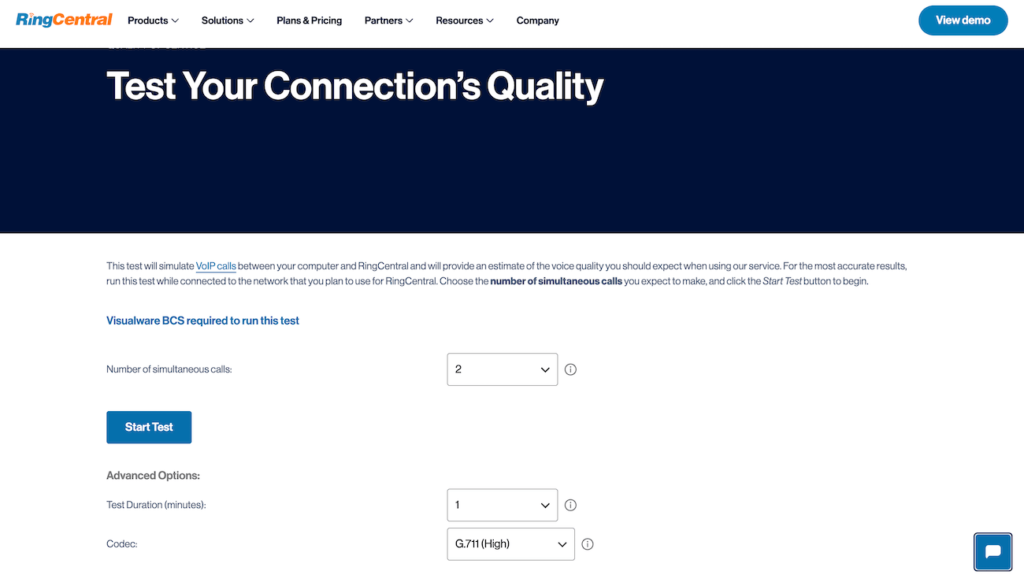
A VoIP quality test measures the performance of your network connection. The test simulates a set number of calls on your network and uses key metrics to determine how calls would sound in different situations. It can help you understand whether your connection is strong enough before implementing a VoIP system and alert you to potential post deployment issues as well. Mean opinion score (MOS) is an industry standard metric for VoIP call quality — it’s a simple 1-5 rating system with 1 being the worst and 5 being the best. Anything above a 4 is sufficient and scores below 3.5 should be considered unacceptable. Below that range, users are more likely to experience mic echo, dropped calls, choppy or robotic sounds, and cutting out. This guide covers everything you need to know to perform VoIP tests and tweak settings to optimize for MOS. 1 RingCentral RingEx Employees per Company Size Micro (0-49), Small (50-249), Medium (250-999), Large (1,000-4,999), Enterprise (5,000+) Medium (250-999 Employees), Large (1,000-4,999 Employees), Enterprise (5,000+ Employees) Medium, Large, Enterprise Features Hosted PBX, Managed PBX, Remote User Ability, and more 2 Talkroute Employees per Company Size Micro (0-49), Small (50-249), Medium (250-999), Large (1,000-4,999), Enterprise (5,000+) Any Company Size Any Company Size Features Call Management/Monitoring, Call Routing, Mobile Capabilities, and more What a VoIP quality test measures Before we dive into how to run a VoIP quality test, it’s important to understand what metrics you’ll get back and what they mean. Every VoIP test is different, but most measure things like: Upload and download speed — Measures how fast data packets can move through your network. In general, the higher the speed, the better the quality. Bandwidth — The maximum amount of data that can be transmitted across your network. It directly impacts the number of simultaneous calls you can have before quality takes a nose dive. Jitter — Variations between sent and received data packets. If these variations are significant, users might miss entire words or sentences during the call. Latency (or ping) — Measures the delay from one caller to another. High latency is often caused by network congestion and results in echoing. Packet loss — Refers to data packets that never reach their final destination. If it exceeds 1%, calls will likely have choppy audio and other distortions. Many will also let you simulate calls with different VoIP codecs. This is a parameter that defines how much compression happens during a call. More compression makes packets smaller, resulting in faster transmissions and reduced network congestion. But too much compression can lower audio quality to the point it’s unrecognizable. The key is finding a good balance that works for your team. Lastly, some of the better VoIP quality tests calculate your MOS by factoring in all of these elements and metrics. It’s also worth noting that some tools let you run tests for different numbers of simultaneous calls, and you may even be able to change the origin location of the call. As you adjust different parameters and variables, you may get a different MOS. For example, you might have a perfect score right next to your router but a lower score if you’re on the other side of the building. SEE: Learn how to optimize your VoIP network.  How to run a VoIP quality test There are dozens of tools that let you test VoIP quality. To keep it simple, I’ll show you how to do it in just a few minutes for free, and what to use if you’re a developer or need more granular insights. Free online VoIP quality tests Many business phone providers have their own online VoIP quality tests you can use for free. They’re very easy and quick, making them perfect if you’re not quite sure what’s going on and just need a simple way to tell if your network is stable enough. Most measure latency, jitter, upload speed, and download speed. Some (but not all) also measure packet loss and calculate your MOS. RingCentral’s quality of service test is one of the best free options I’ve seen. Test the quality of your VoIP network with RingCentral’s free online test. Image: Ringcentral.com The best part about this test is that it gives you MOS. It also measures packet loss, latency, and jitter in your audit summary. Another standout of RingCentral’s test is the ability to adjust your codec. You can also test up to 50 simultaneous calls and run the test for up to five minutes — the longer you test, the better chance you have of finding an issue. Once the test is finished, it does a good job of explaining what all the numbers mean and whether or not your connection passes. It’s also about as easy as it gets to run. All you have to do is select your preferred number of concurrent calls, adjust the duration, and tweak the codec if you want. While RingCentral’s is one of the most detailed free options, there are others you can use to validate your results if you’d like. There are other VoIP quality tests on the market that you can use, and it might be a good idea to try multiple to see if you get consistent results across the board. Here are some others worth checking out: Nextiva’s test — Simple option for testing up to 200 simultaneous calls. Ooma’s test — Easy way to check latency, jitter, upload, and download speed. 8×8’s test — Similar to Ooma, but lets you change the host. Overall, RingCentral’s is the most detailed, but these other free VoIP quality tests can give you more data points to ensure accuracy. SEE: Learn more about our favorite VoIP providers: RingCentral review | Nextiva review | Ooma review | 8×8 review. Network monitoring software (paid with a free trial) Network monitoring software is typically used by IT network administrators to ensure their network is running smoothly. It’s also useful for identifying issues with various components (routers, servers, firewalls, switches, etc.). You

How To Run a VoIP Quality Test and Improve Your MOS Read More »

Keeper Password Manager Review (2024): Features, Pros, & Cons

Keeper fast facts Our rating: 4.4 stars out of 5Pricing: Starts at $2.92 per monthKey features Discounts for students, military, medical personnel. Free trials with no card info required. Useful One-Time Share feature. Image: Keeper Keeper is a quality password manager that operates on zero-knowledge encryption, offers a ton of authentication options, and comes with an intuitive user interface. There’s a free version of Keeper, but it’s very limited. It’s best to take advantage of the free trials and specialized discounts for its paid subscriptions. Keeper’s strong mix of security and usability features make it a top password manager to consider in 2024. NordPass Employees per Company Size Micro (0-49), Small (50-249), Medium (250-999), Large (1,000-4,999), Enterprise (5,000+) Micro (0-49 Employees), Small (50-249 Employees), Medium (250-999 Employees), Large (1,000-4,999 Employees), Enterprise (5,000+ Employees) Micro, Small, Medium, Large, Enterprise Features Activity Log, Business Admin Panel for user management, Company-wide settings, and more Dashlane Employees per Company Size Micro (0-49), Small (50-249), Medium (250-999), Large (1,000-4,999), Enterprise (5,000+) Micro (0-49 Employees), Small (50-249 Employees), Medium (250-999 Employees), Large (1,000-4,999 Employees), Enterprise (5,000+ Employees) Micro, Small, Medium, Large, Enterprise Features Automated Provisioning ManageEngine ADSelfService Plus Employees per Company Size Micro (0-49), Small (50-249), Medium (250-999), Large (1,000-4,999), Enterprise (5,000+) Any Company Size Any Company Size Features Access Management, Compliance Management, Credential Management, and more Is Keeper free? Keeper has a free version, but it is very limited; it’s only available for the Keeper mobile app and doesn’t give users access to Keeper’s web vault or desktop application. Other password managers, such as Bitwarden, offer free access to its desktop and web application in the free version. Despite the limited free version, Keeper offers a 30-day free trial for its Personal subscription that includes access to its desktop and mobile apps, unlimited password storage, and access on unlimited devices. For its Business plan, Keeper has a 14-day free trial that gives organizations access to an encrypted vault for every employee and end user, an admin console for overall management, and role-based access controls, among others. I recommend trying one of these free trials over Keeper’s free version. While they’re time-limited, you get unrestricted access to Keeper’s full feature set compared to the watered down experience you get on their free tier. These free trials don’t require you to provide credit card information to access. How much does Keeper cost? Keeper divides its plans into two groups: Personal & Family and Organizations. Keeper’s Personal plan, at $2.92 per month, also called Keeper Unlimited, is on par with other password managers’ starting plans. It falls between similar plans from Dashlane ($4.99 per month) and NordPass Premium’s one-year plan ($1.69 per month). Personal / Unlimited Family $2.92 per month $6.25 per month ($34.99 billed annually) ($74.99 billed annually) 1 user vault 5 user vaults Unlimited password storage. Unlimited devices. Unlimited password sharing. Fingerprint and Face ID. Emergency access. 24/7 customer support. All personal features. 10GB secure file storage. Share folders, records, and manage permissions. More about Cloud Security Keeper’s Family plan is on the pricier end, at $6.25 per month. While it offers five user vaults/accounts instead of one, its price is a bit higher than similar plans from other password managers. For example, Dashlane’s Friends and Family plan is pegged at $7.49 per month but covers 10 family members. Meanwhile, Bitwarden’s Families subscription covers only six users but is more affordable at $3.33 per month. I like that Keeper’s Family plan adds folder sharing and 10 GB secure file storage. These can be useful for families that plan on sharing files and passwords on a regular basis. Keeper’s plans for organizations are Business Starter, Business, and Enterprise. These subscription plans offer the best value out of Keeper’s offerings, as there’s a tailor-made option for each type of business. Plan Business Starter Business Enterprise Price $2 per user, per month; ($24 per user billed annually) $3.75 per user, per month; ($45 per user billed annually) Contact Keeper for a quote. Best for Teams of up to 10 people (Minimum 5) Small to medium-sized businesses Larger companies Notable Features Free Family Plan for every user Folders and Subfolders Encrypted vaults All Starter Features Delegated Administration Advanced Org Structure Share Admin All Starter and Business features Advanced Two-Factor Authentication Single Sign-On Authentication Automated Team Management I especially like Keeper’s Business plan at $3.75 per user, per month. It’s a very affordable business option, considering similar plans like 1Password’s Business tier at $7.99 per user per month, and LastPass’ Business subscription at $7 per user per month While there isn’t a free version, Keeper offers a 30-day trial for its Personal plan and a 14-day trial for its Business and Enterprise plans. I would highly recommend going for one of these free trials first, as you get a glimpse of Keeper without having to make an initial payment. Keeper has a unique discount option for students, military, and medical personnel. Students can receive 50% off Keeper Unlimited, and if you’re military or a first responder, you can receive a 30% discount for Keeper Personal and Keeper Family annual plans. If you fall within any of these groups, Keeper should be a top consideration given the specialized discounts. Is Keeper safe? Keeper is a safe password management solution in 2024. It utilizes zero-knowledge architecture, which means that only Keeper users have access to the information they store in their vaults. It also implements the military-grade 256-bit AES encryption that makes user data unreadable to malicious hackers and is widely-considered the gold standard of encryption today. Also, Keeper has never reported a data breach or security leak — a good indicator of security. The company also holds the longest-standing SOC2 and IOS27001 certification in the industry — two of the most popular standards for information security. All in all, Keeper shows that it’s a secure platform to store passwords, logins, and other important credentials. Key features of Keeper On top of the requisite security features we want in a password manager,

Keeper Password Manager Review (2024): Features, Pros, & Cons Read More »

Astrill VPN Review: Features, Performance, and Insights

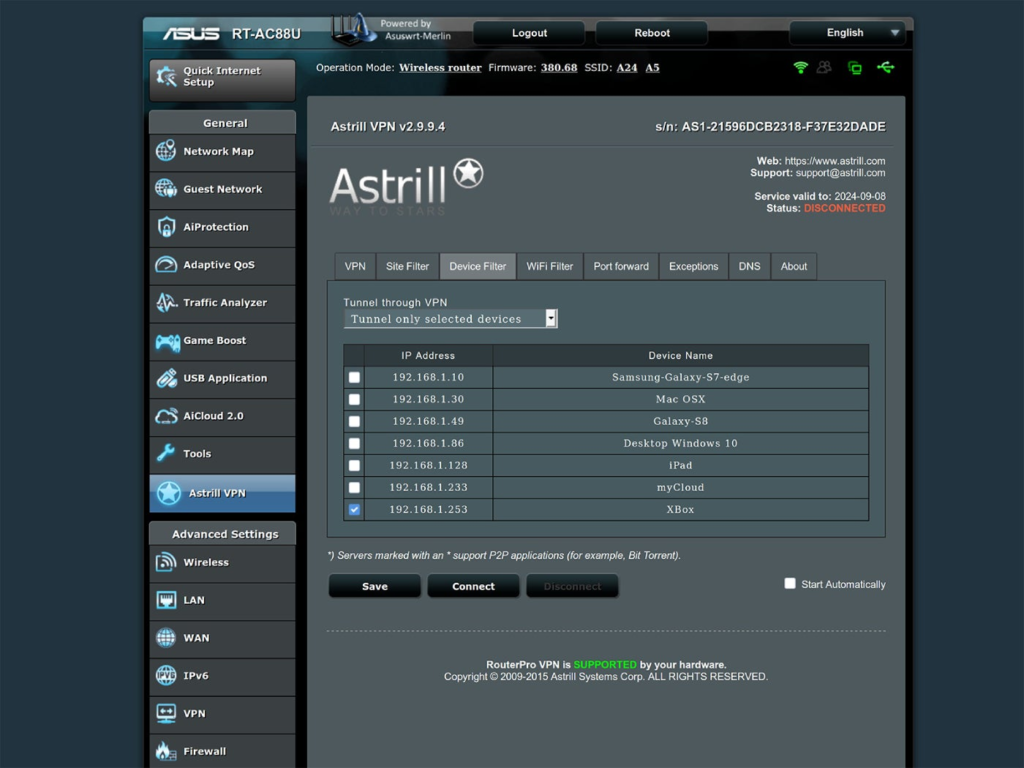
Astrill VPN’s fast facts Our rating: 3 out of 5.Starting price: $12.50 per user per month.Key features: Good security and anonymity. Some Netflix access. High speeds. Astrill is regarded by some as a premium VPN that users can harness to gain a greater degree of online privacy and security. It is priced accordingly. I found it to be more expensive than competitive solutions. The company is registered in the Seychelles, which helps it get around many of the regulatory hurdles that VPN companies encounter when handing data over to government agencies. 1 Semperis Employees per Company Size Micro (0-49), Small (50-249), Medium (250-999), Large (1,000-4,999), Enterprise (5,000+) Large (1,000-4,999 Employees), Enterprise (5,000+ Employees) Large, Enterprise Features Advanced Attacks Detection, Advanced Automation, Anywhere Recovery, and more 2 ESET PROTECT Advanced Employees per Company Size Micro (0-49), Small (50-249), Medium (250-999), Large (1,000-4,999), Enterprise (5,000+) Any Company Size Any Company Size Features Advanced Threat Defense, Full Disk Encryption , Modern Endpoint Protection, and more 3 ManageEngine Log360 Employees per Company Size Micro (0-49), Small (50-249), Medium (250-999), Large (1,000-4,999), Enterprise (5,000+) Micro (0-49 Employees), Small (50-249 Employees), Medium (250-999 Employees), Large (1,000-4,999 Employees), Enterprise (5,000+ Employees) Micro, Small, Medium, Large, Enterprise Features Activity Monitoring, Blacklisting, Dashboard, and more Astrill VPN’s pricing Astrill costs $30 per month which comes down to $15 a month for a one-year subscription and $12.50 monthly for a two-year subscription. There is also a free VPN available for one Android device. Business plans for 10 to 200 accounts range from $8 to $18 per account per month. Astrill VPN allows unlimited devices to connect per subscription but I discovered that only five can do so simultaneously. Figure 1: Astrill VPN screenshot. Image: Astrill VPN. Astrill VPN’s key features Data security The data security features of Astrill VPN include a kill switch so that if the VPN is disconnected, all web activity is shut down, and all browsers are closed. Further, multi-hop encryption protects data despite going through a large number of servers. The company uses several types of encryption, including OpenWeb, StealthVPN, and Wireguard. Dedicated IP addresses are available when a user wants one to address the fact that some email providers and websites create problems for shared IP addresses. While security features vary from provider to provider, when I checked into competitors like NordVPN, ExpressVPN, and ProtonVPN as part of this Astrill VPN review, I found they generally offered an even wider range of security features. Figure 2: Astrill VPN multi-hop encryption provides additional layers of security. Image: Astrill VPN. Anonymity Astrill VPN’s Seychelles Islands home is well-chosen as it is outside the jurisdiction of nations that demand VPN vendors hand over personal data as per the Five Eyes, Nine Eyes, and 14 Eyes surveillance alliances (collectively known as the Eyes Alliance). Some other VPNs are situated in jurisdictions that are forced to turn over user data in certain circumstances. NordVPN and CyberGhost provide a similar level of anonymity to Astrill VPN, whereas Surfshark and Private Internet Access can sometimes be subject to prying eyes. I liked the fact that Astrill VPN has even achieved some success in China, which is better than most other VPNs, though performance and connectivity can be spotty in that region. SEE: Everything You Need to Know about the Malvertising Cybersecurity Threat (TechRepublic Premium) Figure 3: Astrill VPN’s smart mode means users can tunnel only international sites and leave other sites to connect via the web. Image: Astrill VPN. Netflix access Netflix and other streaming services make life hard for VPNs and many don’t work when trying to use Netflix outside their approved geographical zone. VPNs like NordVPN, ExpressVPN, and Surfshark all provide Netflix access, but TunnelBear, Mozilla VPN, and Perfect Privacy don’t. Astrill VPN sometimes provides Netflix access, depending on which server you use. You might get lucky. Speed Astrill promised me fast download and upload speeds, and it delivers. Speed tests have it well ahead of ExpressVPN and Surfshark. It even beats NordVPN in some tests, which is the VPN that generally has the speediest reputation. However, speeds vary and the user of a VPN can mean applications operate more slowly than if they ran over the web without a VPN. Figure 4: As well as Astrill VPN fast upload speeds, its one-click features mean it is quick to connect. Image: Astrill VPN. SEE: 6 Best Anonymous (No-Log) VPNs for 2024 (TechRepublic) Astrill VPN pros Good range of security and encryption features. Beyond the reach of problematic jurisdictions such as Five Eyes. Decent upload and download speeds. Has some success within China. Astrill VPN cons Astrill VPN is more expensive than most VPNs. You can only connect five devices to Astrill VPN at the same time, which may cause problems in some households and in some businesses. Astrill VPN users must download apps for Windows, macOS, iOS, Linux, Android, and routers as there are no browser extensions. Limited server network of around 300 servers compared to thousands among many of its competitors. Figure 5: Users can share VPN connections with other devices they have running on the network. Image: Astrill VPN. More about Cloud Security Frequently asked questions about Astrill VPN What is Astrill VPN? Astrill VPN is a premium VPN that is generally faster than other VPNs and is available at a higher price. Is Astrill VPN safe to use? Astrill VPN is based in the Seychelles and lies well outside the Eyes Alliance nations, making it safer to use than VPNs stationed within Eyes Alliance jurisdictions. SEE: The 6 Best Small Business VPNs for 2024 (TechRepublic) How fast is Astrill VPN? Each Astrill VPN server is connected to a 1 gbit or 10 gbit connection using dedicated bandwidth. As a result, the service promotes superfast speeds. Note, though, that I discovered during this Astrill VPN review that these speeds to be highly variable depending on a number of factors, including location, the amount of encryption used, and the application. Sometimes, speeds are close to 300 Mbps, and

Astrill VPN Review: Features, Performance, and Insights Read More »

Yes, a Multichannel Contact Center CAN Replace a Dozen Apps

Accommodating your customers’ communication preferences is important, especially as your business grows. This means supporting them via social media, website forms, live chat, SMS, traditional phone support, and any other channels they may use. Going after the wrong channels or using the wrong approach can be costly and difficult to manage. This is true for supervisors, admins, and agents alike. A multichannel contact center that centralizes communication methods in one place can solve many of these problems, make it easier to scale, save you money, and improve the customer experience. 1 RingCentral RingEx Employees per Company Size Micro (0-49), Small (50-249), Medium (250-999), Large (1,000-4,999), Enterprise (5,000+) Medium (250-999 Employees), Large (1,000-4,999 Employees), Enterprise (5,000+ Employees) Medium, Large, Enterprise Features Hosted PBX, Managed PBX, Remote User Ability, and more 2 Talkroute Employees per Company Size Micro (0-49), Small (50-249), Medium (250-999), Large (1,000-4,999), Enterprise (5,000+) Any Company Size Any Company Size Features Call Management/Monitoring, Call Routing, Mobile Capabilities, and more How a multichannel contact center works Multichannel contact centers make it possible for customers to interact with companies through various communication channels. Agents can manage all of these channels through a single platform, making it easy to support customers no matter where they reach out from. They’ll be able to answer phone calls, respond to texts, reply to Facebook messages, offer support on X, and more all from a single dashboard. In most cases, multiple agents can work together to knock it all out with shared inboxes. On the admin side, managers can use multichannel contact centers to bring together data that would otherwise be scattered across different tools. For example, you’ll get a more holistic look at agent performance across every channel rather than analyzing one channel at a time. Multichannel contact center vs omnichannel contact center Multichannel contact centers are not quite the same as omnichannel contact centers, and it’s important to note these differences to truly understand how these solutions work. With a multichannel system, all communication is managed from a single platform, but each channel is siloed and operates independently. An agent speaking to an inbound caller likely won’t have access to that customer’s previous interactions via email or social media. Omnichannel contact centers unify the customer experience by giving agents access to the full communication history of each customer, regardless of the channel. Reps can see all customer interactions, which is helpful in scenarios when the customer journey extends across multiple touch points. If you’re using a web form or live chat to qualify customers before directing them to customer service, an omnichannel solution is helpful as your agents will be able to seamlessly continue communication right where it left off. A multichannel solution is sufficient if customer interactions typically start and end on the same channel. How to deploy a multichannel contact center There are three main ways to set up a multichannel contact center — CCaaS, CPaaS, and on-premises deployments. Here’s an overview of each so you can determine which one makes sense for your business. CCaaS (contact center as a service) CCaaS solutions are pre-built, cloud-based contact center systems that include all communication channels under a single subscription. They’re the most affordable option and the easiest to set up, making it the ideal deployment method for smaller and mid-sized contact centers that don’t need customizations or intricate setups. You can get a CCaaS deployment from a call center software provider. CPaaS (communications platform as a service) CPaaS contact centers are also cloud-based, but they require developers and significant upfront configuration. It’s a better choice for businesses that need a way to add multiple communication features to an existing application, utilizing APIs and other developer-friendly components. For example, a health insurance provider could use a CPaaS deployment to add live chat to their existing healthcare app during open enrollment. This type of set up is oftentimes the only option when you need to build channel-specific communication features and customizations into your existing systems, compared to a CCaaS where everything is pre-built out of the box. It can also be a superior option if off-the-shelf contact center integrations don’t work for you. On-premises On-premises deployments are generally reserved for enterprise organizations that either have specific compliance requirements or already have the existing infrastructure in place to handle everything in-house. In this scenario, you’re managing all of the hardware and software from your own on-site data center. You’ll have total control over everything — including all the security and customization capabilities. But you’re also responsible for managing all of the backend requirements to power your contact center, which isn’t realistic for most businesses. Benefits of a multichannel contact center There are dozens of advantages of migrating your contact center to a multichannel solution. But these five do a good job of summing up why you might want to switch. Simplified tech stack The best part about multichannel contact centers is that you can consolidate all of your apps into a single platform. Rather than using one app to manage chatbots on your website, a second for SMS marketing, and a third for social media messages, your multichannel contact center brings all of these elements together. Improved agent productivity Agents will be more productive if they don’t have to switch between multiple platforms, windows, and screens when handling communication across different channels. It’s also easier for agents to multi-task if everything is centralized. For example, a single agent can handle two live chat conversations while also providing phone support from a multichannel contact system. Insufficient tools are one of the leading causes of call center burnout, so this can help with that too. On top of that, contact center AI that works across various platforms can free up agents for more complex situations. Better customer experiences A multichannel contact center is the easiest way to give your customers more options when they need to contact your business. Whether it’s for sales, support, or a general inquiry, your customers can reach you in whatever way is

Yes, a Multichannel Contact Center CAN Replace a Dozen Apps Read More »

Australian IT Pros Urged to Guard Against Chinese Cyber Threats

The Australian Signals Directorate and the Australian Cyber Security Centre have joined cybersecurity institutions from the U.S., Canada, and New Zealand in warning local technology professionals to beware of threat actors affiliated with China, including Salt Typhoon, infiltrating their critical communications infrastructure. The news comes weeks after the Australian Signals Directorate’s Annual Cyber Threat Report 2023-2024, where the agency warned that state-sponsored cyber actors had been persistently targeting Australian governments, critical infrastructure, and businesses using evolving tradecraft over the most recent reporting period. What is Salt Typhoon? Recently, the U.S. revealed that a China-connected threat actor, Salt Typhoon, compromised the networks of at least eight U.S.-based telecommunications providers as part of “a broad and significant cyber espionage campaign.” But the campaign is not limited to U.S. shores. Australian agencies did not confirm whether Salt Typhoon has reached Australian telco companies. However, Grant Walsh, telco industry lead at local cyber security firm CyberCX, wrote that it was “unlikely the ACSC – and partner agencies – would issue such detailed guidance if the threat was not real.” “Telco networks have invested in some of the most mature cyber defences in Australia. But the global threat landscape is deteriorating,” he wrote. “Telecommunications networks are a key target for persistent and highly-capable state-based cyber espionage groups, particularly those associated with China.” SEE: Why Australian Cyber Security Pros Should Worry About State-Sponsored Cyber Attacks More Australia coverage Salt Typhoon: Part of a wider state-sponsored threat problem Over the past year, the ASD has issued several joint advisories with international partners to highlight the evolving operations of state-sponsored cyber actors, particularly from China-sponsored actors. In February 2024, the ASD joined the U.S. and other international partners in releasing an advisory. It assessed that China-sponsored cyber actors were seeking to position themselves on information and communications technology networks for disruptive cyberattacks against U.S. critical infrastructure in the event of a major crisis. The ASD noted that Australian critical infrastructure networks could be vulnerable to similar state-sponsored malicious cyber activity as seen in the U.S. “These actors conduct cyber operations in pursuit of state goals, including for espionage, in exerting malign influence, interference and coercion, and in seeking to pre-position on networks for disruptive cyber attacks,” the ASD wrote in the report. SEE: Australia Passes Ground-Breaking Cyber Security Law In the ASD’s annual cyber report, the agency said China’s choice of targets and pattern of behaviour is consistent with pre-positioning for disruptive effects rather than traditional cyber espionage operations. However, it said that state-sponsored cyber actors also have information-gathering and espionage objectives in Australia. “State actors have an enduring interest in obtaining sensitive information, intellectual property, and personally identifiable information to gain strategic and tactical advantage,” the report said. “Australian organisations often hold large quantities of data, so are likely a target for this type of activity.” Common techniques used by state-sponsored attackers According to Walsh, China-sponsored actors like Salt Typhoon are “advanced persistent threat actors.” Unlike ransomware groups, they are not seeking immediate financial gain but “want access to the sensitive core components of critical infrastructure, like telecommunications, for espionage or even destructive purposes.” “Their attacks are not about locking up systems and extracting fast profits,” according to Walsh. “Instead, these are covert, state-sponsored cyber espionage campaigns that use hard-to-detect techniques to get inside critical infrastructure and stay there, potentially for years. They are waiting to steal sensitive data or even disrupt or destroy assets in the event of future conflict with Australia.” The ASD has warned defenders about the common techniques these state-sponsored threat actors leverage. Supply chain compromises The compromise of supply chains can act as a gateway to target networks, according to the ASD. The agency noted, “Cyber supply chain risk management should form a significant component of an organisation’s overall cyber security strategy.” Living off the land techniques One of the reasons state-sponsored actors are so difficult to detect, according to the ASD, is because they use “built-in network administration tools to carry out their objectives and evade detection by blending in with normal system and network activities.” These so-called “living off the land” techniques involve waiting to steal information from an organisation’s network. Cloud techniques State-sponsored threat actors adapt their techniques to exploit cloud systems for espionage as organisations move to cloud-based infrastructure. The ASD said techniques for accessing an organisation’s cloud services include “brute-force attacks and password spraying to access highly privileged service accounts.” SEE: How AI Is Changing The Cloud Security Equation How to defend against cyber threats There are some similarities in threat actors’ techniques and the weaknesses in the systems they exploit. The ASD said state-sponsored cyber actors often use previously stolen data, such as network information and credentials from previous cyber security incidents, to further their operations and re-exploit network devices. Luckily, companies can protect themselves from cyber-attacks. Earlier this year, TechRepublic consolidated expert advice on how businesses can defend themselves against the most common cyber threats, including zero-days, ransomware, and deepfakes. These suggestions included keeping software up-to-date, implementing endpoint security solutions, and developing an incident response plan. source

Australian IT Pros Urged to Guard Against Chinese Cyber Threats Read More »