Tech Republic

Take This $75 Chromebook Anywhere

Traveling for work or working remotely often means juggling priorities and finding ways to stay productive while protecting your most valuable gear. Lugging an expensive desktop or high-end laptop around isn’t always practical—or safe. That’s why it’s so useful to have something like this $75 HP Chromebook 11. This compact computer would normally cost $239, but now you can get a reliable, low-risk machine for under $100. Head to TechRepublic Academy to grab this offer. Under the hood This refurbished Chromebook offers enough power to handle email, web browsing, video calls, and basic productivity tasks. It’s equipped with an Intel Celeron processor and 4GB of RAM, which is modest by modern standards but perfectly adequate for lightweight tasks. The Chrome OS ecosystem enhances its usability, providing seamless integration with Google apps like Docs, Drive, and Gmail, and you can also access Android apps for some added functionality. Durability is key for any travel laptop, and this Chromebook doesn’t disappoint. Originally designed for classroom use, the HP Chromebook 11 is built to endure bumps, spills, and the wear and tear of travel. It has reinforced corners and a spill-resistant keyboard, so you can toss it in your bag without worrying about every little mishap. Its compact size and light weight make it perfect for slipping into a carry-on or backpack without adding unnecessary bulk. You won’t have to search for an outlet often. This Chromebook can last up to 13.5 hours on a single charge, which makes it ideal for long flights or days spent working in coffee shops or coworking spaces. And with fast charging, you can get back up to 90% battery life in just 90 minutes. While it won’t replace a powerful desktop or serve as a multitasking machine for heavy workloads, this HP Chromebook excels as a secondary device you can use on the go. Visit TechRepublic Academy to get this HP Chromebook for only $74.99. Prices and availability are subject to change. source

Take This $75 Chromebook Anywhere Read More »

11 Podcast Planning Templates You Can Download Right Now

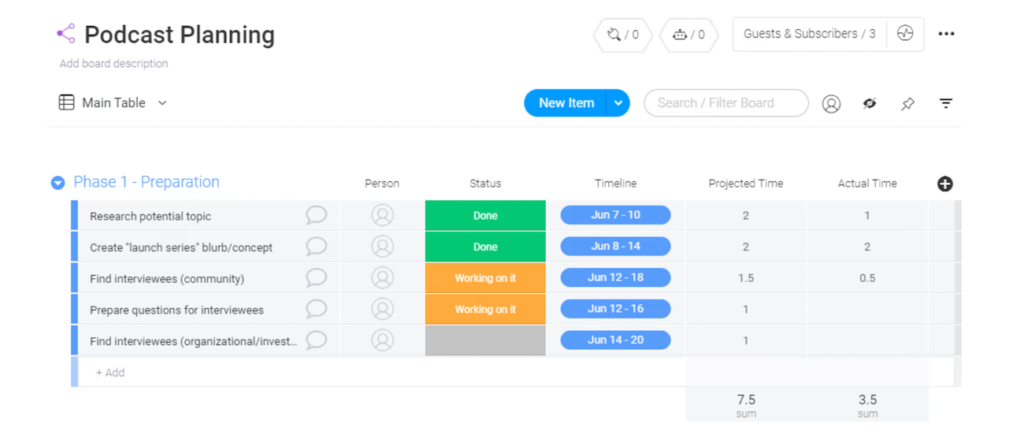
From brainstorming ideas to booking guests and outlining show topics, there’s a lot of work involved with planning a podcast episode. Podcast planning templates can help you keep track of sponsors, manage your editing and production process, and even map out promotional content once your episodes go live. These are some of my favorite options for beginners, seasoned hosts, and everyone in between. monday.com: A podcast planning template for smooth production monday.com is one of my favorite project management tools on the market. It’s a great way to plan your podcast because it has everything you need to stay organized and ensure none of your production tasks slip through the cracks. It also has a great mobile app, allowing you to manage podcast planning from the palm of your hand. You can sign up for monday.com’s free plan to unlock access to 200+ templates, up to three project boards, eight custom column types, and seats for two collaborators. It’s a great place to start or try it out but most teams will likely need to upgrade to a paid plan rather quickly. More on monday.com: monday.com Review | monday.com vs Wrike | monday.com vs Airtable. Individuals and teams alike can use monday.com to organize ideas and manage podcast productions. Image: monday.com I really like how the production flow is set up with this template. Instead of a single card for each episode that displays its status, every episode has its own list of dedicated tasks. For example, the preparation phase may include tasks related to preparing questions for guests and outlining the episode structure. You can also have a post-production phase for things like editing clips to be promoted on social media before the final episode is polished and ready to live. This kind of setup lets you get as granular as you’d like without cluttering everything up. The template also lets you estimate how much time each task should take. From there, you can enter the actuals and compare the difference. Overall, monday.com and this template are solid options for any podcaster, whether you’re working by yourself or with a full team. It’s easy to use, and the fact that you’re getting the full power of monday.com’s project management platform is a bonus that can’t be overlooked. ClickUp: Podcast planning templates for any type of show ClickUp is another all-in-one project management and team collaboration platform. While this might seem like overkill for podcast planning, there’s a free forever plan that’s perfect for organizing just about everything. Each template below is more advanced than the one before it. The right one for you depends on how much you want to lean on the tool, how many people you’re working with, and how granular you want to be with post-production tracking. More on ClickUp:  ClickUp Review | ClickUp vs monday.com | ClickUp vs Notion. Template 1: A beginner-friendly option for planning episodes This template is great for newer podcast hosts who just need something simple to plan upcoming episodes. It comes with all of the basics you need to stay organized. You can create a backlog of episode ideas, categorize episodes, add audio files, and attach links to live episodes so everything’s centralized in one place. This beginner-friendly template is great for solo podcast hosts who need some help planning and organizing upcoming episodes. Image: Clickup.com My favorite part about this podcast planning template is its simplicity. It’s organized into four sections that follow a linear flow — planned episodes, recorded episodes, shows that have been edited, and shows that have been published. Because of its simplicity, you won’t have to spend a ton of time figuring out how it works. It’s just a matter of signing up and adding all of your ideas. Within minutes you’ll be more organized and have far more insight into where everything stands in your production flow. The biggest downside is that it’s missing functionality for brainstorming, managing post-production tasks, and scaling beyond a single channel. This isn’t necessarily a bad thing, especially for newer shows. But bigger production teams will likely need to go with one of the other templates below. Template 2: Added features for managing different types of podcasts This ClickUp template follows the same core concept of the previous one in the sense that all episodes are organized by stage in the production process. But it takes it up a notch if you want more granular details about each episode. You’ll see the progress status of each episode updated in real-time as you or your team completes tasks required to get it live. This template is a good starting point if you need to involve a team in your production flow. Image: Clickup.com This template comes pre loaded with 17 custom attributes that you can use tag episodes and stay organized. These range from topic categories to listens, subscriber information, and more. You’ll also be able to categorize each item by type. For each type, you can define a set structure that’s applied when you add a new episode, so you don’t have to outline all the steps every single time you add something new. Say you’re planning an episode that includes a guest. If you tag that episode with this attribute, you can have your interview notes and questions available by default on that particular card. I also love the visual elements of this template. If you want to have a broad range of topics for your show, the color-coded topic column clearly indicates whether you have a good mix of ideas or too many episodes in one category. While you can use it to manage some post-production tasks, like your social media marketing plans, it’s a bit more limited for this use compared to the template below. Template 3: The most advanced option for managing all pre and post-production tasks If you have a well-established show with a full team working collaboratively to record, edit, and promote your show, this template has everything you’ll need to stay

11 Podcast Planning Templates You Can Download Right Now Read More »

IT: The Unsung Heroes Driving Sustainability and Change

Sustainability has moved from a buzzword to a boardroom priority. But what may surprise many is that the unsung heroes driving this change are not in environmental departments — they’re in IT. As a chief sustainability officer, I have witnessed firsthand this transition — and the challenges and opportunities that come with it — at the intersection of sustainability, innovation, and culture in the tech sector. I couldn’t be more convinced of the stealthy role IT has to play in the twin agendas of digital transformation and decarbonization. In my work, I have seen colleagues in tech roles often do not immediately see themselves or their work as central to the pursuit of sustainability goals. Many in tech roles assume sustainability is someone else’s job — a task for environmental departments or corporate leaders. There’s often a perception there is little they can do. But what if the data centers powering our digital age become leaders in sustainability? What if IT teams hold the key to decarbonization? IT professionals and tech leaders have a tremendous opportunity to drive real impact. The software systems and infrastructure they manage are at the heart of what can make or break sustainability efforts in an organization today. Still, they are also critical to the resilience strategies of the future. Recognizing this critical role is key to unlocking the transformative potential of IT-driven sustainability. More about data centers Nicola Acutt is the chief sustainability officer at NetApp, Inc. The Urgency of an IT-Driven Approach to Sustainability IT practitioners are uniquely positioned to lead the charge in sustainability for their organizations because of the transformative potential of the technologies they create and deploy. Consider our reliance on data centers. These on-prem, hybrid, and cloud powerhouses of the digital age are also significant energy consumers. Without a sustainability strategy in place, data centers stand to overshadow the airline industry in the scale and scope of their carbon footprint. As we continue to generate more data, the energy demand only grows. Yet this challenge is a significant opportunity for IT. By leveraging advancements in artificial intelligence, machine learning, and data analytics, IT can help the organization better optimize energy use, reduce waste, and improve the overall efficiency of enterprise IT operations. For example, AI-powered sustainability dashboards — like NetApp’s BlueXP Sustainability Dashboard — are already helping businesses track their carbon emissions and set realistic, impactful targets for reduction. As this example shows, deploying great tech solutions and prioritizing sustainability doesn’t have to be an either-or proposition. Instead, the call to action should be striving for the “Goldilocks zone” — the solution that is just right. We can deliver transformative impact by enabling organizations to take an intelligent approach to data, dramatically reduce their carbon footprints, transition to renewable energy, and implement energy-efficient solutions that are essential for a sustainable IT future. SEE: All You Need to Know about Greentech Reigniting Circularity in IT Purchasing However, sustainability isn’t just about energy efficiency. It’s also about rethinking how we design, build, and dispose of our technology. In addition to energy, another critical aspect of IT-driven sustainability is operationalizing a circular business model. A circular economy is a system where resources are reused, recycled, and repurposed, minimizing waste and the environmental footprint of products. The traditional linear “take, make, dispose” model is no longer viable in a world with finite resources. Again, this challenge presents an opportunity: designing and building digital infrastructure for the future by prioritizing innovation and product development goals that aim at reducing, reusing, and recycling materials across the entire product lifecycle. The tech industry has made strides over the years in this area, as “Design for the environment” is not a new concept. Advancements in hardware design now focus on modularity and recyclability, ensuring that devices can be easily upgraded, repaired, and recycled. This shift reduces the environmental impact of electronic waste and creates new business opportunities in the circular economy. But companies can do more. Organizations can make circularity a design principle in engineering and take action to bake it into product operation. NetApp, for instance, has prioritized designing products with longer lifespans, using recycled materials, and implementing take-back programs that ensure our products’ responsible disposal and recycling. This strategy supports a more sustainable ecosystem and invests in the growing demand for responsible technology. SEE: Google’s Greenhouse Gas Emissions Increased by 48% Since 2019, Thanks to AI Pursuits Mapping Sustainability and IT Agendas The intersection of IT and sustainability is filled with possibilities for organizations committed to meeting and exceeding their sustainability goals. IT professionals can make an impact in their organizations and lead the way in building a sustainable future by: However, activating a sustainability innovation agenda in IT requires more than just technology — it requires a shift in mindset. We must recognize that sustainability is not a separate initiative or compliance task but an opportunity for IT to drive value to the business, enhance resilience, and enable long-term success. Sustainability-driven IT decisions today will impact sustainability now and in future generations. IT practitioners are no strangers to transformation. By stepping up as sustainability leaders today, they have the unique chance to drive real-world change — not just for their companies but for the planet. Nicola Acutt is the chief sustainability officer at NetApp, Inc., with over 20 years of experience in business, technology, and sustainability. Previously, she was Chief Sustainability Officer at VMware, leading a 30-person team. Nicola has worked across business, government, academia, and nonprofits, including roles at Presidio Graduate School and Common Ground Consulting. She holds a B.S. from UC Berkeley and a Ph.D. from the University of East Anglia. source

IT: The Unsung Heroes Driving Sustainability and Change Read More »

How to Fix Mic Echo Before Everyone Bails on the Call

If you’re on a phone or video call and you suddenly hear your own voice on a slight delay, you’re most likely experiencing mic echo. Even with modern calling technology, this scenario is still common and it can leave anyone feeling frustrated — especially when time is short and you need to present yourself as a polished, prepared communicator. Fortunately, this mic echo is usually caused by a variety of easily fixable factors, including: Where your microphone is located. This is the most common cause of echo issues. If you’re using an external mic, it may be situated too close to your speakers, causing it to pick up and send out the sound of your voice in an endless loop. The volume level of your speakers. If your speakers are too loud, your mic may be picking up on its output no matter where it’s located. The number of microphones in use. Having more than one running mic can multiply the sound of your voice. Make sure your main mic — whether it’s a headset, laptop, phone, or other standalone source — is the only one in use. Some readers will be able to get rid of mic echo with just that short bit of guidance there. In the rest of this post, I’ll go into detail about these fixes, why they work, and additional steps you can take to stop this annoying problem. 1 RingCentral RingEx Employees per Company Size Micro (0-49), Small (50-249), Medium (250-999), Large (1,000-4,999), Enterprise (5,000+) Medium (250-999 Employees), Large (1,000-4,999 Employees), Enterprise (5,000+ Employees) Medium, Large, Enterprise Features Hosted PBX, Managed PBX, Remote User Ability, and more 2 Talkroute Employees per Company Size Micro (0-49), Small (50-249), Medium (250-999), Large (1,000-4,999), Enterprise (5,000+) Any Company Size Any Company Size Features Call Management/Monitoring, Call Routing, Mobile Capabilities, and more Why does mic echo happen? During a normal call, a person’s voice is captured by the microphone, transmitted through the system, and then played back in real-time to the listener. The sound is clear and immediate, with no delay or repetition. Mic echo occurs when the sound from the speaker is picked up by the microphone and retransmitted, leading to a delayed or repeated sound. The delayed retransmission causes the echo effect, disrupting the normal flow of communication. This phenomenon is much more common on VoIP phone systems vs landline phones. Identifying the source of mic echo When mic echo occurs, it may not always be clear exactly what or who is causing the problem. If everyone else on a call hears your voice echo, then you are likely to be the source, even if your voice sounds normal to you on your own speakers. The same goes for any other participant. Fixing mic echo (without stopping the call) Once you’ve identified that you are the source of the echo, you should be able to remedy the problem quickly without interrupting the conversation. Start by trying this series of quick fixes: Turn down your speaker volume Access your device settings or press the external volume adjust buttons to lower speaker sound levels to their minimum volume. Then, slowly begin raising the volume until the conversation becomes audible, checking for any remaining echo. This works well if the problem is caused by feedback picked up in your speakers. Lowering the volume is an incredibly common fix for people that are using a computer or tablet as a softphone to make calls. Moving your microphone further away from your speakers. Another way of reducing mic feedback is to distance your microphone farther away from the speakers. This is likely to fix the issue if you’re using an external device, such as a webcam or lavalier mic, paired with your computer or phone speaker. Switching to a headset or headphones with a built-in mic If you’ve tried lowering the speaker volume and distancing your mic from your speakers, the next best option is to switch from an external device to a headset or headphones with a built-in mic. Any decent VoIP headset will do a good job reducing the amount of ambient noise picked up by your mic. SEE: Check out our complete guide on the best VoIP headsets.  Disable all other nearby mics Many modern devices feature microphones, including game controllers, laptops, phones, smartwatches, smart speakers, television remotes, and webcams. If you’re still experiencing mic echo, one of these may be the culprit. Make sure to check device audio settings or switch them off completely in order to reduce additional sound pickup. Adjust call recording software settings If you’re recording a call for future reference, you may need to adjust the call volume settings in your business phone service interface or app. This is usually accomplished through the main Settings menu, where you can search for an Audio option to adjust Input (microphone) or Output (speaker) volume. SEE: Looking for a new phone system? Check out our top business phone service picks.  Disable SIP ALG on your router SIP ALG (Session Initiation Protocol Application Layer Gateway) is a feature often enabled by default in routers to help manage VoIP traffic. Unfortunately, this feature often causes more problems than it solves, leading to delays and audio distortions that result in mic echo during calls. To resolve this, SIP ALG can typically be disabled through the router’s settings, often found under advanced network or firewall configuration options. This is a slightly more technical fix than most of the other ones, but I promise you won’t be the first person to Google “disable SIP ALG” for your particular VoIP router. The problem is widespread enough that finding beginner-friendly guidance is not going to be hard. SEE: Discover the best VoIP routers.  Additional fixes for mic echo If you’ve tried every quick fix imaginable and still experience an issue, there’s a few more things you can do to solve the problem: Restart your computer or device. Turning your device off and then on again closes out all programs that may be

How to Fix Mic Echo Before Everyone Bails on the Call Read More »

Automate Google Sheets Tasks with This $99 Lifetime Subscription

TL;DR: Get lifetime access to Logic Sheet for $99 (reg. $720) and automate repetitive tasks in Google Sheets to save time and boost productivity. If you spend countless hours managing data in Google Sheets, it’s time for a smarter solution. With Logic Sheet, you can automate repetitive tasks, streamline your workflow, and focus on more critical priorities. For just $99 (regularly $720), this lifetime subscription gives you access to powerful tools designed to save time and boost productivity. Logic Sheet transforms Google Sheets into a powerful automation hub, enabling you to create workflows that work for you. The process is simple. First, you set up a trigger, like scheduling an action to run daily or initiating a workflow when your spreadsheet is edited. Next, add conditions to customize your automation, ensuring it only runs when specific criteria are met, such as a value exceeding a certain threshold or a keyword appearing in a form submission. Finally, select your action—Logic Sheet can send emails, update other platforms like Airtable or Notion, refresh spreadsheet formulas, or even push API requests. The possibilities are plentiful. One of Logic Sheet’s standout features is its pre-built templates and automation recipes, which make setup fast and intuitive. Whether you’re managing projects, analyzing data, or tracking customer interactions, these templates simplify the process. With just a few clicks, you can customize workflows to meet your unique needs without spending hours on configuration. Logic Sheet is perfect for professionals across industries. A project manager can automate updates to team members whenever a project milestone is completed. Without manual input, a marketer can sync customer data between Google Sheets and Mailchimp. An analyst can refresh and organize data automatically, ensuring that reports are always up-to-date. Don’t miss this low price on a lifetime of Google Sheets support and work smarter with lifetime access to Logic Sheet for $99 (reg. $720). Prices and availability are subject to change. source

Automate Google Sheets Tasks with This $99 Lifetime Subscription Read More »

EU Cyber Resilience Act: What You Need to Know

The E.U. Cyber Resilience Act was enacted on Dec. 10. This legislation impacts all manufacturers, distributors, and tech importers that connect to other devices or networks operating in the bloc. Examples of applicable products include smart doorbells, baby monitors, alarm systems, routers, mobile apps, speakers, toys, and fitness trackers. Those that comply with the legislation will have a CE label, which indicates the device meets E.U. standards for health, safety, and environmental protection, allowing consumers to consider security in purchasing decisions. The Act aims to clarify and cohesively enforce existing cyber security regulations so that all devices sold in the E.U. meet a baseline level of protection. It obligates tech manufacturers, importers, and distributors to provide security support and updates. “Digital hardware and software products constitute one of the main avenues for successful cyberattacks,” the official Act website reads. “In a connected environment, a cybersecurity incident in one product can affect an entire organisation or a whole supply chain, often propagating across the borders of the internal market within a matter of minutes.” Examples of incidents where the security of products with digital elements have been exploited include the WannaCry ransomware, Pegasus mobile phone spyware, and Kaseya VSA supply chain attack. “Before the European Cyber Resilience Act, the various acts and initiatives taken at Union and national levels only partially addressed the identified cybersecurity related problems and risks, creating a legislative patchwork within the internal market,” the Act’s website reads. The legislation includes security requirements for all stages of a product’s lifecycle, from its design and development to production, deployment, maintenance, and eventual disposal. While the Act has now entered force, many obligations will apply in stages, with the majority being required by Dec. 11, 2027. SEE: NIS 2 Compliance Deadline Arrives: What You Need to Know The Product Security and Telecommunications Infrastructure Act, which came into force in April, holds internet-of-things device manufacturers, importers, and distributors in the U.K. to a similar standard. In the country, devices must each come with a unique password, the duration of its security support, and a way of reporting security issues, at minimum. Who must comply with the Cyber Resilience Act? Any company that manufactures, distributes, or imports products with digital components must comply with the Act. These include: Security and access management systems: privileged access management software and hardware, password managers, biometric readers, etc. Software applications: browsers, VPNs, etc. Network and security systems: firewalls, security information, event management systems, etc. Core hardware and components: routers, modems, microprocessors, etc. Operating systems and virtualisation: operating systems, boot managers, hypervisors, etc. Public key and certificate management: public key infrastructure, digital certificate issuance software, etc. Smart devices and IoT products: smart assistants, smart door locks, baby monitors, alarm systems, internet-connected toys with interactive features such as location tracking or filming, wearables for children, health monitoring, etc. Hardware with advanced security functionalities: hardware with security boxes, smart meter gateways, smartcards, etc. These are considered “critical” products so they will be subject to more frequent security updates and enhanced vulnerability management measures. They must also have a European cybersecurity certificate at an assurance level at least “substantial.” Exceptions may be made for devices that are subject to cybersecurity requirements in other legislation, such as medical devices, aeronautical devices, and cars. For a full list, see Annex III and IV of the Act. SEE: Data (Use and Access) Bill: What Is It and How Does It Impact UK Businesses? Must-read security coverage What are the requirements of the Cyber Resilience Act? For manufacturers Patch vulnerabilities in the product for at least five years or its lifespan, whichever is shorter. Maintain technical files that prove compliance at every stage, including designs (security must be “by design and by default”), manufacturing details, and conformity assessments. Affix the CE mark to compliant products and ensure accurate instructions are available in the target markets’ languages. Exploited vulnerabilities must be reported to the European Union Agency for Cybersecurity, ENISA, and designated Incident Response Team within 24 hours of discovery. A vulnerability notification must also be sent out within 72 hours and a final report within either 14 days or a month. Notify users and market surveillance authorities if the company ceases operations. For importers Ensure products comply with regulations by verifying the manufacturer’s documentation. Keep technical documentation and declarations of conformity available for at least ten years after the product’s release. Report non-compliant or risky products to manufacturers or relevant authorities. For distributors Verify the manufacturer’s or importer’s documentation before putting products on the market to ensure compliance with regulations. Ensure storage and transportation conditions do not compromise product compliance. Maintain records of suppliers and customers to facilitate recall or other safety actions. Report non-compliant or risky products to the manufacturer or importer. If the importers or distributors place the product on the market under their own name or trademark, or if an individual makes substantial modifications and then makes it available on the market, they will also be subject to manufacturer-level obligations. How will the Cyber Resilience Act be enforced? The E.U. Cyber Resilience Act will primarily be enforced through conformity assessments and market surveillance. Most assessments can be performed in-house, while critical products should be assessed by accredited third parties. Procedures also vary by product risk level. National Market Surveillance Authorities will monitor compliance through inspections, testing, and checking documentation. What are the penalties for non-compliance? Manufacturers that do not comply with the Act shall be subject to administrative fines of up to €15,000,000 or up to 2.5% of its total worldwide annual turnover for the preceding financial year, whichever is higher. Importers and distributors that do not comply with the Act shall be subject to administrative fines of up to €10,000,000 or up to 2% of its total worldwide annual turnover for the preceding financial year, whichever is higher. Recalls and bans may also be used as corrective actions. Criticism of the Cyber Resilience Act Not everyone is content with the Cyber Resilience Act. In 2023, 34% of global CISOs

EU Cyber Resilience Act: What You Need to Know Read More »

Why Router vs Firewall Really Only Matters at Work

Routers and firewalls are network security devices, sometimes grouped into business and home network packages or sold separately as dedicated hardware. Though the two are closely linked, routers and firewalls are very different devices. Router: Exchanges data between networks or gateways. Firewall: Blocks traffic from protected networks. Put simply, routers connect networks and move data efficiently, while firewalls protect networks by controlling and securing the flow of data. For home networks, most people already have a router with a built-in firewall. Under normal circumstances, they don’t need to get an extra firewall to keep their network safe. Businesses, on the other hand, typically have more than one router and benefit from having a discrete firewall device or application. Thoughtful deployment of both elements is an important part of securing a business network. 1 RingCentral RingEx Employees per Company Size Micro (0-49), Small (50-249), Medium (250-999), Large (1,000-4,999), Enterprise (5,000+) Medium (250-999 Employees), Large (1,000-4,999 Employees), Enterprise (5,000+ Employees) Medium, Large, Enterprise Features Hosted PBX, Managed PBX, Remote User Ability, and more 2 Talkroute Employees per Company Size Micro (0-49), Small (50-249), Medium (250-999), Large (1,000-4,999), Enterprise (5,000+) Any Company Size Any Company Size Features Call Management/Monitoring, Call Routing, Mobile Capabilities, and more Key differences between routers and firewalls Here is a quick breakdown of the key differences between routers and firewalls: Network Role: Routers and firewalls serve different purposes in a network. A router connects networks and ensures data travels efficiently between them, like a VoIP router for voice traffic. A firewall, on the other hand, is like a security checkpoint, inspecting and filtering data to block potential threats. Traffic Management: Routers focus on directing traffic based on IP addresses, determining the best path for data to reach its destination. Firewalls control traffic by applying security rules, deciding what data is allowed to pass through or be blocked based on factors like source, destination, and content. Default Behavior: By default, routers allow all data to pass unless specific restrictions are added. Firewalls take the opposite approach: they block most traffic unless explicitly allowed, prioritizing security over openness. Placement: Routers are typically positioned at the edge of the network to connect it to the internet or other networks. Firewalls can be placed at the edge or internally within the network to control access between segments, adding extra layers of protection. Customization and Control: Firewalls are built for granular control, letting you enforce security policies based on specific applications, users, or behaviors. Routers, while configurable, prioritize speed and efficiency over detailed filtering. Why router vs firewall doesn’t matter on a home network Most routers have a built-in firewall that offers basic protection for homes and very small offices. Typically it is a stateful firewall capable of inspecting traffic flows and performing basic perimeter security. Because the router already has a firewall installed, the average home network does not need a separate or additional firewall. These simple networks tend to have a handful of devices connected to a single router, and the integrated firewall is enough to keep the network safe from unwanted traffic and prevent unauthorized users from gaining access to the network. On top of this, modern devices have built-in firewalls of their own. Windows Defender and Android Firewall are two common examples. From the moment your ISP turns on the internet at your house, every device connected to the router is already shielded from the public internet by multiple firewalls. If you are doing something out of the ordinary at home — like running a business with sensitive information or hosting a game server — more advanced software or hardware firewall protections will be important to set up. People with a lot of IoT (Internet of Things) devices on a home network might also consider additional firewall protections as one of the ways to reduce IoT attack surface. But outside the edge-cases, you really don’t have to compare router versus firewall at all — you probably have both already. Why router vs firewall matters a lot for business On business networks, tons of devices are logging in and out constantly, using cloud applications and potentially connecting to offices at other locations over a Wide Area Network (WAN). Unlike simple home networks, business networks have multiple routers (and a host of other elements) that connect physical and virtual resources to users. Routers play a key role in setting up an effective network security architecture, and while they may have built-in firewall functionality, businesses most often have dedicated hardware and/or software firewalls. Organizations need to protect their connected devices from virus and malware threats, but also from sophisticated security concerns that would never impact a home network. Business-grade firewalls offer granular control over the traffic, which means that managers can regulate access separately for different users and applications. This is important when you have protected resources on the network that you need to make available to the public, remote workers, or third-parties. This access control is centralized in a business’s firewall security policy, which a network manager can view and control. Many businesses also deal with payment information flowing in and out of their networks, either for customer purchases or employee salaries, so their systems are required to be HIPAA and PCI-DSS-compliant — which isn’t always possible with consumer-grade firewall tech. Businesses have other considerations as well, such as whether their routers or firewalls should be placed at the network edge. Edge routers are typically used to give access to remote workers so they can connect to the corporate network. In fact, the terms “edge routers” and “firewalls” are often used interchangeably to describe a network security device that protects the LAN from a point “between” networks. Can a router and firewall be on the same device? Certain software-defined networks and routers come equipped with software firewalls already installed. Some businesses prefer this because of the simplicity of having the two integrated. It just doesn’t make much sense to have multiple devices that need to be configured and managed separately, especially

Why Router vs Firewall Really Only Matters at Work Read More »

CrowdStrike vs Palo Alto 2024: Features, Pricing, and Insights

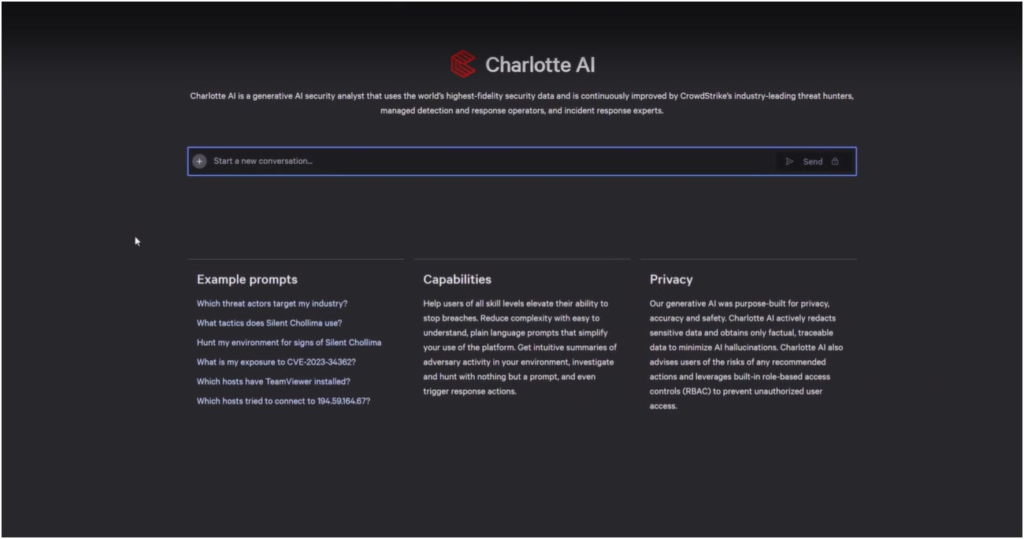
CrowdStrike and Palo Alto Networks are the top providers in the endpoint security industry today. The CrowdStrike Falcon XDR platform has stood as a community favorite for years, bringing high-quality protection, fast investigations, and an easy-to-use console to its service. Meanwhile, Palo Alto’s Cortex XDR delivers a robust service in its own right. It offers ML-powered behavioral analytics and powerful malware analysis sandbox capabilities that keep organizations safe from advanced threats. In this article, I give you a rundown of some of the main differences between CrowdStrike and Palo Alto in 2024. Recommended Alternative: CrowdStrike CrowdStrike offers the most complete CNAPP to stop breaches from code to cloud. Unified Platform and Agent: CrowdStrike Falcon® Cloud Security simplifies cloud protection with a single-agent, single-platform model, offering seamless workload security across the enterprise. In contrast, Palo Alto’s Prisma Cloud is an entirely separate console from Cortex XDR, increasing complexity and reducing analyst efficiency. Elite Threat Intelligence: Falcon Cloud Security seamlessly integrates in-depth threat intelligence with context-aware indicators, delivering unmatched visibility into the relationships between IOCs, cloud workloads, and adversaries across a comprehensive, real-time threat landscape. Unlike Prisma Cloud, which relies on threat intel detections powered by its AutoFocus product, CrowdStrike uniquely provides adversary profiles and attribution, offering a deeper understanding of threats and the actors behind them. Pre-Built Detections and Alert Correlation: Falcon Cloud Security delivers advanced runtime detections powered by on-sensor machine learning and integrated threat intelligence, all within a unified console. This enables SOC analysts to investigate alerts quickly and in context. Palo Alto’s reliance on static baselines for newly deployed containers requires manual tuning, leaving new workloads vulnerable. Learn More About Falcon Cloud Security. ESET PROTECT Advanced Employees per Company Size Micro (0-49), Small (50-249), Medium (250-999), Large (1,000-4,999), Enterprise (5,000+) Any Company Size Any Company Size Features Advanced Threat Defense, Full Disk Encryption , Modern Endpoint Protection, and more ManageEngine Desktop Central Employees per Company Size Micro (0-49), Small (50-249), Medium (250-999), Large (1,000-4,999), Enterprise (5,000+) Any Company Size Any Company Size Features Activity Monitoring, Antivirus, Dashboard, and more CrowdStrike Falcon vs Palo Alto Cortex XDR: Comparison table CrowdStrike Falcon Palo Alto Cortex XDR Starting price $184.99 per device, billed annually Contact sales for pricing Magic Quadrant for Endpoint Protection Platforms Leader Leader Machine learning Yes Yes Behavioral analysis Yes Yes Ease of use (Gartner rating) 4.6 4.7 CrowdStrike Falcon vs Palo Alto Cortex XDR: Pricing CrowdStrike Falcon pricing CrowdStrike’s EDR software is available through its Falcon Enterprise and Falcon Elite subscription tiers. Below is an overview of pricing and features for both: Falcon Enterprise: $184.99 per device, billed annually; EDR, XDR, managed threat hunting, and integrated threat intelligence. Falcon Elite: Contact sales for pricing; all Enterprise features plus, identity protection, Falcon Discover IT Hygiene, and Falcon Identity Protection. You can avail of a 15-day free trial for the CrowdStrike Falcon through their online form. This includes their Falcon platform, plus its Falcon Prevent next-generation antivirus and Falcon Device Control services. Personally, I recommend going this route to get hands-on time with their software and whether it fits your business’ needs. Palo Alto Cortex XDR pricing Compared to CrowdStrike, Palo Alto’s Cortex XDR unfortunately doesn’t have transparent pricing on its product page. It has two main subscription options: Cortex XDR Prevent and Cortex XDR Pro. Below is an overview of the feature differences between both: Cortex XDR Prevent: Contact sales for pricing; NGAV, endpoint protection. Cortex XDR Pro: Contact sales for pricing; all Prevent features plus EDR, and optional add-ons for managed detection and response, identity threat detection and response, host insights, and forensics. Interested customers can contact Palo Alto to arrange a 30-minute product demo of their Cortex XDR solution. In my view, this is the first step to take if you’re considering their Cortex XDR software for your business. The demo can be requested via an online form on their official website. CrowdStrike Falcon vs Palo Alto Cortex XDR: Feature comparison Threat detection and mitigation With CrowdStrike, you get consolidation of cloud, identity, endpoint, data protection, IT automation, and other attack surfaces into a single, unified console. This provides IT teams with a comprehensive threat detection tool that’s both effective in its deployment and user-friendly in its management. CrowdStrike’s Charlotte AI query dashboard. Image: CrowdStrike Its Falcon Insight XDR also includes its new Charlotte AI generative AI cybersecurity analyst. Through Charlotte AI, security professionals are able to cut hours in threat investigation time and prioritize high-level incidents via automated workflows and your traditional query writing. On the flipside, Palo Alto Cortex XDR prioritizes accurate threat detection using a blend of machine learning and behavioral analytics. With their platform, endpoints are secured through NGAV, host firewalls, USB device controls, among others, to make sure no cracks or possible vulnerabilities can be exploited by threat actors. MITRE ATT&CK Framework within Cortex XDR. Image: Palo Alto Cortex XDR’s behavior analytics are also crucial in finding hidden threats such as credential attacks, insider threats and abuse, and data exfiltration techniques. More cloud security coverage Independent assessments Both CrowdStrike and Palo Alto have garnered positive recognition from key independent firms looking at endpoint protection and extended detection and response providers. In Gartner’s Magic Quadrant for Endpoint Protection Platforms report for 2024, both providers were considered Leaders in the EPP space. This means they both offered balanced services, extensive EDR capabilities, and integrated workspace security functionality, per Gartner’s criteria. Magic Quadrant for EPP published in September 2024. Image: Gartner In the report, CrowdStrike was praised for its suitability towards a “broad range of organizations worldwide” and companies requiring cloud-delivered EPP deployment. Meanwhile, Cortex XDR was said to be a good choice for organizations with “mature, well-staffed security operations teams” and those seeking security vendor consolidation. Similarly, Forrester also declared CrowdStrike and Palo Alto Networks as Leaders in their Forrester Wave Extended Detection And Response Platforms for Q2 2024. This is impressive since they’re two of only three providers labeled as Leaders, with Microsoft being the last of the set of three.

CrowdStrike vs Palo Alto 2024: Features, Pricing, and Insights Read More »

CrowdStrike vs Wiz: Which Offers Better Cloud Security and Value?

CrowdStrike and Wiz are two security providers operating from vastly different positions. On one hand, CrowdStrike has been in the space since 2011 and has solidified itself as an industry leader in endpoint detection and response solutions. Meanwhile, Wiz is a much younger cybersecurity startup founded in 2020 that aims to make a name for itself in the world of cloud security. In this article, we examine how CrowdStrike and Wiz stack against each other to determine which one is best for you and your organization. Recommended Alternative: CrowdStrike CrowdStrike offers the most complete CNAPP to stop breaches from code to cloud. Unified Protection: CrowdStrike Falcon® Cloud Security provides comprehensive coverage for infrastructure, applications, data, AI, and SaaS within a single, consolidated platform. This unified approach reduces complexity and allows organizations to consolidate multiple tools. Unlike Wiz, which focuses on CSPM and vulnerability management, Falcon Cloud Security integrates seamlessly into the Falcon platform with unified cloud, endpoint, identity and data security, delivering protection across every attack path. Built to Stop Breaches: While Wiz mainly focuses on detecting misconfigurations, Falcon Cloud Security detects misconfigurations and stops cloud breaches in real-time with the same unified agent as its industry-leading EDR and Identity Protection. Leader in Detection and Response: With 24/7 threat intelligence and managed services, Falcon Cloud Security’s Cloud Detection and Response (CDR) delivers actionable insights and expert support to protect across every cloud environment. While Wiz lacks adversary-focused threat intelligence, CrowdStrike provides robust detection and response to handle even the most sophisticated attacks. Learn More About Falcon Cloud Security. Semperis Employees per Company Size Micro (0-49), Small (50-249), Medium (250-999), Large (1,000-4,999), Enterprise (5,000+) Large (1,000-4,999 Employees), Enterprise (5,000+ Employees) Large, Enterprise Features Advanced Attacks Detection, Advanced Automation, Anywhere Recovery, and more ESET PROTECT Advanced Employees per Company Size Micro (0-49), Small (50-249), Medium (250-999), Large (1,000-4,999), Enterprise (5,000+) Any Company Size Any Company Size Features Advanced Threat Defense, Full Disk Encryption , Modern Endpoint Protection, and more ManageEngine Log360 Employees per Company Size Micro (0-49), Small (50-249), Medium (250-999), Large (1,000-4,999), Enterprise (5,000+) Micro (0-49 Employees), Small (50-249 Employees), Medium (250-999 Employees), Large (1,000-4,999 Employees), Enterprise (5,000+ Employees) Micro, Small, Medium, Large, Enterprise Features Activity Monitoring, Blacklisting, Dashboard, and more CrowdStrike vs Wiz: Comparison table CrowdStrike Wiz Starting price $59.99 per year (Falcon Go) Use their online portal for price quotations. Cloud Native Application Protection Platform Yes Yes Cloud Security Posture Management Yes Yes Cloud Workload Protection Yes Yes Agent-based or agentless Unified agent and agentless Agentless Endpoint detection and response Yes No Cloud detection and response Yes Yes CrowdStrike vs Wiz: Pricing As a disclaimer, this article compares CrowdStrike and Wiz and their overall product offerings. While there is an emphasis on cloud security solutions, we aim to provide the general differences between the two providers as a whole. CrowdStrike pricing Image: Crowdstrike CrowdStrike offers several cybersecurity solutions that cater to different security requirements and business sizes. Below is brief summary of pricing and feature differences for each: Falcon Go: $59.99 per year; next-generation antivirus, device control, and express support. Falcon Pro: $99.99 per device, billed annually; all Falcon Go features plus firewall management. Falcon Enterprise: $184.99 per device, billed annually; all Falcon Pro features plus EDR, threat hunting, and intelligence capabilities. Falcon Elite: Contact sales for pricing; all Falcon Enterprise features plus IT Hygiene and identity protection. CrowdStrike Cloud Security: Contact sales for a price quote; CSPM, ASPM, container security, and server threat graphs. CrowdStrike offers free trials for most of the subscriptions listed above. I recommend checking out these trials for interested buyers to get a feel for CrowdStrike’s services and whether they fit your organization’s needs. Wiz pricing Image: Wiz Wiz doesn’t provide a standard price for its cloud services. Instead, it offers one-to-one curated pricing depending on your organization’s current cloud workload and environment. On their official website, Wiz has a price request portal that asks a few questions before providing the custom price quote. Below are some questions and details asked by Wiz: How many clouds are you using? (AWS, GCP, Azure, etc.) Providing name and work email address. Job title, company name, and phone number. You can also get a personalized, 30-minute demo of Wiz’s software through their official website. Like the price request, this is accessible after providing a few details. CrowdStrike vs Wiz: Feature comparison Area of focus While both in the cybersecurity space, CrowdStrike and Wiz take different approaches to the services they’re most known for. On the one hand, Wiz primarily deals with cloud environments and securing cloud infrastructures. This is achieved through their Cloud Security Posture Management, Vulnerability Management, Infrastructure Entitlements Management, and Cloud Native Application Protection Platform consoles, among others. Wiz CSPM Security Graph. Image: Wiz On the flip side, CrowdStrike hovers more on endpoint security and is considered an industry leader with its EDR and XDR offerings. They also have managed detection and response, NGAV, and threat-hunting service options. To be clear, CrowdStrike has a dedicated Falcon Cloud Security product that overlaps with Wiz’s offerings. This bundles together CSPM, CNAPP, and CIEM functionality into a unified console. CrowdStrike Falcon Cloud Security dashboard. Image: CrowdStrike Despite these similarities, I think this is a good place to start in discerning which provider to go for. Are you looking for a solution that exclusively provides strong visibility and protection for your cloud infrastructure? In this case, Wiz may be the better choice. Meanwhile, if you want a more comprehensive provider that offers both cloud and endpoint security tools, CrowdStrike should be your prime consideration. Independent assessments If we look into independent assessments, both CrowdStrike and Wiz are well-ranked among their competitors in the cloud space. In the Forrester Wave’s Cloud Workload Security report for Q1 2024, CrowdStrike was named a Leader, while Wiz was recognized as a Strong Performer. The report praised CrowdStrike for its CWS vision, robust container runtime protection, and strong agent-based CWP. Meanwhile, Wiz was highlighted as being a solid choice for organizations that “prioritize

CrowdStrike vs Wiz: Which Offers Better Cloud Security and Value? Read More »

Employee Data Access Behaviors Hurting Australian Employers

More than 60% of Australian employees admit to bypassing their employer’s cybersecurity policies for convenience, according to identity security vendor CyberArk. Many also access workplace applications with non-secure personal devices. The CyberArk 2024 Employee Risk Survey, which polled 14,003 workers across the U.S., U.K., France, Germany, Australia, and Singapore in October 2024, revealed that Australian employees generally comply more with cybersecurity policies than other countries. However, most are still bypassing cyber policies to make their lives easier. CyberArk found common workarounds among Australian employees, including using one password across multiple accounts, using personal devices as WiFi hotspots, and forwarding corporate emails to personal accounts. SEE: Australian employees choosing convenience, speed over cyber security In the report, CyberArk’s CEO Matt Cohen said the overall findings show that “high-risk access is scattered throughout every job role,” potentially putting sensitive organizational data at greater risk. Australian employees access sensitive data from personal devices The CyberArk report found that most Australian employees (80%) access workplace applications — often containing business-critical data — from personal devices that often lack adequate security controls. This rate of personal device usage is significantly higher than the global average of 60%. Marketing departments were found to be the most likely (94%) to use personal devices to access work applications, followed by IT teams (93%). Concerningly, more than half (52%) of entry-level employees already had access to critical data with the workplace tools they used. Australians among slowest to update their personal device security Australian employees were found to be among the slowest globally to install firmware updates or security patches on their personal or BYOD devices upon release by vendors. Globally, over a third (36%) of employees surveyed said they do not immediately install security patches or software updates for all their personal devices. In addition, 26% disagreed they always use a VPN when they access work resources, increasing the risk of cyberattacks. Access to actions valuable for attackers widespread among employees The report found that widespread privileged access to systems allows many different employees to perform actions that would be considered highly valuable to attackers taking over their accounts: 40% of global respondents indicated they habitually download customer data. 33% are able to alter critical or sensitive data. 30% can approve large financial transactions. More Australia coverage Australian employees struggle with password reuse practices Password reuse was also common globally. The report found that 49% of employees surveyed used the same login credentials for multiple work-related applications. In Australia, 33% of employees chose to use the same login credentials for both personal and workplace applications and services. Globally, 41% of surveyed employees said they have shared workplace-specific confidential information with outside parties, which CyberArk said heightened the risk of security leaks and breaches. SEE: The pace of passkey adoption is lagging in Australia Productivity being prioritised over cybersecurity policies worldwide Employees globally are also bypassing cybersecurity policies to avoid friction. Among global respondents to CyberArk’s survey: 20% were using personal devices as Wi-Fi hotspots. 18% avoided installing an update because it takes too long. 18% use personal devices regularly instead of company-issued ones. 17% forward corporate emails to personal email accounts. Some Australian employees never adhere to guidelines for using AI tools Over 66% of Australian employees were found to be using AI tools. However CyberArk warned AI tools can introduce new vulnerabilities, such as when an employee puts sensitive data into them. This behaviour appears to be happening among Australian employees: Nearly 25% admitted to occasionally using AI tools that are unapproved or unmanaged by the organisation. SEE: Splunk urges Australian organisations to secure LLMs Additionally, over a third (33%) of Australian employees say they either “only sometimes” or “never” adhere to guidelines on handling sensitive information in their use of AI tools. IT and security pros advised to guide employees toward better practices Thomas Fikentscher, CyberArk’s area vice president for ANZ, noted that post-authentication breaches are expected to become even more common over time as Australian organisations continue to shift workflows to the cloud. He said organisations should not rely on MFA alone to protect against fraudulent activity. The CyberArk report also recommended that organisations reduce risky employee behaviours by adopting solutions that empower the workforce rather than slow it down. With AI use growing fast, CyberArk said that security teams need to recognise it is here to stay and that AI use should be considered when modernising security controls for the future. source

Employee Data Access Behaviors Hurting Australian Employers Read More »