How To Get a Business Loan With No Money: Step-by-Step Guide

Key takeaways: It is possible to get a business loan with no money, but lenders may require strong personal credit, a solid business plan, or collateral. Alternative financing options include microloans, equipment financing, business credit lines, invoice factoring, merchant cash advances (MCAs), and accounts receivable (A/R) financing. Choosing the right option depends on factors like business type, revenue model, and financial situation. Properly using and repaying your financing can help build business credit, increasing your chances of qualifying for larger loans in the future. Step 1: Strengthen your personal and business credit. When applying for a startup business loan with no money, lenders will closely evaluate your credit history to assess risk. If your business lacks revenue or assets, a strong personal credit score can improve your chances of approval. Start by checking your credit reports for errors and paying down existing debt to boost your score. Additionally, consider opening a business credit card or a small credit line to establish business credit. The stronger your credit profile, the more financing options you’ll have. Step 2: Create a solid business plan. A well-crafted business plan is essential when applying for a startup business loan, as it shows lenders you have a clear path to profitability. Your plan should outline your business model, target market, revenue projections, and how you intend to use the loan. Lenders want to see that you have a strategy to generate revenue and repay the loan, even if you don’t have upfront capital. A strong plan can make up for a lack of financial history and increase your chances of securing funding. Step 3: Choose the right financing option. Since traditional business loans can be difficult to secure without upfront capital, exploring alternative financing options can be a smarter approach. The best option depends on your business type, revenue model, and financial situation. I discuss each in detail later, but here’s an overview. Microloan is ideal for startups needing 1) small amounts of capital to get their businesses off the ground; and 2) access to mentorship and business training. Equipment financing works well for operations with machinery, tools, or technology, as the equipment itself serves as collateral. Business line of credit offers flexible, revolving credit, making them useful for covering ongoing expenses or managing cash flow as needed. Invoice factoring or A/R financing helps businesses with outstanding invoices access immediate cash without waiting for customers to pay. Invoice factoring involves selling your invoice to a factoring company to obtain immediate cash, while A/R financing allows you to use the invoices as collateral by borrowing against them. MCA can be a fast funding solution for businesses with strong daily credit card sales, though it often comes with high fees. Business credit card provides an easy way to cover short-term expenses while helping to build business credit. Step 4: Apply for the option that fits your needs. Once you’ve identified the best for your business, the next step is to prepare and apply. Each type has different eligibility requirements, so it’s important to gather the necessary documentation. For example: Microloan may require a business plan and proof of industry experience. Equipment financing typically requires a quote for the equipment and an assessment of your creditworthiness. Business credit line and credit card are often based on your personal and business credit scores. A/R financing or invoice factoring requires unpaid invoices from reliable customers. MCA is based on your daily credit card sales history. Before applying, check the lender’s requirements and improve your credit profile if needed. Having the right paperwork ready can speed up the approval process and increase your chances of securing funding. Step 5: Use the funds strategically to grow your business. Once you’ve secured financing, use the funds wisely to maximize your business’s growth and ability to repay the loan. Prioritize spending on essential expenses that will generate revenue — such as equipment, inventory, marketing, and operational costs. If your financing option involves revolving credit, such as a business credit line or credit card, use it responsibly to maintain a healthy credit profile. For loans with fixed payments, ensure you have a clear repayment plan to avoid missed payments or high fees. By making smart financial decisions, you’ll build your business’s financial strength and improve your chances of qualifying for more funding in the future. Mercury Venture Debt may be an option for startups that have already raised venture capital. It has a term loan that focuses more on the strength of your venture capital investors than on your business’s current cash flow. Visit Mercury for details. Best business loan types for businesses with no money Securing financing can seem daunting for entrepreneurs with promising ideas but no established revenue stream. However, several funding options exist specifically for pre-revenue startups and new businesses. Even with zero dollars coming in, these alternative methods can help transform your business concept into a revenue-generating reality by focusing on your potential rather than your current bank balance. Income minimum Time in business Loan term Interest rate range Microloan None 6 months+ 6 months to 6 years 7% to 15% Equipment financing Must be able to cover new payment + existing debt 6 months+ 1 to7 years Based on equipment lifespan. 6% to 20% Business line of credit $50,000 to $250,000 annually 6 months+ Revolving (ongoing) 8% to 60% Invoice factoring No strict minimum Depends on invoice values. ;$5,000 minimum for 80% advance rate No strict minimum Until invoice is paid Typically 30-90 days. 1% to 5% factoring value per month with 70% to 90% factoring advance MCA $10,000+ in monthly credit card sales 3 months+ 3 to 18 months Factor rates of 1.1 to 1.5 APR can potentially reach 350% A/R financing No strictminimum Depends on invoice values. 2+ years operating history preferred Until invoice is paid Typically 30-90 days. 1.15 % to 5% factoring rate with 70% to 90% factoring advance Business credit card Personal income requirements vary by card No strictminimum Personal credit history is important. Revolving (ongoing) 13% to 26% Microloan This is a great option if

How To Get a Business Loan With No Money: Step-by-Step Guide Read More »

Navigating The Use Of AI Tools In Workplace Investigations

By Vance Knapp, Kayla Panek and Alen Samuel ( April 1, 2025, 5:32 PM EDT) — Sophisticated artificial intelligence tools, if properly vetted, can be used during workplace investigations to identify and analyze evidence, conduct witness interviews, synthesize findings, draw conclusions, and draft a report…. Law360 is on it, so you are, too. A Law360 subscription puts you at the center of fast-moving legal issues, trends and developments so you can act with speed and confidence. Over 200 articles are published daily across more than 60 topics, industries, practice areas and jurisdictions. A Law360 subscription includes features such as Daily newsletters Expert analysis Mobile app Advanced search Judge information Real-time alerts 450K+ searchable archived articles And more! Experience Law360 today with a free 7-day trial. source

Navigating The Use Of AI Tools In Workplace Investigations Read More »

En todo el mundo, muchas personas abandonan las religiones de su infancia

Encuestas realizadas en 36 países revelan que el cristianismo y el budismo registran las mayores pérdidas por este “cambio de religión”  Este comunicado de prensa se ha traducido del inglés original al español. En muchos países del mundo, una quinta parte o más de todos los adultos ha abandonado el grupo religioso en el que se criaron. El cristianismo y el budismo han experimentado pérdidas especialmente grandes debido a este “cambio de religión”, mientras que un número cada vez mayor de adultos no tiene ninguna afiliación religiosa, según las encuestas realizadas por el Pew Research Center a casi 80.000 personas en 36 países. ¿Qué es el “cambio de religión”? A lo largo de este informe, el “cambio de religión” se refiere a un cambio entre el grupo religioso en el que una persona dice haberse criado (durante su infancia) y su pertenencia religiosa actual (en la edad adulta).  Utilizamos el término “cambio de religión” en lugar de “conversión” porque los cambios pueden producirse de muchas maneras, tanto como haberse criado bajo una religión a no estar vinculado a ella.  Contamos los cambios entre grandes categorías religiosas (como de budista a cristiano, o de hindú a no vinculado), pero no los cambios dentro de una religión mundial (como de una confesión cristiana a otra).  Para más detalles, consulte la sección Terminología de nuestro informe. Las variaciones en la afiliacion religiosa global varían mucho en todo el mundo, según muestran las encuestas.   En algunos países, cambiar de religión es muy raro. En India, Israel, Nigeria y Tailandia, el 95 % o más de los adultos dicen seguir perteneciendo al grupo religioso en el que se criaron.   Pero en Asia Oriental, Europa Occidental, Norteamérica y Sudamérica, el cambio de religión es bastante común. Por ejemplo, el 50 % de los adultos en Corea del Sur, el 36 % en los Países Bajos, el 28 % en Estados Unidos y el 21 % en Brasil ya no se identifican con la religión de su infancia.   ¿A cuales religiones se están cambiando las personas? La mayor parte de los cambios de religión son desvinculaciones: personas que abandonan la religión de su infancia y ya no se identifican con ninguna religión. Muchas de estas personas fueron criadas como cristianas. Por ejemplo, el 29 % de los adultos en Suecia dicen que fueron criados como cristianos, pero ahora se describen desde el punto de vista religioso como ateos, agnósticos o “sin ninguna religión en particular”. El budismo también está perdiendo adeptos por desvinculación en algunos países. Por ejemplo, el 23 % de los adultos encuestados en Japón y el 13 % en Corea del Sur afirman que se criaron como budistas, pero que actualmente no se identifican con ninguna religión.   Sin embargo, no todos los cambios implican alejarse de la religión. Algunas personas se mueven en la dirección opuesta. De los 36 países encuestados, Corea del Sur cuenta con el mayor porcentaje de personas que afirman no haber sido criadas bajo ninguna religión, pero que hoy profesan una (9 %).La mayoría de ellos (6 % de todos los adultos surcoreanos) afirman no haber sido criados bajo ninguna religión y ahora ser cristianos. ¿Qué grupos religiosos han experimentado las mayores pérdidas por el cambio de religión?     En la mayoría de los países estudiados, el cristianismo registra las mayores perdidas netas – es decir, las mayores proporciones de personas que abandonan frente a las que se adhieren.   En Alemania, por ejemplo, esta proporción entre cristianos es de 19,7 a 1,0, lo que significa que hay casi 20 alemanes que dicen haber sido criados como cristianos en la infancia, pero que hoy no se consideran cristianos respecto a cada alemán que se hizo cristiano después de haber sido criado bajo otra religión mundial o bajo ninguna religión.   La encuesta también muestra que el budismo está experimentando grandes pérdidas por cambio de religión, en su mayoría desvinculación, en unos cuantos países, como Japón, Singapur y Corea del Sur. Sin embargo, la proporción entre abandonos y adhesiones no es tan elevada como en el caso del cristianismo.   ¿Qué grupo religioso ha ganado más adeptos con el cambio de religión?    La categoría que ha experimentado las mayores ganancias netas por el cambio es la de los que no estan vinculados a ninguna religión.   En los países donde hay un gran número de personas que se declaran no religiosas o sin vínculos religiosos, son muchos más aquellos encuestados que reportan no estar vinculados, que los que se han unido a una religion tras haberse criado sin ella.  En Italia, por ejemplo, la relación entre abandono y adhesión entre los no vinculados es de 1,0 a 28,7. Esto quiere decir que por cada persona que se crio sin afiliación religiosa, pero que ahora tiene una religión, más de 28 personas dicen que se criaron bajo una religión, pero ya no la tienen.  ¿Existen diferencias por edad, educacion o sexo en los indices de cambios en la afiliacion religiosa?   La edad: En la mayoría de los países encuestados, los porcentajes de adultos jóvenes y mayores que han cambiado de religión son prácticamente iguales. Sin embargo, en 13 países, incluidas casi todas las naciones latinoamericanas encuestadas, así como varios países de Europa y Norteamérica, los adultos menores de 35 años tienen más probabilidades que los mayores de 50 de haber cambiado de religión.   Educación: En la mayoría de los países, las tasas de cambio de religión no varían mucho entre personas con distintos niveles de educación. Sin embargo, en 12 de los 36 países estudiados, las personas con mayor nivel educativo tienden a tener tasas más elevadas de cambio de religión.   Una vez más, la mayor parte de las personas que cambian de religión en cada nivel educativo es por desvinculación; en concreto, personas que dicen haber sido criadas bajo una tradición religiosa (a menudo como cristianos o budistas), pero que ya no se identifican con ninguna religión.   Género: Asimismo, en la mayoría de los países encuestados, los porcentajes de mujeres y hombres que han cambiado de religión son aproximadamente iguales.   Otras conclusiones claves

En todo el mundo, muchas personas abandonan las religiones de su infancia Read More »

KeePass Review (2025): Features, Pricing, and Security

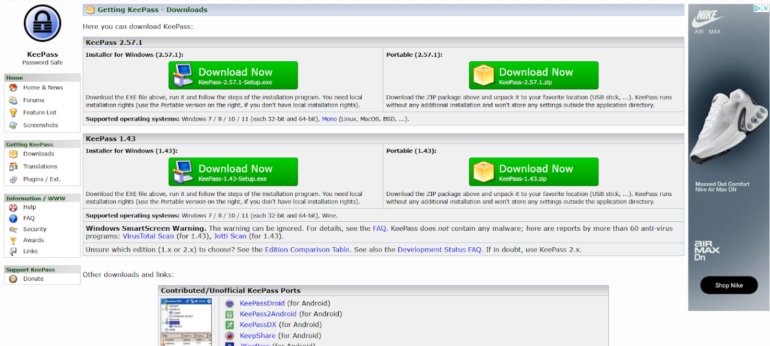
KeePass fast facts Our rating: 3.0 stars out of 5Pricing: FreeKey features Downloadable user-generated plugins. Open-source. Completely free. KeePass is a free and open-source password manager that’s been around for over 20 years. Since its release in 2003, the password manager’s ability to add user-generated plugins and extensions has made it a popular option for enthusiasts and more technical users. While KeePass offers decent and secure password storage, its dated design, lack of traditional password capture and replay, and unintuitive application make it hard to recommend against more modern password managers. NordPass Employees per Company Size Micro (0-49), Small (50-249), Medium (250-999), Large (1,000-4,999), Enterprise (5,000+) Micro (0-49 Employees), Small (50-249 Employees), Medium (250-999 Employees), Large (1,000-4,999 Employees), Enterprise (5,000+ Employees) Micro, Small, Medium, Large, Enterprise Features Activity Log, Business Admin Panel for user management, Company-wide settings, and more Dashlane Employees per Company Size Micro (0-49), Small (50-249), Medium (250-999), Large (1,000-4,999), Enterprise (5,000+) Micro (0-49 Employees), Small (50-249 Employees), Medium (250-999 Employees), Large (1,000-4,999 Employees), Enterprise (5,000+ Employees) Micro, Small, Medium, Large, Enterprise Features Automated Provisioning ManageEngine ADSelfService Plus Employees per Company Size Micro (0-49), Small (50-249), Medium (250-999), Large (1,000-4,999), Enterprise (5,000+) Any Company Size Any Company Size Features Access Management, Compliance Management, Credential Management, and more KeePass pricing KeePass is a completely free password manager that doesn’t have any paid tiers. This is in contrast to competitors like NordPass and Dashlane which have paid plans and have free versions, but with inherent limitations. For example, Dashlane’s free version only allows for a maximum of 25 passwords. However, you can avail of their paid plan to get unlimited password storage. Image: KeePass One big difference between KeePass and other password managers is that a lot of features aren’t included out of the box. Instead, users can customize their KeePass client’s feature set via downloadable plugins from the password manager’s site. Plugins are available for capabilities such as importing and exporting passwords, data backups and auto typing. Is KeePass safe? Yes, KeePass is a safe and secure password manager. It utilizes the industry standard AES-256 encryption for its database and user vaults. It’s also open-source, allowing the public to verify its source code for possible vulnerabilities or potential security holes. This is a big feature for privacy enthusiasts, especially those who value transparency, as it lets the users and experts collaborate with KeePass in keeping it secure to use. Encryption-wise, I like that KeePass encrypts the whole database, which means that not only are passwords encrypted but also other items such as usernames and notes. As of March 2025, KeePass had not been involved in any data breach. The password manager has been audited in the European Commission’s Free and Open Source Software Auditing (EU-FOSSA 1) project, which showed that it had zero security issues. KeePass also shares that it is the recommended password manager in the BSI Cyber Security Recommendations BSI-CS 003 2.0 by the German Federal Office for Information Security and is on the list for recommended free software for French public agencies. To me, these recommendations from government agencies hold a lot of weight since they handle highly sensitive and public data. Key features of KeePass Aside from password storage and password generation, KeePass comes with a few key features that make it unique compared to other password managers. Library of plugins and extensions KeePass Plugins. Image: KeePass One of KeePass’ biggest selling points is the ability to download and add plugins for each user’s KeePass client. These plugins add more features or modify existing functionality, such as letting users import or export different file formats, changing the KeePass user interface, or adding autofill capabilities. Right now, there are more than 180 downloadable plugins on the KeePass website. This is perfect for users who value being able to customize their password manager and its feature set. For me, I prefer a password management solution that already comes with dedicated features, without having to worry about adding them after the initial installation. If you’re like me on this, 1Password or NordPass are password managers with a variety of features already baked in. Local-device password management A KeePass database saved on my desktop. Image: Lui Millares Another standout feature from KeePass is that it is a completely local password management system. This means that all your passwords and stored credentials are encrypted locally on your computer or device of choice. This is in contrast to other password managers that store passwords in the cloud, like 1Password or LastPass. If you’re paranoid about cloud-based password managers possibly being involved in a data breach and leaking your data, KeePass can be a great solution since everything is stored locally. You can read our LastPass review to learn more about how data breaches can affect a password management solution. On the flip side, KeePass’ all-local implementation can be a disadvantage since you won’t have the convenience of easy access to your passwords on multiple devices through the cloud. Auto-Type functionality Unlike most modern password managers, KeePass doesn’t have a conventional autofill feature. What it does have is Auto-Type — a global auto-type hotkey which automatically types out credentials in your chosen account pages. Auto-Type via KeePass. Image: Luis Millares Auto-Type works by having KeePass open in the background, switching to the website, and KeePass automatically typing out your login credentials after you hit a particular keyboard shortcut. This is opposed to other password managers that automatically fill out the username and password fields via a browser extension or through a clickable pop-up. While seeing KeePass automatically type out my password was cool at first, I did find it really finicky to use after a few times. Because I had to manually set the sequence in which the login credentials are to be typed, i.e. if the username or password goes first, there were times that KeePass couldn’t type my details in the proper fields. Despite Auto-Type being a unique party trick that I haven’t encountered on other password managers, I honestly found manually copying and pasting from the KeePass client to

KeePass Review (2025): Features, Pricing, and Security Read More »

Why CIOs Fail — and How They Can Avoid It

It’s never been harder to be a chief information officer. You have the demands of major digital-transformation projects that far too often fail to fully deliver on their promise. You have the give and take between user convenience and IT security in an era when, thanks to ransomware, breaches have never been more costly. You have talent gaps and budget limitations.   And, you have unremitting requests from business units amid the emergence of generative AI, which has had the effect of releasing squirrels at a dog show.  So, it’s no surprise that, while infamously short CIO tenures seem to be marginally longer than they were a few years back, their departures are often someone else’s idea. How can a CIO avoid that fate?  Don’t try to be a technical wizard. The CIO job is mostly about communicating. You don’t make it to the C-suite without proven technical skills. That background remains indispensable. But the CIO’s job is to deeply understand the business’s goals and then guide the selection, implementation, and acceptance of technological solutions that best help the organization achieve those goals.   The business environment is in constant flux. Technologies quickly evolve. Knowing the business requires constant dialogue with C-suite peers as well as business-unit leaders. That means taking the initiative to reach out to and drive strategic conversations with leaders across the organization to deeply understand what their functions do; what they hope to do; how they’re using technology; and how all that contributes (or may one day contribute) to the organization’s overall strategic goals.   Related:How to Prioritize Multiple Innovation Projects However, to grasp the technological state of the art, CIOs must rely on the deep dives of trusted IT architects and other specialists. Only then can CIOs serve as trusted intermediaries between business and technology experts. So, regardless of one’s background, a CIO’s communication skills and political savvy are vastly more prized than their technical knowledge.  Also, a CIO’s technical upbringing can color a worldview in unproductive ways. A CIO who came up through data-center management and infrastructure may be prone to invest in performance past the point of economic return. One who grew up in development may pour more money into custom solutions and user experience than pays off. Staying laser-focused on the company’s strategy and business goals while understanding — and communicating at a conceptual level — how evolving technologies can meet those goals lets CIOs grow beyond their own backgrounds. That’s good for the company, and for the CIO.   Related:Should IT Add Automation and Robotics Engineers? Focus on strategy. That takes ruthless prioritization. Marketing wants a new automation platform. Finance and operations want a new security app. Product wants custom development for an R&D project. Business development wants IT due diligence for a prospective acquisition. Sales wants a new lead-generation system. Operations wants a new messaging app.  Each may be a good idea in isolation. But approving them all would overwhelm the IT group even if one could budget for it all. Yet, so often, the CIO says “yes,” “yes,” and “yes.” That’s overpromising, which is a guaranteed path to underdelivering, disappointing and throwing the CIO’s competence into question.  A focus on strategy is crucial here. What is technology’s role in the business? Unless you’re a Spotify or a Netflix, technology is not what the business does, but rather an enabler of what the business does. For example, with a financial advisory firm, finding new customers to advise is the lifeblood, so it makes sense to invest in and support state-of-the-art analytics and lead-generation capabilities for the sales team and to hold off on that new messaging app for operations.  Say “no,” then explain the strategic business reasons why. Vivid explanation must accompany ruthless prioritization. This takes us back to the importance of communication. Failing to deliver on too many “yeses” can doom a CIO. But saying “no” (or, with good ideas that rank as lower priorities for the time being, “not yet”) will disappoint, too. That can sour a business unit or administrative function’s relationship with IT. At its worst, it can lead to rogue installations that bring security risks and maintenance nightmares.   Related:Task Delegation Mistakes IT Leaders Need to Avoid The way a CIO avoids this is, yet again, by evangelizing the IT organization’s alignment with the company’s overall strategic goals. That means being firm and factual about where a rejected or waitlisted project sits on the long roster of prospective projects — and why the ones above it are more important to the business’s success.   It may mean describing the need to engage external partners or bring in outside resources. It certainly means explaining that each new system or API represents a long-term commitment of money and attention. And it could even mean reminding people that trying to deliver for everyone runs the real risk of delivering for no one.  Failure to deliver due to impaired strategic vision, compounded by poor communication, is bad for the business and everyone involved. By constantly communicating, ruthlessly prioritizing, and focusing on projects that make the most strategic sense for the business, CIOs can make the right moves for their companies and help ensure that, when they do depart, they do so on their own terms.  source

Why CIOs Fail — and How They Can Avoid It Read More »

How the wow factor drives innovation at Northeast Grocery

To drive democratization, we follow ECTERS, which is educate, coach, train the trainer, empower, reinforce, and support, which helps nurture and embed internal AI talent. For ChatGPT Enterprise, for example, we use town halls to educate employees about AI use cases, coached through the establishment of an early adopter AI Champions group, and provide power users with advanced training. For empowerment, we’ve introduced prompt engineering guides and access to an AI knowledge hub, and we reinforce training through AI forums about high-value use cases. We also provide support through dedicated AI phone-a-friend peer communities and office hours. What is the role of the CIO in our age of AI? A key part is to educate. We’re creating a new environment that empowers the business to leverage data better. These business discussions are much better if everyone understands how AI works, what’s possible, and how to apply a functional domain lens to a problem set in order to create solutions they never thought were possible, and in a relatively short period of time. Another part of the role is to drive momentum. Your new job is to create, support, and nurture that innovation wheel so as new AI tools come onto the market, you can rotate the wheel and keep the momentum going. With AI, we can now deliver the wow factor, which increases momentum and shows the power of the wheel to the entire enterprise. In IT, we’re no longer ticket-takers; we’re momentum creators. A third key aspect is being facilitators of the future. By democratizing AI innovation, IT can now share its responsibility to anticipate future customer behavior with the entire organization by bringing new tools and information to the business user, and then training them to leverage that power. This takes a different way of thinking than a traditional CIO role. source

How the wow factor drives innovation at Northeast Grocery Read More »

Meta’s answer to DeepSeek is here: Llama 4 launches with long context Scout and Maverick models, and 2T parameter Behemoth on the way!

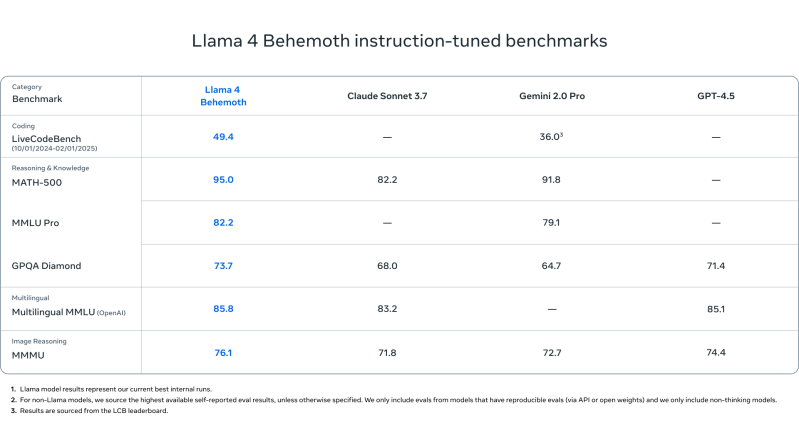
Join our daily and weekly newsletters for the latest updates and exclusive content on industry-leading AI coverage. Learn More The entire AI landscape shifted back in January 2025 after a then little-known Chinese AI startup DeepSeek (a subsidiary of the Hong Kong-based quantitative analysis firm High-Flyer Capital Management) launched its powerful open source language reasoning model DeepSeek R1 publicly to the world, besting the performance of U.S. tech giants such as Meta. As DeepSeek usage spread rapidly among researchers and enterprises, Meta was reportedly sent into panic mode upon learning that this new R1 model had been trained for a fraction of the cost of many other leading models, as little as several million dollars — what it pays some of its own AI team leaders — yet still achieved top performance in the open source category. Meta’s whole generative AI strategy up to that point had been predicated on releasing best-in-class open source models under its brand name “Llama” for researchers and companies to build upon freely (at least, if they had fewer than 700 million monthly users, at which point they are supposed to contact Meta for special paid licensing terms). Yet DeepSeek R1’s astonishingly good performance on a far smaller budget had allegedly shaken the company leadership and forced some kind of reckoning, with the last version of Llama, 3.3, having been released just a month prior in December 2024 yet already looking outdated. Now we know the fruits of that reckoning: today, Meta founder and CEO Mark Zuckerberg took to his Instagram account to announce a new Llama 4 series of models, with two of them — the 400-billion parameter Llama 4 Maverick and 109-billion parameter Llama 4 Scout — available today for developers to download and begin using or fine-tuning now on llama.com and AI code sharing community Hugging Face. A massive 2-trillion parameter Llama 4 Behemoth is also being previewed today, though Meta’s blog post on the releases said it was still being trained, and gave no indication of when it might be released. (Recall parameters refer to the settings that govern the model’s behavior and that generally more mean a more powerful and complex all around model.) One headline feature of these models is that they are all multimodal — trained on, and therefore, capable of receiving and generating text, video, and imagery (audio was not mentioned). Another is that they have incredibly long context windows — 1 million tokens for Llama 4 Maverick and 10 million for Llama 4 Scout — which is equivalent to about 1,500 and 15,000 pages of text, respectively, all of which the model can handle in a single input/output interaction. That means a user could theoretically upload or paste up to 7,500 pages-worth-of text and receive that much in return from Llama 4 Scout, which would be handy for information-dense fields such as medicine, science, engineering, mathematics, literature etc. Here’s what else we’ve learned about this release so far: All-in on mixture-of-experts All three models use the “mixture-of-experts (MoE)” architecture approach popularized in earlier model releases from OpenAI and Mistral, which essentially combines multiple smaller models specialized (“experts”) in different tasks, subjects and media formats into a unified whole, larger model. Each Llama 4 release is said to be therefore a mixture of 128 different experts, and more efficient to run because only the expert needed for a particular task, plus a “shared” expert, handles each token, instead of the entire model having to run for each one. As the Llama 4 blog post notes: As a result, while all parameters are stored in memory, only a subset of the total parameters are activated while serving these models. This improves inference efficiency by lowering model serving costs and latency—Llama 4 Maverick can be run on a single [Nvidia] H100 DGX host for easy deployment, or with distributed inference for maximum efficiency. Both Scout and Maverick are available to the public for self-hosting, while no hosted API or pricing tiers have been announced for official Meta infrastructure. Instead, Meta focuses on distribution through open download and integration with Meta AI in WhatsApp, Messenger, Instagram, and web. Meta estimates the inference cost for Llama 4 Maverick at $0.19 to $0.49 per 1 million tokens (using a 3:1 blend of input and output). This makes it substantially cheaper than proprietary models like GPT-4o, which is estimated to cost $4.38 per million tokens, based on community benchmarks. Indeed, shortly after this post was published, I received word that cloud AI inference provider Groq has enabled Llama 4 Scout and Maverick at the following prices: Llama 4 Scout: $0.11 / M input tokens and $0.34 / M output tokens, at a blended rate of $0.13 Llama 4 Maverick: $0.50 / M input tokens and $0.77 / M output tokens, at a blended rate of $0.53 All three Llama 4 models—especially Maverick and Behemoth—are explicitly designed for reasoning, coding, and step-by-step problem solving — though they don’t appear to exhibit the chains-of-thought of dedicated reasoning models such as the OpenAI “o” series, nor DeepSeek R1. Instead, they seem designed to compete more directly with “classical,” non-reasoning LLMs and multimodal models such as OpenAI’s GPT-4o and DeepSeek’s V3 — with the exception of Llama 4 Behemoth, which does appear to threaten DeepSeek R1 (more on this below!) In addition, for Llama 4, Meta built custom post-training pipelines focused on enhancing reasoning, such as: Removing over 50% of “easy” prompts during supervised fine-tuning. Adopting a continuous reinforcement learning loop with progressively harder prompts. Using pass@k evaluation and curriculum sampling to strengthen performance in math, logic, and coding. Implementing MetaP, a new technique that lets engineers tune hyperparameters (like per-layer learning rates) on models and apply them to other model sizes and types of tokens while preserving the intended model behavior. MetaP is of particular interest as it could be used going forward to set hyperparameters on on model and then get many other types of models out of it, increasing training efficiency. As my

Meta’s answer to DeepSeek is here: Llama 4 launches with long context Scout and Maverick models, and 2T parameter Behemoth on the way! Read More »

Accountant Shortage: How to Protect Yourself This Tax Season

As the April 15, 2025, tax filing deadline approaches, you may find yourself joining the growing crowd of US taxpayers scrambling to find a qualified tax accountant. With a dwindling IRS workforce, trying to do taxes alone isn’t an attractive alternative, especially if you hit any snags in tax prep. Acumatica Cloud ERP Employees per Company Size Micro (0-49), Small (50-249), Medium (250-999), Large (1,000-4,999), Enterprise (5,000+) Any Company Size Any Company Size Features Accounts Receivable/Payable, API, Departmental Accounting, and more QuickBooks Employees per Company Size Micro (0-49), Small (50-249), Medium (250-999), Large (1,000-4,999), Enterprise (5,000+) Micro (0-49 Employees), Small (50-249 Employees), Medium (250-999 Employees), Large (1,000-4,999 Employees) Micro, Small, Medium, Large Features API, General Ledger, Inventory Management Quicken Business & Personal Employees per Company Size Micro (0-49), Small (50-249), Medium (250-999), Large (1,000-4,999), Enterprise (5,000+) Micro (0-49 Employees) Micro Features Accounts Receivable/Payable, Invoicing / Billing, Mobile Capabilities, and more Here’s the backstory for the shortage and a few practical places to start your search to secure a tax pro in 2025. Why can’t you find a tax preparer? There’s a growing shortage of tax professionals in the US. Many certified public accountants (CPAs) have retired over the past few years, and fewer young professionals are entering the field. Accounting programs have seen declining enrollment, and the high stress and long hours during tax season have pushed some out of the profession. These trends are evidenced by the following statistics: Decline in accounting professionals: Over the past five years, the US has seen a reduction of approximately 340,000 accountants, indicating a substantial decrease in the workforce. Aging workforce: Currently, about 75% of CPAs are part of the Baby Boomer generation and are approaching retirement age, highlighting an emerging gap in experienced professionals. Seasonal surge in demand: Tax professionals are frequently scheduled out several weeks in advance. This makes it very difficult for taxpayers to get on a tax preparer’s schedule if they don’t start looking until March or later. More complex tax situations: Tax returns have become increasingly complicated. Between gig work, cryptocurrency transactions, and remote work arrangements, more people are seeking professional help to navigate the maze of deductions, credits, and compliance rules. How to increase your chances of landing a tax pro 1. Contact your state’s CPA society. Every US state (and most territories) supports an independent CPA professional society. Many have directories or referral services that aren’t widely advertised. Some even have “Find a CPA” tools geared toward matching by specialty, which can be especially useful if you need both financial statement preparation and tax preparation services. 2. Reach out to university accounting programs. Some accounting departments have student-run tax clinics (especially around tax season) where advanced students help with returns for free or at a low cost under faculty supervision. Contact the business school at your local university to determine if that institution has a tax prep program. Note that these programs will likely cater to simpler returns, and there may be income or other demographic limitations for participation. If you land a preparer through a program like this, starting a professional relationship with someone new to the profession may set you up for long-term service and reduce your chances of repeating this search year over year. 3. Link up via LinkedIn. If you’re on LinkedIn, search for CPAs or tax preparers in your area or industry. Look for professionals posting about tax topics, as this often signals their engagement in the community and potential openness to engaging new clients. Consider posting a status asking for referrals — your network may have good recommendations. 4. Ask your other service providers. In addition to leveraging your LinkedIn connections, tap into your existing network of professional service providers. Inquire with financial advisors, mortgage brokers, lawyers, and more for tax preparer recommendations. These professionals frequently collaborate with CPAs and can point you to someone trustworthy. Some professionals, like financial advisors, might also have accounting designations or experience providing tax preparation services. While they may not advertise those, they may be open to offering them for a bundled fee in conjunction with the other services they provide. 5. Tune into podcasts, blogs & social media/online marketplaces. YouTube channels, podcasts, and tax-focused TikToks are other ways to identify individuals interested in growing their brand. Listening to someone’s content gives you a sense of their style and may reveal their niche. Tax content creators may be open to taking clients, offering consultations, or — at the very least — offering recommendations. Tip: When going with someone you don’t know, be sure to confirm their credentials to ensure that they’re a credible authority, as a social media platform alone doesn’t guarantee expertise. 6. Check out online marketplaces. Some tax preparers offer their services on platforms like Upwork and Fiverr. You may also find a tax preparer using financial services networks like XY Planning Network. If you have doubts about using a preparer from one of these online marketplaces, here are some things to consider when hiring a CPA from any source that does not come with a personal recommendation. Verify credentials. Ensure the CPA or enrolled agent (EA) is licensed and in good standing. You can verify this information in some states by entering the state name and “professional license verification” into a search engine and then looking up the preparer’s name. Not all tax preparers must be CPAs or EAs, but the lack of a designation makes it more difficult to verify their skill level. Meet face-to-face. Ask for an in-person meeting or a video conference call. Without a recommendation, the more information you know about the preparer, the better equipped you’ll be to make the best preparer selection. Inquire about the security of information. Be wary of how your preparer asks for your data to be submitted. Tax preparers have a duty to protect client information and shouldn’t request that sensitive information be transferred through non-secure methods. More about Tech & Work More helpful tips & resources When looking for a tax preparer, you can do a few

Accountant Shortage: How to Protect Yourself This Tax Season Read More »

Dave Meyer, Chief AI Officer at Reveleer: Compliance Isn’t Enough for Healthcare AI

In the healthcare industry, compliance falls short as an AI strategy. Chief AI officers, CIOs, and CISOs need to prioritize responsible AI usage to minimize potential data breaches that could not only lead to fines and litigation, but also reputational damage.  “It’s really a trust factor,” says Dave Meyer, chief data and AI officer at value-based care platform Reveleer. “[Public healthcare information or] PHI is paramount in healthcare, so we have to treat it responsibly. No one in our organization, including data scientists, has access to anything they don’t need to access. Data access needs to be strictly governed.”  Transparency is also critical because it reduces the risk of relying on what could be a hallucination.   “When we give AI results, or when we go through our data models, we support it with monitoring, evaluation, assessment and treatment (MEAT). So, for example, not only did we find the term, ‘diabetes,’ in a patient’s chart, there’s also an explanation of why we suggested this particular ICD [internal classification of diseases] code,” says Meyer. “That way, when AI provides suggestions, the human still decides whether the suggestion is valid or invalid. We’re not trying to [replace] humans. We’re trying to make their job easier and more accurate.”  Related:How to Prioritize Multiple Innovation Projects AI as a Problem-Solving Tool  While the ability to quickly identify health conditions and find correlations is powerful, it’s considerably less helpful if users must then manually wade through volumes of information, which could be several hundred or more pages, to locate the references. Instead, AI can surface the references quickly, such as by identifying on what pages of a document, or pages within a set of documents, those references can be found.   That sort of use case opens the door to GenAI, however, like in many other industry sectors, GenAI tends to be misunderstood. People who lack a foundational understanding of AI tend to believe that GenAI is the latest and greatest version of single technology called, “AI” versus another AI technique.   “I think people view GenAI as a panacea, and it is not a panacea, especially in the healthcare industry where you cannot just have a black box that says, ‘Here’s the answer, but we’re not going to tell you how we got there,’” says Meyer. “We’re using it for evidence extraction from the chart which we can then double check for hallucinations. We take that evidence and run it through our models.”  However, Reveleer also uses AI for other techniques, such as rules, to pull evidence.  Related:Should IT Add Automation and Robotics Engineers? “A lot of people think they can upload a chart and then ask GenAI for the answer. It will give you an answer that looks okay on the surface, but they are not production level, customer trustworthy answers that are in the percentile of accuracy that [is necessary] in the healthcare industry,” says Meyer. “Healthcare is a high stakes industry where you’re trying to drive patient outcomes, and I don’t think that GenAI can be trusted on its own to provide that answer.”  Some Healthcare’s Challenges and How to Address Them  One of healthcare’s biggest challenges is failing to understand that the accuracy of a prediction can, and often does, vary with use cases. Since healthcare organizations need highly sensitive patient information to provide diagnoses and treatment, the confidence level matters greatly.  “Trust is a big factor, so being given a suggestion that is 70% accurate isn’t good enough. The stakes are too high. You have to balance the sensitivity and security of the data with who has access to it,” says Meyer.   Of course, trust must be earned by a vendor, particularly when patient records are involved. In Reveleer’s case, customer trust in its AI capabilities has been earned in a stair-step fashion over time. Specifically, the company began by automatically routing patient charts, then later NLP techniques were added so patient information could be surfaced faster and validated. Now its AI provides automatic pointers to where critical information can be located.  Related:Task Delegation Mistakes IT Leaders Need to Avoid “One of the biggest challenges is getting the data in an organized format that is usable,” says Meyer. “In order to build any AI model, you need to have a large quantity of data, and you need to govern that data appropriately. Managing your data is really the foundation of everything before you start building models. You also need to make sure that you know how to handle the data well.”  In addition to getting the foundational elements right, it’s important to choose the right tool for the right job.  “Data science still is a good method for solving a lot of these problems. Everybody’s trying to jump to GenAI as the solution. Don’t force that if you’re getting good results from data science,” says Meyer. “The same is true for rules-based systems. For example, if you see the word, ‘blood pressure’ and the reading next to it says 120 over 80, you don’t need a GenAI model to pull that out for you. Or, if the data is in a structured format, and you can pull it out without any AI.”  However, don’t overlook the need for a human in the loop when it comes to AI.   “In the healthcare industry, machines need to be partnered with humans, because healthcare is too high stakes for a lack of human oversight. One suggestion may have a better than 90% confidence score while another only has a 50% conference score,” says Meyer. “AI can help you cut through the noise and surface the good stuff quickly, but it’s always going to need the human element. We’re not trying to replace humans; we’re just trying to make them more efficient.” source

Dave Meyer, Chief AI Officer at Reveleer: Compliance Isn’t Enough for Healthcare AI Read More »

Taming the cost of AI: Is FinOps the answer?

As artificial intelligence (AI) services, particularly generative AI (genAI), become increasingly integral to modern enterprises, establishing a robust financial operations (FinOps) strategy is essential. AI services require high resources like CPU/GPU and memory and hence cloud providers like Amazon AWS, Microsoft Azure and Google Cloud provide many AI services including features for genAI. When using these services, it is imperative that we keep an eye on the consumption as cost overhead in using AI services can be costly for an organization. The advent of AI services, particularly genAI, has revolutionized various industries, enhancing capabilities and driving innovation. However, the financial complexities posed by these advanced technologies necessitate a robust FinOps strategy to ensure cost efficiency and sustainability. Establishing a governance model and cost management strategy for AI services plays a vital role in the AI strategy. FinOps provides the structure to achieve cost transparency, cost management and cost optimization, ensuring that AI services are not only effective but also economically sustainable. This article delves into developing FinOps solutions tailored for AI services, highlighting the unique considerations and strategic approaches necessary. source

Taming the cost of AI: Is FinOps the answer? Read More »