NordPass vs LastPass: Compare Features, Security, and Pricing for 2025

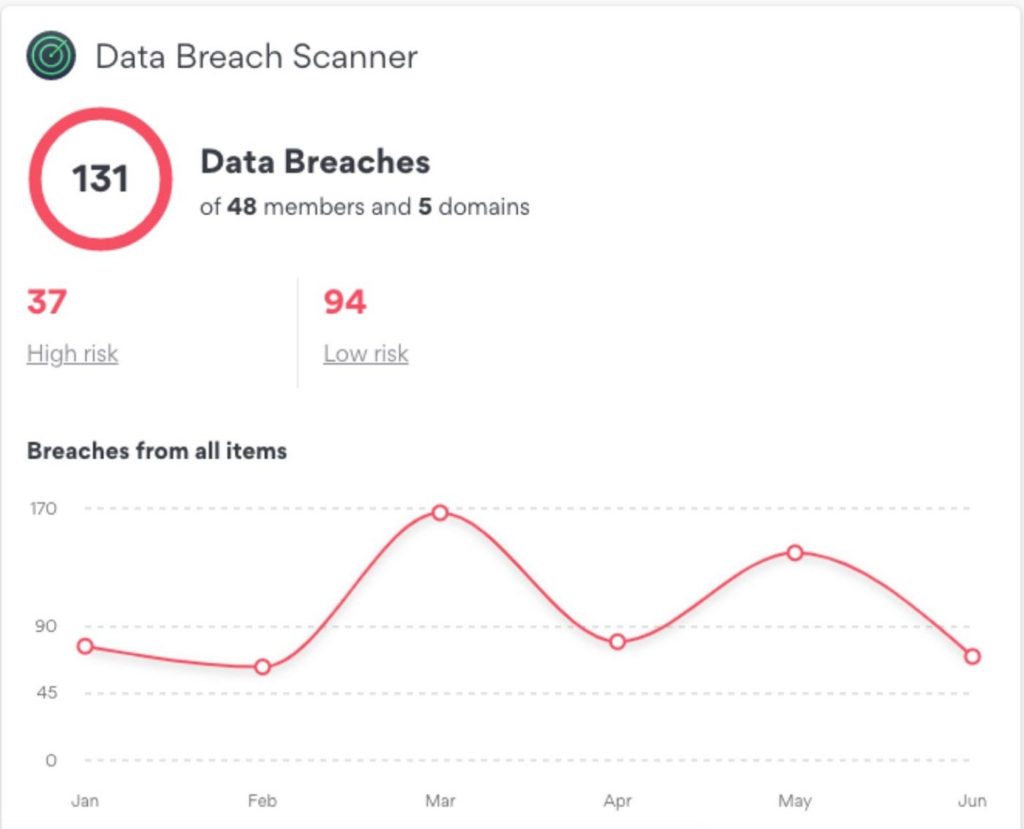
Choosing a password manager can be overwhelming, especially since the best password managers have very similar features. In this detailed comparison guide, we explore NordPass and LastPass — two popular password managers on the market. NordPass is a password manager notable for its XChaCha20 encryption, an advanced encryption technique that has gained wider acceptance in recent years. LastPass is one of the oldest password managers on the market, with advanced security features like Dark Web monitoring and AES 256-bit encryption. Both password managers are great at generating, securing, and managing passwords, but each possesses some distinct features that make them stand out. NordPass: Best for affordability, modern encryption, and clean security track record. LastPass: Best for accessible password recovery and flexible multifactor authentication options. Dashlane Employees per Company Size Micro (0-49), Small (50-249), Medium (250-999), Large (1,000-4,999), Enterprise (5,000+) Micro (0-49 Employees), Small (50-249 Employees), Medium (250-999 Employees), Large (1,000-4,999 Employees), Enterprise (5,000+ Employees) Micro, Small, Medium, Large, Enterprise Features Automated Provisioning ManageEngine ADSelfService Plus Employees per Company Size Micro (0-49), Small (50-249), Medium (250-999), Large (1,000-4,999), Enterprise (5,000+) Any Company Size Any Company Size Features Access Management, Compliance Management, Credential Management, and more NordPass vs LastPass comparison table This table covers both password managers’ key features, prices, and compatibility. NordPass LastPass Our Rating 4.6 stars out of 5 3.4 stars out of 5 Encryption XChaCha20 AES 256-bit Password Generator Yes Yes Cross-Platform Support Windows, macOS, Linux, Android, iOS, Web Vault Windows, macOS, Android, iOS Password Autofill Yes Yes Two-Factor Authenticator Yes Yes Free plans Yes Yes Browser Extension Brave, Chrome, Edge, Firefox, Opera, Safari Chrome, Firefox, Opera, Safari, Edge Starting Price $1.99 per user $3 per user Password Health Check Yes Yes VPN support Yes No NordPass and LastPass pricing NordPass pricing NordPass has two subscription tiers: Personal and Business — both have one-year and two-year billing plans. The Personal tier is for individuals and families. It includes three subscription options: Free plan Premium 1 year plan Free for a lifetime $1.99 per month 2 year plan Free for a lifetime $1.49 per month Number of users 1 user 1 user The Business tier is for corporate entities, depending on their size and needs. It also includes three subscription options: Teams Business 1 year plan $1.99 per user, per month $3.99 per user, per month 2 year plan $1.79 per user, per month $3.59 per user, per month Number of users 10 users 5 users and above LastPass pricing LastPass also has two subscription tiers: “Single Users and Families” and “Business.” The Single Users and Families tier includes: Free: This plan is free for a lifetime. Premium: Billed annually at $3.00 per month for one user. Families: Billed annually at $4.00 per month for up to six users. The Business tier includes: Teams: Billed annually at $4.00 per user, per month for up to 50 users. Business: Billed annually at $7.00 per user, per month, and accommodates an unlimited number of users. Both NordPass and LastPass offer a 14-day free trial for their Business tier. Feature comparison NordPass vs. LastPass Below, I compare the standout features of each password manager. Security and monitoring Both password managers employ advanced encryption algorithms, multi-factor authentication (MFA) security breach monitoring, and alert systems. NordPass uses XChaCha20 encryption, which is more advanced than the 256-bit AES encryption. It also has a data breach scanner and alert feature that verifies if your passwords, banking information, and other personally identifiable information have been compromised and offers guidance on appropriate actions during a security breach. NordPass data breach scanner Image: NordPass Conversely, LastPass uses the 256-bit-AES encryption method, which is reliable and considered the industry standard. Other security features include dark web monitoring and breach alerts, which are capable of scanning the web to alert users when their data is compromised. While LastPass remains a top password manager, its integrity has been dented by a series of security breaches in recent years. You can read more about this in our full LastPass review. LastPass dark web monitoring Image: LastPass User interface and ease of use Both password managers have easy-to-navigate mobile and desktop apps. NordPass has a more modern and user-friendly dashboard and an intuitive interface that checks all the usability boxes. LastPass also has easy navigation, with well-organized categories on its dashboard, making its usage and management seamless. NordPass’s desktop interface. Image: Luis Millares They both work seamlessly across devices and diverse operating systems, such as Windows, Linux, macOS, iOS, and Android. Both NordPass and LastPass have browser extensions for Chrome, Safari, Edge, Firefox, and Opera. LastPass’ web vault UI. Image: Luis Millares I found the setup for NordPass to be slower than LastPass when trying to use a new browser; NordPass required several login steps before verifying my account. Still, once I successfully logged in, I could set up my vault in the new browser in no time. Password recovery features For password recovery in NordPass, the 24-symbol recovery code generated during the account setup is used to reset the master password. Be sure to keep this code somewhere safe if you ever need to recover your password. If you don’t have your master password or recovery code, you’ll lose your vault and have to reset the account. LastPass has a more flexible recovery process: you’re sent a link to activate the local recovery one-time password. The link allows you to locate and use the password, enabling you to create a new master password and regain access to your vault. Alternatively, if you’ve set up SMS account recovery, you’ll receive a code via text instead of an emailed link. LastPass password recovery via SMS Image: LastPass Password sharing and storage Both password managers have secure password-sharing features. For NordPass, the password is stored in your shared folder with the recipient and auto-fills when they visit the saved website. Additionally, NordPass has a ‘Shared Folders’ feature that allows enterprise users to invite members, share folders, and grant permissions for the folder. LastPass also has a shared

NordPass vs LastPass: Compare Features, Security, and Pricing for 2025 Read More »
OpenAI expands Deep Research access to Plus users, heating up AI agent wars with DeepSeek and Claude

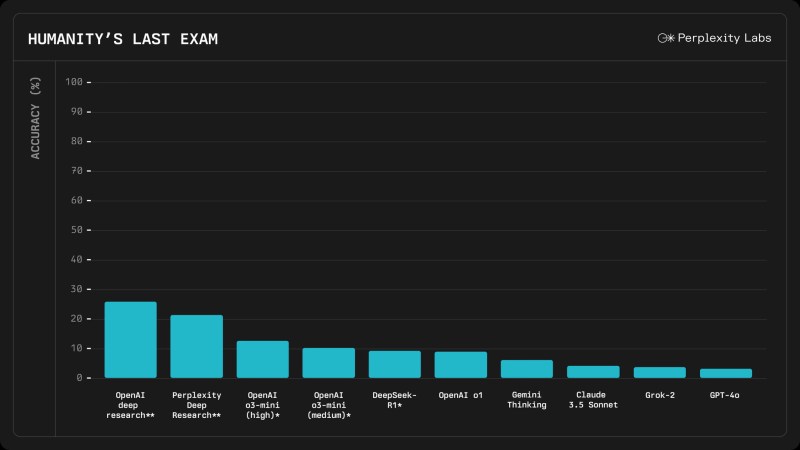
Join our daily and weekly newsletters for the latest updates and exclusive content on industry-leading AI coverage. Learn More OpenAI announced today that it is rolling out its powerful Deep Research capability to all ChatGPT Plus, Team, Education and Enterprise users, significantly expanding access to what many experts consider the company’s most transformative AI agent since the original ChatGPT. According to an announcement on OpenAI’s official X account, Plus, Team, Education and Enterprise users will initially receive 10 deep research queries per month, while Pro tier subscribers will have access to 120 queries monthly. Deep Research, which is powered by a specialized version of OpenAI’s upcoming o3 model, represents a significant shift in how AI can assist with complex research tasks. Unlike traditional chatbots that provide immediate responses, Deep Research independently scours hundreds of online sources, analyzes text, images and PDFs and synthesizes comprehensive reports comparable to those produced by professional analysts. Deep research is now rolling out to all ChatGPT Plus, Team, Edu, and Enterprise users ? — OpenAI (@OpenAI) February 25, 2025 The AI research arms race: DeepSeek’s open challenge meets OpenAI’s premium play The timing of OpenAI’s expanded rollout is hardly coincidental. The generative AI landscape has transformed dramatically in recent weeks, with China’s DeepSeek emerging as an unexpected disruptor. By open-sourcing their DeepSeek-R1 model under an MIT license, the company has fundamentally challenged the closed, subscription-based business model that has defined Western AI development. What makes this competition particularly interesting is the divergent philosophies at play. While OpenAI continues to gate its most powerful capabilities behind increasingly complex subscription tiers, DeepSeek has opted for a radically different approach: Give away the technology and let a thousand applications bloom. Chinese AI company Deepseek recently made waves when it announced R1, an open-source reasoning model that it claimed achieved comparable performance to OpenAI’s o1, at a fraction of the cost. But for those following AI developments closely, Deepseek and R1 didn’t come out of… pic.twitter.com/FUahYP0HHz — Y Combinator (@ycombinator) February 5, 2025 This strategy echoes earlier eras of technology adoption, where open platforms ultimately created more value than closed systems. Linux’s dominance in server infrastructure offers a compelling historical parallel. For enterprise decision-makers, the question becomes whether to invest in proprietary solutions that may offer immediate competitive advantages or embrace open alternatives that could foster broader innovation across their organization. Perplexity’s recent integration of DeepSeek-R1 into its own research tool — at a fraction of OpenAI’s price point — demonstrates how quickly this open approach can yield competing products. Meanwhile, Anthropic’s Claude 3.7 Sonnet has taken yet another path, focusing on transparency in its reasoning process with “visible extended thinking.” deepseek’s r1 is an impressive model, particularly around what they’re able to deliver for the price. we will obviously deliver much better models and also it’s legit invigorating to have a new competitor! we will pull up some releases. — Sam Altman (@sama) January 28, 2025 The result is a fragmented market where each major player now offers a distinctive approach to AI-powered research. For enterprises, this means greater choice, but also increased complexity in determining which platform best aligns with their specific needs and values. From walled garden to public square: OpenAI’s calculated democratic pivot When Sam Altman writes that Deep Research “probably is worth $1,000 a month to some users,” he’s revealing more than just price elasticity — he’s acknowledging the extraordinary value disparity that exists among potential users. This admission cuts to the heart of OpenAI’s ongoing strategic balancing act. The company faces a fundamental tension: Maintaining the premium exclusivity that funds its development while simultaneously fulfilling its mission of ensuring that “artificial general intelligence benefits all of humanity.” Today’s announcement represents a careful step toward greater accessibility without undermining its revenue model. i think we are going to initially offer 10 uses per month for chatgpt plus and 2 per month in the free tier, with the intent to scale these up over time. it probably is worth $1000 a month to some users but i’m excited to see what everyone does with it! https://t.co/YBICvzodPF — Sam Altman (@sama) February 12, 2025 By limiting free tier users to just two queries monthly, OpenAI is essentially offering a teaser — enough to demonstrate the technology’s capabilities without cannibalizing its premium offerings. This approach follows the classic “freemium” playbook that has defined much of the digital economy, but with unusually tight constraints that reflect the substantial computing resources required for each Deep Research query. The allocation of 10 monthly queries for Plus users ($20/month) compared to 120 for Pro users ($200/month) creates a clear delineation that preserves the premium value proposition. This tiered rollout strategy suggests OpenAI recognizes that democratizing access to advanced AI capabilities requires more than just lowering price barriers — it necessitates a fundamental rethinking of how these capabilities are packaged and delivered. Beyond the surface: Deep Research’s hidden strengths and surprising vulnerabilities The headline figure — 26.6% accuracy on “Humanity’s Last Exam” — tells only part of the story. This benchmark, designed to be extraordinarily challenging even for human experts, represents a quantum leap beyond previous AI capabilities. For context, achieving even 10% on this test would have been considered remarkable just a year ago. What’s most significant isn’t just the raw performance, but the nature of the test itself, which requires synthesizing information across disparate domains and applying nuanced reasoning that goes far beyond pattern matching. Deep Research’s approach combines several technological breakthroughs: multi-stage planning, adaptive information retrieval and, perhaps most crucially, a form of computational self-correction that allows it to recognize and remedy its own limitations during the research process. Yet, these capabilities come with notable blind spots. The system remains vulnerable to what might be called “consensus bias” — a tendency to privilege widely accepted viewpoints while potentially overlooking contrarian perspectives that challenge established thinking. This bias could be particularly problematic in domains where innovation often emerges from challenging conventional wisdom. Moreover, the system’s reliance on existing web

OpenAI expands Deep Research access to Plus users, heating up AI agent wars with DeepSeek and Claude Read More »

3. Identifying with a religion because of culture, ethnicity or family background

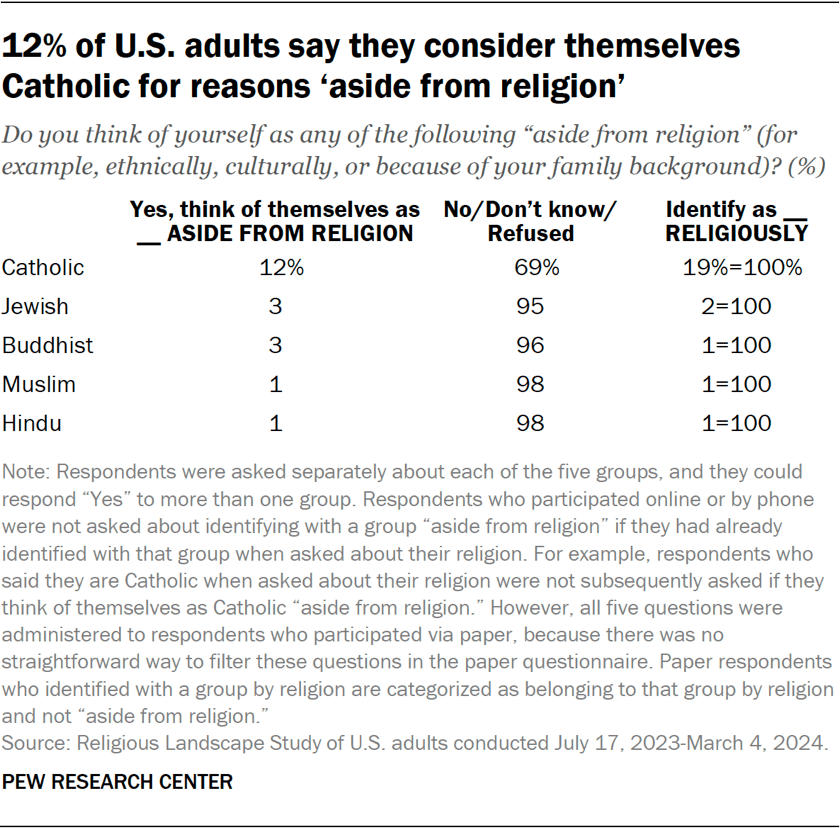
For many years, Pew Research Center’s standard question about religious identity has asked, “What is your present religion, if any?” We asked that question again in the 2023-24 Religious Landscape Study (RLS). This new survey, coming after a long period of decline in U.S. religious affiliation, also sought to measure whether Americans feel connected to religions that they do not identify with religiously. So we asked respondents if they think of themselves as Catholic, Jewish, Buddhist, Muslim or Hindu for reasons “aside from religion” – for example, ethnically, culturally, or because of their family background. Respondents had the option to say they felt connected to any of these five religions, or to none of them. We asked this question because we wanted to know how many people feel an enduring attachment to a religious tradition they were raised in but no longer practice, or feel a connection to a particular religious group for other reasons – perhaps, for example, because they have a spouse, family member or close friend who belongs to the group, or because their ancestors belonged to the group – even though they don’t consider it their own religion. In some previous research, we delved into the views and experiences of Americans who feel these kinds of cultural, ethnic or ancestral connections to the Jewish people, to Catholicism and to Islam. In the new RLS, we have broadened the lens to include two additional religions that are often intertwined with ethnicity: Hinduism and Buddhism. The survey finds that more Americans identify as Catholic aside from religion (12%) than express a similar connection with any other religion we listed. Combining this 12% with the 19% of U.S. adults who identify Catholicism as their religion, a total of 31% of all U.S. adults identify as Catholic either religiously or aside from religion. The survey also finds that 3% of U.S. adults identify as Jewish aside from religion, and an identical share identify as Buddhist aside from religion. Additionally, 1% of U.S. adults identify as Muslim aside from religion, and 1% identify as Hindu aside from religion. (All these percentages have been rounded to the nearest whole number.) The survey did not ask any follow-up questions about why respondents identify with these religious groups. But, using other questions in the survey, we can see that some people who identify with a religious tradition for reasons aside from religion also say they were raised in that religion or have a spouse or partner who identifies with that religion. For example, 62% of people who identify as Catholic aside from religion say they were raised Catholic or have a Catholic spouse or partner. Among adults who identify as Jewish, Buddhist, Muslim or Hindu aside from religion, about one-in-five or slightly fewer respondents say they were raised in these traditions or have a spouse or partner who identifies with the tradition. Other people identify with more than one group aside from religion, which may suggest they have an affinity for many religions or all major religious traditions. Still, other respondents – ranging from 12% among those who identify as Hindu aside from religion to 52% of those who identify as Jewish aside from religion – say they identify with one of these groups aside from religion even though they were not raised in that religion, do not have a spouse/partner who identifies with that group and do not identify with multiple traditions. Presumably, these respondents have some other connections to the traditions they identify with aside from religion that cannot be measured by this survey. Read on for more about Americans who identify with the following traditions aside from religion: Catholic ‘aside from religion’ Overall, 12% of U.S. adults identify religiously as something other than Catholic but nevertheless say they think of themselves as Catholic “aside from religion” – for example culturally, ethnically, or because of their family background. Among this group (people who identify as Catholic aside from religion), 57% say they were raised in the Catholic faith as children. And 12% say they currently have a spouse or partner who is Catholic by religion. Altogether, 62% of people who identify as Catholic aside from religion were either raised Catholic or have a Catholic spouse or partner. In terms of their current religion, 39% of people who consider themselves Catholic aside from religion identify as Christians – though not as Catholics by religion – while 7% identify with other (non-Christian) religions and 51% are religiously unaffiliated (i.e., atheist, agnostic or “nothing in particular”). Overall, 13% of people who identify as Catholic aside from religion also say they identify with one or more additional religious traditions aside from religion, indicating that they feel connections to multiple religions. Jewish ‘aside from religion’ Past Pew Research Center surveys have examined U.S. adults who are not Jewish by religion but consider themselves Jewish for other reasons, such as ancestry or culture. The current RLS finds that 3% of all U.S. adults are not Jewish by religion but consider themselves Jewish for reasons aside from religion, such as their ethnicity, culture, or family background. About one-in-ten people in this group (11%) say they were raised Jewish by religion. And 5% have a spouse or partner who is Jewish by religion. Altogether, 16% were either raised Jewish themselves or have a spouse or partner who is Jewish. Slightly more than half of people who identify as Jewish aside from religion identify religiously today as Christians, and 9% identify with another religion (other than Christianity or Judaism). One-third are religiously unaffiliated. Overall, 35% of people who identify as Jewish aside from religion also identify with one or more additional religious traditions aside from religion. Buddhist ‘aside from religion’ About 3% of U.S. adults consider themselves to be Buddhist aside from religion. Within this group, 13% say they were raised Buddhist in childhood. And 5% say they have a Buddhist spouse or partner today. Altogether, 16% were either raised Buddhist or have a Buddhist spouse or partner. The survey

3. Identifying with a religion because of culture, ethnicity or family background Read More »

SonicWall Report: "Threat Actors are Moving at Unprecedented Speeds"

SonicWall’s new 2025 Annual Threat Report highlights startling revelations, including that hackers exploited new vulnerabilities within two days 61% of the time, and that it takes the average organization between 120 and 150 days to apply a patch. In addition, the firm’s researchers detected 210,258 “never-before-seen” malware variants in 2024. Researchers reported that, in 2024, the average ransomware payment reached $850,700, with total related losses often exceeding $4.91 million when factoring in downtime and recovery costs. Global losses from business email compromise (BEC) attacks exceeded $2.95 billion in 2024. SonicWall also detailed increased cyberattacks impacting Latin America and the U.S. healthcare sector. Must-read security coverage Ransomware skyrocketed in Latin America Ransomware was up 259% in Latin America and up 8% in North America, the firm said. IoT attacks jumped 124%, encrypted threats climbed 93%, and malware spiked 8% year-over-year. Highly visible ransomware groups such as LockBit and BlackCat leveraged ransomware-as-a-service models to carry out widespread attacks and take advantage of critical vulnerabilities to infiltrate systems, SonicWall’s 2025 Annual Threat Report noted. 198M+ American patients were impacted by cyberattacks The U.S. healthcare sector faced “unprecedented challenges, with over 198 million American patients impacted by ransomware,’’ said Bob VanKirk, president and chief executive officer of SonicWall, in the report. He attributed the new malware variants to the rapid adoption of and advancements in AI tools. Double extortion was prolific throughout the year with triple extortion also rising, especially in healthcare. “This specific tactic involves encrypting an organization’s most critical data while simultaneously threatening to release sensitive information unless demands are met,’’ the report stated. “This tactic is used to place even more pressure on ransomware victims to pay the threat actors as the criminals are essentially holding the data hostage in multiple different ways.” In the case of triple extortion in the healthcare industry, threat actors will even go directly to patients and threaten to release their data unless that ransom is paid. The report noted that healthcare organizations “were also among the least prepared to handle the fallout.” SMBs increasingly need to bolster their defenses VanKirk wrote, “SonicWall’s data indicates that threat actors are moving at unprecedented speeds.” He noted that this especially puts pressure on small and medium-sized businesses and added “they should not go it alone in the fight against cybercrime.” The report urged SMBs to use trusted managed service providers (MSPs) or managed security service providers (MSSPs) to bolster defenses. These partners can provide real-time monitoring, rapid patch deployment, zero-trust security models, and ongoing education, the report said. Methodology The report is based on perspectives from SonicWall’s 24/7 security operations center analysts and market insights from respected cybersecurity insurance providers, VanKirk said. source

SonicWall Report: "Threat Actors are Moving at Unprecedented Speeds" Read More »

The rise of browser-use agents: Why Convergence’s Proxy is beating OpenAI’s Operator

Join our daily and weekly newsletters for the latest updates and exclusive content on industry-leading AI coverage. Learn More A new wave of AI-powered browser-use agents is emerging, promising to transform how enterprises interact with the web. These agents can autonomously navigate websites, retrieve information and even complete transactions — but early testing reveals significant gaps between promise and performance. While consumer examples offered by OpenAI’s new browser-use agent Operator, like ordering pizza or buying game tickets, have grabbed headlines, the question is where the main developer and enterprise use cases are. “The thing that we don’t know is what will be the killer app,” said Sam Witteveen, cofounder of Red Dragon, a company that develops AI agent applications. “My guess is it’s going to be things that just take time on the web that you don’t actually enjoy.” This includes things like searching the web for a product’s cheapest price or booking the best hotel accommodations. More likely it will be used in combination with other tools like Deep Research, where companies can then do even more sophisticated research plus execution of tasks around the web. Companies need to carefully evaluate the rapidly evolving landscape, as established players and startups take different approaches to solving the autonomous browsing challenge. Key players in the browser-use agent landscape The field has quickly become crowded with major tech companies as well as innovative startups: Operator and Proxy are the most advanced, in terms of being consumer-friendly and out-of-the-box ready. Many of the others appear to be positioning themselves more for developer or enterprise usage. One example is Browser Use, a Y-Combinator startup that allows users to customize the models used with the agent. This gives you more control over how the agent works, including the ability to use a model from your local machine. But it’s definitely more involved. The others listed above provide varying degrees of functionality and interaction with local machine resources. I decided not to even test ByteDance’s UI-TARS for now, because it requested lower-level access to my machine’s security and privacy features (if I test it out, I’ll definitely use a secondary computer).  Testing reveals reasoning challenges So the easiest to test are OpenAI’s Operator and Convergence’s Proxy. In our testing, the results highlighted how reasoning capabilities can matter more than raw automation features. Operator, in particular, was more buggy. For example, I asked the agents to find and summarize VentureBeat’s five most popular stories. It was an ambiguous task, because VentureBeat doesn’t have a “most popular” section per se. Operator struggled with this. It first fell into an infinite scrolling loop while searching for “most popular” stories, requiring manual intervention. In another attempt, it found a three-year-old article titled “Top five stories of the week.” In contrast, Proxy demonstrated better reasoning by identifying the five most visible stories on the homepage as a practical proxy for popularity, and it gave accurate summaries. The distinction became even clearer in real-world tasks. I asked the agents to book a reservation at a romantic restaurant for noon in Napa, California. Operator approached the task linearly — finding a romantic restaurant first, then checking availability at noon. When no tables were available, it reached a dead end. Proxy showed more sophisticated reasoning by starting with OpenTable to find restaurants that were both romantic and available at the desired time. It even came back with a slightly better-rated restaurant. Even seemingly simple tasks revealed important differences. When searching for a “YubiKey 5C NFC price” on Amazon, Proxy quickly found the item more easily than Operator.  OpenAI hasn’t divulged much about the technologies it uses for training its Operator agent, other than saying it has trained its model on browser-use tasks. Convergence, however, has provided more detail: Its agent uses something called Generative Tree Search to “leverage Web-World Models that predict the state of the web after a proposed action has been taken. These are generated recursively to produce a tree of possible futures that are searched over to select the next optimal action, as ranked by our value models. Our Web-World models can also be used to train agents in hypothetical situations without generating a lot of expensive data.” (More here). Benchmarks may be useless for now On paper, these tools appear closely matched. Convergence’s Proxy achieves 88% on the WebVoyager benchmark, which evaluates web agents across 643 real-world tasks on 15 popular websites like Amazon and Booking.com. OpenAI’s Operator scores 87%, while Browser Use says it reaches 89% but only after changing the WebVoyager codebase slightly, it conceded, “according to our needs.” These benchmark scores should really be taken with a grain of salt, though, as they can be gamed. The real test comes in practical usage for real-world cases. It’s very early, the space is so rapidly changing, and these products are changing almost on a daily basis. The results will depend more on the specific jobs you’re trying to do, and you may want to instead rely on the vibes you get while using the different products. Enterprise implications The implications for enterprise automation are significant. As Witteveen points out in our video podcast conversation about this, where we do a deep dive into this browser-use trend, many companies are currently paying for virtual assistants — operated by real people — to handle basic web research and data gathering tasks. These browser-use agents could dramatically change that equation. “If AI takes this over,” Witteveen notes, “that’s going to be some of the first low-hanging fruit of people losing their jobs. It’s going to show up in some of these kinds of things.” This could feed into the robotic process automation (RPA) trend, where browser use is pulled in as just another tool for companies to automate more tasks. And as mentioned earlier, the more powerful use cases will be when an agent combines browser use with other tools, including things like Deep Research, where an LLM-driven agent uses a search tool plus browser use to do more sophisticated

The rise of browser-use agents: Why Convergence’s Proxy is beating OpenAI’s Operator Read More »

IT leaders: Perform these 3 actions in 2025, says PwC

In PwC’s June 2024 Pulse Survey, 85% of technology, media, and telco executives reported they have the capability to execute business models and scale by leveraging these technologies. And 76% said they plan to use gen AI to ramp up those efforts. These innovations offer immense potential, says Dolen, but the complexity involved in realizing that potential means CIOs and other tech leaders have a prime opportunity to play a strategic role in rethinking business models and delivery strategies. It’s not just about adapting to disruption, but thriving in an era of evolving competition and customer expectations, he adds. Organizations will have to make potentially big bets because the winners are likely to be the organizations that successfully navigate decisions about adopting technologies, like AI agents, as soon as they become commercially viable. source

IT leaders: Perform these 3 actions in 2025, says PwC Read More »

Trending At The PTAB: Insights From 2024 Fed. Circ. Statistics

By Erik Puknys and Michelle Rice ( February 21, 2025, 6:39 PM EST) — This article is part of a monthly column that reviews the latest issues facing attorneys practicing before the Patent Trial and Appeal Board. In this installment, we examine the Federal Circuit’s reversals and vacaturs in 2024 PTAB appeals…. Law360 is on it, so you are, too. A Law360 subscription puts you at the center of fast-moving legal issues, trends and developments so you can act with speed and confidence. Over 200 articles are published daily across more than 60 topics, industries, practice areas and jurisdictions. A Law360 subscription includes features such as Daily newsletters Expert analysis Mobile app Advanced search Judge information Real-time alerts 450K+ searchable archived articles And more! Experience Law360 today with a free 7-day trial. source

Trending At The PTAB: Insights From 2024 Fed. Circ. Statistics Read More »

6. Religion, fertility and child-rearing

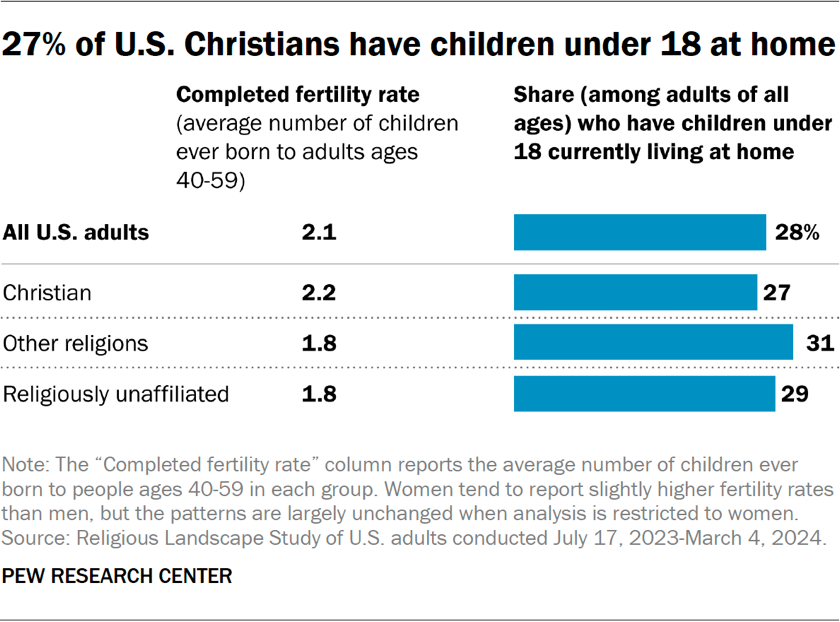
The new Religious Landscape Study (RLS) shows that average family size varies by religious affiliation. To compare how many children are born to parents in various groups, we asked all respondents how many biological children they have ever had during their lives. Since most Americans have completed childbearing by the time they reach ages 40 to 59, we focus on answers from respondents in this age group to estimate “completed fertility.” In the new RLS, Christians have a higher completed fertility rate (2.2 children per respondent) than religiously unaffiliated Americans (1.8) and Americans who belong to non-Christian religions (1.8). Another way to gauge family size is by asking respondents whether they are currently parents or guardians of children under the age of 18 living in their home. Overall, Christian adults (27%) are a little less likely to be living with minor children than are religiously unaffiliated adults (29%) or adults who identify with non-Christian religions (31%). How is it that U.S. Christians are less likely than other Americans to have children under 18 at home, but also that they’ve had more children over the course of their lives than other Americans, on average? A key factor is age. U.S. Christians are older, on average, than religiously unaffiliated people and people who identify with other religions. Just 42% of the Christian respondents in the RLS are between the ages of 25 and 54 – ages in which children are often present in homes – compared with 60% of religiously unaffiliated people and 56% of people who belong to other religions. In addition to asking about family size, the survey also asked parents whether they engage in various religious activities with their children under 18 who live at home, and if these children receive specific types of religious education. Approximately four-in-ten respondents who are parents or guardians of minor children at home say they pray or read scripture with at least one of their children. About a third of parents of minor children say they send their kids to a religious education program, and 17% say they opt for homeschooling or private religious schooling instead of public school. Among parents who are highly religious, 81% say they pray or read scripture with their children; 66% say they send their children to a religious education program; and 29% say they homeschool or send their children to a private religious school instead of a public school. Overall, 89% of highly religious parents say they do at least one of these things. Read more about how religious groups answer the survey’s questions about: Parental status and fertility rates across religious groups Overall, 28% of U.S. adults report being the parent or guardian of at least one child under 18 currently living with them. Similar shares of religiously affiliated (28%) and religiously unaffiliated (29%) adults say this, although sizable differences exist within these groups. Among people identifying with a religion, for example, Hindus (44%) and Muslims (42%) are most likely to be raising children at home. At the other end of the spectrum, 22% of Jewish adults and 21% of mainline Protestants say they are the parent or guardian of a minor child in their home. (On average, Jewish Americans and mainline Protestants are much older than Hindus and Muslims. Therefore, Jewish and mainline Protestant respondents are more likely than Hindu and Muslim respondents to be past the period of their lives when parents typically have minor children living with them. Refer to Chapter 24 for additional details about the age of people in various religious groups.) The survey finds that among adults between the ages of 40 and 59, Christians have had 2.2 children, on average. Jewish Americans ages 40 to 59 report having had 2.0 children during their lifetimes, on average, while religiously unaffiliated adults in this age range have had an average of 1.8 children.  Parents’ religious activities with children Among Christians in the new survey who are currently the parents or guardians of at least one child in their home, 58% say they pray or read scripture with their children. About half (48%) say they send their child to a religious education program, and 22% say they homeschool their children or send them to a private religious school instead of public school. In total, 70% of Christian parents engage in at least one of these forms of religious education for their children. Parents who identify as evangelical Protestants (82%) or members of the Church of Jesus Christ of Latter-day Saints (84%) – who are widely known as Mormons – are even more likely than Christian parents overall to say they do at least one of these things with their children. Far fewer religious “nones” who are parents of children under 18 living at home say they participate in these kinds of religious activities with their children. For example, just 9% say they send their child to a religious education program. (The survey did not include enough responses from Orthodox Christian, Jewish, Muslim, Buddhist or Hindu respondents who are currently parenting minor children to be able to report their answers to these questions.) source

6. Religion, fertility and child-rearing Read More »

Del. Supreme Court TripAdvisor Ruling May Limit 'MFW Creep'

By Andrew J. Haile ( February 25, 2025, 5:19 PM EST) — The Delaware Supreme Court may have signaled the end of so-called MFW creep in its Feb. 4 decision in Maffei v. Palkon.[1]… Law360 is on it, so you are, too. A Law360 subscription puts you at the center of fast-moving legal issues, trends and developments so you can act with speed and confidence. Over 200 articles are published daily across more than 60 topics, industries, practice areas and jurisdictions. A Law360 subscription includes features such as Daily newsletters Expert analysis Mobile app Advanced search Judge information Real-time alerts 450K+ searchable archived articles And more! Experience Law360 today with a free 7-day trial. source

Del. Supreme Court TripAdvisor Ruling May Limit 'MFW Creep' Read More »

Announcing Forrester's "AI Platform" Coverage

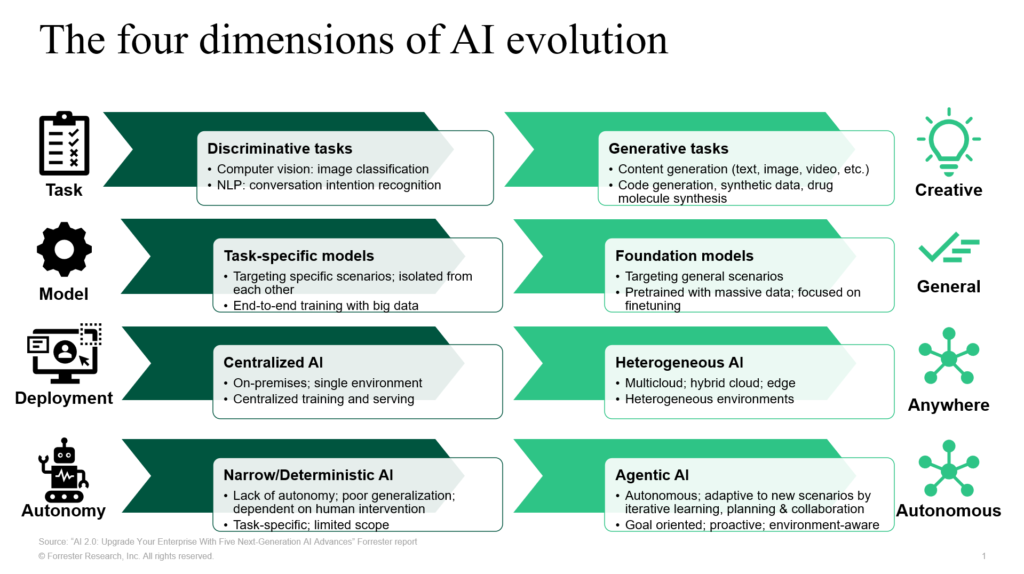
For more than a decade, Forrester has been committed to researching AI and ML technologies and platforms. During my 13-year tenure at Forrester, I had the privilege of working alongside our talented AI analysts. Together, we have continuously refined our market definitions and research focus to stay aligned with emerging tech trends and business needs. In this blog, we introduce a new branding approach for the AI and ML platform market, ensuring our insights remain relevant and valuable for our clients. A Decade-Long Journey In Helping Clients Innovate With AI Here is a quick snapshot of Forrester’s coverage of AI and ML technologies and platforms: In 2015, we (kudos to Mike Gualtieri and Rowan Curran) pioneered Forrester’s research in the discriminative AI field named predictive analytics. This research helped enterprise clients by providing actionable insights to anticipate customer behavior and optimize decision-making to drive efficiency and revenue growth. In 2017, we rebranded the market as predictive analytics and machine learning in response to the rise of ML and deep learning (DL). This rebranding helped enterprise clients assess tools that also leverage advanced ML and DL techniques. In 2022, we expanded this definition to AI/ML platforms, reflecting a broader view of AI with ML/DL at the core. This offered our enterprise clients a broader perspective to adopt full-lifecycle AI/ML solutions, including integrating them seamlessly into their environment to drive AI innovation in business processes. In 2023, in the China version of AI/ML platform Forrester Wave™, we incorporated more functionalities of foundation model support to reflect the market trends of generative AI (genAI). This Chinese market research focuses on enterprise clients in China or doing business in China to harness genAI capabilities, unlocking new opportunities for content creation, automation, and personalized customer experiences. In 2024, in Forrester’s global AI/ML platform Landscape and Wave, we formally defined genAI as one core use case with dedicated evaluation criteria. We also emphasized AI readiness by incorporating DataOps into our framework. Also in 2024, we published the dedicated Landscape and Wave research on AI foundation models (FMs) for languages (AI-FML, aka large language models [LLMs]). This genAI-focused research assists enterprise clients to evaluate LLMs to help support numerous genAI use cases. Over the past 18 months, AI technology has seen remarkable advancements. FMs have emerged as a cornerstone of modern AI, driving innovation and scalability. These models have led to breakthroughs in various domains, including model algorithms, retrieval-augmented generation (RAG), AI agents, and AI hardware infrastructure. Businesses worldwide are actively experimenting with these technologies, integrating AI into various applications to enhance efficiency and drive growth. The Convergence Of AI/ML Platforms And FMs The AI/ML platform and FM markets are rapidly converging through two key trends. AI/ML platform providers are expanding their FM capabilities across the entire AI development lifecycle — from data management to model development, deployment, and AI application development (particularly in agents, app generation, and agentic workflows). These platforms are also integrating with popular third-party models to better serve developers. Meanwhile, FM vendors are broadening their offerings to include comprehensive platform features like API integration, knowledge retrieval, and agent development tools. As our research shows, enterprises typically don’t rely on a single LLM but rather integrate multiple models as essential components of their broader AI infrastructure. The convergence of AI/ML platforms and FMs signifies a profound transformation in AI adoption across four key dimensions: From discriminative tasks to more generative tasks. AI has transitioned from primarily performing predictive analytics to generating new content of various modalities. GenAI is being applied in various fields, such as content creation, customer service, document automation, and TuringBots. This trend highlights the growing importance of AI in augmenting human capabilities, automation, and expanding the boundaries of what machines can achieve. From task-specific models to FMs. Enterprise AI has evolved from specialized models requiring domain-specific training to large-scale FMs pretrained on vast datasets that can be adapted for multiple use cases through fine-tuning and prompting. These FMs function as versatile building blocks that can be customized through fine-tuning and compression techniques. Organizations can adapt these pretrained models for specific use cases without the extensive data and computational requirements of traditional training approaches. This paradigm shift has dramatically accelerated AI development cycles and optimized resource utilization, enabling rapid deployment of AI applications across diverse business contexts. From centralized deployment to heterogeneous architecture options. AI deployment has evolved from centralized approaches to a variety of heterogeneous options across multicloud, hybrid cloud, and edge. This shift offers architecture options to achieve the right balance of scalability, resilience, and adaptability. This allows AI platforms to operate efficiently in diverse and dynamic environments, respecting data gravity and optimizing performance and cost. This trend is particularly important for applications that require real-time processing and low-latency responses, such as autonomous vehicles and IoT edge workloads. From tightly prescribed behavior to greater autonomy and self-improvement. AI systems are moving from predetermined scenarios that rely heavily on human design and planning, to more autonomous approaches. With sufficient intelligence, AI agents have the potential to adapt to new scenarios through iterative learning, planning, and collaboration, making them goal-oriented, proactive, and environment-aware. This autonomy allows AI to handle complex and dynamic tasks with greater efficiency and effectiveness, reducing the need for constant human oversight. The development of autonomous AI is paving the way for advanced applications in robotics, healthcare, and other fields where adaptability and decision-making are crucial.   Rebranding The Market To “AI Platform” As a result of this convergence, starting from this year we will fold in the AI-FML into this larger platform and further evolve our market terminology into “AI platform.” We will continuously refine our research around business use cases, key functionalities, and evaluation criteria design, aiming to help our enterprise clients in refactoring or redefining your technology strategies in AI adoption. For more details, or if you would like to share your thoughts on this, please book an inquiry or guidance session with us to discuss. source

Announcing Forrester's "AI Platform" Coverage Read More »