TNW boosts startup mission with new role for ecosystems leader

TNW has strengthened its support for European tech by adding ecosystems expert Yeni Joseph to the management team. Yeni has also started a new role as Head of Ecosystem Strategy and Partnerships.  The appointment brings extensive expertise to TNW’s leadership — and fresh ideas.  “TNW has a long-standing track record of catalysing innovation,” says Yeni. “We now want to focus on going from legacy to measurable impact.” Yeni’s work will shape TNW’s influence within the world of tech. Her strategies will support the company’s mission to elevate high-potential startups. To meet this objective, Yeni will foster industry communities, identify emerging trends, and engage key stakeholders. She will also integrate the TNW Conference 2025 themes — Growth & Venture, The Next in Tech, and Enterprise Innovation — into ecosystem initiatives.  The 💜 of EU tech The latest rumblings from the EU tech scene, a story from our wise ol’ founder Boris, and some questionable AI art. It’s free, every week, in your inbox. Sign up now! Yeni wants her work to shift the sector’s priorities. “It’s no longer just about company growth,” she says. “It’s about driving innovation, sustainability, and inclusion across the ecosystem as a whole.” To amplify TNW’s contribution, Yeni will tighten alignment with the company’s events and media. She will also lead several major programs. Chief among them is the Assembly, an exclusive gathering of policymakers and business leaders at TNW Conference. Attendees of the event will discuss actionable solutions to key tech policy developments.  Themes for the Assembly’s 2025 edition include defence tech — a timely pick with the NATO Summit arriving in Amsterdam one week later. European competitiveness is also on the agenda. Another program underway is Tech5 — a ranking to showcase leading scaleups from across Europe. The awards will be announced during TNW Conference 2025. Previous winners include Hopin, Too Good To Go, and Wolt. Yenni brings a wealth of experience to her new position. She has spent a decade at the intersection of tech and government policy, enjoying success in both the public and private sectors. Her resume boasts eye-catching roles at numerous industry leaders. It includes spells at StartupAmsterdam, the NLdigital trade association, and the Dutch Ministry of Economic Affairs, where she led the Netherlands’ Taskforce for Diversity and Inclusion in the digital industry. In 2020, Yeni joined TNW. She was previously Head of Ecosystems and Public Policy and the Dutch Startup Visa Facilitator — a role she will continue alongside her new position. Yeni’s work at TNW revolves around a core objective. “We empower the startups shaping the future, knowing that our success and relevance are strongly influenced by their growth and achievements.” source

TNW boosts startup mission with new role for ecosystems leader Read More »

Engineering Metrics: The Elephant In The Room

There’s a story, probably apocryphal, about a royal leader who presented an elephant as a gift to those who had fallen out of favor. The unlucky recipients were left with a large and expensive problem. They knew they had a valuable animal, and they knew their health depended on the elephant’s health. But the cost of feeding and caring for the creature exceeded the value that they could realize. Ultimately, they went bankrupt, surrounded by piles of … err, tech debt. This story came to mind when I talked with a client recently. Their complaint was that “engineering” and “the business” didn’t understand each other. Engineering was the elephant: bulky, expensive to keep, hard to move, and incomprehensible. Business was the poor beneficiary, not understanding how to create value from the incredible resource — they weren’t even sure what they had. Framing the problem this way is a recipe for failure. Engineering is part of the business, often a large part. Engineering leaders must recognize that they need the rest of the business to be healthy, or the elephant will starve. Leaders of the rest of the business must give clear direction to the elephant so that it’s doing useful work for the organization and not just wandering off on its own. GenAI: Was That An Earthquake? Developer productivity is on everyone’s mind these days. We’ve all heard that generative AI promises to increase developer productivity by 40% or more. There’s a lot of hype, and leaders need to cut through the hype to find reality. Business leaders both inside and out of engineering have been coming to me with the same question these days: “How can we determine if our developers are more productive with genAI tools?” My response usually doesn’t go over too well: “Take whatever you’re using to measure productivity now, add genAI, and see if those measures go up.” The truth is that measuring developer productivity is hard. Back in 2003, Martin Fowler gave up, saying that “we have no way of reasonably measuring productivity.” Metrics such as lines of code have always been meaningless, and they’re even more meaningless when you can add a prompt like “make this twice as long.” Business Is What Matters In many cases, metrics are a form of vanity. “Our team is DORA-elite” doesn’t mean much if your customer doesn’t want what you deliver or if you’ve got overwhelming turnover costs due to developer burnout. Just the act of measurement will change what happens at your organization, so a light — and balanced — touch is needed. Save the time and motion studies for processes that get repeated and automated. The elephant knows how to lift the log and enjoys doing it. Team up with the elephant so you can both succeed. Create alignment — make sure that the elephant understands where the log needs to be — clear out the obstacles, and let the elephant figure out how to get it there. To learn how to do that, Forrester clients can connect with me or read my report, Your Focus On Developer Productivity Is Killing You. source

Engineering Metrics: The Elephant In The Room Read More »

How to Protect Header and Footer Areas in Microsoft Word

Headers are an important part of many Microsoft Word documents. Once everything’s in place, you can protect the header so no one can inadvertently mess it up, especially if you’re collaborating with others in your organization. You can protect a document, but there’s no setting that lets you protect only the header and footer while continuing to allow users to edit the body of the document. Fortunately, you can protect the header and unprotect the body when necessary, but the process isn’t intuitive. SEE: 5 Ways to Delete a Page in Word (TechRepublic) In this tutorial, I’ll show you a three-step process for protecting the header or footer area without protecting the body of the Word document. I’ll be working in the header, but this technique protects both the header and the footer. I’m using Microsoft 365 on a Windows 10 64-bit system, but you can use earlier versions of Word. This article isn’t appropriate for Word for the web. Unfortunately, this solution isn’t a good one for online collaboration, because Word for the web won’t open a document with enabled protection in any section. You can download the Microsoft Word demo file for this tutorial. Step one: How to insert a page break in Word Once a document is in good shape and you’ve added header content, you might want to keep others from editing that section. Doing so is easy, but there’s no quick-click solution. The first step is to add a page break, as follows: Press Ctrl + Home to move the cursor to the first position on page one of the document. The break must be the first thing in the document. Click Show/Hide in the Paragraph group on the Home tab. This step isn’t technically necessary but showing the page break symbol will make things easier. Click the Layout tab. In the Page Setup group, click the Breaks dropdown and choose Continuous. Insert a continuous section break. Image: Microsoft The section break must be the first thing on the first page. Image: Microsoft As you can see in the image above, the section break is the first thing on the document’s first page, because the cursor was at the beginning of that page when we inserted the break. The position of this break allows us to format the header differently than the body of the document. If you’re not familiar with section breaks, they apply to the content before the break and the only thing before this break is the header area. The next step will help clarify why that matters. You might be wondering how this solution can also apply to the footer if the break applies to the content before the break. Word does allow you to enter different header and footer content, but internally, Word sees the header and footer as the same area. SEE: 6 Best Free Alternatives to Microsoft Word (TechRepublic) Step two: How to protect the document in Word Our second step might seem a bit counterproductive, but it will all come together in the end. Now, we need to protect the entire document, including the header, footer, and the body. To protect the entire document, do the following: Click the File tab and then click Info in the left pane. Click Protect Document and choose Restrict Editing from the dropdown. Word will return to the document and display the editing options in the Restrict Editing pane. Check the second option and choose No Changes (Read Only) from the dropdown. Choose the Restrict Editing option. Image: Microsoft Select the option that restricts editing. Image: Microsoft At this point, you’ve protected the entire document: If you stopped right now, no one would be able to edit anything. That’s not what we want. We need to unprotect the body of the document. SEE: How to Use Section Breaks to Control Formatting in Word (TechRepublic) Step three: How to unprotect the body of the document in Word If you’re not familiar with Word protection, you might be wondering where we’re headed because protecting everything in the document wasn’t what we intended when we set out. We want to protect the document’s header but still be able to edit the body of the Word document. Here’s how to unprotect the body of the document: Select everything in the document but the section header. To do so, position the cursor at the beginning of the first line in the document by pressing Ctrl + Home. Then, press Ctrl + Shift + End to select everything but section break. In the Restrict Editing pane, check the Everyone option in the Exceptions section. In section three, click Yes, Start Enforcing Protection. When Word prompts you for a password, as shown in the second image below, enter “pw” twice and click OK. When applying this to your own work, you’ll want to use a more secure password. For demonstration purposes, we want to keep everything simple. Check the Everyone option. Image: Microsoft Enter a password so you still have access to the Word document. Image: Microsoft Look for the opening and closing brackets at the beginning and ending, respectively, of the unprotected area. As the author, you will know the password to the Word document so you can make changes to the header and footer area. Others can edit the body of the document, but not the header and footer area. This solution isn’t intuitive, and, oddly, Word doesn’t offer an option for protecting only the header and footer. However, you can still do so using this easy technique. This article was originally published in September 2022. It was updated by Antony Peyton in January 2025.   source

How to Protect Header and Footer Areas in Microsoft Word Read More »

Will Your Network Traffic Analysis Spot Today's Threats?

Network traffic analysis (NTA) is the practice of monitoring and interpreting the data flowing across your network to ensure performance, reliability, and security. Companies rely on a mix of tools — ranging from packet sniffers and flow analysis software to advanced NDR systems — to gain visibility into their network’s behavior. This guide explores the types of NTA solutions available, the key features that provide visibility and control over your network, and where related technologies like NDR tools fit into a modern, secure network strategy. But first, I want to start with a few red flags that tell you network traffic is hiding performance bottlenecks, sophisticated cyber threats, or both. Relying on yesterday’s tools can mean missing critical warning signs. 1 RingCentral RingEx Employees per Company Size Micro (0-49), Small (50-249), Medium (250-999), Large (1,000-4,999), Enterprise (5,000+) Medium (250-999 Employees), Large (1,000-4,999 Employees), Enterprise (5,000+ Employees) Medium, Large, Enterprise Features Hosted PBX, Managed PBX, Remote User Ability, and more 2 Talkroute Employees per Company Size Micro (0-49), Small (50-249), Medium (250-999), Large (1,000-4,999), Enterprise (5,000+) Any Company Size Any Company Size Features Call Management/Monitoring, Call Routing, Mobile Capabilities, and more 3 CloudTalk Employees per Company Size Micro (0-49), Small (50-249), Medium (250-999), Large (1,000-4,999), Enterprise (5,000+) Any Company Size Any Company Size Features 24/7 Customer Support, Call Management/Monitoring, Contact Center, and more Seven signs you should revamp network traffic analysis Ideally, network traffic analysis (NTA) gives administrators a clear, real-time view of how data moves across their network. It helps them spot performance issues, track resource use, and identify potential security threats before they become serious problems. When NTA tools and strategy leave critical blind spots, it will fail to detect performance issues, security threats, or unexpected traffic patterns that could disrupt operations. Below are some warning signs and scenarios that warrant a review of your current approach and may indicate the need for strategic retooling of your network traffic analysis. Red flags include: Security incidents or suspicious activity: An uptick in network breaches, unauthorized access, or unusual traffic flows (e.g., data exfiltration attempts or DDoS attacks) indicates that your current strategy may not be adequately monitoring threats or alerting you in real-time. Unpredictable traffic spikes: If you notice unexpected increases in traffic, such as during off-hours or periods when there should be low activity, it could indicate an issue with how traffic is being managed or even malicious activity. If unpredictable spikes persist, re-evaluate your performance monitoring and threat detection tools to confirm they are giving you full visibility. Lack of visibility into specific traffic types: If your existing tools or strategy don’t provide clear insight into specific types of traffic — like VoIP, streaming, or encrypted data — it may be time to upgrade to a more sophisticated solution that offers deep packet inspection and greater granularity. Inconsistent reporting or alerts: If your current system isn’t providing consistent, actionable reports or timely alerts, it’s a sign the network traffic strategy might be outdated or improperly configured. Review your thresholds, detection rules, and alerting policies. Changes in network infrastructure or traffic demands: As network infrastructure evolves (e.g., shifting to cloud services, remote work, or increased IoT), it’s crucial to ensure that your NTA tools and approach are adapted to these changes, ensuring seamless traffic monitoring and management. Disconnected network data: If your NTA tools aren’t integrating well across various network segments or systems, it might be hard to get a full picture of network performance or security threats. A unified approach to traffic analysis may be required for better insight. Compliance or regulatory changes: If new compliance regulations or industry standards (such as GDPR or HIPAA) affect data protection and privacy, it may be necessary to review your NTA strategy to ensure it meets those requirements and avoids potential penalties. There are other warning signs I haven’t captured here, and new zero-day exploits are emerging everyday. Taking a proactive approach with NTA is a wise idea. Operating with less than full visibility into your network traffic is asking for trouble — both performance and security are at stake. After all, once they have access to your network, it only takes two days for attackers to own your data. What makes improving network traffic analysis so difficult? As NTA technology evolves, it becomes increasingly powerful and capable of identifying sophisticated threats. But these enhanced capabilities come with a major caveat: you need some really highly-paid IT resources in-house. The more advanced the tool, the higher the level of experience, expertise, and manpower required to effectively operate and manage it. A basic network for a single office may be relatively straightforward to implement and monitor with minimal expertise. A large network with cutting-edge NTA platforms requires skilled security professionals who can interpret intricate data, respond to threats quickly, and fine-tune the system to adapt to new attack techniques and ransomware trends. These factors make powerful NTA solutions more resource-intensive, demanding both skilled personnel and ongoing training to maintain their effectiveness. Organizations must consider not just the technological capabilities of an NTA solution but also the capacity of their team to manage and maximize its potential. Types of network traffic analysis tools Network traffic analysis tools are essential for monitoring and optimizing data flow across a network. They help identify bottlenecks, troubleshoot issues, and ensure efficient use of resources. The main categories of network traffic analysis tools are: Packet sniffers: These tools capture and analyze raw network traffic at the packet level. Common tools, like Wireshark, provide deep insights into the types of data being transferred and help identify issues like packet loss or protocol mismatches. Flow analysis tools: Tools such as SolarWinds and NetFlow Analyzer track flow data, which shows how traffic moves through a network in terms of sessions or connections. These tools focus on aggregate data, such as bandwidth usage, which helps in understanding overall network performance. Network performance monitors: These tools, like PRTG Network Monitor, analyze both traffic and overall network health, including latency, throughput, and device


Will Your Network Traffic Analysis Spot Today's Threats? Read More »

7 of the coolest Dutch tech startups at CES 2025

Fifty of the fastest-growing tech firms in the Netherlands are in Las Vegas this week. The crew crossed the Atlantic to attend CES — the world’s biggest tech show. By their side is economic affairs minister Dirk Beljaarts, who’s on a mission to promote Dutch innovation. So is TNW. We’ve partnered with the Consumer Trade Association — which organises CES — on its annual Match program at the event. The in-person meetings connect startups with investors and corporate venture arms. TNW has also checked out the Dutch delegation at CES. Here are seven members of the tech team that caught our eye. 1. SunLED The sun is shining in Vegas, but the skies in Europe are pretty dark and grey in January. SunLED wants to brighten up our lives. The company develops near-infrared light technology that’s proven to improve mental and physical health. The system integrates with computer screens, car interiors, and lamps. 2. DeepSleep The 💜 of EU tech The latest rumblings from the EU tech scene, a story from our wise ol’ founder Boris, and some questionable AI art. It’s free, every week, in your inbox. Sign up now! After you’ve enjoyed a bright day, DeepSleep can offer you a restful night. The startup’s wearables analyse brainwaves to predict upcoming neural activity. They then deliver gentle sensory stimuli to enhance deep sleep waves. In tests, 64% of users reported improved sleep quality, while 78% said their daytime fatigue had decreased. 3. OrthoFoodie Another startup planning to boost our health is OrthoFoodie. The company’s app tracks your diet with a unique food analyser. After scanning a product’s barcode, users can instantly log nutritional data into a daily food diary. The app also offers personalised advice on your daily macro and micro needs.  4. Medical-X Self-care is all well and good, but sometimes we need healthcare from trained professionals. Enter Medical-X. Based in Arnhem, the company develops humanoid robots for medical training. Medical-X describes the droids as “the world’s most realistic, advanced, and customisable patient simulators.” 5. Whispp Leiden-based Whispp has targeted another healthcare issue. The startup has launched an app for people with voice disabilities and severe stutters. Powered by AI, the system converts impaired speech into a clear and natural voice of the user’s choice — without any delay. Time Magazine named Whispp one of the best inventions of 2024. Credit: Whispp 6. Addoptics Better sight is also on offer at CES. Rotterdam-based Addoptics plans to boost our vision in augmented reality by developing prescription lenses for AR glasses. The lightweight lenses are customised to fit any shape of smart frame. They could also boost adoption of AR. 7. Flowbeams Flowbeams has pioneered another path to better health: needle-free injections. Using a laser, the company first heats the relevant liquid. The process creates a micro-bubble, which propels a thin jet through the skin for quick absorption in the body. Besides addressing needle-phobia, the tech could reduce infection risks and hazardous waste. All this new medtech has made us optimistic about our New Year’s resolutions for a healthier life. Yet our top seven is just a taste of the Dutch treats at CES. You can check out all 50 members of the delegation here. source

7 of the coolest Dutch tech startups at CES 2025 Read More »

What Makes a Perfect AI Pilot?

How do you get your AI use case up and running? A pilot is the essential starting point. However, if you’re like most organizations, you may run up against barriers at this early stage. In research conducted by Lenovo earlier this year, 60% of companies told us that they struggle to get stakeholder support for pilot programs, while the majority reported substantial financial constraints at both pilot (88%) and deployment stage (83%). How can you overcome these hurdles and put a successful pilot together? Like good cooking, it’s about getting the ingredients, people, and timing right. Let’s start with ingredients. Bring Together the Data and Tools Data is the key component of any AI application. What’s imperative is to first find the data that’s needed to drive your use case. While each one is different, what GenAI projects have in common is that the data is likely to be unstructured – for example, a mix of documents, PDFs, and web content – rather than relational data. To be maximally effective, AI solutions typically need as much of this data as possible. This brings us to the second ingredient – the tools to run and manage the pilot. These break down into three broad areas: Data evaluation and screening. First up, is there enough data to work with? It’s important to know what’s there upfront. Tools are available now that can evaluate documents and ensure they have enough quality data to support a GenAI use case. Data cleansing. Documents need to be screened for low-quality documents, duplicate information or personally identifiable information that should be masked, for example. So, you’ll need a tool that’s capable of doing this across unstructured data, which is a different challenge to cleaning up relational databases. GenAI operations. If an AI pilot is not properly proven, stakeholders will rapidly lose trust. Solutions have been known to “hallucinate,” give out incomplete or incorrect answers, or even make missteps like recommending a competitor’s products. GenAI operations put in place practices that check for and correct issues such as model drift and bias, guarantee accuracy, and generally make sure the solution is ready for use in a production environment. This might include, for example, using a set of baseline questions to benchmark the AI’s performance. Assemble the Right People Next, the people. The first and most obvious are the individuals who own the use case that the GenAI pilot is designed for. Engaging with them – and understanding their definition of success – is a critical first step. Then, there are a range of people that our experience shows are pivotal to making any AI pilot a success: Data steward. This is the subject-matter expert who owns and understands the data needed to drive the solution. Vendor data expert. They work with the data steward to make sure data is cleansed and ingested into the GenAI system, making it ready to use. IT team. The pilot needs people who understand the systems that are being integrated with the vendor’s AI solution and have ownership of them from a technology point of view. Security team member. The AI pilot also needs a security expert on hand to ensure that the solution meets your security requirements. This individual will also be able to define upfront the levels of integration required, as well as the solution’s balance between the cloud and your secure data center. Internal domain experts. While a vendor can of course help with testing an AI pilot, it’s essential to bring in subject-matter experts to validate whether it is providing the right responses. In an insurance use case, for example, these would be the people who know whether the AI was recommending the correct policies. Get the Timing Right Finally, timing. GenAI pilots typically take between two and six months, depending on the extent of the use case. However, like any good recipe, they need careful monitoring throughout the process, in this case to check for “model drift” and to correct for any changes in data or the model itself. And to save time in the future, what’s important is to use one Gen AI platform for every use case, to avoid having to start from scratch every time. Proven Solutions Lenovo, in collaboration with NVIDIA, offers tried-and-tested tools and frameworks for building AI pilots to help you get GenAI solutions into production. Lenovo AI Advantage with NVIDIA, a full-stack solution for building and deploying AI capabilities, combines Lenovo’s services and infrastructure with NVIDIA accelerated computing and NVIDIA AI Enterprise software. To build real-world proofs of concept, Lenovo AI Fast Start delivers live solutions to demonstrate generative AI deployment and showcase business, operational, and technology results. Businesses can accelerate and quickly scale AI using full-stack NVIDIA-based technologies through Lenovo AI Fast Start for NVIDIA AI Enterprise, which also includes NVIDIA NIM microservices, NVIDIA NeMo, and NVIDIA Blueprints. To learn more about GenAI pilots, and how Lenovo and NVIDIA technologies can help, contact [email protected]. source

What Makes a Perfect AI Pilot? Read More »

Full-Funnel Advertising Makes Poppi Famous

America’s soda market is very difficult to disrupt. The market is massive — nine of 10 US households buy soda — and dominated by a few iconic incumbents. Nonetheless, challenger brands have tried to take share. Orbitz, whose soda looked like a potable lava lamp, lasted less than a year. Jolt Cola packed a punch of sugar and caffeine but lost favor after a decade of cult following. Aspen Soda popularized apple-flavored soda but fizzled after a few years. Nearly every challenger to Coke, Pepsi, Dr Pepper, and Sprite failed to scale beyond a niche of loyalists, until now. Poppi launched prebiotic soda on “Shark Tank” in 2018. The brand’s TV appearance garnered funding from CAVU Consumer Partners. Poppi then went viral on social media and began cultivating its community of creators. Now, Poppi revolutionizes soda for the next generation. Poppi reaches and engages its entire audience throughout the funnel. Massive reach and engagement require big budgets, which are increasingly hard to come by as CFOs scrutinize return on advertising spend. They also require sophisticated frameworks to measure media’s short- and long-term effects. Filling the funnel with new households, particularly in a market as crowded as soda, tests stakeholders’ patience and appreciation for awareness media’s subtle halo effects on consideration and sales. Poppi overcomes these challenges by applying performance marketing, which demands rigor, adaptability, and risk tolerance. Performance marketing needn’t be synonymous with direct response campaigns or lower-funnel outcomes. Poppi works with its agency, Tinuiti, to run performance marketing for tentpole events, micro-influencer campaigns, and everything in between. This manifests in: Making the brand familiar and famous. Poppi personalizes and publicizes its brand across channels. For example, Poppi gifts soda to nano-influencers and advertises in the Super Bowl. Casually noticing Poppi in a friend’s fridge and appreciating the brand’s seemingly expensive TV creative confers credibility and helps Poppi punch above its weight. Poppi went from its first linear TV campaign to advertising in the Super Bowl in just eight weeks. Following its audience’s lead. Poppi’s mass media doesn’t come at the expense of rigorous personalization because its advertising is informed by deep customer understanding. Poppi complements ads in “Thursday Night Football” with ads on Bravo, given the correlation between reality TV viewers and Poppi drinkers. Poppi also bets bigger on women’s college and professional basketball than men’s basketball because it has found a stronger correlation between women’s basketball and site traffic. Our latest report — Case Study: Poppi Is Famous And Full-Funnel — explains why and how Poppi does full-funnel advertising. It explains Poppi’s media planning and advertising technology, describes the brand’s measurement methodologies, and details Poppi’s results. Stay tuned for more research on full-funnel advertising in collaboration with Jay Pattisall and Brad Haag. As always, feel free to reach out to learn more. source

Full-Funnel Advertising Makes Poppi Famous Read More »

6 Predictions For Cyber Risk And Insurance In 2025

By Pamela Signorello, Bill Knauss and Mallory Meaney ( January 10, 2025, 4:33 PM EST) — Predicting what may be next in a space as rapidly evolving as cyber can be an elusive task. However, if what’s past is prologue, then 2025 is likely to bring with it some thorny and expensive challenges…. Law360 is on it, so you are, too. A Law360 subscription puts you at the center of fast-moving legal issues, trends and developments so you can act with speed and confidence. Over 200 articles are published daily across more than 60 topics, industries, practice areas and jurisdictions. A Law360 subscription includes features such as Daily newsletters Expert analysis Mobile app Advanced search Judge information Real-time alerts 450K+ searchable archived articles And more! Experience Law360 today with a free 7-day trial. source

6 Predictions For Cyber Risk And Insurance In 2025 Read More »

3. Views of children’s financial future

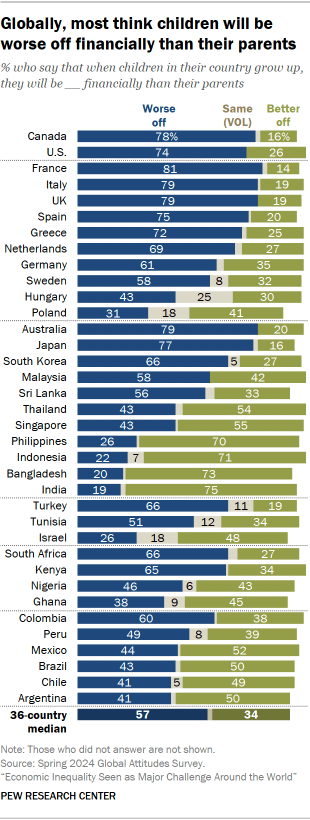
Across the nations we surveyed, people are generally pessimistic about the financial future of the next generation in their country. A median of 57% say children will grow up to be financially worse off than their parents, compared with a median of 34% who say they will be better off. In the high-income nations of Canada and the U.S., about three-quarters of adults believe children will be worse off. Similarly high shares are pessimistic in most of the European countries surveyed, all of which are high-income countries. About three-quarters or more in France, Greece, Italy, Spain and the UK say children will grow up to be worse off financially than their parents. Poland is the only European country where people more likely to offer an optimistic view of the next generation’s financial future: 41% of Poles say children will be better off, while 31% say they will be worse off. Another 18% of Poles volunteer that their future financial situation will be about the same. In the Asia-Pacific region, views are most negative in Australia, Japan and South Korea, where about two-thirds or more say children will be worse off than their parents. People in Malaysia and Sri Lanka are also pessimistic on this question. In the six other Asia-Pacific countries surveyed, people are more likely to say that children will be financially better off than their parents. At least seven-in-ten hold this view in Bangladesh, India, Indonesia and the Philippines. Singapore is the only high-income Asia-Pacific nation where people say children will be better off. Of the Middle East-North African countries surveyed, people in Turkey have an especially dim view of children’s financial future. About two-thirds of Turks say children in their country will be worse off than their parents. In sub-Saharan Africa, around two-thirds of adults in Kenya and South Africa also say children will be worse off than their parents. Views are divided in the Latin American countries surveyed. In Colombia and Peru, more people say children will be worse off than better off, but the reverse is true in Argentina. Views by perception of economic inequality There’s a clear relationship between people’s perceptions of economic inequality in their country and how they see the next generation’s financial future. In most countries, people who consider the gap between the rich and the poor to be a very big problem are especially pessimistic about how children will fare financially when they grow up. Likewise, dissatisfaction with the current economic situation and with the functioning of democracy are linked to the sense that children will be worse off financially than their parents in the future. Views by opinion of the governing party The belief that children will grow up to be financially worse off than their parents is also more common among people who do not support the governing party in their country. For example, in Hungary, 57% of people who do not support the governing party say children will grow up to be worse off financially than their parents. This view is shared by just 20% of Hungarians who support the governing party. (Read Appendix B for a classification of governing parties as of spring 2024.) Views by age and income In most countries, older and younger adults generally have the same outlook on children’s financial future. There are also few major differences by income level. How views of the next generation’s financial future have changed over time In 15 surveyed countries, the public’s economic outlook is worse today than before the coronavirus pandemic. For example, the share of Germans who think children will grow up to be worse off financially than their parents has increased by 19 percentage points since 2019 – from 42% then to 61% today. source

3. Views of children’s financial future Read More »

Choose a Customer Data Platform That Amplifies Your Customer Engagement Strategy

Managing customer data has never been more important – or more complex. Organizations are grappling with the need to not only consolidate vast amounts of customer data but to use it as a foundation for driving personalized, omnichannel customer experiences. At the heart of this transformation is the Customer Data Platform (CDP) – a technology that enables organizations to unify fragmented data and profiles, build segments, and use AI, orchestration and activation capabilities to deliver exceptional customer engagement and drive alignment between marketing, sales, customer success and other functional teams. CDPs: Backbone of Data-Driven Engagement Whether you are operating in B2C or B2B markets, customer experience (CX) matters more than ever. It is a strong driver of financial growth and organizational outcomes and sets leaders apart from followers. B2C brands engage with customers, who often switch between channels, through multiple touchpoints and modalities. A successful CDP should allow businesses to deliver cohesive, personalized experiences across all these channels, ensuring that a customer’s journey is consistent regardless of where it begins or ends—whether in-store, in contact center, in-field, online, or on social media. Effective omnichannel orchestration drives higher engagement and reduces friction in customer journey, which is particularly important in B2C sectors like retail, travel, financial services, and hospitality. B2B brands are always looking for opportunities to drive growth and differentiation for their products and services as they lean into the shift towards consumer-like purchasing behavior. B2B buyers are demanding omnichannel journey experience, clear understanding – not of just their needs, but also the role they play in the buying group – and experimentation with new channels, especially digital. Firms are adopting CDP technologies that can unify and activate individual data across accounts and opportunities and navigate multi-stakeholder, non-linear acquisition and retention cycles to serve their B2B customers. Evaluating B2B and B2C CDPs: Tailoring Your Approach While the foundational goals of CDPs—data unification, analytics and AI, and engagement—are consistent across industries, their applications in B2B and B2C context differ. In B2C environments, CDPs must handle vast amounts of customer data generated by millions of interactions daily. The emphasis is on scale, speed, and dynamic personalization. B2C CDPs need to enable real-time marketing interactions that adapt instantly to customer behaviors, ensuring relevance and impact. Key success metrics often include customer lifetime value, conversion rates, and engagement levels. Conversely, B2B CDPs are optimized for precision and alignment with longer, more complex sales cycles. These platforms focus on account-based marketing (ABM), lead scoring, and multi-touch attribution, providing insights that enable sales and marketing teams to work seamlessly together. Integration with enterprise systems and the ability to support high-value, multi-stakeholder accounts are critical. These customer and buyer trends have pushed vendors to provide integrated CDPs with functionality ranging from data unification and management, analytics and AI to activation. There has been ongoing market deliberations between packaged CDP vendors who provide integrated all-in-one solution, but also emphasize interoperability, extensibility, and modularity, and composable CDP vendors who offer buyers the flexibility to select and assemble individual CDP functional components. Even between these two informal classification of CDP vendors, there is overlap of functionality, workflows, systems and architecture approaches. Overall, the CDP market continues to be diverse and there is some level of confusion for buyers. Buyers must carefully consider not only CDPs, but how their selected solution will integrate with other MarTech (marketing technology) and enterprise investments. Growing Interest in CDPs From IT and Data Personas As CDPs evolve, their appeal is extending beyond traditional marketing users. Today, data management and IT leaders and users are emerging as additional stakeholders in CDP evaluation decisions. For these personas, the focus is on ensuring that the CDP integrates with broader data ecosystems, particularly cloud data warehouses and enterprise analytics platforms. CDPs that offer robust APIs, native integrations, zero-copy and zero-ETL approach, and support for modern data architectures are gaining traction as businesses prioritize interoperability and scalability. Additionally, data and IT teams are increasingly involved in evaluating the security, privacy, compliance, and governance features of CDPs. As regulations become more stringent and as customers demand transparency and trust in how their data is being used, handled and protected, CDPs that address these challenges while offering hyper personalization are becoming essential in an organization’s marketing and CX technology stack and for brands to differentiate themselves from competitors. Announcing the IDC MarketScape: Customer Data Platforms To bring clarity to this rapidly evolving market and for buyers, IDC has released two MarketScape reports that help you understand and evaluate how these vendors stack up against capabilities and strategy criteria. The CDP market is constantly evolving, with vendors that vary in size, expertise, and geographic focus. Key Findings: AI and Analytics Lead the Way: Platforms incorporating AI for predictive analytics, audience segmentation, lead scoring, journey optimization, churn prevention and related use cases are delivering value for organizations. Interest and use of Generative AI is rising: Evaluate how GenAI capabilities within CDP tooling and workflows will make it easier for non-technical users in terms of productivity and data literacy for users and drive better personalization of content and engagements. Go beyond structured data sources: Consider how unstructured and semi-structured data can be transformed into consistent attributes, enrich it with identity services and further augment customer profiles for broader marketing, sales, customer service, etc. use cases. Privacy and Governance as a Feature, not a Hurdle: Vendors that embed privacy, consent management and compliance tools directly into their platforms are helping businesses build trust while delivering personalization. Real-Time Engagement is Non-Negotiable: CDPs excel in enabling real-time data activation to meet customers where they are, instantly and effectively, especially in B2C settings, to drive higher engagement rates and meet continuously evolving customer expectations. Omnichannel activation is key: Weigh how CDPs will help to simplify tooling, spend and complexity associated with campaign execution across channels within your existing or planned MarTech stack. Playbooks and Use Case templates: Prioritize CDPs that offer templates, schemas, or playbooks specific to B2C or B2B functions and use cases to streamline implementation and adoption. Value Measurement: There

Choose a Customer Data Platform That Amplifies Your Customer Engagement Strategy Read More »