How to Break a Phone: Common Causes of Phone Damage

We depend upon our smartphones. They keep us connected, informed, and updated during the hectic daily grind. For many of us, those smartphones have become more than a simple tool, so we should probably take better care of them than we do. Instead of treating them as toys that can be replaced on a whim, we should treat smartphones as if they contain sensitive data and our jobs depend upon them. What steps can you take to ensure you don’t damage or destroy your mobile device? I have a list of nasty things that can be hazardous to the health of your smartphone or tablet. 1 New Relic Employees per Company Size Micro (0-49), Small (50-249), Medium (250-999), Large (1,000-4,999), Enterprise (5,000+) Any Company Size Any Company Size Features Analytics / Reports, API, Compliance Management, and more 2 Zoho Sprints Employees per Company Size Micro (0-49), Small (50-249), Medium (250-999), Large (1,000-4,999), Enterprise (5,000+) Any Company Size Any Company Size Features Burn-down Charts, Epics, Kanban, and more 3 NordLayer Employees per Company Size Micro (0-49), Small (50-249), Medium (250-999), Large (1,000-4,999), Enterprise (5,000+) Small (50-249 Employees), Medium (250-999 Employees), Large (1,000-4,999 Employees), Enterprise (5,000+ Employees) Small, Medium, Large, Enterprise Exposing it to the elements Both heat and cold can bring that smart device to the land of devastation. Leaving your phone in a car in the heat of summer or overnight in the cold of winter is a surefire way of saying goodbye and having to return to your carrier for a replacement. Studies have shown that Android devices fare better in the cold than iOS devices, but at about -40 degrees Fahrenheit, both platforms will cease to work. SEE: 10 Common Misconceptions About Mobile Device Batteries The heat is worse. At 113 degrees Fahrenheit, the devices will be adversely affected. The best way to avoid the effects of heat is to turn off the device. The moral of this story: don’t leave your phone in your car (and if you find yourself in the desert, turn that device off). Rooting improperly There’s a certain cross-section of users who want to take as much control over their devices as possible. To do this, they root their smartphones. There are many reasons to root a device and one reason not to. There is always a slim chance that improper rooting can brick a phone. This is why, on every set of rooting instructions you find, you will see warnings that should have average users turning away from the act. Actually, in many cases, some tools make rooting quite simple. But even with that simplicity, you could find yourself with a device refusing to function. Root carefully. Ignoring malware Malware isn’t just for desktops. The threat of malware could do even worse damage on a smartphone. Why? Because smartphone malware can track your location (no matter where you are), and snatch highly sensitive data, among other things. Zscaler’s ThreatLabz witnessed a 29% rise in banking mobile malware over 2024, with banking malware representing 20% of the total Android threat landscape. Loïc Guézo, senior director of Cybersecurity Strategy at Proofpoint, said, “Scams, smishing, and mobile malware have increased exponentially for the past few years. This is a trend that began pre-pandemic and continues. Trust in mobile messaging communications makes it a very attractive platform for commercial and marketing activity; it also makes the mobile channel ripe for fraud and identity theft for cybercriminals.” SEE: Cybercriminals Deploy New Malware to Steal Data via Android’s Near Field Communication You must use caution when installing apps on your smartphone. I recommend users install an app like Malwarebytes to keep their phones as malware-free as possible. Do not ignore the threat of malware. Install enough malware-filled apps, and your phone will become useless until it is removed. Cramming it full Smartphones have precious little storage space. Unless you use an Android phone and use SD cards intelligently, you can quickly fill up those devices until they don’t work. My wife was unaware she was working without an SD card until the device started malfunctioning. I discovered she had no space remaining, so I added an SD card and transferred all her photos from the main storage. All was well. Without enough storage space, the device simply won’t function. Monitor the space on your device, and if possible, use SD cards. SEE: How to Free Up Storage Space in Android 11 Leaving it on… always Our smartphones work, and work, and work, and work. In fact, in many cases, these devices work better than our desktops and laptops. The thing is, even these remarkably stable mobile platforms need to be given a rest. At least once a week, reboot that device or (even better) shut it down for 30 minutes or so. Doing this will ensure that caches are cleared and subsystems are properly restarted. Shutting down the device once a week will aid with the longevity of the RAM on the device and allow certain diagnostics to be run at boot. Botching the SIM card lock There is one good reason to place a lock on your SIM card — so others can’t use it. However, both the SIM card lock and that SIM card are toast. I understand this is not the device itself — but until you can get the SIM card replaced, your phone will not function. If you feel the need to place a lock on the SIM card, do so VERY carefully. Not sure how to do this? Read my post here: Protect your Android SIM card with a SIM PINlock. Plugging it in carelessly Those micro USB connections aren’t as bad as USB connections (there’s always a 50/50 chance you’ll get it right on the first try), but they still can be a bit tricky to connect. When frustration sets in, it’s tempting to force the issue. Fight that urge at all costs. With one swift push, the micro USB port is ruined. If you break that, the phone will

How to Break a Phone: Common Causes of Phone Damage Read More »

SEC Says Food Tech Startup Overstated Revenue By $550M

By Tom Zanki ( January 17, 2025, 6:45 PM EST) — The U.S. Securities and Exchange Commission on Friday fined venture-backed food technology startup GrubMarket $8 million for allegedly misleading investors by overstating revenue by more than $550 million, with faulty accounting that regulators say the company should have known was unreliable…. Law360 is on it, so you are, too. A Law360 subscription puts you at the center of fast-moving legal issues, trends and developments so you can act with speed and confidence. Over 200 articles are published daily across more than 60 topics, industries, practice areas and jurisdictions. A Law360 subscription includes features such as Daily newsletters Expert analysis Mobile app Advanced search Judge information Real-time alerts 450K+ searchable archived articles And more! Experience Law360 today with a free 7-day trial. source

SEC Says Food Tech Startup Overstated Revenue By $550M Read More »

Edge computing’s rise will drive cloud consumption, not replace it

This article is part of VentureBeat’s special issue, “AI at Scale: From Vision to Viability.” Read more from this special issue here. This article is part of VentureBeat’s special issue, “AI at Scale: From Vision to Viability.” Read more from the issue here. The signs are everywhere that edge computing is about to transform AI as we know it. As AI moves beyond centralized data centers, we’re seeing smartphones run sophisticated language models locally, smart devices processing computer vision at the edge and autonomous vehicles making split-second decisions without cloud connectivity.  “A lot of attention in the AI space right now is on training, which makes sense in traditional hyperscale public clouds,” said Rita Kozlov, VP of product at Cloudflare. “You need a bunch of powerful machines close together to do really big workloads, and those clusters of machines are what are going to predict the weather, or model a new pharmaceutical discovery. But we’re right on the cusp of AI workloads shifting from training to inference, and that’s where we see edge becoming the dominant paradigm.” Kozlov predicts that inference will move progressively closer to users — either running directly on devices, as with autonomous vehicles, or at the network edge. “For AI to become a part of a regular person’s daily life, they’re going to expect it to be instantaneous and seamless, just like our expectations for web performance changed once we carried smartphones in our pockets and started to depend on it for every transaction,” she explained. “And because not every device is going to have the power or battery life to do inference, the edge is the next best place.” Yet this shift toward edge computing won’t necessarily reduce cloud usage as many predicted. Instead, the proliferation of edge AI is driving increased cloud consumption, revealing an interdependency that could reshape enterprise AI strategies. In fact, edge inference represents only the final step in a complex AI pipeline that depends heavily on cloud computing for data storage, processing and model training.  New research from Hong Kong University of Science and Technology and Microsoft Research Asia demonstrates just how deep this dependency runs — and why the cloud’s role may actually grow more vital as edge AI expands. The researchers’ extensive testing reveals the intricate interplay required between cloud, edge and client devices to make AI tasks work more effectively. How edge and cloud complement each other in AI deployments To understand exactly how this cloud-edge relationship works in practice, the research team constructed a test environment mirroring real-world enterprise deployments. Their experimental setup included Microsoft Azure cloud servers for orchestration and heavy processing, a GeForce RTX 4090 edge server for intermediate computation and Jetson Nano boards representing client devices. This three-layer architecture revealed the precise computational demands at each level. The key test involved processing user requests expressed in natural language. When a user asked the system to analyze a photo, GPT running on the Azure cloud server first interpreted the request, then determined which specialized AI models to invoke. For image classification tasks, it deployed a vision transformer model, while image captioning and visual questions used bootstrapping language-image rre-training (BLIP). This demonstrated how cloud servers must handle the complex orchestration of multiple AI models, even for seemingly simple requests. The team’s most significant finding came when they compared three different processing approaches. Edge-only inference, which relied solely on the RTX 4090 server, performed well when network bandwidth exceeded 300 KB/s, but faltered dramatically as speeds dropped. Client-only inference running on the Jetson Nano boards avoided network bottlenecks but couldn’t handle complex tasks like visual question answering. The hybrid approach — splitting computation between edge and client — proved most resilient, maintaining performance even when bandwidth fell below optimal levels. These limitations drove the team to develop new compression techniques specifically for AI workloads. Their task-oriented method achieved remarkable efficiency: Maintaining 84.02% accuracy on image classification while reducing data transmission from 224KB to just 32.83KB per instance. For image captioning, they preserved high-quality results (biLingual evaluation understudy — BLEU — scores of 39.58 vs 39.66) while slashing bandwidth requirements by 92%. These improvements demonstrate how edge-cloud systems must evolve specialized optimizations to work effectively. But the team’s federated learning experiments revealed perhaps the most compelling evidence of edge-cloud symbiosis. Running tests across 10 Jetson Nano boards acting as client devices, they explored how AI models could learn from distributed data while maintaining privacy. The system operated with real-world network constraints: 250 KB/s uplink and 500 KB/s downlink speeds, typical of edge deployments. Through careful orchestration between cloud and edge, the system achieved over ~68% accuracy on the CIFAR10 dataset while keeping all training data local to the devices. CIFAR10 is a widely used dataset in machine learning (ML) and computer vision for image classification tasks. It consists of 60,000 color images, each 32X32 pixels in size, divided into 10 different classes. The dataset includes 6,000 images per class, with 5,000 for training and 1,000 for testing.  This success required an intricate dance: Edge devices running local training iterations, the cloud server aggregating model improvements without accessing raw data and a sophisticated compression system to minimize network traffic during model updates. This federated approach proved particularly significant for real-world applications. For visual question-answering tasks under bandwidth constraints, the system maintained 78.22% accuracy while requiring only 20.39KB per transmission — nearly matching the 78.32% accuracy of implementations that required 372.58KB. The dramatic reduction in data transfer requirements, combined with strong accuracy preservation, demonstrated how cloud-edge systems could maintain high performance even in challenging network conditions. Architecting for edge-cloud The research findings present a roadmap for organizations planning AI deployments, with implications that cut across network architecture, hardware requirements and privacy frameworks. Most critically, the results suggest that attempting to deploy AI solely at the edge or solely in the cloud leads to significant compromises in performance and reliability. Network architecture emerges as a critical consideration. While the study showed that high-bandwidth tasks like visual question answering need up to

Edge computing’s rise will drive cloud consumption, not replace it Read More »

A Quick And Dirty Guide To Cryptocurrencies, Stablecoins, And CBDCs

In the EU, the Markets in Crypto-Assets (MiCA) Regulation fully came into force on December 30, 2024; it covers cryptoasset issuance and services not covered by existing financial services and products regulation, and it includes stablecoins. While this legislation provides the regulatory clarity for which the industry has often asked, many industry players criticize it for being too onerous. By contrast, the US presidential election led to a sharp uptick in the price of Bitcoin and other cryptocurrencies; this reflects market participants’ expectation of a more lenient regulatory approach to the sector from the incoming US administration. We don’t know yet what will transpire in the US, but we do know — from the questions we get asked — that there’s a lot of confusion out there about what different terms mean and what the implications may be from a regulatory perspective, so here’s a quick reminder. Cryptocurrencies (like Bitcoin) are speculative assets. There’s no backing asset and no issuer. Despite their name, they fail the test of what constitutes “money”: Their volatility means they’re not a store of value, they’re not a universally accepted means of payment, and they’re not a unit of account anywhere (quite the contrary — the value of cryptocurrencies is typically expressed in another currency such as USD, GBP or EUR). Stablecoins come in many shapes and sizes, and the differences matter. Stablecoins were first created as an on-ramp to the cryptocurrency ecosystem, partly because the existing banking system cannot support the requirements for 24/7/365 funds transfer and partly because market participants wanted to keep their funds inside of the cryptocurrency world but without being exposed to the volatility of the actual cryptocurrencies. Most are pegged to the US dollar, but there are also stablecoins pegged to EUR, GBP, and other currencies. Stablecoins are still predominantly used within the cryptoasset ecosystem (including DeFi), but they’ve also taken on a wider role as a payment and value transfer mechanism. Unlike cryptocurrencies, most stablecoins have a backing asset to help them keep their value; in theory, holders of stablecoins should always be able to redeem their holdings at face value of the pegged currency (i.e., 1 USDC (Circle) should always be 1 USD; 1 USDT (Tether) should always be 1 USD, etc.). But all stablecoins are not created remotely equal. Here are the major different types of stablecoins you’ll encounter and the salient differences between them: Deposit tokens. Strictly speaking, they don’t even belong here, as they are direct one-to-one representations of cash in an escrow account (i.e., cash that can’t be used for other purposes until the corresponding tokens are destroyed). Deposit tokens use the same type of distributed ledger technology (DLT) as cryptocurrencies and stablecoins but aren’t available on public blockchains. The best-known example is JPMorgan’s JPM Coin (now called Kinexys Digital Payments). Their value is in faster, more efficient business payments that help keep costs down and free up liquidity. Fiat-backed stablecoins. This is the most prevalent form of stablecoin. But despite what some assume, “fiat-backed” doesn’t mean that the backing asset is cash. The backing asset of such stablecoins is typically a (small) proportion of cash, with the rest made up of Treasury bills (T-bills) and other assets that are regarded as cash-equivalent. If that sounds like a money market fund, that’s because the backing assets of many stablecoins are indeed managed like money market funds. Aside from MiCA, however, there are currently no rules regarding what constitutes a permissible backing asset. For example, should commercial paper be permitted? If so, what grade of commercial paper? And outside of MiCA’s reach, there are no reporting requirements (even though some, like Circle, voluntarily issue monthly attestations). This clearly has implications for redemption: Will you be able to get the same amount of hard currency back that you put in? Commodity-backed stablecoins. As the name suggests, the backing asset for such coins is a commodity like gold or silver or possibly oil. Examples include PAXG (PAX Gold, regulated by the New York Department of Financial Services) and XAUt (Tether Gold). Theoretically, such stablecoins could be collateralized against any fungible commodity, but so far, none of those attempts have gained any meaningful traction. Crypto-collateralized stablecoins. Again, the name speaks for itself: The backing asset for such cryptocurrencies is other cryptocurrencies such as Bitcoin or Ether. In theory, the value of the coin should be kept close to that of a hard currency (usually USD). Given that the underlying currencies are often highly unstable, such crypto-collateralized coins are typically overcollateralized, using algorithms to manage ratios. Algorithmic stablecoins. Also known as noncollateralized stablecoins, there’s no backing asset of any kind, as the name implies; algorithms decide whether the supply should go up or down to maintain an exchange value of one hard currency unit (usually USD). What could possibly go wrong? See the Terra LUNA crash of May 2022, which wiped out $50 billion in valuation and caused lots of small investors to lose all of their savings. CBDCs (central bank digital currencies). These are included here because we’re occasionally asked about “bank-issued cryptocurrencies.” Central banks don’t issue cryptocurrency; they issue fiat money — but any bank could, with regulatory permission, issue fiat-backed stablecoins. But that’s not what we’re talking about here: CBDCs are issued by a country’s or currency bloc’s central bank. They come in two forms: wholesale (for use between banks and other financial institutions) and retail or general (for use by individuals and businesses). The public focus has been mainly on retail CBDCs, which banks started investigating a while ago in reaction to declining cash use. Apart from in China and India, CBDCs in major economies remain at the investigation or design phases, and it’s not always clear what need they will actually meet. Whether or not a CBDC uses DLT is a matter of technical choice, not a foregone conclusion. Listen to my conversation with my colleagues Peter Wannemacher, Laura Koetzle, and Keith Johnston on this week’s episode of the What It Means

A Quick And Dirty Guide To Cryptocurrencies, Stablecoins, And CBDCs Read More »

Bitwarden vs 1Password: Battle of the Best

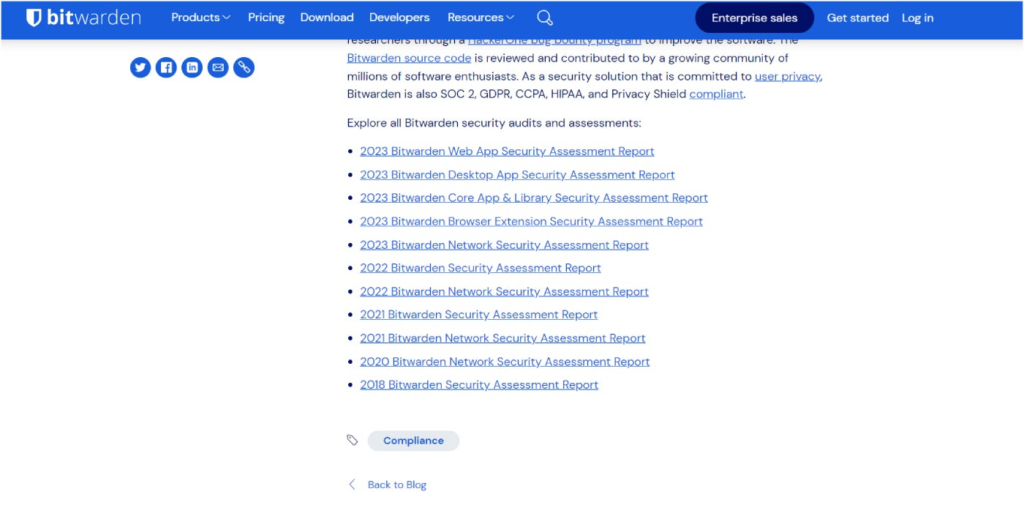
As two of the top password managers today, both Bitwarden and 1Password offer quality password management — albeit in different ways. Bitwarden is an open-source solution with a strong emphasis on affordability and transparency. Meanwhile, 1Password is a closed-source service that offers a streamlined user experience with top-tier security. In this article, we take a look at which password manager is best for you and your organization. Bitwarden: Best for users who need a high-quality password manager that’s both free and open-source. 1Password: Best for users who prioritize having an intuitive and well-designed user interface with many extra security features included. NordPass Employees per Company Size Micro (0-49), Small (50-249), Medium (250-999), Large (1,000-4,999), Enterprise (5,000+) Micro (0-49 Employees), Small (50-249 Employees), Medium (250-999 Employees), Large (1,000-4,999 Employees), Enterprise (5,000+ Employees) Micro, Small, Medium, Large, Enterprise Features Activity Log, Business Admin Panel for user management, Company-wide settings, and more Dashlane Employees per Company Size Micro (0-49), Small (50-249), Medium (250-999), Large (1,000-4,999), Enterprise (5,000+) Micro (0-49 Employees), Small (50-249 Employees), Medium (250-999 Employees), Large (1,000-4,999 Employees), Enterprise (5,000+ Employees) Micro, Small, Medium, Large, Enterprise Features Automated Provisioning ManageEngine ADSelfService Plus Employees per Company Size Micro (0-49), Small (50-249), Medium (250-999), Large (1,000-4,999), Enterprise (5,000+) Any Company Size Any Company Size Features Access Management, Compliance Management, Credential Management, and more Bitwarden vs 1Password: Comparison Bitwarden 1Password Our rating 4.6 out of 5 stars 4.3 out of 5 stars Starting price (monthly) $0.83 per month $3.99 per month Encryption AES 256 encryption AES 256 encryption Authentication options Authenticator apps, email, FIDO2 WebAuthn, YubiKey, Duo Security, face scan, fingerprint Authenticator apps, security keys like YubiKey and Titan Customer support Knowledge base guides and articles, email and ticketing system, community forum Knowledge base guides and articles, AI chatbot, email and ticketing system, community forum Platform support Windows, macOS, Linux, Chrome, Safari, Firefox, Vivaldi, Opera, Brave, Edge, Tor Browser, DuckDuckGo for Mac, iOS, Android, CLI Windows, macOS, Linux, Chrome, Safari, Firefox, Edge, Brave, Chrome OS, CLI, iOS, Android Free version Yes No Free trial Yes Yes Bitwarden vs 1Password: Pricing Both Bitwarden and 1Password divide their paid subscriptions into Personal and Business tiers. In terms of free plans, only Bitwarden has a free version, while 1Password doesn’t currently offer a dedicated free plan. Fortunately, both password managers have free trials for their paid subscriptions. Of the two, 1Password is more generous as it provides a 14-day free trial for all its plans, except for its Enterprise subscription. In contrast, Bitwarden has a respectable seven-day free trial for both its Bitwarden Teams and Enterprise subscriptions. Bitwarden pricing Bitwarden Personal: Free: Unlimited passwords, unlimited devices. Premium: $0.83 per month; unlimited devices; integrated authenticator, file attachments, emergency access, among others. Families: $3.33 per month; up to 6 users; unlimited sharing, unlimited collections, organization storage. Bitwarden Business: Teams: $4 per month per user; data sharing, event, and audit log monitoring, user groups, directory integration, among others. Enterprise: $6 per month per user; all Teams features plus enterprise policies, passwordless SSO integration, and account recovery capabilities. Custom quote: Contact sales for pricing; scalable subscription. If you want to learn more, read our full Bitwarden review. 1Password pricing Compared to Bitwarden’s monthly subscriptions, 1Password provides an option for either a monthly or an annual plan. Below is an overview of the pricing of 1Password’s plans for both contract options: 1Password Personal Plan Monthly Annual Individual $3.99 per month $2.99 per month, paid annually Covers 1 user, autofill capabilities, password sharing, end-to-end encryption Families $6.95 per month $4.99 per month, paid annually Covers 5 family members, all Individual features, plus simple admin controls and unlimited shared vaults 1Password Business Plan Monthly Annual Teams Starter Pack $19.95 per month $19.95 per month, paid annually Covers up to 10 users; actionable security alerts, domain breach report, 1Password Developer Business $9.99 per user per month $7.99 per user per month, paid annually Covers unlimited seats; includes all Teams Starter Pack features plus integration with Okta, Entra ID, and others; advanced reporting, granular admin controls Enterprise Contact sales for a quote Contact sales for a quote All Business features plus a dedicated account manager, tailored onboarding, quarterly and annual business reviews, and priority for new business features If you want to learn more, read our full 1Password review. Bitwarden vs 1Password: Feature comparison Security and encryption Winner: Tie Both Bitwarden and 1Password offer high-end security with their respective password managers. In terms of encryption, both services utilize the AES-256 encryption algorithm, which is widely considered the industry standard in the space. In addition, I’m happy to report that both Bitwarden and 1Password take third-party testing seriously. In the realm of security software, safety and security claims can only do so much. That’s why independent security audits are a critical feature to look out for. For Bitwarden, they’ve shown a strong commitment to third-party testing with its suite of security audits dating back to 2018. It’s also SOC 2, GDPR, and HIPAA-compliant. Its most recent third-party audit was an assessment of its Web App conducted by security firm Cure53 back in August 2023. Bitwarden’s third-party audits. Image: Bitwarden On the other hand, 1Password likewise offers an impressive portfolio of third-party audit results. As of May 2024, 1Password has 24 third-party audits covering various aspects of its password management service. Compilation of 1Password audits. Image: 1Password 1Password has also achieved SOC 2 type 2, ISO 27001:2022, 27017:2015, 27018:2019, and 27701:2019 certifications — showing it meets industry and international standards for information security. On August 6, 2024, 1Password shared that a vulnerability on 1Password 8 for Mac (versions before 8.10.36) was discovered, possibly affecting the application’s platform security. Per 1Password, the issue “enables a malicious process running locally on a machine to bypass inter-process communication protections.” 1Password for Mac issue. Image: 1Password Fortunately, 1Password has patched the issue with 1Password for Mac version 8.10.36 and has said that there have been no reports of the issue being exploited by anyone else. In this instance, I commend 1Password for

Bitwarden vs 1Password: Battle of the Best Read More »

Digital twins of cities to expand under plans from new Dutch startup

A startup called Scenexus has unveiled plans to build digital twins of cities around the world. A spin-off from Dutch research organisation TNO, Scenexus launched this week with a new platform for urban planning. The software blends multiple datasets to clone entire cities and regions. Planners and engineers then use the replicas to precisely analyse the impacts of their ideas. The next big thing? It might be you… TNW Conference is here to support startups & scaleups to become the next big thing. Be part of the journey. Price increase on Friday. According to Scenexus, the platform can accelerate their assessments from days to just minutes. They can then forecast the social, environmental, and economic impacts of developments. A host of factors can be reviewed, from traffic and safety to financial growth and resident sentiment. The concepts can then be fine-tuned to address pressing challenges, such as the housing crisis and congestion. The platform has already attracted clients in Amsterdam, San Diego, and Singapore. More cities are slated to sign up soon. Scenexus has also revealed a new backer for the project. The Hague-based business has raised €1.6mn from the LUMO Rise Fund, a €100mn pot of capital for impact-driven technologies. Scenexus is the first investment from the fund, which is managed by Dutch VC firm LUMO Labs. Andy Lürling, a founding partner at LUMO Labs and a TNW Advisory Board member, has great expectations for the startup. “The range of application domains is nearly unlimited,” Lürling told TNW. He highlighted 10 particularly promising targets: smart mobility, air quality, noise, climate, spatial development, equity, well-being, liveability, resilience, and energy. To support these applications, Scenexus will supply its digital twin platform as a software-as-a-service solution. Building digital twins Under the system’s hood, thousands of calculations are processed in parallel by algorithms running on graphical processing units (GPUs). Scenexus said the results arrive up to 1,000 times faster than the leading planning software on the market. Thanks to this speed, clients can rapidly develop new urban planning concepts. Scenexus will now focus on bringing more cities to its platform. The startup has also joined digital cities projects with Microsoft and a European consortium. Lürling is bullish about the company’s plans. “With Scenexus, cities directly save time, money, and effort, and uncover unforeseen challenges before they arise,” he said. “At the same time, it enables lasting improvement of the city’s liveability and safety, and the well-being of residents and visitors.” source

Digital twins of cities to expand under plans from new Dutch startup Read More »

茶藝界年度盛事這3天登陸PMQ城中最大型茶市集擁40個茶飲品牌、美食攤位

年度茶藝界盛事「茶迴 TEA ROUND 2025」將於一月登陸!由本地年輕團隊Tearoundhk主辦、PMQ元創方及朝顏堂協辦的茶文化盛會 ,將於1月17日至19日在PMQ元創方舉行。 元創方是中西文化交匯地,亦是香港的創意設計地標。元創方一直致力為新晉創意專才提供機會,讓他們實踐創意理念及汲取營商經驗。這場備受業界認同與支持的盛事,以「Tea Round 茶迴」作主題,象徵新舊品茶世代和而不同的交流融合。大會除了匯聚本地多個老字號茶行,更引入不少新派茶館,以及台灣、韓國、泰國等多地人氣茶商聚首一堂,合作推動飲茶潮流!現場 集合接近40個人氣品茶與美食攤位,加上流水茶席、府城封茶、展覽與多個茶藝工作坊,無論是品茗專家還是閒來一杯的飲茶愛好者都能樂在其中。 最大型!茶迴新年市集:40個品茶 + 美食攤位一連三日的TEA ROUND 2025既是一個業界交流平台,也是大眾周末放假食買 玩打卡好去處!屆時PMQ地面廣場將化身成城中最大型茶市集,有接近40個品茶與美食攤位,包攬茶葉茶包、特調茶飲、烘焙美點、陶瓷、茶具和生活精品等, 應有盡有!亮點攤檔必數中環老字號蓮香樓,茶居特別以傳統茶融合手搖飲品創製出「蓮香茶」;年輕茶館「老去茶事」則大推茶湯關東煮,於冷冷冬日加添暖意 ;近年人氣急升的大安茶冰廳更呈獻桂花烏龍拿鐵與多款的茶蛋撻,如大熱的抹茶紅豆蛋撻及港式奶茶蛋撻,相信會成為一眾Foodie打卡焦點。 首推喜氣洋洋茶福袋及禮品迎新年 臨近新年,TEA ROUND更是辦年貨好地方!除了各式高質靚茶和手工陶器可作賀年伴手禮,今年大會更首推以茶作主角的福袋,福袋「寶物」全由茶藝師精心挑選,包括新星茶莊2015探花熟磚、1980年代台灣老烏龍、德化獨立陶藝家小茶杯,以及迷你收藏版府城封茶,睇頭十足!配上型格的包裝設計,無論送禮或自用都適合不過。福袋售價為$180,數量有限,從速搶購! 一次品嚐港台韓泰多個地區茶風味不同地方出產和製作的茶,風味有何不同?來到TEA ROUND便能親身感受!今年參展的茶商陣容強大,既有本地傳統與新派茶職人,更有來自台灣、韓國、泰國等茶館茶商參展!注目的要數韓國OMOT,品牌致力推廣韓國種植茶葉,讓大家捕捉韓國原料和季節的風味香氣,在當地舉行的茶席深受歡迎。來自台灣的 「蕪茶不歡」,由出身於南投茶葉世家的五代目醒茶人主理,專注研究在「荒蕪」中 成長、產量極少的「野放茶」,茶葉不用農藥、肥料及灌溉技術栽種,含天然韻味, 茶湯純淨甘甜,必試! 精彩茶事活動浪接浪:府城封茶、流水茶席第18屆台南府城封茶(香港區)今年載譽歸來!這個傳統茶文化活動,去年首次於香港舉辦,今年踏入第二屆,在台南發起人帶領下,參加者齊齊將茶葉裝進茶甕(或茶罐)內,並在內籤寫下自己對未來的祈願或對親友的祝福,用封條封存, 經歲月催化,茶葉將展現出獨有風味,一盞茶香,既能傳承禮俗,亦是對新一年的祝福。TEA ROUND今年延續這個傳統,在一月這去舊迎新的時刻別具意義。 喜歡坐低飲杯茶的,別錯過TEA ROUND另一重頭戲——流水茶席!由設計師精 心打造的露天環型茶席,座落在場地中央,自成一國卻吸引大眾眼球!由本地和 海外侍茶師分別坐陣四個茶席,參加者流水式逐一品嚐各家茶湯,並觀賞沖茶手藝,交流品茗心得與喜好,寫意有趣。 連日精彩活動還有不同店家分享會和工作坊,包括評茶師品評體驗,教大家如何 品評一杯好飲檸茶!愛玩愛打卡愛小手作的,必選一日茶師體驗和手繪青花瓷體驗!至於進階茶人,推介參加普洱品鑒茶席和茶事比賽!逛完市集,別錯過 「普洱迴廊」展覽,可以走進「時光隧道」,看到不同年代普洱珍藏。多元化的茶活動,務求讓大眾從多角度了解茶藝,愛上飲茶! 首度驚喜登場!市集限定1+1品茗套裝為Tea Tasting加分 為方便茶迷於活動期間輕鬆試茶打卡,今年活動首次推出Tea Round市集限定 1+1品茗套裝,當中包括一隻限量版小茶杯及一張現金優惠券。限量製作的白瓷杯上有「茶」字主題標誌,小巧可愛,精緻設計絕對是值得收藏的紀念品;而套裝 內的$20現金優惠券則可於場內本地店家使用。Tea Round市集限定1+1品茗套 裝定價港幣$50,大家可在活動現場購買或於網上預訂,數量有限,售完即止。 網上訂購請按三天精彩節目,讓你一起投入茶的繽紛世界,感受茶的無限可能性! TEA ROUND 2025 茶迴主辦:Tearoundhk協辦:PMQ元創方、朝顏堂 日期:2025年1月17日(星期五)至1月19日(星期日) 時間:1月17日(星期五)3pm-7pm;1月18日及19日(星期六及日)11am-7pm 地點:中環鴨巴甸街35號PMQ元創方地面廣場入場費用:全免 LinkedIn Email Facebook Twitter WhatsApp source

茶藝界年度盛事這3天登陸PMQ城中最大型茶市集擁40個茶飲品牌、美食攤位 Read More »

US Chip Export Rule Proposes Limits to Thwart Chinese GPUs

The federal government on Jan. 13 proposed a global policy to limit the distribution of powerful, U.S.-made GPUs, an effort to promote U.S. dominance over China in the AI chip industry. “To enhance U.S. national security and economic strength, it is essential that we do not offshore this critical technology and that the world’s AI runs on American rails,” the White House’s announcement reads. The White House moved forward with the proposal despite pushback from several tech giants, including NVIDIA and Oracle. If the rule is implemented, it will be enforceable after 120 days, after a comment period. The incoming administration will determine whether the rule will go into effect. What’s hot at TechRepublic Proposed rule sorts countries into allied, restricted, or limited categories The Interim Final Rule on Artificial Intelligence Diffusion proposes restrictions on U.S. chip distribution to secure U.S. market share against competing technologies in China. Issued under the Commerce Department’s Bureau of Industry and Security, the rule mitigates national security risks exacerbated by generative AI, including cyberattacks. The rule has six main parts: 18 U.S. allies will have unlimited access to chip sales. “Chip orders with collective computation power up to roughly 1,700 advanced GPUs” are exempt, the White House said. Therefore, most universities and medical and research institutions can place chip orders without roadblocks. Trusted partners known as “Universal Verified End Users” have U.S. permission to place a small percentage of their global AI computational capacity globally. Countries on neither the U.S. “country of concern” nor close ally list that meet certain security requirements can be listed as “National Verified End Users.” This designation allows them to purchase computational power equivalent to up to 320,000 advanced GPUs from the U.S. for use within neutral countries over the next two years. (The “countries of concern” are China and its Special Administrative Regions, Hong Kong and Macau.) Foreign governments, health care providers, and businesses outside of the U.S. or its close allies not designated National Verified End Users can purchase up to the equivalent of 50,000 advanced GPUs from the U.S. per country. Governments that sign arrangements with the U.S. to specify export control, clean energy, and technology security efforts can double their allotted number of chips. China will be restricted from advanced U.S. technology in general and AI foundation model weights. Russia also remains blocked from purchasing advanced chips from the U.S. Which countries have unlimited access to U.S. AI chips? The 18 ally countries with unlimited access to U.S. AI chips under the policy are: Australia. Belgium. Canada. Denmark. Finland. France. Germany. Ireland. Italy. Japan. Netherlands. New Zealand. Norway. Republic of Korea (South Korea). Spain. Sweden. Taiwan. United Kingdom. As CNN points out, the categories of countries with caps on how much U.S. chip technology they can access could help prevent China from acquiring U.S.-made chips or getting its foothold in the advanced tech industry in those countries. Israel and Mexico are among the countries with limited access. Depending on the size of their operation, companies outside the U.S. could see delays in their supply chains or limited opportunities to add AI features to their products due to the policy. “Although administration rulings and export controls produce a narrow, short-term advantage, they may produce a broader, long-term loss to American technological leadership,” Benjamin Lee, University of Pennsylvania professor of engineering and computer science, told TechRepublic in an email. “In the short-term, export controls will slow some country’s deployment of the most advanced GPUs and the largest AI data centers. But in the long-term, export controls will cause other countries to develop their own hardware architectures or software models.” NVIDIA, Oracle strongly oppose the move NVIDIA Vice President of Government Affairs Ned Finkle disagrees with the new rules on two major points. He says that distributing powerful AI chips is a matter of national security and that restricting AI purchasing in some countries will benefit the U.S. “While cloaked in the guise of an ‘anti-China’ measure, these rules would do nothing to enhance U.S. security,” Finkle wrote. “The new rules would control technology worldwide, including technology that is already widely available in mainstream gaming PCs and consumer hardware.” SEE: The EU approved a major merger between simulation software company Ansys and chip design software provider Synopsys. Ken Glueck, executive vice president of Oracle, acknowledged the importance of some restrictions around AI use in cases such as weapons of mass destruction and super-intelligent AI. However, he also opposes the new White House policy, calling the rule “highly complex and wildly overbroad” in a blog post on Jan. 5. “In a single confusing action, the BIS retroactively regulates global cloud GPU deployments; shrinks the global market for U.S. cloud and chip suppliers; establishes volume restrictions; tells 20 countries they can be trusted only if they agree to new unilaterally imposed terms—including certification and semi-annual reporting requirements—and likely pushes the rest of the world to Chinese technology,” wrote Glueck. However, in a statement to the Associated Press, Microsoft President Brad Smith was less critical: “We’re confident we can comply fully with this rule’s high-security standards and meet the technology needs of countries and customers around the world that rely on us.” source

US Chip Export Rule Proposes Limits to Thwart Chinese GPUs Read More »

Arc Browser Review (2025): Should You Make the Switch?

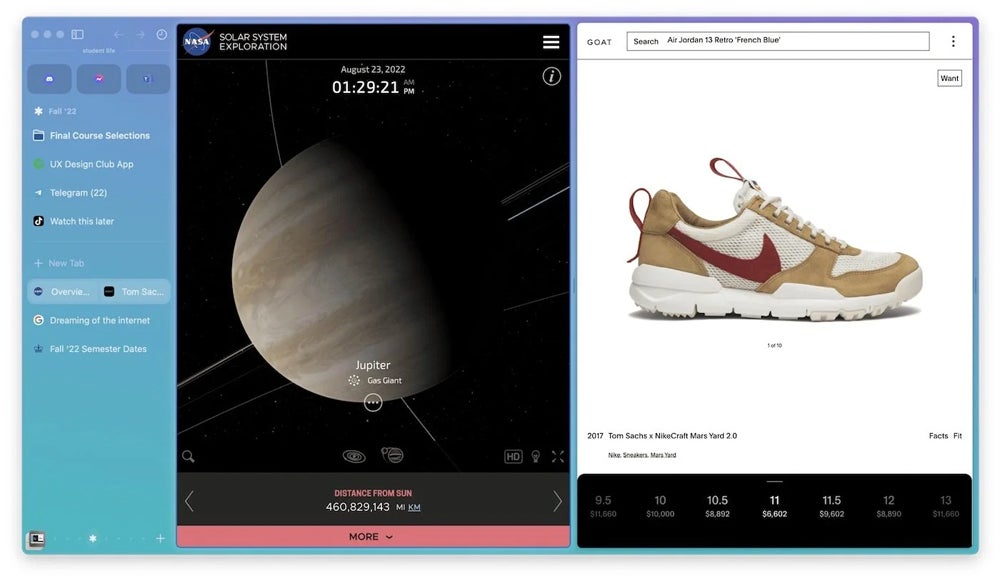
Arc Browser: Fast facts Key features: User-centered, highly customizable design, rich in features, integrates apps with web browsing to create an all-in-one multitasking experience. Pricing: Free. Best for: Users looking for a modern, customizable, and private browser. Web browsers have always been a sector dominated by big names, but Google’s Chrome, Apple’s Safari, and Microsoft’s Bing have a new competitor in Arc. The concept behind this hyper-personalized browser, developed by The Browser Company, is to provide a customizable web experience and act as the web’s operating system, integrating online content with apps and files. Pricing Arc is a freeware web browser. It’s available for free to all Mac and Windows users. Arc is also available for iPhone,  iPad, and Android users in a stripped-down version. Is Arc available for Windows, Mac, Linux, Android, and iOS? As of January 2025, Arc is available for Mac and Windows but not Linux. Arc is mainly designed as a desktop browser; therefore, its mobile iOS version for iPhones, iPads, and Android has some limitations. SEE: The U.K.’s competition watchdog in November alleged Apple’s WebKit browser engine restricts competition and consumer choice. Key features of the Arc browser Not only has The Browser Company invested in a modern design, but Arc has a wide range of features for advanced and nonadvanced users. Going vertical with tabs The main features of most web browsers are always positioned at the top in a horizontal structure, but in Arc, everything a user needs is on a left panel.  This includes the search bar, tab list, bookmarks, apps, and more. The vertical placement of the browser’s features creates an original design and frees up space while allowing users to multitask. For example, a user could browse in Arc during a video meeting. Arc can be customized and organized extensively. Tabs can be pinned, and “Spaces” can be created to manage tabs. The browser also offers split-screen mode. Split-screen mode in Arc. Image: Arc Design, design, design Everything in Arc is oriented toward user experience. From colors and themes to layouts, users can play with the browser’s settings intuitively, remixing components effortlessly. Arc’s user interface is a modern, decluttered, minimalistic, clean design. Image: Arc Browser Boosts With Arc’s Boosts, users can save and share their themes and customizable browsing experiences with other users. Arc shares the best Boosts users create in a central gallery. More advanced users with HTML, CSS, HTML, and JavaScript knowledge can modify known websites and even remove entire sections of sites such as YouTube, TikTok, and Gmail. The original websites aren’t modified; the only aspect that changes is how users see that website when they deploy a Boost. Arc Boost for YouTube created and shared by a user on the main gallery. Image: Arc Currently, Arc hasn’t faced legal problems due to giving users the power to change websites; however, media like Engadget have referred to this feature as capable of ” … vandalizing any website.” Rapid onboarding Setting up Arc Browser is a fast and intuitive process that only takes a few steps. From the start, users are asked to choose a color and theme, create their account, and import bookmarks and other web browser data if they want. The browser can also sync between devices with its proprietary functionality. Arc Sync. A browser or an OS? Why not both? The Browser Company wants its browser to be the “web’s operating system.” To meet this goal, the company innovates and creates different apps integrated within the web browser. Apps can be used without ever leaving the browser. Apps and Easels Arc can integrate known apps such as Gmail and Google Calendar and present them to users as apps instead of web pages by placing quick access on the left panel. Arc’s vertical tabs include apps and bookmarks. Image: Arc Additionally, the browser has its own apps. The Easel feature is used to create smart whiteboards; users can draw, write, add images, take screenshots, and collect and share ideas while browsing the internet. The Easel features include tools for typing and drawing and each Easel can be kept private, shared with others, and even posted online. Arc has a notebook app that can be accessed from the left panel. Other apps and features of the Arc Browser include: Little Arc: A small floating window that allows users to quickly browse new tabs without cluttering their workspace. Proactive tab management: This feature automatically closes tabs that haven’t been used in a while, keeping the browser tidy, and cleanup time can be customized. Ad blocker: This feature blocks ads to improve browsing experiences and safety while speeding up the browser. Smart picture-in-picture: Users can watch videos in a floating window while multitasking. Listen to music while browsing: Users can play music or podcasts when browsing the web and integrate apps such as Spotify into their browsers. Arc Search: This is a version of the Arc browser for mobile devices. Users can sync Spaces and pinned tabs between Arc Search and the main browser. Tidy Tabs: Organize tabs with one click. Instant Links: Use Search + Shift after typing a query in the search bar to bring up the top results for that query. Peek: A preview of a Pinned or Favorited Tab will appear when a user clicks on the link from the tab. Multitasking in the Arc browser with the integrated Spotify app. Image: Arc Mobile Companion Arc has a mobile version called Mobile Companion, a stripped, lightweight app for users to take their Spaces and Tabs anywhere. The mobile app is available for iPhones via the Apple App Store or Android phones via Google Play. Profiles Using Arc, users can create customized Profiles. The Profile feature allows users to switch from work to school or personal mode with only one click. Each profile can store multiple login credentials and save browsing history and cookies. The Profile feature can also be customized with themes, colors, Spaces, and tabs. Privacy Besides the ad blocker, Arc has strong

Arc Browser Review (2025): Should You Make the Switch? Read More »