Trend Health Partners’ HITRUST certification strengthens security, builds customer trust

Certification as a worthy challenge HITRUST is one of the most thorough assessments Trend Health Partners participates in each year to evaluate whether the company’s security controls comply with regulations. Trend’s team knew that, despite the challenges of a new HITRUST version, getting v11 certification would establish a comprehensive, scalable, and secure foundation on which to grow the company’s business (Trend Health Partners is still a young company, founded in 2018, with 200 employees as of September 2024). “The challenges we anticipated included navigating the complexities of a brand-new framework and ensuring our existing controls aligned with the updates,” says Emory. “We prioritized risks that could directly impact our clients’ sensitive data, focusing on data encryption, access management, and continuous monitoring.” source

Trend Health Partners’ HITRUST certification strengthens security, builds customer trust Read More »

The Current Top AI Employers

While the unemployment rate for IT professionals rose to 6% in August, up from 5.6% the prior month, the situation is far brighter for AI experts.  The AI job market has shown resilience and growth, especially in the first half of 2024, says Antti Karjalainen, an analyst with WilsonHCG, a global executive search and talent consulting firm. “Despite some fluctuations, the demand for AI professionals remains robust, driven by increased investments in AI technologies and projects,” he observes in an online interview.  Amazon currently leads the pack with 1,525 AI-related employees, primarily operating in the e-commerce and cloud computing sectors, according to data from WilsonHCG’s talent intelligence and labor market analytics platform. Meta follows closely with 1,401 employees, while Microsoft is next with 1,253 employees in AI-related roles. “As expected, Apple and Alphabet also have significant numbers with 1,204 and 970 employees, respectively,” Karjalainen notes.  TalentNeuron, a global labor market analytics provider, breaks down the market somewhat differently. “Globally, the top five AI employers are Google, Capital One, Amazon, ByteDance, and TikTok,” says David Wilkins, the firm’s chief product and marketing officer. “Of note, Amazon saw a 519% increase in AI job postings year-over-year, and Google saw a 367% increase,” he observes in an online interview. “Out of the top 20 AI employers, Reddit saw the largest year-over-year increase at 1,579%.”  Related:2024 InformationWeek US IT Salary Report: Profits, Layoffs, and the Continued Rise of AI While the US is a strong market for AI talent, there’s a significant shortage of AI specialists relative to the growing demand, Wilkins says. “So, companies, Google among them, have expanded overseas for talent.” TalentNeuron’s latest report on tech talent hubs found that demand growth is highest in emerging, lower-cost markets, such as the Indian cities of Pune and Hyderabad, as organizations seek to strategically place AI capabilities.  Sought-After Skills  The most sought-after skills in AI job postings, according to WilsonHCG data, include deep learning, machine learning model development, computer vision, generative AI, and natural language processing (NLP), Karjalainen says. “These skills are crucial for developing advanced AI systems and applications.” He adds that advanced algorithm development, model deployment and productionization (the process of turning a prototype into something that can be mass-produced), and AI-specific programming languages, such as TensorFlow, PyTorch, and Keras, are also highly valued by employers.  Related:Curtail Cloud Spend With These Strategies Many employers also value proficiency in programming languages, such as Python, MATLAB, C++, and Java, as well as data analysis and statistical modeling talents. “These skills are foundational for any AI-related role and are necessary for developing, testing, and deploying AI models,” Karjalainen says. Having the ability to work with large datasets, perform data mining, and apply statistical techniques is also crucial, he notes. “Employers are looking for candidates who can not only build AI models but also interpret and analyze the results to drive business decisions.”  Top Fields  WilsonHCG finds that the computer software industry leads with 4,135 AI professionals, indicating a strong demand for AI talent in software development and related services. Following closely is the IT and services sector, which employs 3,304 AI professionals. “This sector includes companies that provide IT consulting, system integration, and managed services, all of which are increasingly incorporating AI into their offerings,” Karjalainen says.  With 2,176 individuals working in the area, research organizations also have a significant number of AI professionals. This sector includes academic institutions, research labs, and private research firms focused on advancing AI technologies, Karjalainen says. Financial services, with 819 AI professionals, is yet another key sector, as banks, insurance companies and investment firms leverage AI for risk management, fraud detection, and customer service. Meanwhile, the internet industry, which includes companies providing online services and platforms, employs 635 AI professionals, reflecting the importance of AI in enhancing user experiences and optimizing operations.  Related:Forrester Speaker Sneak Peek: Analyst Jayesh Chaurasia to Talk AI Data Readiness Karjalainen says that other fields with significant AI employment include higher education (444 professionals), biotechnology (384 professionals), and mechanical or industrial engineering (378 professionals). The hospital and health care sector employs 324 AI professionals, highlighting the growing use of AI in medical diagnostics, treatment planning, and patient care. The automotive industry, with 320 AI professionals, is also a key player, particularly in the development of autonomous vehicles and advanced driver-assistance systems. Other important fields employing AI professionals include management consulting, electrical/electronic manufacturing, and semiconductors.  Salary Trends  WilsonHCG data shows that AI job postings consistently offer higher salaries than non-AI IT postings. For instance, in July 2024, the average advertised salary for AI jobs was $166,584, while for non-AI IT jobs the average was $110,005. The comparison represents a difference of $56,579, or 51.4%.  Looking at the annual median salary, AI jobs offer $150,018 compared to $108,377 for non-AI IT jobs, resulting in a difference of $41,641, or 38.4%, Karjalainen says. “This trend is consistent across various months, with AI job salaries consistently outpacing those of non-AI IT jobs by a substantial margin.”  Wilkins reports that top US AI employers offer a median base salary of $183,250, according to TalentNeuron salary data. The median base salary for US AI jobs overall is $143,000. In comparison, the US Bureau of Labor Statistics in May 2023 reported a median annual wage of $104,420 for computer and information technology occupations.  Overall, the data suggests that top AI employers generally pay more than other employers, particularly in the IT sector, Karjalainen says. “This higher compensation reflects the specialized skills and expertise required for AI roles, as well as the high demand for AI talent in the job market”  Talent Hubs  According to WilsonHCG statistics, California’s San Francisco-Oakland-Hayward, metro area has 10,740 AI professionals, making it the leading AI talent hub. In second place with 5,422 AI professionals is the New York-Newark-Jersey City-NY-NJ-PA region. “This area is a significant center for finance, media, and technology, attracting a diverse range of AI talent,” Karjalainen notes. The Seattle-Tacoma-Bellevue, Washington metro area, with 3,139 AI professionals, is another key location, driven by the

The Current Top AI Employers Read More »

StartHub Asia Invited to the 3rd UM Innovation and Entrepreneurship Exhibition

StartHub Asia Invited to “The UltiMater 2024” StartHub Asia is honored to be invited by the University of Macau to participate in the prestigious The UltiMater 2024 — The 3rd UM Innovation and Entrepreneurship Exhibition. This event, scheduled for November 8-9, 2024, at the University of Macau’s N1 Multi-Function Hall, is set to be a landmark gathering for innovators, entrepreneurs, and industry leaders. Event Theme and Objectives The theme for this year’s exhibition is “Innovation Integration, Illuminating 1+4 Diversified Development.” It aims to showcase the university’s cutting-edge research and development achievements, acting as a bridge for industry upgrades, diversification, and cross-industry collaboration. The event will feature over 80 innovative projects showcasing Macau’s technological advancements. Highlights of the Event Opening Ceremony and Keynote Speeches: Insightful speeches from experts in robotics innovation, fintech, and Macau’s non-gaming industries. Exhibition and Demonstrations: Attendees can explore numerous innovative projects, offering a glimpse into Macau’s future tech landscape. Networking Opportunities: Guided tours and group visits facilitate in-depth discussions, fostering connections with industry leaders, investors, and collaborators. StartHub Asia’s Role and Synergy StartHub Asia is dedicated to fostering innovation and entrepreneurship across Asia. Our participation in this exhibition underscores our commitment to supporting Macau’s economic diversification and tech development. We aim to: Share Expertise: Engage in discussions and presentations to share knowledge and experience in nurturing startups. Explore Collaborations: Seek partnerships with academic institutions, industry leaders, and fellow innovators. Promote Cross-Border Initiatives: This event aligns with our mission to enhance synergy between Macau and other Asian innovation hubs. Distinguished Participants This event features esteemed enterprises, industry experts, professors, and investors, along with Macau’s cultivated and incubated startups, showcasing their innovative solutions and contributions to the industry. Key Activities Deal Flow Sessions: Startups had opportunities to present projects and explore potential investments. Advisory Opinions: Our team provided strategic advice to startup founders on scaling innovations and market navigation. Idea Exchange: Engaged in vibrant discussions with experts, fostering a collaborative atmosphere for idea sharing. Networking and Collaboration We connected with prominent enterprises, scholars, and investors, building the foundation for future partnerships. These interactions with Macau’s startups highlighted their innovative potential for industry impact. Looking Ahead Reflecting on this successful exhibition, StartHub Asia looks forward to supporting Macau’s economic diversification and technological growth. For further inquiries or to discuss potential collaborations, please contact us at [email protected].

StartHub Asia Invited to the 3rd UM Innovation and Entrepreneurship Exhibition Read More »

OpenAI turns ChatGPT into a search engine, aims directly at Google

Join our daily and weekly newsletters for the latest updates and exclusive content on industry-leading AI coverage. Learn More OpenAI transformed its popular ChatGPT service into a powerful search engine today, marking the company’s boldest move yet to compete with Google. The upgrade lets users ask questions in plain English and get real-time information about news, sports, stocks, and weather — features that until now required a separate search engine. “We believe finding answers should be as natural as having a conversation,” an OpenAI spokesperson told VentureBeat. The company will roll out the feature first to paying subscribers, with plans to expand to free users in coming months. ChatGPT Search: How OpenAI’s new AI-powered web search actually works Unlike traditional search engines (i.e. Google and Bing) that return a list of links, ChatGPT now processes questions in natural language and delivers curated answers with clear source attribution. Users can click through to original sources or ask follow-up questions to dig deeper into topics. The technology builds on OpenAI’s SearchGPT experiment from July, which tested the search features with 10,000 users. That limited release helped the company refine how its AI processes web information and attributes sources. The system runs on a specialized version of GPT-4o, OpenAI’s most advanced AI model. The company trained it on massive amounts of web data and fine-tuned it to understand context across longer conversations. Major news publishers partner with OpenAI to power next-generation search results Major news organizations including the Associated Press, Axel Springer, and Vox Media have partnered with OpenAI to provide content. The deals aim to address long-standing concerns about AI systems using publishers’ work without permission or payment. “ChatGPT search promises to better highlight and attribute information from trustworthy news sources, benefiting audiences while expanding the reach of publishers like ourselves who produce premium journalism,” said Pam Wasserstein, President of Vox Media, in a statement. Publishers can opt out of having their content used for AI training while still appearing in search results. Inside OpenAI’s $5 billion bet on custom chips and AI infrastructure The launch comes as OpenAI races to build its own technology infrastructure. The company recently announced deals with AMD, Broadcom, and TSMC to develop custom AI chips by 2026 — a move to reduce its reliance on Nvidia’s expensive processors. These investments don’t come cheap. Microsoft, OpenAI’s biggest backer with nearly $14 billion invested, said this week the partnership will cut into its quarterly profits by $1.5 billion. OpenAI itself expects to spend $5 billion this year on computing costs. This massive investment in custom silicon and infrastructure signals a crucial shift in OpenAI’s strategy. While most AI companies remain dependent on Nvidia’s chips and cloud providers’ data centers, OpenAI is making an ambitious play for technological independence. It’s a risky bet that could either drain the company’s resources or give it an insurmountable advantage in the AI arms race. By controlling its own chip destiny, OpenAI could potentially cut its computing costs in half by 2026. More importantly, custom chips optimized specifically for GPT models could enable capabilities that aren’t possible with general-purpose AI processors. This vertical integration — from chips to models to consumer products— mirrors the playbook that helped Apple dominate smartphones. The new search features will appear on ChatGPT’s website and mobile apps. Enterprise customers and educational users will get access in the next few weeks, followed by a gradual rollout to OpenAI’s millions of free users. For now, Google remains the dominant force in search. But as AI technology improves and more users grow comfortable with conversational interfaces, the competition for how we find information online appears poised for its biggest shake-up in decades. source

OpenAI turns ChatGPT into a search engine, aims directly at Google Read More »

3 Reasons Third-Party Content Should Be Part of Every Growing Tech Vendor’s Strategy

As a growing tech vendor, gaining traction in a competitive marketplace can be a daunting challenge. While creating in-house content is crucial for brand visibility, there’s another powerful tool that can significantly enhance your credibility and market positioning: third-party content. Independent, expert-driven insights like analyst briefs, whitepapers, and industry reports offer an unbiased, authoritative perspective that customers trust, helping you stand out from the competition. In this blog, we’ll explore three reasons why third-party content matters for growing tech vendors and provide actionable tips on how best to use it to drive growth. 1. Builds Trust and Credibility One of the biggest hurdles for emerging tech vendors is building trust with customers and investors. No matter how strong your product or service is, buyers are often skeptical of vendor-authored content because they understand it ultimately serves your interests. This is where third-party content, such as analyst briefs or independent whitepapers, becomes invaluable. Independent analysts and research firms like IDC have earned reputations for providing impartial, data-backed insights. By leveraging content from these sources, you align your brand with trusted voices, lending credibility to your solutions and establishing a stronger position in the market. Customers are more likely to trust your offering when it’s supported by an unbiased, expert perspective. How to Use It: Reference third-party reports and data points in your blog posts, case studies, and sales presentations to add weight to your claims. Use analyst-backed insights to create a more compelling narrative in your marketing campaigns, positioning your product within the broader market context. Promote whitepapers or reports on your website as gated content to attract leads, showcasing your company’s alignment with industry trends. Example:When launching a new product, reference findings from a relevant IDC report that validates your solution’s importance within your niche. Incorporating trusted data helps position your offering as a solution to real market needs, easing the buyer’s decision-making process. 2. Enhances Your Go-to-Market Strategy In a fast-paced tech landscape, staying ahead of emerging trends is essential for creating a strong go-to-market strategy. Third-party content provides valuable insights into market dynamics, competitive landscapes, and customer behavior, helping you make informed decisions. Analyst reports and industry studies can reveal growth opportunities, identify potential challenges, and offer strategic recommendations that align with where the market is heading. By leveraging these insights, you can fine-tune your go-to-market approach, ensuring your product or service is positioned to meet current and future demand. Whether you’re entering a new market, launching a new feature, or refining your sales approach, third-party content gives you the context and data needed to make informed, strategic moves. How to Use It: Integrate analyst predictions into your product development roadmap, ensuring your offerings are aligned with future market trends. Use insights from industry reports to identify growth opportunities or untapped customer segments. Incorporate findings into pitch decks or investor presentations, highlighting how your company is staying ahead of the curve. Example:A growing SaaS company can leverage IDC market reports to refine its product roadmap, ensuring that features being developed align with customer needs and anticipated market shifts. By using these reports to guide product development, the company stays competitive and relevant as customer demands evolve. 3. Differentiates You from Competitors In crowded tech markets, differentiation is key to standing out. While every vendor can create content promoting their product, third-party content provides an extra layer of differentiation. It offers an independent, trusted perspective that helps validate your position and sets you apart from competitors who may only rely on self-promotion. By backing your claims with third-party reports and analysis, you strengthen your value proposition and present a more balanced, credible view of your solution. Moreover, independent content can highlight your unique strengths or competitive advantages in a way that resonates with buyers. For instance, an analyst report that highlights emerging trends can help position your product as a cutting-edge solution, differentiating you from competitors who aren’t addressing the same needs. How to Use It: Use third-party comparisons or reviews from analyst firms to demonstrate how your solution outperforms competitors. Reference independent content in product launches or feature announcements to highlight why your offering stands out in the marketplace. Share third-party reports that showcase your company’s alignment with market trends, positioning yourself as an industry leader. Example:When launching a product update, include a relevant IDC report that shows why your solution addresses the latest market trends. Use this to highlight your forward-thinking approach and differentiate your product from competitors who aren’t keeping pace with these changes. How to Maximize the Value of Third-Party Content To get the most out of third-party content, it’s important to use it strategically across multiple channels. Here are some best practices to ensure you’re maximizing its impact: Repurpose Content Across Platforms: Turn a single analyst report into multiple pieces of content, such as blog posts, infographics, and social media snippets. Repurposing allows you to reach different audience segments while making the most of your content investment. Use It in Lead Generation Campaigns: Third-party content is often seen as more trustworthy, making it highly effective for lead generation. Offer whitepapers or reports as gated content, attracting high-quality leads who are seeking unbiased, expert insights. Incorporate It into Sales Conversations: Equip your sales team with third-party reports and whitepapers to help them build trust with potential clients. These materials can strengthen your sales pitch by providing a neutral perspective that validates your solution. Cite It in Thought Leadership: Align your brand with independent, trusted voices by referencing third-party content in webinars, blog posts, and thought leadership articles. This not only enhances your credibility but also helps position your company as an informed industry player. Conclusion For early-stage to mid-market tech vendors, building credibility and driving growth relies on increasing market awareness, generating leads, and capturing investor attention. Third-party content, such as analyst reports and whitepapers, is a powerful tool to help you achieve these goals. By partnering with a respected analyst firm, you gain independent validation that enhances your brand’s visibility and builds trust

3 Reasons Third-Party Content Should Be Part of Every Growing Tech Vendor’s Strategy Read More »

IT resiliency: Running two different hypervisors

Having a Plan B is table stakes for any IT team. Rather than wait for a storm to hit, IT professionals map out options and build strategies to ensure business continuity. This may involve embracing redundancies or testing new tools for future operations. Following Broadcom’s late 2023 acquisition of VMware, numerous changes prompted customers and partners to reassess their strategies. Some delayed decisions by relying on existing VMware licenses, while others explored alternatives or ran redundancies to compare options. Forrester predicted 20% of VMware customers would leave in 2024, “exhausted by significant price hikes, degrading support, and mandatory subscription.” Since Broadcom’s acquisition of VMware, many IT teams are considering whether it’s the right time to explore VMware alternatives, says Steve Carter, Nutanix’s product marketing director. “Many are reframing how to manage infrastructure, especially as demand for AI and cloud-native innovation escalates,” Carter said. A few years ago, Gregg Lowe the CIO of Boyd Gaming Corp., operator of 28 hotel and casino properties across the US, was negotiating a fresh enterprise agreement with VMware prior to its acquisition, reported The Register. “Boyd was using VMware as our hypervisor and Nutanix’s AHV,” said Lowe while interviewed at NEXT 2024. “I’ll call it a bake-off: May the best person win. We put our requirements out there and let things go head to head.” While Boyd opted for Nutanix, Lowe emphasized that Boyd Gaming couldn’t afford business disruptions. “We needed to plan out this migration,” he said. “It took about 18 months. It’s not something you just flip off a switch and you’re done. You need to plan. You need to focus to do the cutover. I do recognize some companies are probably easier than ours to go ahead and do the migration. But again, I still think it takes that commitment, that effort, and that reliance on each other to say, ‘this is what we’re doing.’” While Boyd Gaming switched from VMware to Nutanix, others choose to run two hypervisors for resilience against threats and scalability, Carter explained.“Organizations can maintain high-risk parts of their legacy VMware infrastructure while exploring how an alternative hypervisor can run business-critical applications and build new capabilities,” said Carter. When vendor shakeups occur, CIOs and IT leaders immediately think about resiliency. Vendor allegiance – once critical for many organizations due both to convenience and loyalty – has become a company liability for many. Additionally, the sheer amount of options available and today’s demand for more flexibility and hyper-customized user experiences require IT leaders to think more innovatively. Reveal the best of both worlds Carter noted that many VMware customers have invested in its solutions for decades but now seek modernization for greater agility, scalability, and cloud-native environments. The disruption from VMware’s acquisition has led many to reconsider their virtualization strategies and explore new options. “By running two hypervisors, companies can build a hybrid infrastructure that maintains legacy systems and learn what’s the best way to handle new demands,” Carter said. Carter explained that companies often run two hypervisors due to past mergers or acquisitions, where legacy systems exist across both environments rather than intentional implementation. However, this setup can offer a head start. He stressed that migrating to a new hypervisor requires careful planning and vendor support to ensure smooth execution and build IT team confidence. Notwithstanding, running two hypervisors can provide valuable resilience and help companies modernize while retaining legacy systems that still offer value and learning what works best. “The aim is to manage present needs and be able to enlist new capabilities to meet future demands,” Carter said. It’s the ongoing challenge of integrating legacy systems and applications with next-gen technologies and solutions. Which Carter said is particularly relevant as businesses embrace and evolve hybrid multicloud operations for a future where they can manage resources and workloads across on-premises and public cloud services. Rene Van Den Bedem, principal technical program manager at Microsoft Azure, noted the benefits clients are seeing by running VMware and Nutanix together on Azure public cloud. “The main requirement is having an Azure landing zone, and then you can build whatever service that you want on it,” he told The Forecast. “I think we’re going to see more of that. Typically, customers do like to have one hypervisor of choice, but that’s a legacy on-prem way of thinking. I think the world is changing.” Learn about AHV and the Nutanix Cloud Platform or explore the steps for migrating to Nutanix from VMware and the VMware to Nutanix Promotion. Disclaimer: Nutanix, Inc. is not affiliated with VMware by Broadcom or Broadcom. Ken Kaplan is Editor in Chief for The Forecast by Nutanix. Find him on X @kenekaplan. source

IT resiliency: Running two different hypervisors Read More »

Increasing Awareness of DNS Hijacking: A Growing Cyber Threat

A recent report from Palo Alto Networks’s Unit 42 exposes the persistent and evolving threat of DNS hijacking, a stealthy tactic cybercriminals use to reroute internet traffic. By leveraging passive DNS analysis, the cybersecurity company also provided real-world examples of recent DNS hijacking attacks — highlighting the urgency of countering this hidden danger. What is DNS hijacking? DNS hijacking involves modifying the responses from targeted DNS servers, redirecting users to attacker-controlled servers instead of the legitimate ones they intend to reach. DNS hijacking can be done in several ways: Gaining control of the domain owner’s account, providing access to DNS server settings: In this scenario, the attacker possesses valid user credentials with the authority to directly change the DNS server configuration. The attacker could also have valid credentials for the domain registrar or DNS service provider and change the configuration. DNS cache poisoning: The attacker impersonates a DNS nameserver and forges a reply, leading to attacker-controlled content instead of the legitimate one. Man-in-the-Middle attack: The attacker intercepts the user’s DNS queries and provides results that redirect the victim to the attacker-controlled content. This only works if the attacker is in control of a system implicated in the DNS query/answer process. Modifying DNS-related system files, such as the host file in Microsoft Windows systems. If the attacker has access to that local file, it is possible to redirect the user to attacker-controlled content. Attackers generally use DNS hijacking to redirect users to phishing websites that look similar to the intended websites or to infect the users with malware. Detecting DNS hijacking with passive DNS The Unit 42 report described a method to detect DNS hijacking via passive DNS analysis. What is passive DNS? Passive DNS describes terabytes of historical DNS queries. In addition to the domain name and the DNS record type, passive DNS records generally contain a “first seen” and a “last seen” timestamp. These records allow users to trace the IP addresses a domain has directed users to over time. For an entry to appear in passive DNS, it must be queried by a system whose DNS queries are recorded by passive DNS systems. This is why the most comprehensive passive DNS information generally comes from providers with high query volumes, such as ISPs or companies with extensive customer bases. Subscribing to a passive DNS provider is often advisable, as they collect more DNS queries than the average company, offering a more complete view than local DNS queries alone. SEE: Everything You Need to Know about the Malvertising Cybersecurity Threat (TechRepublic Premium) Detecting DNS hijacking Palo Alto Network’s method for detecting DNS hijacking begins by identifying never-seen-before DNS records, as attackers often create new records to redirect users. Never-seen-before domain names are excluded from detection because they lack sufficient historical information. Invalid records are also removed at this step. The DNS records are then analyzed using passive DNS and geolocation data based on 74 features. According to the report, “some features compare the historical usage of the new IP address to the old IP address of the domain name in the new record.” The goal is to detect anomalies that could indicate a DNS hijack operation. A machine-learning model then provides a probability score based on the analysis. WHOIS records are also checked to prevent a domain from being re-registered, which generally leads to a complete IP address change that could be detected as DNS hijack. Finally, active navigations are conducted on the domains’ IP addresses and HTTPS certificates. Identical results indicate false positives and can therefore be excluded from DNS hijacking operations. Must-read security coverage DNS hijack statistics From March 27 to Sept. 21 2024, researchers processed 29 billion new records, 6,729 of which were flagged as DNS hijacking. This resulted in an average of 38 DNS hijack records per day. Daily counts of candidates and predicted DNS hijacking records. Image: Palo Alto Networks Unit 42 indicates that cybercriminals have hijacked domains to host phishing content, deface websites, or spread illicit content. DNS hijacking: Real-world examples Unit 42 has seen multiple DNS hijack cases in the wild, mostly for cybercrime purposes. Yet it is also possible to use DNS hijacking for cyberespionage. Hungarian political party leads to phishing One of the largest political opposition groups to the Hungarian government, the Democratic Coalition (DK), has been hosted on the same subnet of IP addresses in Slovakia since 2017. In January 2024, researchers detected a change in the DK’s website, which suddenly resolved to a new German IP address, leading to a Microsoft login page instead of the political party’s usual news page. Microsoft login phishing page. Image: Palo Alto Networks US company defaced In May 2024, two domains of a leading U.S. utility management company were hijacked. The FTP service, which has led to the same IP address since 2014, suddenly changed. The DNS nameserver was hijacked using the attacker-controlled ns1.csit-host.com. According to the research, the attackers also used the same nameservers to hijack other websites in 2017 and 2023. The goal of the operation was to show a defaced page from an activist group. How companies can protect themselves from this threat To protect from these threats, the report suggested that organizations: Deploy multi-factor authentication to access their DNS registrar accounts. Establishing a whitelist of IP addresses allowed to access DNS settings is also a good idea. Leverage a DNS registrar that supports DNSSEC. This protocol adds a layer of security by digitally signing DNS communications, making it more difficult to intercept and spoof data for threat actors. Use networking tools that compare DNS queries results from third-party DNS servers — such as those from ISPs — to the DNS queries results obtained when using the company’s usual DNS server. A mismatch could indicate a change in DNS settings, which might be a DNS hijacking attack. In addition, all hardware, such as routers, must have up-to-date firmware, and all software must be up-to-date and patched to avoid being compromised by common vulnerabilities. Disclosure: I work for Trend

Increasing Awareness of DNS Hijacking: A Growing Cyber Threat Read More »

5 Tips for Balancing Cost and Security in Cloud Adoption

In today’s fast-paced digital landscape, cloud services have become essential for organizations looking to accelerate business innovations and limit downtime. With these opportunities, however, businesses face the challenge of balancing cost savings with security — two priorities often seen as opposing forces.   While cutting costs is tempting, especially in times of economic uncertainty, the risks of inadequate security can far outweigh the immediate savings. A single breach can lead to financial losses, reputational damage, and hefty regulatory penalties, making security investments a strategic imperative rather than an optional expense.  Navigating Cost and Security  In Q2 2024, global spending on cloud infrastructure services grew 19% year over year to reach $78.2 billion, according to Canalys. This expansion reflects a growing reliance on cloud services as organizations seek flexibility, scalability, and operational efficiency. While the market continues to offer significant opportunities for cost optimization, it also introduces various new security challenges that businesses must confront.  Emerging trends like serverless computing and containerization drive cost savings by reducing infrastructure overhead and improving the efficiency of cloud environments. Serverless architectures, for example, allow businesses to operate without the need to manage physical servers, reducing the total cost of ownership. Containerization, similarly, enhances application portability and deployment speed, allowing businesses to optimize resources and scale more effectively.  Related:Infrastructure Sustainability and the Data Center Power Dilemma However, with these benefits come potential vulnerabilities. While eliminating the need to manage infrastructure, serverless computing can expose organizations to security risks if the infrastructure is not properly configured. Misconfigured serverless environments can lead to data breaches, unauthorized access or service disruptions. Such issues will likely negate initial cost savings. Similarly, while offering agility, containerization introduces risks related to container isolation and management, as vulnerabilities in one container could potentially compromise others.  In addition to the technical security challenges, organizations must navigate an increasingly complex regulatory environment when adopting cloud solutions. Data protection laws such as the General Data Protection Regulation (GDPR) in Europe and the California Consumer Privacy Act (CCPA) in the United States impose strict requirements on how businesses handle and secure personal data. Non-compliance with these regulations can result in substantial fines and penalties, making robust security measures non-negotiable for companies operating in regulated industries.  Related:Outage Bootcamp: How Resilient Is IT Infrastructure in 2024? Balancing Priorities  In reality, businesses should not view cost savings and security as opposing forces. By adopting a thoughtful approach, organizations can create a cloud strategy that achieves both. To effectively navigate this balance, consider the following five key strategies.  1. Conduct comprehensive risk assessments  Before selecting a cloud provider, organizations should assess their specific security risks and compliance requirements. This evaluation will help identify areas where cost savings can be safely realized without compromising critical security measures. A thorough risk assessment ensures that organizations allocate resources appropriately, investing in security where needed most.  2. Leverage managed services  For organizations lacking the resources or in-house expertise to manage complex cloud environments, partnering with managed service providers (MSPs) can offer a cost-effective solution. MSPs specializing in cloud infrastructure can offer targeted services like cloud migration support, security management, and optimization of cloud-native tools, all of which help to secure the environment while minimizing operational costs.  Related:Cloud Strategy in the Wake of the CrowdStrike Outage 3. Implement continuous monitoring  To balance cost and security, organizations must maintain vigilant oversight of their cloud services. Continuous monitoring allows businesses to detect vulnerabilities early, optimize resource usage and ensure cost efficiencies. Regularly reviewing cloud resource usage also allows businesses to optimize spending on storage and computing resources, combining security with cost efficiency.  4. Optimize cloud security configurations  Cloud misconfigurations can lead to vulnerabilities, such as leaving sensitive data in unprotected storage buckets. Regular reviews and automated tools designed for cloud environments can help ensure security settings, such as access to control lists and encryption policies, are properly configured and updated. By ensuring configurations are correct and aligned with best practices, businesses can prevent incidents that may incur hefty fines or recovery costs.  5. Invest in employee training  Training should focus on the unique security challenges of cloud environments, such as identity and access management, shared responsibility models, and how to manage cloud resources securely. Ensuring employees understand these cloud-centric security aspects reduces human errors that could expose vulnerabilities. Furthermore, a well-trained workforce can leverage cloud resources more effectively, maximizing the return on cloud investments.  Looking Ahead  The tension between cost savings and security is not just a technical issue; it is a strategic imperative for organizations to navigate in the digital era. As cloud adoption continues to accelerate, businesses must carefully maintain this delicate balance to ensure their bottom line and security posture remain strong.  Organizations can achieve the best of both worlds by adopting a cloud strategy that incorporates risk assessments, continuous education, and effective resource allocation.  source

5 Tips for Balancing Cost and Security in Cloud Adoption Read More »

Trump Win Set To Reshape FCC, Push Policies Rightward

By Christopher Cole ( November 6, 2024, 9:56 PM EST) — Donald Trump’s return to the White House following Tuesday’s election will usher in new political appointees at federal agencies to carry out conservative tech and telecom policies, leading to a reshuffling of priorities at the Federal Communications Commission…. Law360 is on it, so you are, too. A Law360 subscription puts you at the center of fast-moving legal issues, trends and developments so you can act with speed and confidence. Over 200 articles are published daily across more than 60 topics, industries, practice areas and jurisdictions. A Law360 subscription includes features such as Daily newsletters Expert analysis Mobile app Advanced search Judge information Real-time alerts 450K+ searchable archived articles And more! Experience Law360 today with a free 7-day trial. source

Trump Win Set To Reshape FCC, Push Policies Rightward Read More »

How to Test a Call Center Integration Before Buying Seats

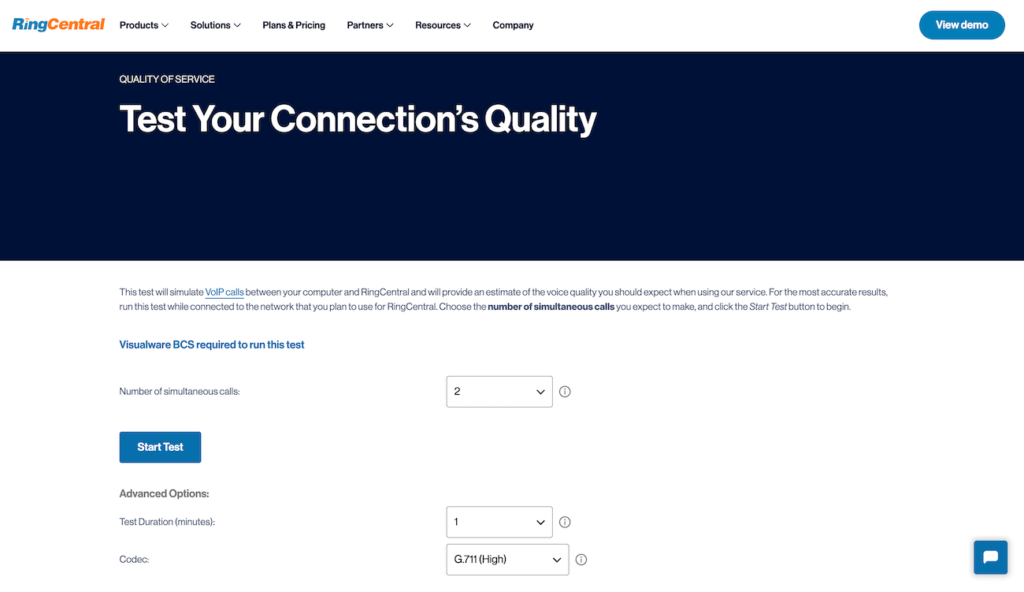
Integrating business software with your call center is essential, but it’s rarely easy. Vendors, of course, are going to sugarcoat the hurdles and advertise a call center integration that works off the shelf. Some are more open about the difficulties, but either way, you need to do your due diligence before making any drastic changes. I’ll walk you through every way that you can test prospective call center integrations before you make a huge commitment. It’s hard to unwind these changes once deployed — you don’t want to be stuck in that position, or locked-in to a suboptimal integration. We’ll also look at how to lead the transition at your organization. The truth is that technically sound integrations sometimes fail because managers lack the will or communication skills to really drive adoption. Preparing your agents and supervisors for the integration is just as important as selecting software that fits with your tech stack. 1 RingCentral Office Employees per Company Size Micro (0-49), Small (50-249), Medium (250-999), Large (1,000-4,999), Enterprise (5,000+) Medium (250-999 Employees), Enterprise (5,000+ Employees), Large (1,000-4,999 Employees) Medium, Enterprise, Large Features Hosted PBX, Managed PBX, Remote User Ability, and more Six steps to test a call center integration 1. Check system and compliance requirements First and foremost, make sure that your system meets the technological or legal requirements for any new integration you wish to add to your stack. Verify that the integration is built to work with your call center software and any other software that it must play well with, such as  CRM software, ticketing systems, or ERP software. Review integration documentation and API specs, ensuring they match your systems’ version and configuration. Compatibility is crucial to avoid issues like data mapping errors or limited functionality. You also want to ensure that this integration complies with all legal requirements. Most reputable call center integrations are built with data security in mind, but if your industry has strict compliance requirements (e.g., HIPAA, GDPR). Check if features like data encryption, role-based access controls, and audit trails satisfy relevant regulations. 2. Consult your IT team Your IT team is a great resource that understands your call center’s technology even more than the agents who will ultimately be using it — and this includes the software you’re looking into integrating. Rather than simply asking if an integration is doable or if the systems are compatible, ask them if they think the software will truly work well with your current infrastructure. What about your infrastructure 2-5 years from now? You can also ask them if they have any glaring concerns about certain integrations, and what they would recommend for a testing plan once the integrations are complete. By arming yourself with as much information as possible beforehand, you can ensure you are asking the right questions moving forward, and that subsequent integration testing is thorough, comprehensive, and accurate. 3.Survey business requirements This is a must, and the better job you do figuring out what everyone at the organization needs, the more pitfalls you can avoid. Survey heads of any team that is going to touch the integration or its data. This probably includes sales, service, IT, billing, HR, and may include third-party apps like payment gateways or services like IVR testing. For example, your sales team may need the integration to work with specific types of call center dialers, call tracking software, or even a separate CRM from your customer service team. It’s crucial for you to uncover the specific needs of each department early on in the process to ensure that you are only shopping for truly viable integrations. The last thing you want to do is find out that your new integration doesn’t meet the actual day-to-day needs of the organization. 4. Speak with customer references Reach out to the sales representatives for the software you’re looking to integrate and ask for any customer references they may have available — particularly from other call centers. Be sure to confirm what integrations their software works with, how their integration processes went, and if they encountered any testing or post-integration issues. Taking this step can reveal potential issues that might not be evident in demos or technical documentation. Speaking with customers who’ve used the software helps validate its effectiveness in the real world. Someone who has been using integration for a few years has a perspective you won’t find anywhere else. With this information from peer organizations, you’ll have several first-hand accounts of the integration and testing process. This can help you rule out seemingly good-fit options and give you a better idea of what to expect moving forward. 5. Conduct demos Be sure to conduct walkthroughs or demos of the technology before committing to any new call center integrations. This can be done by reaching out to company representatives and scheduling demos with key stakeholders such as your call center agents, IT team, and managers. I would get down to a very short list of potential call center integrations before conducting demos. You need to “see how it drives,” but demos are so time-consuming and they pull important employees away from their work for at least an hour for each demo. Know exactly what you want to demo, too. Don’t expect that the vendor’s team is going to come prepared for your exact situation. That would be nice, but it’s not realistic. More likely, you are their third demo of the day, tenth of the week, and the rep is figuring out who you are right before the call. So come prepared on your end. If the integration relies on APIs, come ready to test the software your team plans to use. For example, check if the software integrates smoothly with your CRM, IVR software, and call tracking software. Is data exchanged accurately in real time? Are customer records updating and syncing to call logs? Let’s say you’re looking to integrate interactive voice response (IVR) technology with your call center. You’ll want to know what other technology it’s compatible

How to Test a Call Center Integration Before Buying Seats Read More »